Write a PHP Script containing a function that calculates the tax (8%) on a purchase of...
Write a PHP Script containing a function that calculates the tax (8%) on a purchase of $48.72.
What I have so far.
index.html
<!DOCTYPE html>
<html lang="en">
<head>
<title>PHP Lab II</title>
<meta charset="utf-8">
<link rel="stylesheet" href="main.css">
<meta name="robots" content="noindex, no follow, noarchive"
/>
<meta name="author" content="Michael Dimond Jr" />
</head>
<body>
<div id="wrapper">
<header>
<h1>PHP Lab II</h1>
</header>
<main>
<form action="display.php" method="post">
<div>
<label>Sale Total:
</label>
<input type="text"
name="sale_total"><br>
<br>
</div>
<div>
<label> </label>
<input type="submit"
value="Calculate Sales Tax"><br>
</div>
</form>
</main>
</div>
</body>
</html>
display.php
<?php
//Get Data from form
$sale_total = filter_input(INPUT_POST, 'sale_total');
//Calculate Sales Tax
$final_amount = $sale_total * .08;
//Add currency symbols
$sale_total_f = "$".number_format($sale_total, 2);
$final_amount_f = "$".number_format($final_amount, 2);
?>
<!DOCTYPE html>
<html lang="en">
<head>
<title>PHP Lab I</title>
<meta charset="utf-8">
<link rel="stylesheet" href="main.css">
<meta name="robots" content="noindex, no follow, noarchive"
/>
<meta name="author" content="Michael Dimond Jr" />
</head>
<body>
<div id="wrapper">
<header>
<h1>PHP Lab I</h1>
</header>
<main>
<h1>Sales Total Calculator</h1>
<label>Sale Total: </label>
<span><?php echo
htmlspecialchars($sale_total_f); ?></span>
<br>
<label>Sales Tax: </label>
<span><?php echo "8%";
?></span>
<br>
<label>Final Amount: </label>
<span><?php echo $final_amount_f;
?></span>
<br>
</main>
</div>
</body>
</html>
Homework Answers
HTML FILE
<!DOCTYPE html>
<html lang="en">
<head>
<title>PHP Lab II</title>
<meta charset="utf-8">
<link rel="stylesheet" href="main.css">
<meta name="robots" content="noindex, no follow, noarchive"
/>
<meta name="author" content="Michael Dimond Jr" />
</head>
<body>
<div id="wrapper">
<header>
<h1>PHP Lab II</h1>
</header>
<main>
<form action="display.php" method="post">
<div>
<label>Sale Total: </label>
<input type="text" name="sale_total"><br>
<br>
</div>
<div>
<label> </label>
<input type="submit" value="Calculate Sales
Tax"><br>
</div>
</form>
</main>
</div>
</body>
</html>
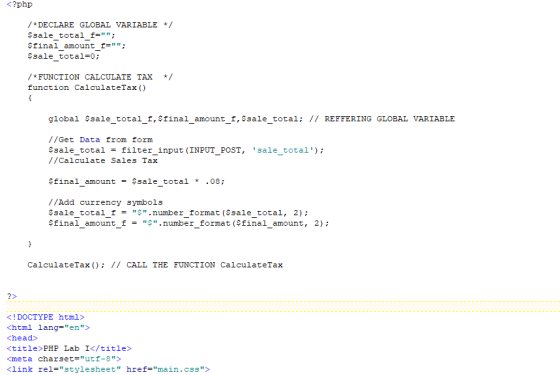
PHP FILE
<?php
/*DECLARE GLOBAL VARIABLE */
$sale_total_f="";
$final_amount_f="";
$sale_total=0;
/*FUNCTION CALCULATE TAX */
function CalculateTax()
{
global $sale_total_f,$final_amount_f,$sale_total; // REFFERING GLOBAL VARIABLE
//Get Data from form
$sale_total =
filter_input(INPUT_POST, 'sale_total');
//Calculate Sales Tax
$final_amount = $sale_total * .08;
//Add currency symbols
$sale_total_f =
"$".number_format($sale_total, 2);
$final_amount_f =
"$".number_format($final_amount, 2);
}
CalculateTax(); // CALL THE FUNCTION CalculateTax
?>
<!DOCTYPE html>
<html lang="en">
<head>
<title>PHP Lab I</title>
<meta charset="utf-8">
<link rel="stylesheet" href="main.css">
<meta name="robots" content="noindex, no follow, noarchive"
/>
</head>
<body>
<div id="wrapper">
<header>
<h1>PHP Lab I</h1>
</header>
<main>
<h1>Sales Total Calculator</h1>
<label>Sale Total: </label>
<span><?php echo htmlspecialchars($sale_total_f);
?></span>
<br>
<label>Sales Tax: </label>
<span><?php echo "8%"; ?></span>
<br>
<label>Final Amount: </label>
<span><?php echo $final_amount_f; ?></span>
<br>
</main>
</div>
</body>
</html>
SCREEN SHOT CODE
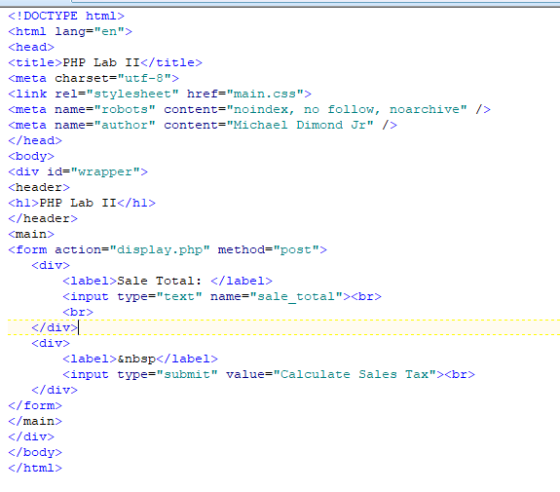
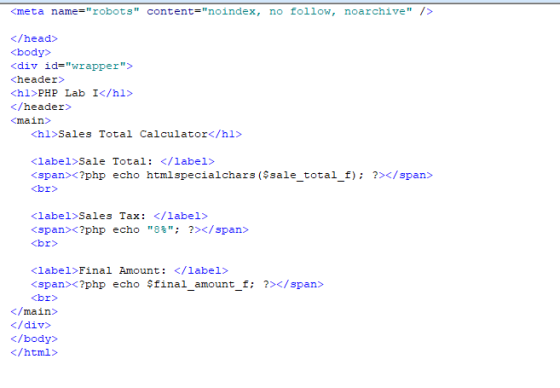
PHP FILE ( Changes created by inserting a function for calculating tax)
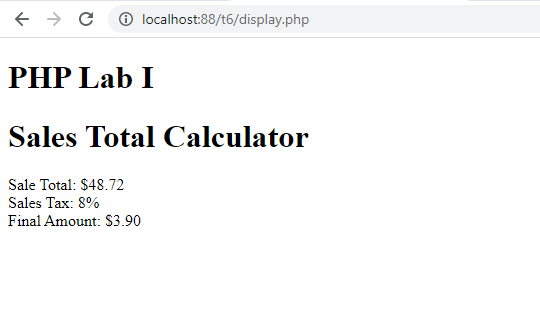
OUT PUT
Add Answer to:
Write a PHP Script containing a function that calculates the tax
(8%) on a purchase of...
In this exercise, you’ll modify the Future Value Calculator application to include a header and footer....
In this exercise, you’ll modify the Future Value Calculator application to include a header and footer. Review the project Open the header.jsp file and note that it contains the code necessary for the start of an HTML page including the opening html, head, and body tags, the title for the web page, and a link including the CSS file. Open the footer.jsp file and note that includes a copyright notice and the closing body and html tags. Modify the code...
I cant seem to get the CSS at the bottom of this HTML to work. <!doctype...
I cant seem to get the CSS at the bottom of this HTML to work. <!doctype html> <html lang="en"> <head> <!--Madison McCuiston--> <meta charset="utf-8"> <title>Amelie Boulangerie</title> <link href="style.css" rel="stylesheet" type="text/css"> </head> <body> <div id="wrapper"> <header>Amelie Boulangerie</header> <!-- change this to header tag --> <nav> <ul> <li><a href="index.html">Home</a></li> <li><a href="pastries.html">Pastries</a></li> <li><a href="events.html">Events</a></li> <li><a href="contact.html">Contact</a></li> </ul> </nav> <main> <H2>Experience the Difference</H2> <p><span class="bakery">Amelie Boulangerie</span> is the master of flavor combinations.The jewel-colored macarons come in the most tempting of flavors. Experience the difference...
I beleiebve my code is right but it will not accept it. Please tell me what...
I beleiebve my code is right but it will not accept it. Please tell me what I am doing wrong. Enter your name and the date in the comment section of each file: gp_cover.html, gp_page1.html, gp_page2.html, gp_page3.html, gp_layout.css, and gp_print.css respectively. Go to the gp_cover.html file and add a viewport meta tag to the document head, setting the width of the layout viewport to the device width and setting the initial scale of the viewport to 1.0. Go to the...
PHP code that is given : <?php // Here is where your preprocessing code goes //...
 PHP code that is given :
<?php
// Here is where your preprocessing code goes
// An example is already given to you for the First Name
$fname = $_GET['fname'];
?>
<!DOCTYPE html>
<html lang="en">
<head>
<meta charset="utf-8">
<title>Exercise 2 - GET Echo</title>
<style>
body {
margin:0;
padding:0;
font-family: Arial;
}
form {
margin:20px;
}
input[type="text"], input[type="password"] {
width:150px;
padding:3px;
font-size:1em;
}
input[type="submit"] {
padding:3px;
font-size:1em;
}
label {
display:inline-block;
width:150px;
}
.input-container {
padding:5px;
}
</style>
</head>
<body>
<form...
PHP code that is given :
<?php
// Here is where your preprocessing code goes
// An example is already given to you for the First Name
$fname = $_GET['fname'];
?>
<!DOCTYPE html>
<html lang="en">
<head>
<meta charset="utf-8">
<title>Exercise 2 - GET Echo</title>
<style>
body {
margin:0;
padding:0;
font-family: Arial;
}
form {
margin:20px;
}
input[type="text"], input[type="password"] {
width:150px;
padding:3px;
font-size:1em;
}
input[type="submit"] {
padding:3px;
font-size:1em;
}
label {
display:inline-block;
width:150px;
}
.input-container {
padding:5px;
}
</style>
</head>
<body>
<form...
Hello! I am to create a .js file that allows the paragraph on the bottom of...
Hello! I am to create a .js file that allows the paragraph on the bottom of the page to update with what the user enters. I need to modify the given HTML to recognize the javascript file that I am to make from scratch. The HTML file and other details are below: Use the given HTML to add functionality to an interactive form that generates an invitation to volunteers for an event. The file will have the following invitation message...
1. Predict the Result.Draw and write a brief description of the Web page that will becreated...
1. Predict the Result.Draw and write a brief description of the Web page that will becreated with the following XHTML code:<!DOCTYPE html PUBLIC "-//W3C//DTD XHTML 1.0 Transitional//EN""http://www.w3.org/TR/xhtml1/DTD/xhtml1-transitional.dtd"><html xmlns="http://www.w3.org/1999/xhtml" lang="en" xml:lang="en"><head><title>CircleSoft Designs</title> <meta http-equiv="Content-Type" content="text/html; charset=utf-8" /><style type="text/css">body { background-color: #FFFFCC;color: #330000;font-family Arial,Helvetica,sans-serif; }.content { width: 750px; }</style></head>Apply Your Knowledge<body><div class="content"><h1>CircleSoft Design</h1><div><strong>CircleSoft Designs will </strong><ul><li>work with you to create a Web presence that fits yourcompany</li><li>listen to you and answer your questions</li><li>utilize the most appropriate technology for your sites:JavaScript, Java, PHP, databases,...
Look at the following illustrated output for an HTML and a css given below <!DOCTYPE html>...
 Look at the following illustrated output for an HTML and
a css given below
<!DOCTYPE html>
<head>
<title>TABLE with STYLE
SHEET</title>
<meta charset="utf-8" />
<meta name="description" content="Godaddy Webpage
original" />
<link rel = "stylesheet"
href="GoDaddy_assignment_1.css">
<body>
<img src= "GoDaddy.png"/>
<p>Welcome
to:<strong>webhamster.com</strong></br>
This web page is
parked<strong>Free</strong>courtesy of
<a class="aclass1" href
="https://www.godaddy.com">GoDaddy.com</a></p>
<h1>Want to buy<span class
="span2">webmaster.com ?</span></h1>
<div class ="div1">
<a class ="aclass2"
href="https://www.godaddy.com">Learn How</a>
</div>
</hr>
<button>Search Ads</button>
</body>
</html>
“
QUESTION continued Given the corresponding css
file
.aclass1{color:purple;}...
Look at the following illustrated output for an HTML and
a css given below
<!DOCTYPE html>
<head>
<title>TABLE with STYLE
SHEET</title>
<meta charset="utf-8" />
<meta name="description" content="Godaddy Webpage
original" />
<link rel = "stylesheet"
href="GoDaddy_assignment_1.css">
<body>
<img src= "GoDaddy.png"/>
<p>Welcome
to:<strong>webhamster.com</strong></br>
This web page is
parked<strong>Free</strong>courtesy of
<a class="aclass1" href
="https://www.godaddy.com">GoDaddy.com</a></p>
<h1>Want to buy<span class
="span2">webmaster.com ?</span></h1>
<div class ="div1">
<a class ="aclass2"
href="https://www.godaddy.com">Learn How</a>
</div>
</hr>
<button>Search Ads</button>
</body>
</html>
“
QUESTION continued Given the corresponding css
file
.aclass1{color:purple;}...
HTML: ch14 IC_1B - use a fadeToggle to control jQuery to show the second part of...
HTML: ch14 IC_1B - use a fadeToggle to control jQuery to show the second part of the content on Chp 14 slide 33. <!DOCTYPE html> <html lang="en"> <head> <title> jQuery </title> <meta charset="utf-8"> <style> #details { display: none; } </style> <xxxx src="http://ajax.googleapis.com/ajax/libs/jquery/1.10.1/jquery.min.js"></xxxx> </head> <body> <h1>jQuery</h1> <p>Many websites, including Amazon and Google, use jQuery, to provide interaction and dynamic effects on web pages. <a href="#" id="more">...
In an external JavaScript file, you need to create two global variables for the Quarter name...
In an external JavaScript file, you need to create two global variables for the Quarter name array and the Sales amount array. Create an anonymous function and connect it to the onclick event of the Add to Array button that adds the values from the fields (Quarter and Sales) to the respective arrays. Create an anonymous function and connect it to the onclick event of Display Sales button displays the contents of the arrays, displays the sum of all the...
<!-- DOCTYPE declaration --> <!DOCTYPE html> <!-- HTML boilerplate code --> <html lang="en"> <!-- head...
<!-- DOCTYPE declaration --> <!DOCTYPE html> <!-- HTML boilerplate code --> <html lang="en"> <!-- head tag --> <head> <meta http-equiv="content-type" content="text/html; charset=UTF-8"> <title>Personal Webpage</title> </head> <!-- body tag --> <body> <style> .sidenav { height: 100%; width: 160px; position: fixed; z-index: 1; top: 0; left: 0; ...
 PHP code that is given :
<?php
// Here is where your preprocessing code goes
// An example is already given to you for the First Name
$fname = $_GET['fname'];
?>
<!DOCTYPE html>
<html lang="en">
<head>
<meta charset="utf-8">
<title>Exercise 2 - GET Echo</title>
<style>
body {
margin:0;
padding:0;
font-family: Arial;
}
form {
margin:20px;
}
input[type="text"], input[type="password"] {
width:150px;
padding:3px;
font-size:1em;
}
input[type="submit"] {
padding:3px;
font-size:1em;
}
label {
display:inline-block;
width:150px;
}
.input-container {
padding:5px;
}
</style>
</head>
<body>
<form...
PHP code that is given :
<?php
// Here is where your preprocessing code goes
// An example is already given to you for the First Name
$fname = $_GET['fname'];
?>
<!DOCTYPE html>
<html lang="en">
<head>
<meta charset="utf-8">
<title>Exercise 2 - GET Echo</title>
<style>
body {
margin:0;
padding:0;
font-family: Arial;
}
form {
margin:20px;
}
input[type="text"], input[type="password"] {
width:150px;
padding:3px;
font-size:1em;
}
input[type="submit"] {
padding:3px;
font-size:1em;
}
label {
display:inline-block;
width:150px;
}
.input-container {
padding:5px;
}
</style>
</head>
<body>
<form...
 Look at the following illustrated output for an HTML and
a css given below
<!DOCTYPE html>
<head>
<title>TABLE with STYLE
SHEET</title>
<meta charset="utf-8" />
<meta name="description" content="Godaddy Webpage
original" />
<link rel = "stylesheet"
href="GoDaddy_assignment_1.css">
<body>
<img src= "GoDaddy.png"/>
<p>Welcome
to:<strong>webhamster.com</strong></br>
This web page is
parked<strong>Free</strong>courtesy of
<a class="aclass1" href
="https://www.godaddy.com">GoDaddy.com</a></p>
<h1>Want to buy<span class
="span2">webmaster.com ?</span></h1>
<div class ="div1">
<a class ="aclass2"
href="https://www.godaddy.com">Learn How</a>
</div>
</hr>
<button>Search Ads</button>
</body>
</html>
“
QUESTION continued Given the corresponding css
file
.aclass1{color:purple;}...
Look at the following illustrated output for an HTML and
a css given below
<!DOCTYPE html>
<head>
<title>TABLE with STYLE
SHEET</title>
<meta charset="utf-8" />
<meta name="description" content="Godaddy Webpage
original" />
<link rel = "stylesheet"
href="GoDaddy_assignment_1.css">
<body>
<img src= "GoDaddy.png"/>
<p>Welcome
to:<strong>webhamster.com</strong></br>
This web page is
parked<strong>Free</strong>courtesy of
<a class="aclass1" href
="https://www.godaddy.com">GoDaddy.com</a></p>
<h1>Want to buy<span class
="span2">webmaster.com ?</span></h1>
<div class ="div1">
<a class ="aclass2"
href="https://www.godaddy.com">Learn How</a>
</div>
</hr>
<button>Search Ads</button>
</body>
</html>
“
QUESTION continued Given the corresponding css
file
.aclass1{color:purple;}...
Most questions answered within 3 hours.
-
Where is the error in this code sequence?
String s1 = "Hello";
String s2 = "ello";...
asked 11 months ago -
Financial data for Joel de Paris, Inc., for last year
follow:
Joel de Paris, Inc.
Balance...
asked 11 months ago -
Consider this reaction:
Al2(SO4)3 (aq)+ BaCl3
(aq) Al2Cl6 (aq)- +
3BaSO4(s) . What is the...
asked 11 months ago -
Suppose that Savneet is considering increasing her
recent random sample from 20 car rentals to 40...
asked 11 months ago -
Trucks arrive at an unloading terminal at an average rate of 120
per hour.
Trucks arrive...
asked 11 months ago -
Why are methanol and ethanol completely soluble in water while
octanol is not very little soluble....
asked 11 months ago -
A facilities manager at a university reads in a research report
that the mean amount of...
asked 11 months ago -
When the CuSO4 is rehydrated by adding water to the anhydrous
compound, is this an endothermic...
asked 11 months ago -
A ray of sunlight is passing from diamond into crown glass; the
angle of incidence is...
asked 11 months ago -
A block of mass 0.249 kg is placed on top of a light, vertical
spring of...
asked 11 months ago -
how do the kidneys compensate in the presences of acidosis
a) trigger hyperventilate
b) reserve acid...
asked 11 months ago -
Question 501 pts
The rental rate of capital to the firm increases. Which of the
following...
asked 11 months ago