Question
PYTHON
VB Auto sells its own brand of spark plugs. To cross-reference
to major brands, it keeps a table of equivalent part numbers (see
image below). VB Auto wants to computerize the process of looking
up part numbers in order to improve its customer service.
The user should be able to enter the part number and brand and
look up the corresponding VB Auto part number.
Your program will automatically import all 4 txt files
(BrandA.txt, BrandC.txt, BrandX.txt and BrandVB.txt) and place into
Lists. Put those lists into a Master List. Search the Master List
with the part number and brand to identify the VB Auto part number.
Display the VB Auto part number. All in the python shell. The below
image gives you the matrix.

Homework Answers
Answer #1
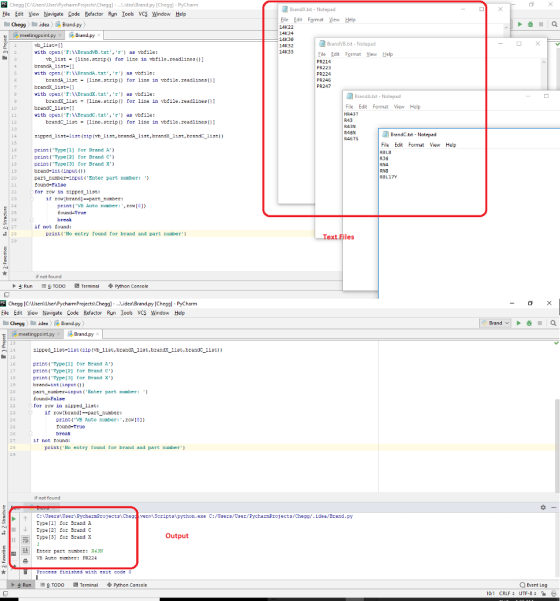
Thanks for posting the question, we are glad to help you. You need to create four text files and write the data in the table, once done, you need to update the file paths in the code and then you are all set to run the program
Here is the code and the output, refer the screenshot for the output and the code indenation
____________________________________________________________________________________________________
vb_list=[]
with open('F:\\BrandVB.txt','r') as vbfile:
    vb_list = [line.strip() for line in vbfile.readlines()]
brandA_list=[]
with open('F:\\BrandA.txt','r') as vbfile:
    brandA_list = [line.strip() for line in vbfile.readlines()]
brandX_list=[]
with open('F:\\BrandX.txt','r') as vbfile:
    brandX_list = [line.strip() for line in vbfile.readlines()]
brandC_list=[]
with open('F:\\BrandC.txt','r') as vbfile:
    brandC_list = [line.strip() for line in vbfile.readlines()]

zipped_list=list(zip(vb_list,brandA_list,brandX_list,brandC_list))

print('Type[1] for Brand A')
print('Type[2] for Brand C')
print('Type[3] for Brand X')
brand=int(input())
part_number=input('Enter part number: ')
found=False
for row in zipped_list:
    if row[brand]==part_number:
        print('VB Auto number:',row[0])
        found=True
        break
if not found:
    print('No entry found for brand and part number')
________________________________________________________________________________________________
image screenshot
thank you !!
Know the answer?
Add Answer to:
PYTHON
VB Auto sells its own brand of spark plugs. To cross-reference
to major brands, it...
Not the answer you're looking for?
Ask your own homework help question.
Our experts will answer your question WITHIN MINUTES for Free.
Similar Homework Help Questions
ADVERTISEMENT
Need Online Homework Help?
Ask
a QuestionGet Answers For Free
Most questions answered within 3 hours.
Most questions answered within 3 hours.
ADVERTISEMENT
Active Questions
-
Where is the error in this code sequence?
String s1 = "Hello";
String s2 = "ello";...
asked 10 months ago -
Financial data for Joel de Paris, Inc., for last year
follow:
Joel de Paris, Inc.
Balance...
asked 10 months ago -
Consider this reaction:
Al2(SO4)3 (aq)+ BaCl3
(aq) Al2Cl6 (aq)- +
3BaSO4(s) . What is the...
asked 10 months ago -
Suppose that Savneet is considering increasing her
recent random sample from 20 car rentals to 40...
asked 10 months ago -
Trucks arrive at an unloading terminal at an average rate of 120
per hour.
Trucks arrive...
asked 10 months ago -
Why are methanol and ethanol completely soluble in water while
octanol is not very little soluble....
asked 10 months ago -
A facilities manager at a university reads in a research report
that the mean amount of...
asked 10 months ago -
When the CuSO4 is rehydrated by adding water to the anhydrous
compound, is this an endothermic...
asked 10 months ago -
A ray of sunlight is passing from diamond into crown glass; the
angle of incidence is...
asked 10 months ago -
A block of mass 0.249 kg is placed on top of a light, vertical
spring of...
asked 10 months ago -
how do the kidneys compensate in the presences of acidosis
a) trigger hyperventilate
b) reserve acid...
asked 10 months ago -
Question 501 pts
The rental rate of capital to the firm increases. Which of the
following...
asked 10 months ago
ADVERTISEMENT