you need to use javafx for following problem
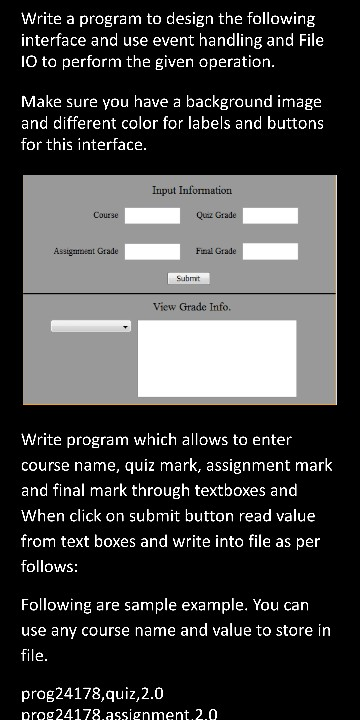
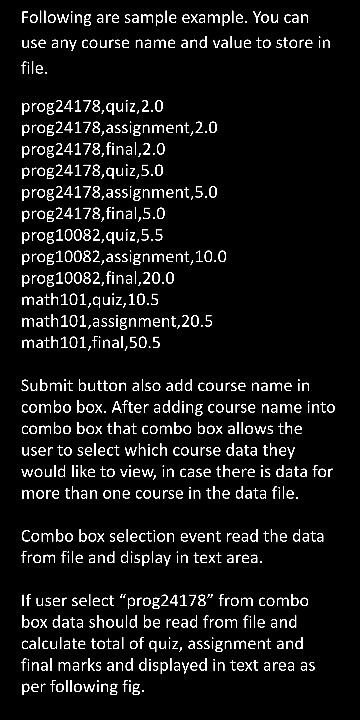
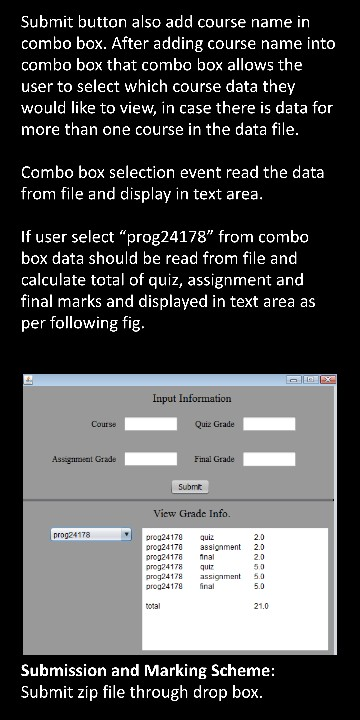
these instructions is for JavaFX program so you need to follow the instructions and according to images you have design the GUI
Homework Answers
hey there ! i am done with the code ,,, Please give me a like to appreciate my work and efforts,,,
here is the code---
package fileinformation;
import javafx.application.Application;
import javafx.event.ActionEvent;
import javafx.event.EventHandler;
import javafx.geometry.HPos;
import javafx.geometry.Insets;
import javafx.geometry.Pos;
import javafx.scene.Group;
import javafx.scene.Scene;
import javafx.scene.control.Button;
import javafx.scene.control.ChoiceBox;
import javafx.scene.control.Label;
import javafx.scene.control.TextArea;
import javafx.scene.control.TextField;
import javafx.scene.layout.ColumnConstraints;
import javafx.scene.layout.GridPane;
import javafx.scene.layout.Priority;
import javafx.scene.layout.StackPane;
import javafx.scene.shape.HLineTo;
import javafx.scene.shape.MoveTo;
import javafx.scene.shape.Path;
import javafx.scene.text.Font;
import javafx.scene.text.FontWeight;
import javafx.stage.Stage;
public class FileInformation extends Application {
private GridPane createForm()
{
// Instantiate a new Grid Pane
GridPane gridPane = new GridPane();
//Setting the padding
gridPane.setPadding(new Insets(10, 10, 10, 10));
//Setting the vertical and horizontal gaps between the
columns
gridPane.setVgap(5);
gridPane.setHgap(5);
//Setting the Grid alignment
gridPane.setAlignment(Pos.CENTER);
return gridPane;
}
private void addUIControls(GridPane gridPane) {
// Add Header
Label headerLabel = new Label("Input Information");
headerLabel.setFont(Font.font("Arial", FontWeight.BOLD, 24));
gridPane.add(headerLabel, 0,0,2,1);
GridPane.setHalignment(headerLabel, HPos.CENTER);
GridPane.setMargin(headerLabel, new Insets(20, 0,20,0));
// Add Name Label
Label courseLabel = new Label("Course : ");
gridPane.add(courseLabel, 0,1);
// Add Name Text Field
TextField courseField = new TextField();
gridPane.add(courseField, 1,1);
// Add Email Label
Label quizLabel = new Label("Quiz Grade : ");
gridPane.add(quizLabel, 2,1);
// Add Email Text Field
TextField quizField = new TextField();
gridPane.add(quizField, 3, 1);
// Add assignmentLabel Label
Label assignmentLabel = new Label("Assignment Grade : ");
gridPane.add(assignmentLabel, 0, 3);
// Add assignment Field
TextField assignmentField = new TextField();
gridPane.add(assignmentField, 1, 3);
// Add assignmentLabel Label
Label finalLabel = new Label("Final Grade : ");
gridPane.add(finalLabel, 2, 3);
// Add assignment Field
TextField finalField = new TextField();
gridPane.add(finalField, 3, 3);
// Add Submit Button
Button submitButton = new Button("Submit");
submitButton.setPrefHeight(40);
submitButton.setDefaultButton(true);
submitButton.setPrefWidth(100);
gridPane.add(submitButton, 0, 4, 2, 1);
GridPane.setHalignment(submitButton, HPos.CENTER);
GridPane.setMargin(submitButton, new Insets(20, 0,20,0));
//Creating an object of the Path class
Path path = new Path();
//Moving to the starting point
MoveTo moveTo = new MoveTo();
moveTo.setX(0.0);
moveTo.setY(10.0);
//Instantiating the HLineTo class
HLineTo hLineTo = new HLineTo();
//Setting the properties of the path element horizontal line
hLineTo.setX(500.0);
//Adding the path elements to Observable list of the Path
class
path.getElements().add(moveTo);
path.getElements().add(hLineTo);
//Creating a Group object
Group root = new Group(path);
//Choice box for location
ChoiceBox choice = new ChoiceBox();
gridPane.add(choice, 2, 5);
TextArea textArea = new TextArea();
textArea.setPrefRowCount(10);
textArea.setPrefColumnCount(20);
gridPane.add(textArea, 2, 6);
submitButton.setOnAction(new EventHandler<ActionEvent>()
{
@Override
public void handle(ActionEvent t) {
String coursename=courseField.getText();
String quizname=quizField.getText();
String assignment=assignmentField.getText();
String finalgrade=finalField.getText();
choice.getItems().add(coursename);
String info=coursename+" quiz "+quizname+ " \n"+coursename+"
assignment "+assignment+ " \n"+coursename+" final "+finalgrade+ "
";
textArea.setText(info);
}
});
}
@Override
public void start(Stage primaryStage) {
// Create the registration form pane
GridPane gridPane = createForm();
// Add UI controls to the information form grid pane
addUIControls(gridPane);
// Create a scene with the registration form gridPane as the root
node.
Scene scene = new Scene(gridPane, 600, 700);
StackPane root = new StackPane();
primaryStage.setTitle("Input Information!");
primaryStage.setScene(scene);
primaryStage.show();
}
public static void main(String[] args) {
launch(args);
}
}
and the snapshot of output ---
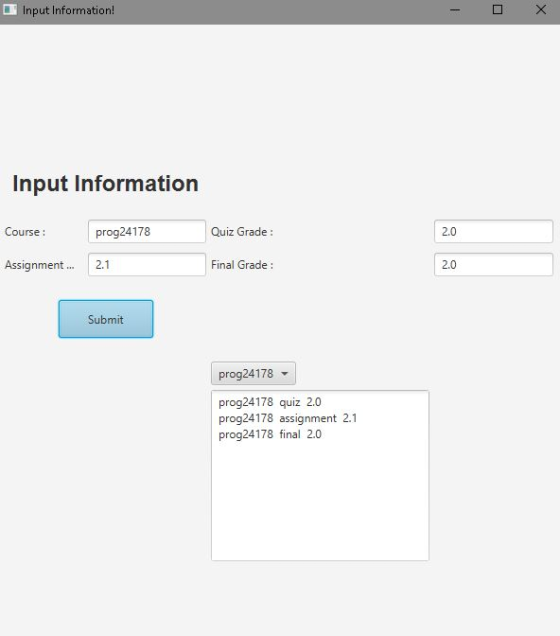
Thank You !
Add Answer to:
you need to use javafx for following problem
these instructions is for JavaFX program so you...
Write a program that allows a user to view a table of temperature conversion. The user...
Write a program that allows a user to view a table of temperature conversion. The user should be able to enter a starting value and an ending value in to textboxes. Your program will display a list of temperature conversion from Celsius to Fahrenheit in a text area like the example below: You can choose any color, design and font for this interface. Use javafx scene builder for program. When you click on "Display" button it read values from text...
Must be done in C# please! Thanks! In this assignment you will create a program named...
 Must be done in C# please! Thanks!
In this assignment you will create a program named Test Scores that displays the average of all tests; average midterm score; average final score; and displays the midterm or final score of a particular student. Create a class level two dimensional integer array named Grades initialized with the following data: 897 242 301 987 116 450 865 128 992 109 88 75 94 70 90 87 81 79 97 79 78 80 92...
Must be done in C# please! Thanks!
In this assignment you will create a program named Test Scores that displays the average of all tests; average midterm score; average final score; and displays the midterm or final score of a particular student. Create a class level two dimensional integer array named Grades initialized with the following data: 897 242 301 987 116 450 865 128 992 109 88 75 94 70 90 87 81 79 97 79 78 80 92...
****THIS IS A 2 PART QUESTION! I ONLY NEED THE ANSWER TO PART 2 ON HOW...
 ****THIS IS A 2 PART QUESTION! I ONLY NEED THE ANSWER TO PART 2
ON HOW TO SEND THE DATA SERIALIZED****
Write a c# program that stores student grades in a text file and
read grades from a text file. The program has the
following GUI:
There are four buttons: Create File, Save Case, Close File and
Load File. Initially, only the Create File and Load File
buttons are enabled. If the user clicks the Create File
button, a Save File Dialog window...
****THIS IS A 2 PART QUESTION! I ONLY NEED THE ANSWER TO PART 2
ON HOW TO SEND THE DATA SERIALIZED****
Write a c# program that stores student grades in a text file and
read grades from a text file. The program has the
following GUI:
There are four buttons: Create File, Save Case, Close File and
Load File. Initially, only the Create File and Load File
buttons are enabled. If the user clicks the Create File
button, a Save File Dialog window...
In this assignment, you will write a program in C++ which uses files and nested loops...
In this assignment, you will write a program in C++ which uses files and nested loops to create a file from the quiz grades entered by the user, then reads the grades from the file and calculates each student’s average grade and the average quiz grade for the class. Each student takes 6 quizzes (unknown number of students). Use a nested loop to write each student’s quiz grades to a file. Then read the data from the file in order...
given below are the project description and their Html and css files i need javascript according to the project and other files!
 HTML------------------------------------------------------CSS---------------------------------------------------WEB230 - JavaScript 1 Assignment 7 - FormsSome of these tasks would be better done in HTML or CSS but do them in JavaScript to practice whatwe have learned.1. Select the form element and save it in a variable. From here we can access all of the form fields.2. When the page loads do the following:add the password value "monkey"select the favourite city "New York"clear the textarea3. Add an event handler to the "name" field to change the background color...
Add event-handling code for the "Load File” button and its associated TextField so that the user...
 Add event-handling code for the "Load File” button and its associated TextField so that the user can load the file with the name provided in the text field and display its contents in the text area for editing. If you are using IntelliJ to implement this assignment, place your input text file in the top directory of your IntelliJ project (perhaps you called it "CSE 114"). Use an Alert Dialog to show an informative error message if a problem is...
Write the functions needed to complete the following program as described in the comments. Use the...
Write the functions needed to complete the following program as described in the comments. Use the input file course.txt and change the mark of student number 54812 to 80. /* File: course.cpp A student's mark in a certain course is stored as a structure (struct student as defined below) consisting of first and last name, student id and mark in the course. The functions read() and write() are defined for the structure student. Information about a course is stored as a...
*Use Java to create this program* For this assignment, you will be building a Favorite Songs...
*Use Java to create this program* For this assignment, you will be building a Favorite Songs application. The application should have a list with the items displayed, a textbox for adding new items to the list, and four buttons: Add, Remove, Load, and Save. The Add button takes the contents of the text field (textbox) and adds the item in it to the list. Your code must trim the whitespace in front of or at the end of the input...
could you please help me with this problem, also I need a little text so I...
 could you please help me with this problem, also I
need a little text so I can understand how you solved the
problem?
import java.io.File; import java.util.Scanner; /** *
This program lists the files in a directory specified by * the
user. The user is asked to type in a directory name. * If the name
entered by the user is not a directory, a * message is printed and
the program ends. */ public class DirectoryList { public static...
could you please help me with this problem, also I
need a little text so I can understand how you solved the
problem?
import java.io.File; import java.util.Scanner; /** *
This program lists the files in a directory specified by * the
user. The user is asked to type in a directory name. * If the name
entered by the user is not a directory, a * message is printed and
the program ends. */ public class DirectoryList { public static...
Java program Program: Grade Stats In this program you will create a utility to calculate and...
 Java program
Program: Grade Stats In this program you will create a utility to calculate and display various statistics about the grades of a class. In particular, you will read a CSV file (comma separated value) that stores the grades for a class, and then print out various statistics, either for the whole class, individual assignments, or individual students Things you will learn Robustly parsing simple text files Defining your own objects and using them in a program Handling multiple...
Java program
Program: Grade Stats In this program you will create a utility to calculate and display various statistics about the grades of a class. In particular, you will read a CSV file (comma separated value) that stores the grades for a class, and then print out various statistics, either for the whole class, individual assignments, or individual students Things you will learn Robustly parsing simple text files Defining your own objects and using them in a program Handling multiple...
 Must be done in C# please! Thanks!
In this assignment you will create a program named Test Scores that displays the average of all tests; average midterm score; average final score; and displays the midterm or final score of a particular student. Create a class level two dimensional integer array named Grades initialized with the following data: 897 242 301 987 116 450 865 128 992 109 88 75 94 70 90 87 81 79 97 79 78 80 92...
Must be done in C# please! Thanks!
In this assignment you will create a program named Test Scores that displays the average of all tests; average midterm score; average final score; and displays the midterm or final score of a particular student. Create a class level two dimensional integer array named Grades initialized with the following data: 897 242 301 987 116 450 865 128 992 109 88 75 94 70 90 87 81 79 97 79 78 80 92...
 ****THIS IS A 2 PART QUESTION! I ONLY NEED THE ANSWER TO PART 2
ON HOW TO SEND THE DATA SERIALIZED****
Write a c# program that stores student grades in a text file and
read grades from a text file. The program has the
following GUI:
There are four buttons: Create File, Save Case, Close File and
Load File. Initially, only the Create File and Load File
buttons are enabled. If the user clicks the Create File
button, a Save File Dialog window...
****THIS IS A 2 PART QUESTION! I ONLY NEED THE ANSWER TO PART 2
ON HOW TO SEND THE DATA SERIALIZED****
Write a c# program that stores student grades in a text file and
read grades from a text file. The program has the
following GUI:
There are four buttons: Create File, Save Case, Close File and
Load File. Initially, only the Create File and Load File
buttons are enabled. If the user clicks the Create File
button, a Save File Dialog window...
 Add event-handling code for the "Load File” button and its associated TextField so that the user can load the file with the name provided in the text field and display its contents in the text area for editing. If you are using IntelliJ to implement this assignment, place your input text file in the top directory of your IntelliJ project (perhaps you called it "CSE 114"). Use an Alert Dialog to show an informative error message if a problem is...
 could you please help me with this problem, also I
need a little text so I can understand how you solved the
problem?
import java.io.File; import java.util.Scanner; /** *
This program lists the files in a directory specified by * the
user. The user is asked to type in a directory name. * If the name
entered by the user is not a directory, a * message is printed and
the program ends. */ public class DirectoryList { public static...
could you please help me with this problem, also I
need a little text so I can understand how you solved the
problem?
import java.io.File; import java.util.Scanner; /** *
This program lists the files in a directory specified by * the
user. The user is asked to type in a directory name. * If the name
entered by the user is not a directory, a * message is printed and
the program ends. */ public class DirectoryList { public static...
 Java program
Program: Grade Stats In this program you will create a utility to calculate and display various statistics about the grades of a class. In particular, you will read a CSV file (comma separated value) that stores the grades for a class, and then print out various statistics, either for the whole class, individual assignments, or individual students Things you will learn Robustly parsing simple text files Defining your own objects and using them in a program Handling multiple...
Java program
Program: Grade Stats In this program you will create a utility to calculate and display various statistics about the grades of a class. In particular, you will read a CSV file (comma separated value) that stores the grades for a class, and then print out various statistics, either for the whole class, individual assignments, or individual students Things you will learn Robustly parsing simple text files Defining your own objects and using them in a program Handling multiple...
Most questions answered within 3 hours.
-
Where is the error in this code sequence?
String s1 = "Hello";
String s2 = "ello";...
asked 10 months ago -
Financial data for Joel de Paris, Inc., for last year
follow:
Joel de Paris, Inc.
Balance...
asked 10 months ago -
Consider this reaction:
Al2(SO4)3 (aq)+ BaCl3
(aq) Al2Cl6 (aq)- +
3BaSO4(s) . What is the...
asked 10 months ago -
Suppose that Savneet is considering increasing her
recent random sample from 20 car rentals to 40...
asked 10 months ago -
Trucks arrive at an unloading terminal at an average rate of 120
per hour.
Trucks arrive...
asked 10 months ago -
Why are methanol and ethanol completely soluble in water while
octanol is not very little soluble....
asked 10 months ago -
A facilities manager at a university reads in a research report
that the mean amount of...
asked 10 months ago -
When the CuSO4 is rehydrated by adding water to the anhydrous
compound, is this an endothermic...
asked 10 months ago -
A ray of sunlight is passing from diamond into crown glass; the
angle of incidence is...
asked 10 months ago -
A block of mass 0.249 kg is placed on top of a light, vertical
spring of...
asked 10 months ago -
how do the kidneys compensate in the presences of acidosis
a) trigger hyperventilate
b) reserve acid...
asked 10 months ago -
Question 501 pts
The rental rate of capital to the firm increases. Which of the
following...
asked 10 months ago