Create a JavaFX or Windows Forms (preferably a JavaFX) application that solves a single problem using...
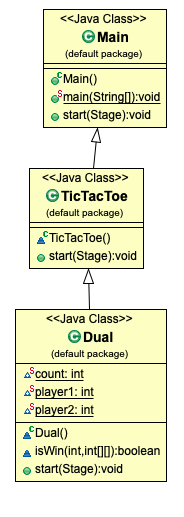
Create a JavaFX or Windows Forms (preferably a JavaFX) application that solves a single problem using 1 or 2 related classes; create UML diagrams for the classes.
Homework Answers
import javafx.application.Application;
import javafx.event.ActionEvent;
import javafx.event.EventHandler;
import javafx.scene.Scene;
import javafx.scene.control.Button;
import javafx.scene.control.Label;
import javafx.scene.control.TextField;
import javafx.scene.layout.Pane;
import javafx.scene.paint.Color;
import javafx.scene.paint.CycleMethod;
import javafx.scene.paint.LinearGradient;
import javafx.scene.paint.Stop;
import javafx.scene.shape.Rectangle;
import javafx.scene.shape.Shape;
import javafx.scene.text.Font;
import javafx.scene.text.FontPosture;
import javafx.scene.text.FontWeight;
import javafx.stage.Stage;
import javafx.scene.text.Text;
public class Main extends Application {
public static void main(String[] args) {
launch(args);
}
@Override
public void start(Stage primaryStage) throws Exception {
Pane pane = new Pane();
GradientColor gradientColor = new GradientColor();
Rectangle rectangle = new Rectangle(10, 10, 580, 380);
gradientColor.gradientColor(rectangle);
rectangle.setArcWidth(23);
rectangle.setArcHeight(23);
primaryStage.setTitle("TicTacToe");
Text text = new Text();
text.setText("Welcome to Guleri");
text.setFont(Font.font("Liberation Serif", FontWeight.BOLD, FontPosture.REGULAR, 60));
text.setY(200);
text.setX(60);
text.setFill(Color.GRAY);
Button start = new Button("start");
start.setLayoutY(250);
start.setLayoutX(300);
start.setScaleX(2.5);
start.setScaleY(1.5);
start.setOnAction(new EventHandler<ActionEvent>() {
@Override
public void handle(ActionEvent event) {
TicTacToe ticTacToe = new TicTacToe();
ticTacToe.start(primaryStage);
}
});
start.setFont(Font.font("Times Roman"));
pane.getChildren().addAll(rectangle, text, start);
primaryStage.setScene(new Scene(pane, 600, 400, Color.RED));
primaryStage.show();
}
}
class TicTacToe extends Main {
@Override
public void start(Stage primaryStage) {
Pane pane = new Pane();
Rectangle rectangle = new Rectangle(10, 10, 580, 380);
GradientColor gradientColor = new GradientColor();
gradientColor.gradientColor(rectangle);
Text text = new Text();
text.setText("Tic Tac Toe");
text.setY(200);
text.setX(100);
text.setFont(Font.font("Liberation Serif", FontWeight.BOLD, FontPosture.REGULAR, 60));
Label label = new Label("Enter Grid size:");
label.setLayoutY(200);
label.setLayoutX(300);
TextField textField = new TextField();
textField.setLayoutY(300);
textField.setLayoutX(300);
Button button1;
button1 = new Button();
button1.setText("start");
button1.setLayoutX(450);
button1.setLayoutY(300);
button1.setOnAction(new EventHandler<ActionEvent>() {
@Override
public void handle(ActionEvent event) {
Dual dual = new Dual();
dual.start(primaryStage);
}
});
pane.getChildren().addAll(rectangle, text,label,textField, button1);
primaryStage.setScene(new Scene(pane, 600, 400));
primaryStage.show();
}
}
class Dual extends TicTacToe {
static int count = 0, player1=1, player2=-1;
boolean isWin(int player, int arr[][]) {
return ((arr[0][0] + arr[0][1] + arr[0][2] == player * 3) ||
(arr[1][0] + arr[1][1] + arr[1][2] == player * 3) ||
(arr[2][0] + arr[2][1] + arr[2][2] == player * 3) ||
(arr[0][0] + arr[1][0] + arr[2][0] == player * 3) ||
(arr[0][1] + arr[1][1] + arr[2][1] == player * 3) ||
(arr[0][2] + arr[1][2] + arr[2][2] == player * 3) ||
(arr[0][0] + arr[1][1] + arr[2][2] == player * 3) ||
(arr[2][0] + arr[1][1] + arr[0][2] == player * 3));
}
@Override
public void start(Stage primaryStage) {
Rectangle dual = new Rectangle(10, 10, 580, 380);
GradientColor gradientColor = new GradientColor();
gradientColor.gradientColor(dual);
Pane pane = new Pane();
final int[][] arr = new int[3][3];
Button b1, b2, b3, b4, b5, b6, b7, b8, b9;
b1 = new Button();
b1.setLayoutY(100);
b1.setLayoutX(200);
b1.setScaleX(4);
b1.setScaleY(3);
b1.setOnAction(new EventHandler<ActionEvent>() {
@Override
public void handle(ActionEvent event) {
if ((count % 2) == 0) {
b1.setStyle("-fx-background-color: #FF6347");
arr[0][0] = 1;
player1=1;
isWin(player1,arr);
count++;
} else {
arr[0][0] = 0;
b1.setStyle("-fx-background-color: #00FF7F");
player2=1;
isWin(player2,arr);
count++;
}
}
});
b2 = new Button();
b2.setLayoutY(100);
b2.setLayoutX(300);
b2.setScaleX(4);
b2.setScaleY(3);
b2.setOnAction(new EventHandler<ActionEvent>() {
@Override
public void handle(ActionEvent event) {
if ((count % 2) == 0) {
b2.setStyle("-fx-background-color: #FF6347");
arr[0][1] = 1;
player2=1;
isWin(player2,arr);
count++;
} else {
arr[0][1] = 0;
b2.setStyle("-fx-background-color: #00FF7F");
player2=1;
isWin(player2,arr);
count++;
}
}
});
b3 = new Button();
b3.setLayoutY(100);
b3.setLayoutX(400);
b3.setScaleX(4);
b3.setScaleY(3);
b3.setOnAction(new EventHandler<ActionEvent>() {
@Override
public void handle(ActionEvent event) {
if ((count % 2) == 0) {
b3.setStyle("-fx-background-color: #FF6347");
arr[0][2] = 1;
player2=1;
isWin(player2,arr);
count++;
} else {
arr[0][2] = 0;
b3.setStyle("-fx-background-color: #00FF7F");
player2=1;
isWin(player2,arr);
count++;
}
}
});
b4 = new Button();
b4.setLayoutY(200);
b4.setLayoutX(200);
b4.setScaleX(4);
b4.setScaleY(3);
b4.setOnAction(new EventHandler<ActionEvent>() {
@Override
public void handle(ActionEvent event) {
if ((count % 2) == 0) {
b4.setStyle("-fx-background-color: #FF6347");
arr[1][0] = 1;
player1=1;
isWin(player1,arr);
count++;
} else {
arr[1][0] = 0;
b4.setStyle("-fx-background-color: #00FF7F");
player2=1;
isWin(player2,arr);
count++;
}
}
});
b5 = new Button();
b5.setLayoutY(200);
b5.setLayoutX(300);
b5.setScaleX(4);
b5.setScaleY(3);
b5.setOnAction(new EventHandler<ActionEvent>() {
@Override
public void handle(ActionEvent event) {
if ((count % 2) == 0) {
b5.setStyle("-fx-background-color: #FF6347");
arr[1][1] = 1;
player1=1;
isWin(player1,arr);
count++;
} else {
arr[1][1] = 0;
b5.setStyle("-fx-background-color: #00FF7F");
player2=1;
isWin(player2,arr);
count++;
}
}
});
b6 = new Button();
b6.setLayoutY(200);
b6.setLayoutX(400);
b6.setScaleX(4);
b6.setScaleY(3);
b6.setOnAction(new EventHandler<ActionEvent>() {
@Override
public void handle(ActionEvent event) {
if ((count % 2) == 0) {
b6.setStyle("-fx-background-color: #FF6347");
arr[1][2] = 1;
player1=1;
isWin(player1,arr);
count++;
} else {
arr[1][2] = 0;
b6.setStyle("-fx-background-color: #00FF7F");
player2=1;
isWin(player2,arr);
count++;
}
}
});
b7 = new Button();
b7.setLayoutY(300);
b7.setLayoutX(200);
b7.setScaleX(4);
b7.setScaleY(3);
b7.setOnAction(new EventHandler<ActionEvent>() {
@Override
public void handle(ActionEvent event) {
if ((count % 2) == 0) {
b7.setStyle("-fx-background-color: #FF6347");
arr[2][0] = 1;
player1=1;
isWin(player1,arr);
count++;
} else {
arr[2][0] = 0;
b7.setStyle("-fx-background-color: #00FF7F");
player2=1;
isWin(player2,arr);
count++;
}
}
});
b8 = new Button();
b8.setLayoutY(300);
b8.setLayoutX(300);
b8.setScaleX(4);
b8.setScaleY(3);
b8.setOnAction(new EventHandler<ActionEvent>() {
@Override
public void handle(ActionEvent event) {
if ((count % 2) == 0) {
b8.setStyle("-fx-background-color: #FF6347");
arr[2][1] = 1;
player1=1;
isWin(player1,arr);
count++;
} else {
arr[2][1] = 0;
b8.setStyle("-fx-background-color: #00FF7F");
player2=1;
isWin(player2,arr);
count++;
}
}
});
b9 = new Button();
b9.setLayoutY(300);
b9.setLayoutX(400);
b9.setScaleX(4);
b9.setScaleY(3);
b9.setOnAction(new EventHandler<ActionEvent>() {
@Override
public void handle(ActionEvent event) {
if ((count % 2) == 0) {
b9.setStyle("-fx-background-color: #FF6347");
arr[2][2] = 1;
player1=1;
isWin(player1,arr);
count++;
} else {
arr[2][2] = 0;
b9.setStyle("-fx-background-color: #00FF7F");
player2=1;
isWin(player2,arr);
count++;
}
}
});
pane.getChildren().addAll(dual, b1, b2, b3, b4, b5, b6, b7, b8, b9);
primaryStage.setScene(new Scene(pane, 600, 400));
primaryStage.show();
}
}
class GradientColor {
void gradientColor(Shape shape) {
Stop[] stops = new Stop[]{new Stop(0, Color.SKYBLUE), new Stop(1, Color.DEEPSKYBLUE)};
LinearGradient linear = new LinearGradient(0, 0, 1, 0, true, CycleMethod.NO_CYCLE, stops);
shape.setFill(linear);
}
}
Add Answer to:
Create a JavaFX or Windows Forms (preferably a JavaFX)
application that solves a single problem using...
I tried to complete a Java application that must include at a minimum: Three classes minimum...
I tried to complete a Java application that must include at a minimum: Three classes minimum At least one class must use inheritance At least one class must be abstract JavaFX front end – as you will see, JavaFX will allow you to create a GUI user interface. The User Interface must respond to events. If your application requires a data backend, you can choose to use a database or to use text files. Error handling - The application should...
Create a JavaFX application that uses a TextField to get a message and encode or decode...
Create a JavaFX application that uses a TextField to get a message and encode or decode it using the classes . Use four buttons to control the kind of cipher used and to specify whether to encode or decode the message. Also, use a TextField to get the number used in the constructor for the ciphers.
Please note: This is in Visual Basic. Create an application (windows forms app). Add a label...
Please note: This is in Visual Basic. Create an application (windows forms app). Add a label and a button to the form. The button’s Click event procedure should declare and initialize a one-dimensional Double array. Use any six numbers to initialize the array. The procedure should display (in the label) the lowest value stored in the array. Code the procedure using the For...Next statement.
Using JavaFX create a Roll application that implements the GUI shown When the user clicks the Rol...
Using JavaFX create a Roll application that implements the GUI shown When the user clicks the Roll button, the program must roll the dice, change the figures randomly, calculate the sum of the dice and show it in a label
Create a GUI program (a Windows Forms Application) called GooseEggCalculator that lets a user enter the...
Create a GUI program (a Windows Forms Application) called GooseEggCalculator that lets a user enter the number of eggs produced by each of four geese. Your program should provide textboxes with labels for the user to enter the values. When the user clicks a Calculate button, your app should sum the textboxes, then display the total number of eggs, as well as the number of eggs in dozens and remaining eggs, as shown on the example. Feel free to make...
**This program is to be created using Visual Studio C#**Create as a Windows Form application** 1....
**This program is to be created using Visual Studio C#**Create as a Windows Form application** 1. Output a header in the console: “This is a replacement program” 1. Output a header that states: “This is Program 5” 2. Output a thank you message: “Thank you for running the program.”
For C# Scenario: Create a Windows Forms application that accepts the total cost of a sale...
For C# Scenario: Create a Windows Forms application that accepts the total cost of a sale and the amount submitted by the customer. Calculate and display the correct change from largest denomination to smallest. If the cost exceeds the amount submitted, post a message to the user that they have entered an invalid amount. The program should accept both the cost and the amount submitted into textbox controls. The program should use Try/Catch statements to keep the program from crashing....
in JAVA please and please show output!! Create a JavaFX application that simulates the rolling of...
 in JAVA please and please show output!!
Create a JavaFX application that simulates the rolling of a pair of
dice. When the user clicks a button, the application should
generate two random numbers, each in the range of 1 through 6, to
represent the value of the dice. Use ImageView component to display
the dice. Six images are included in the project folder for you to
use. For example, the first picture below is the initial window,
after clicking the...
in JAVA please and please show output!!
Create a JavaFX application that simulates the rolling of a pair of
dice. When the user clicks a button, the application should
generate two random numbers, each in the range of 1 through 6, to
represent the value of the dice. Use ImageView component to display
the dice. Six images are included in the project folder for you to
use. For example, the first picture below is the initial window,
after clicking the...
I. User Interface Create a JavaFX application with a graphical user interface (GUI) based on the...
I. User Interface Create a JavaFX application with a graphical user interface (GUI) based on the attached “GUI Mock-Up”. Write code to display each of the following screens in the GUI: A. A main screen, showing the following controls: • buttons for “Add”, “Modify”, “Delete”, “Search” for parts and products, and “Exit” • lists for parts and products • text boxes for searching for parts and products • title labels for parts, products, and the application title B. An add...
C# WINDOWS FORMS APPLICATION (not CONSOLE APPLICATION ) (Please screenshot window form of this program and...
C# WINDOWS FORMS APPLICATION (not CONSOLE APPLICATION ) (Please screenshot window form of this program and write code on computer. Thank you very much !) For this week's assignment , create and complete a Windows application for the following question. Airline Reservation System: An airline has just bought a computer for its new reservation system. Develop a new system to assign seats on the new airplane( capacity: 10 seats) Display the following alternatives: "Please type 1 for first class, and...
 in JAVA please and please show output!!
Create a JavaFX application that simulates the rolling of a pair of
dice. When the user clicks a button, the application should
generate two random numbers, each in the range of 1 through 6, to
represent the value of the dice. Use ImageView component to display
the dice. Six images are included in the project folder for you to
use. For example, the first picture below is the initial window,
after clicking the...
in JAVA please and please show output!!
Create a JavaFX application that simulates the rolling of a pair of
dice. When the user clicks a button, the application should
generate two random numbers, each in the range of 1 through 6, to
represent the value of the dice. Use ImageView component to display
the dice. Six images are included in the project folder for you to
use. For example, the first picture below is the initial window,
after clicking the...
Most questions answered within 3 hours.
-
Where is the error in this code sequence?
String s1 = "Hello";
String s2 = "ello";...
asked 10 months ago -
Financial data for Joel de Paris, Inc., for last year
follow:
Joel de Paris, Inc.
Balance...
asked 10 months ago -
Consider this reaction:
Al2(SO4)3 (aq)+ BaCl3
(aq) Al2Cl6 (aq)- +
3BaSO4(s) . What is the...
asked 10 months ago -
Suppose that Savneet is considering increasing her
recent random sample from 20 car rentals to 40...
asked 10 months ago -
Trucks arrive at an unloading terminal at an average rate of 120
per hour.
Trucks arrive...
asked 10 months ago -
Why are methanol and ethanol completely soluble in water while
octanol is not very little soluble....
asked 10 months ago -
A facilities manager at a university reads in a research report
that the mean amount of...
asked 10 months ago -
When the CuSO4 is rehydrated by adding water to the anhydrous
compound, is this an endothermic...
asked 10 months ago -
A ray of sunlight is passing from diamond into crown glass; the
angle of incidence is...
asked 10 months ago -
A block of mass 0.249 kg is placed on top of a light, vertical
spring of...
asked 10 months ago -
how do the kidneys compensate in the presences of acidosis
a) trigger hyperventilate
b) reserve acid...
asked 10 months ago -
Question 501 pts
The rental rate of capital to the firm increases. Which of the
following...
asked 10 months ago