Create a JavaFX application that uses a TextField to get a message and encode or decode...
Create a JavaFX application that uses a TextField to get a
message and encode or decode it using
the classes . Use four buttons to control the kind of cipher used
and to specify
whether to encode or decode the message. Also, use a TextField to
get the number used in the
constructor for the ciphers.
Homework Answers
Note: As encryption and decryption classes were not given so I have used sample classes. You have to change that.
Please comment for further help and please uprate.
Download Code:
https://drive.google.com/open?id=1d_iJB3z6jn3W8x6J3GCN2SvmmaPf4kBc
MAIN.java
import java.io.IOException;
import javafx.application.Application;
import javafx.fxml.FXMLLoader;
import javafx.scene.Scene;
import javafx.scene.layout.Pane;
import javafx.stage.Stage;
public class MAIN extends Application {
@Override
public void start(Stage primaryStage) {
try {
Pane mainPane
=(Pane)
FXMLLoader.load(MAIN.class.getResource("Sample.fxml"));
primaryStage.setScene(new Scene(mainPane));
primaryStage.show();
} catch (IOException e) {
// TODO
Auto-generated catch block
e.printStackTrace();
}
}
public static void main(String[] args) {
launch(args);
}
}
Controller.java
import java.net.URL;
import java.util.ResourceBundle;
import javafx.event.ActionEvent;
import javafx.fxml.FXML;
import javafx.scene.control.Button;
import javafx.scene.control.Label;
import javafx.scene.control.TextField;
public class Controller {
@FXML
private ResourceBundle resources;
@FXML
private URL location;
@FXML
private TextField FxKeyFld;
@FXML
private Label FxResultlbl;
@FXML
private Button fxDecAff;
@FXML
private Button fxEncAff;
@FXML
private Button fxEncCae;
@FXML
private Button fxEncdec;
@FXML
private TextField fxMessageFld;
@FXML
void decryptAffine(ActionEvent event) {
int key = Integer.parseInt(FxKeyFld.getText());
String message = fxMessageFld.getText();
Affine c=new Affine(key);
FxResultlbl.setText(c.decryptionMessage(message));
}
@FXML
void decryptCaesar(ActionEvent event) {
int key = Integer.parseInt(FxKeyFld.getText());
String message = fxMessageFld.getText();
Caesar c=new Caesar(key);
FxResultlbl.setText(c.decrypt(message));
}
@FXML
void encryptAffine(ActionEvent event) {
int key = Integer.parseInt(FxKeyFld.getText());
String message = fxMessageFld.getText();
Affine c=new Affine(key);
FxResultlbl.setText(c.encryptionMessage(message));
}
@FXML
void encryptCaesar(ActionEvent event) {
int key = Integer.parseInt(FxKeyFld.getText());
String message = fxMessageFld.getText();
Caesar c=new Caesar(key);
FxResultlbl.setText(c.encrypt(message));
}
@FXML
void initialize() {
assert FxKeyFld != null : "fx:id=\"FxKeyFld\" was not injected:
check your FXML file 'Sample.fxml'.";
assert FxResultlbl != null : "fx:id=\"FxResultlbl\" was not
injected: check your FXML file 'Sample.fxml'.";
assert fxDecAff != null : "fx:id=\"fxDecAff\" was not injected:
check your FXML file 'Sample.fxml'.";
assert fxEncAff != null : "fx:id=\"fxEncAff\" was not injected:
check your FXML file 'Sample.fxml'.";
assert fxEncCae != null : "fx:id=\"fxEncCae\" was not injected:
check your FXML file 'Sample.fxml'.";
assert fxEncdec != null : "fx:id=\"fxEncdec\" was not injected:
check your FXML file 'Sample.fxml'.";
assert fxMessageFld != null : "fx:id=\"fxMessageFld\" was not
injected: check your FXML file 'Sample.fxml'.";
}
}
Sample.fxml
<?xml version="1.0" encoding="UTF-8"?>
<?import java.lang.*?>
<?import java.util.*?>
<?import javafx.scene.control.*?>
<?import javafx.scene.layout.*?>
<?import javafx.scene.paint.*?>
<AnchorPane id="AnchorPane" maxHeight="-Infinity"
maxWidth="-Infinity" minHeight="-Infinity" minWidth="-Infinity"
prefHeight="400.0" prefWidth="360.00022207031"
xmlns:fx="http://javafx.com/fxml/1"
xmlns="http://javafx.com/javafx/2.2"
fx:controller="Controller">
<children>
<Label layoutX="31.0" layoutY="67.0" text="Text" />
<TextField fx:id="fxMessageFld" layoutX="132.0" layoutY="64.0"
prefWidth="200.0" />
<Label layoutX="31.0" layoutY="109.0" text="Key" />
<TextField fx:id="FxKeyFld" layoutX="132.0" layoutY="106.0"
prefWidth="200.0" />
<Label layoutX="31.0" layoutY="160.0" text="Result" />
<Label fx:id="FxResultlbl" layoutX="132.0" layoutY="160.0"
text="..." textFill="#0c9900" />
<Button fx:id="fxEncCae" layoutX="36.0" layoutY="228.0"
mnemonicParsing="false" onAction="#encryptCaesar" text="Encrypt
Caesar" />
<Button fx:id="fxEncAff" layoutX="36.0" layoutY="285.0"
mnemonicParsing="false" onAction="#encryptAffine" prefWidth="98.0"
text="Encrypt Affine" />
<Button fx:id="fxDecAff" layoutX="224.0" layoutY="285.0"
mnemonicParsing="false" onAction="#decryptAffine" prefWidth="98.0"
text="Decypt Affine" />
<Button fx:id="fxEncdec" layoutX="224.0" layoutY="227.0"
mnemonicParsing="false" onAction="#decryptCaesar" text="Decrypt
Caesar" />
</children>
</AnchorPane>
Output:
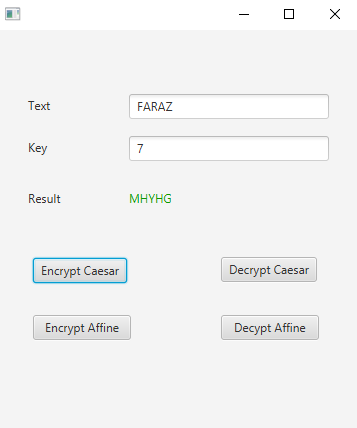
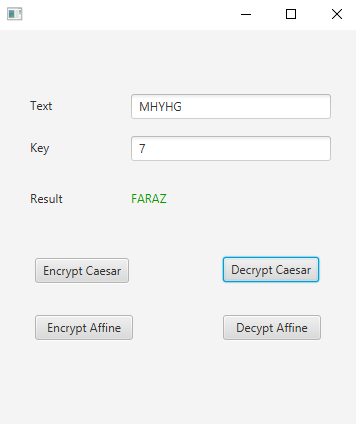
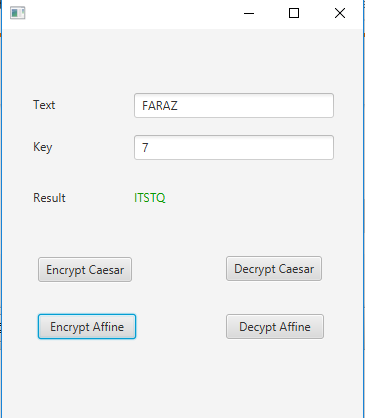
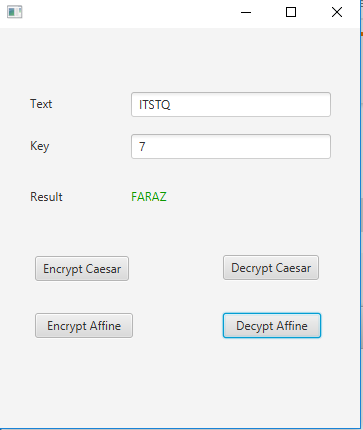
Add Answer to:
Create a JavaFX application that uses a TextField to get a
message and encode or decode...
Question 1 : Create an interface MessageDecoder that has a single abstract method decode( cipherText), where...
Question 1 : Create an interface MessageDecoder that has a single abstract method decode( cipherText), where cipherText is the message to be decoded. The method will return the decoded message. Create a class SubstitutionCipher that implements the interface MessageDecoder as described above. The constructor should have one parameter called shift. Define the method decode so that each letter is shifted by the value in shift. For example, if shift is 3, a will be replaced by d, b will be...
"Encode and decode a message using a substitution and transposition cipher." I'm not exactly sure what...
"Encode and decode a message using a substitution and transposition cipher." I'm not exactly sure what a substitution and transposition cipher are exactly, but I "think" it has to do with something like this: I want to encode then decode the string: "HELLO". I have: c(H) = (8 + 4)mod26 == 12mod26 == 12 H = 12 == L c(E) = (5+4)mod26 E = 9 == I c(L) = (12+4)mod26 L = 16 == P x2 c(O) = (15+4)mod26 O...
Design JavaFX application with 7 labels and one textfield where user enters input inches. When user...
Design JavaFX application with 7 labels and one textfield where user enters input inches. When user enters his choice and presses enter key to complete input, program outputs resulting yards, feet, and inches. Use class P5 that extends Application with start method in it, and class P5Pane that extends GridPane. The only instance variables for P5Pane class are inputInches where user enters input inches, and three labels: outYards, outFeet, and outInches where program displays result of conversion. Use the following...
For this question you will need to complete the methods to create a JavaFX GUI application...
 For this question you will need to complete the methods to create a JavaFX GUI application that implements two String analysis algorithms. Each algorithm is activated when its associated button is pressed. They both take their input from the text typed by the user in a TextField and they both display their output via a Text component at the bottom of the GUI, which is initialized to “Choose a string methods as indicated in the partially completed class shown after...
We have intercepted a message that we need to decode. Luckily, we know that they use...
We have intercepted a message that we need to decode. Luckily, we know that they use the letters A to Z, space, 0 to 9. We also know that when they encode messages they start by shifting the first letter once to the left, then shift the next two letters right twice, then the next three letters left 3 times, then the next four letters right 4 times, the next five letters left 5 times, and so on. a. If...
We have intercepted a message that we need to decode. Luckily, we know that they use...
We have intercepted a message that we need to decode. Luckily, we know that they use the letters A to Z, space, 0 to 9. We also know that when they encode messages they start by shifting the first letter once to the right, then shift the next two letters left twice, then the next three letters right 3 times, then the next four letters left 4 times, the next five letters right 5 times, and so on. a. If...
You will be designing and creating a Java GUI-based course application. Create a “Student” class. You...
You will be designing and creating a Java GUI-based course application. Create a “Student” class. You need to have at least 3 instance variables (student characteristics like name,…), at least 2 constructors (1 should be a no-arg constructor), set and get methods. Create a “Course” class that consists of 2 instance variables: the course name and an array of Students (using your Student class). Design and create a JavaFX-based GUI interface that allows you to : INPUT information for Course...
Tip Calculator App & Order Using NetBeans create a new JavaFX project with two classes TipCalculator...
Tip Calculator App & Order Using NetBeans create a new JavaFX project with two classes TipCalculator (the JavaFX class) and Order Create the Tip Calculator as follows: Start with an Order class with two instance variables, item a String and price a double; include two constructors, a no-parameter constructor that passes default values empty String and zero (0) to the second constructor which then calls the set methods for item and price; the set method for price validates that price...
Can someone please help me for this assignment? Cryptography — the science of secret writing —...
Can someone please help me for this assignment? Cryptography — the science of secret writing — is an old science; the first recorded use was well before 1900 B.C. An Egyptian writer used previously unknown hieroglyphs in an inscription. We will use a simple substitution cypher called rot13 to encode and decode our secret messages. ROT13 ("rotate by 13 places", sometimes hyphenated ROT-13) is a simple letter substitution cipher that replaces a letter with the 13th letter after it, in...
5.6 Exercise. Describe an RSA Public Key Code System based on the primes and 17. Encode and decode several messages Of...
 5.6 Exercise. Describe an RSA Public Key Code System based on the primes and 17. Encode and decode several messages Of coursc, the fun of being a spy is to break codes. So get on your trench coal, pull out your magnifying glass, and begin to spy. The next exercise asks you to break an RSA code and save the world 5.7 Excrcise. You are a secret agent. An evil spy with shallow mumber thery skills uses the RSA Public...
 For this question you will need to complete the methods to create a JavaFX GUI application that implements two String analysis algorithms. Each algorithm is activated when its associated button is pressed. They both take their input from the text typed by the user in a TextField and they both display their output via a Text component at the bottom of the GUI, which is initialized to “Choose a string methods as indicated in the partially completed class shown after...
 5.6 Exercise. Describe an RSA Public Key Code System based on the primes and 17. Encode and decode several messages Of coursc, the fun of being a spy is to break codes. So get on your trench coal, pull out your magnifying glass, and begin to spy. The next exercise asks you to break an RSA code and save the world 5.7 Excrcise. You are a secret agent. An evil spy with shallow mumber thery skills uses the RSA Public...
Most questions answered within 3 hours.
-
Where is the error in this code sequence?
String s1 = "Hello";
String s2 = "ello";...
asked 10 months ago -
Financial data for Joel de Paris, Inc., for last year
follow:
Joel de Paris, Inc.
Balance...
asked 10 months ago -
Consider this reaction:
Al2(SO4)3 (aq)+ BaCl3
(aq) Al2Cl6 (aq)- +
3BaSO4(s) . What is the...
asked 10 months ago -
Suppose that Savneet is considering increasing her
recent random sample from 20 car rentals to 40...
asked 10 months ago -
Trucks arrive at an unloading terminal at an average rate of 120
per hour.
Trucks arrive...
asked 10 months ago -
Why are methanol and ethanol completely soluble in water while
octanol is not very little soluble....
asked 10 months ago -
A facilities manager at a university reads in a research report
that the mean amount of...
asked 10 months ago -
When the CuSO4 is rehydrated by adding water to the anhydrous
compound, is this an endothermic...
asked 10 months ago -
A ray of sunlight is passing from diamond into crown glass; the
angle of incidence is...
asked 10 months ago -
A block of mass 0.249 kg is placed on top of a light, vertical
spring of...
asked 10 months ago -
how do the kidneys compensate in the presences of acidosis
a) trigger hyperventilate
b) reserve acid...
asked 10 months ago -
Question 501 pts
The rental rate of capital to the firm increases. Which of the
following...
asked 10 months ago