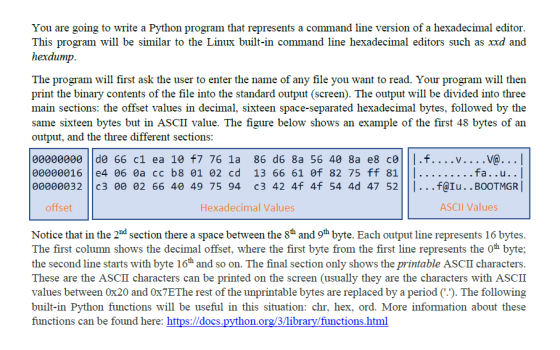
Please read this comment:
This is the only file given by my professor and so can you please help me to write a python program. You can use any test file and post the output with the code. The output might be different then above but please help me to get started with the PYTHON code. Thank you in advance
Homework Answers
//USAGE hexdump.py [filename]
import sys
import os.path
def check_file_provided():
# This method ensures a valid file was provided to the invoked script ##
if (len(sys.argv) < 2):
print("")
print("Error - No file was provided")
print("")
print("Correct Usage:")
print("python hexdump.py <file_to_dump>")
print("")
sys.exit(0)
if not os.path.isfile(sys.argv[1]):
print("")
print("Error - The file provided does not exist")
print("")
sys.exit(0)
def read_bytes(filename, chunksize=8192):
# This method returns the bytes of a provided file ##
try:
with open(filename, "rb") as f:
while True:
chunk = f.read(chunksize)
if chunk:
for b in chunk:
yield b'%c' %b
else:
break
except IOError:
print("")
print("Error - The file provided does not exist")
print("")
sys.exit(0)
def is_character_printable(s):
## This method returns true if a byte is a printable ascii character ##
return all((c < 127) and (c >= 32) for c in s)
def print_headers():
## This method prints the headers at the top of our hex dump ##
print("")
def validate_byte_as_printable(byte):
## Check if byte is a printable ascii character. If not replace with a '.' character ##
if is_character_printable(byte):
return byte.decode('ascii')
else:
return '.'
## main ##
check_file_provided()
memory_address = 0
ascii_string = ""
print_headers()
## Loop through the given file while printing the address, hex and ascii output ##
for byte in read_bytes(sys.argv[1]):
ascii_string = ascii_string + validate_byte_as_printable(byte)
if memory_address%16 == 0:
print(format(memory_address, '06'),end=" "),
print(byte.hex(),end=" "),
elif memory_address%16 == 15:
print(byte.hex(),end=" "),
print("|" + ascii_string + "|")
ascii_string = " "
elif memory_address%16 == 8:
print(byte.hex(),end=" "),
else:
print(byte.hex(),end=" "),
memory_address = memory_address + 1
Add Answer to:
Please read this comment:
This is the only file given by my professor and so can...
Write a C program which will display the contents of a file in base-16 (hexadecimal) and...
Write a C program which will display the contents of a file in base-16 (hexadecimal) and in ASCII. Complete the following tasks: Obtain the name of the input file from the command line. If the command-line is “./hexdump xxx.bin” then argv[1] will contain “xxx.bin”. Open the file for binary input Print the entire file, 16-bytes per line. Each line should begin with an 8-digit hexadecimal offset into the file. This is the count of the bytes that you have already...
This question has been asked before but the responses have been wrong. Please do not copy...
This question has been asked before but the responses have been wrong. Please do not copy and paste their answers. Currently the program opens a file and reads every byte in the file and write both the ASCII hex value for that byte as well as it’s printable character to standard output with non-printable characters printing a "." Now, I want have an option where the program prints in binary instead of hex by typing "-b" at the command line....
Write a C program to run on ocelot to read a text file and print it...
Write a C program to run on ocelot to read a text file and print it to the display. It should optionally find the count of the number of words in the file, and/or find the number of occurrences of a substring, and/or take all the words in the string and sort them lexicographically (ASCII order). You must use getopt to parse the command line. There is no user input while this program is running. Usage: mywords [-cs] [-f substring]...
Write a program that reads in two hexadecimal numbers from a file, hex.dat, and prints out...
 Write a program that reads in two hexadecimal numbers from a file, hex.dat, and prints out the sum of the two numbers in hexadecimal. (As noted in class, first do this without using a file and by reading using the cin > > command) From Wikipedia: "In mathematics and computer science, hexadecimal (also base 16, or hex) is a positional numeral system with a radix, or base, of 16. It uses sixteen distinct symbols, most often the symbols 0-9 to...
IN MIPS PLEASE. Need help writing a MIPS program that reads from a text file named...
IN MIPS PLEASE. Need help writing a MIPS program that reads from a text file named "input.txt" and places it in a buffer. A buffer of 80 bytes is more than enough. Before you call your function, set $a0 equal to the address of the filename and $a1 to the address of the buffer where data is stored. The function should return the number of bytes read in $v0. In the main program, print an error message and terminate the...
Please submit only Python source code. 1. Arithmetic trees 50 marks You are given an input file with multiple pairs of...
 Please submit only Python source code. 1. Arithmetic trees 50 marks You are given an input file with multiple pairs of input lines. The first line of each pair is a tree given as a predecessor array. The second line is the value at the corresponding node. Values at leaf nodes (nodes with no children) are integers. At non-leaf nodes, the two possible values are + or *. The tree represents an arithmetic expression where the value at a non-leaf...
The program is done in C. This program opens a file containing binary or text and...
The program is done in C. This program opens a file containing binary or text and reads every byte in the file and writes both the ASCII hex value for that byte as well as it’s printable (human-readable) character (characters, digits, symbols) to standard output. The issue I am having is when the file has multiple lines being read. The first line is read and done properly but the other lines do not work correctly. For instance, the text file...
C++ please! In this program you will be outputting the characters that map to the ASCIl...
 C++ please!
In this program you will be outputting the characters that map to the ASCIl codes 32 through 126. You will need a loop to iterate through the input values and output the corresponding character. This mapping is shown in appendix A in your Gaddis text book. Your program will be reading in two unsigned integer values. The prompt for read will be Enter lower and upper values You need to check that both values are in the range...
C++ please!
In this program you will be outputting the characters that map to the ASCIl codes 32 through 126. You will need a loop to iterate through the input values and output the corresponding character. This mapping is shown in appendix A in your Gaddis text book. Your program will be reading in two unsigned integer values. The prompt for read will be Enter lower and upper values You need to check that both values are in the range...
PLEASE DO IT IN PYTHON, THANK YOU! CSV file: This is a file containing plain text...
 PLEASE DO IT IN PYTHON, THANK YOU!
CSV file: This is a file containing plain text where each line in the file represents one record of information, and each piece of info in the record is separated by a single comma. Luckily the values won't ever contain commas themselves for this project. But they might start or end with non visible characters (e.g. space, tab). Thus, you must remove the leading and trailing spaces when you store the data in...
PLEASE DO IT IN PYTHON, THANK YOU!
CSV file: This is a file containing plain text where each line in the file represents one record of information, and each piece of info in the record is separated by a single comma. Luckily the values won't ever contain commas themselves for this project. But they might start or end with non visible characters (e.g. space, tab). Thus, you must remove the leading and trailing spaces when you store the data in...
File structure is a structure, which is according to a required format that operating system can...
File structure is a structure, which is according to a required format that operating system can understand. A file has a certain defined structure according to its type. A text file is a sequence of characters organized into lines. A source file is a sequence of procedures and functions. An object file is a sequence of bytes organized into blocks that are understandable by the machine. When operating system defines different file structures, it also contains the code to support...
 Write a program that reads in two hexadecimal numbers from a file, hex.dat, and prints out the sum of the two numbers in hexadecimal. (As noted in class, first do this without using a file and by reading using the cin > > command) From Wikipedia: "In mathematics and computer science, hexadecimal (also base 16, or hex) is a positional numeral system with a radix, or base, of 16. It uses sixteen distinct symbols, most often the symbols 0-9 to...
 Please submit only Python source code. 1. Arithmetic trees 50 marks You are given an input file with multiple pairs of input lines. The first line of each pair is a tree given as a predecessor array. The second line is the value at the corresponding node. Values at leaf nodes (nodes with no children) are integers. At non-leaf nodes, the two possible values are + or *. The tree represents an arithmetic expression where the value at a non-leaf...
 C++ please!
In this program you will be outputting the characters that map to the ASCIl codes 32 through 126. You will need a loop to iterate through the input values and output the corresponding character. This mapping is shown in appendix A in your Gaddis text book. Your program will be reading in two unsigned integer values. The prompt for read will be Enter lower and upper values You need to check that both values are in the range...
C++ please!
In this program you will be outputting the characters that map to the ASCIl codes 32 through 126. You will need a loop to iterate through the input values and output the corresponding character. This mapping is shown in appendix A in your Gaddis text book. Your program will be reading in two unsigned integer values. The prompt for read will be Enter lower and upper values You need to check that both values are in the range...
 PLEASE DO IT IN PYTHON, THANK YOU!
CSV file: This is a file containing plain text where each line in the file represents one record of information, and each piece of info in the record is separated by a single comma. Luckily the values won't ever contain commas themselves for this project. But they might start or end with non visible characters (e.g. space, tab). Thus, you must remove the leading and trailing spaces when you store the data in...
PLEASE DO IT IN PYTHON, THANK YOU!
CSV file: This is a file containing plain text where each line in the file represents one record of information, and each piece of info in the record is separated by a single comma. Luckily the values won't ever contain commas themselves for this project. But they might start or end with non visible characters (e.g. space, tab). Thus, you must remove the leading and trailing spaces when you store the data in...
Most questions answered within 3 hours.
-
Where is the error in this code sequence?
String s1 = "Hello";
String s2 = "ello";...
asked 11 months ago -
Financial data for Joel de Paris, Inc., for last year
follow:
Joel de Paris, Inc.
Balance...
asked 11 months ago -
Consider this reaction:
Al2(SO4)3 (aq)+ BaCl3
(aq) Al2Cl6 (aq)- +
3BaSO4(s) . What is the...
asked 11 months ago -
Suppose that Savneet is considering increasing her
recent random sample from 20 car rentals to 40...
asked 11 months ago -
Trucks arrive at an unloading terminal at an average rate of 120
per hour.
Trucks arrive...
asked 11 months ago -
Why are methanol and ethanol completely soluble in water while
octanol is not very little soluble....
asked 11 months ago -
A facilities manager at a university reads in a research report
that the mean amount of...
asked 11 months ago -
When the CuSO4 is rehydrated by adding water to the anhydrous
compound, is this an endothermic...
asked 11 months ago -
A ray of sunlight is passing from diamond into crown glass; the
angle of incidence is...
asked 11 months ago -
A block of mass 0.249 kg is placed on top of a light, vertical
spring of...
asked 11 months ago -
how do the kidneys compensate in the presences of acidosis
a) trigger hyperventilate
b) reserve acid...
asked 11 months ago -
Question 501 pts
The rental rate of capital to the firm increases. Which of the
following...
asked 11 months ago