This question has been asked before but the responses have been wrong. Please do not copy...
This question has been asked before but the responses have been wrong. Please do not copy and paste their answers. Currently the program opens a file and reads every byte in the file and write both the ASCII hex value for that byte as well as it’s printable character to standard output with non-printable characters printing a "." Now, I want have an option where the program prints in binary instead of hex by typing "-b" at the command line. For instance, ~hexdump -b input.txt(or any name of text file) will result in the binary option and ~hexdump input.txt results in the hex option. Any ideas how to implement this?
This code is done in C.
----------------------------------
#include <stdio.h>
#include <stdlib.h>
#include <string.h>
#define SIZE 1000
void hexDump(void * addr, int len) {
int i;
unsigned char buffline[17];
unsigned char * pc = (unsigned char * ) addr;
for (i = 0; i < len; i++) {
if ((i % 16) == 0) {
if (i != 0)
printf(" %s\n", buffline);
if (pc[i] == 0x00) {
return; //exit will end the program and you cant modify next
line
}
printf(" %07x: ", i); //prints address
}
printf("%02x", pc[i]);
if ((i % 2) == 1)
printf(" ");
if ((pc[i] < 0x20) || (pc[i] > 0x7e)) { //non-printable
chars
buffline[i % 16] = '.';
} else {
buffline[i % 16] = pc[i];
}
buffline[(i % 16) + 1] = '\0'; //clear array
}
while ((i % 16) != 0) { //'.' fill last line
printf(" ");
i++;
}
printf(" %s\n", buffline);
}
int main(int argc, char * argv[]) {
FILE * fp;
char buff[SIZE];
int count=1;
fp = fopen(argv[1], "r");
memset(buff, '\0', sizeof(buff));
while(fgets(buff, SIZE, fp)){
hexDump(& buff, sizeof(buff));
}
fclose(fp);;
return 0;
Homework Answers
Here is the program . Save it in file hexdump.c and run the program with command line parameter -b input.txt
#include <stdio.h>
#include <stdlib.h>
#include <string.h>
#define SIZE 1000
// To print binary data of a int value
void print_binary(int number)
{
if (number) {
print_binary(number >> 1);
putc((number & 1) ? '1' : '0', stdout);
}
}
// Add a new parameter char in_binary in the existing
function
// if in_binary == 'y' it will display binary dump instead of hex
dump
void hexDump (void *addr, int len, char in_binary)
{
int i;
unsigned char buffline[17];
unsigned char *pc = (unsigned char *) addr;
for (i = 0; i < len; i++)
{
if ((i % 16) == 0)
{
if (i != 0)
printf (" %s\n", buffline);
if (pc[i] == 0x00)
{
return; //exit will end
the program and you cant modify next line
}
printf (" %07x: ", i); //prints
address
}
if(in_binary == 'y') {
// print in binary format
print_binary(pc[i]);
} else {
// print in usual hex format
printf ("%02x", pc[i]);
}
if ((i % 2) == 1)
printf (" ");
if ((pc[i] < 0x20) || (pc[i] > 0x7e))
{
//non-printable chars
buffline[i % 16] = '.';
}
else
{
buffline[i % 16] = pc[i];
}
buffline[(i % 16) + 1] = '\0'; //clear array
}
while ((i % 16) != 0)
{
//'.' fill last line
printf (" ");
i++;
}
printf (" %s\n", buffline);
}
int main (int argc, char *argv[])
{
FILE *fp;
char buff[SIZE];
int count = 1;
char in_binary = 'n'; // for 'n' -> do not print in binary
char *filename = "input.txt";
char *binary_option = "-b";
// If command line parameter -b is present dump binary data
correspond to ascii
if(strcmp(argv[1], binary_option) == 0) {
in_binary = 'y'; // for 'y' -> do print in binary format
// Collect the filename
filename = argv[2];
} else {
filename = argv[1];
}
fp = fopen (filename, "r");
memset (buff, '\0', sizeof (buff));
while (fgets (buff, SIZE, fp))
{
hexDump (&buff, sizeof (buff), in_binary);
}
fclose (fp);
return 0;
}
Here is the output in binary
0000000: 11101001101000 11010011110011 1000001101001
1110011100000 1100001100000 11101001100101 11100111110100
1000001101100 this is a test l
0000010: 11010011101110 11001011010 ine.............
0000000: 1100101101110 1100100100000 11011001101001 11011101100101
100000 11101001100101 11100111110100 1000001101100 2nd line. test
l
0000010: 11010011101110 11001011010 ine.............
Here is the textfile input.txt content
this is a test line
2nd line
Here is the usual hexdump output
0000000: 7468 6973 2069 7320 6120 7465 7374 206c this is a test
l
0000010: 696e 650a 0000 0000 0000 0000 0000 0000
ine.............
0000000: 326e 6420 6c69 6e65 0020 7465 7374 206c 2nd line. test
l
0000010: 696e 650a 0000 0000 0000 0000 0000 0000
ine.............
Add Answer to:
This question has been asked before but the responses have been
wrong. Please do not copy...
The program is done in C. This program opens a file containing binary or text and...
The program is done in C. This program opens a file containing binary or text and reads every byte in the file and writes both the ASCII hex value for that byte as well as it’s printable (human-readable) character (characters, digits, symbols) to standard output. The issue I am having is when the file has multiple lines being read. The first line is read and done properly but the other lines do not work correctly. For instance, the text file...
Convert C to C++ I need these 4 C file code convert to C++. Please Convert...
Convert C to C++ I need these 4 C file code convert to C++. Please Convert it to C++ //////first C file: Wunzip.c #include int main(int argc, char* argv[]) { if(argc ==1){ printf("wunzip: file1 [file2 ...]\n"); return 1; } else{ for(int i =1; i< argc;i++){ int num=-1; int numout=-1; int c; int c1; FILE* file = fopen(argv[i],"rb"); if(file == NULL){ printf("Cannot Open File\n"); return 1; } else{ while(numout != 0){ numout = fread(&num, sizeof(int), 1, file); c...
In this exercise we “reverse-engineer” some code to try to determine how the heap in a C program ...
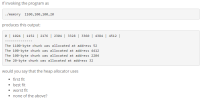 In this exercise we “reverse-engineer” some code to try to
determine how the heap in a C program is managed. Consider the
following C program (compiled as an executable called memory):
#include <stdio.h>
#include <stdlib.h>
int main(int argc, char **argv) {
int chunk_sizes[4];
if ((argc != 2) ||
(sscanf(argv[1], "%d,%d,%d,%d", &chunk_sizes[0], &chunk_sizes[1], &chunk_sizes[2], &chunk_sizes[3]) != 4) ||
(chunk_sizes[0] < 0) || (chunk_sizes[1] < 0) || (chunk_sizes[2] < 0) || (chunk_sizes[3] < 0) ) {
fprintf(stderr,"Usage: %s a,b,c,d\n", argv[0]);
fprintf(stderr," where...
In this exercise we “reverse-engineer” some code to try to
determine how the heap in a C program is managed. Consider the
following C program (compiled as an executable called memory):
#include <stdio.h>
#include <stdlib.h>
int main(int argc, char **argv) {
int chunk_sizes[4];
if ((argc != 2) ||
(sscanf(argv[1], "%d,%d,%d,%d", &chunk_sizes[0], &chunk_sizes[1], &chunk_sizes[2], &chunk_sizes[3]) != 4) ||
(chunk_sizes[0] < 0) || (chunk_sizes[1] < 0) || (chunk_sizes[2] < 0) || (chunk_sizes[3] < 0) ) {
fprintf(stderr,"Usage: %s a,b,c,d\n", argv[0]);
fprintf(stderr," where...
Has to be in Unix! Lab 7 Programs 1. Create a prints.c file, and copy the...
 Has
to be in Unix!
Lab 7 Programs 1. Create a prints.c file, and copy the following into it: #include <stdio.h> int main(int argc, char * argv[]) { double x = 1.0, y = 5.1e7; float pi = 3.14159f; int i=0, j=5115; short int m= 6; unsigned long int n = 51151151; return 0; Now, write printf commands to: • print x with a field width of 6; print y with a field width of 8 and a precision of...
Has
to be in Unix!
Lab 7 Programs 1. Create a prints.c file, and copy the following into it: #include <stdio.h> int main(int argc, char * argv[]) { double x = 1.0, y = 5.1e7; float pi = 3.14159f; int i=0, j=5115; short int m= 6; unsigned long int n = 51151151; return 0; Now, write printf commands to: • print x with a field width of 6; print y with a field width of 8 and a precision of...
Assume I don't understand C++ Can someone explain this program to me Line by Line? Basically...
Assume I don't understand C++ Can someone explain this program to me Line by Line? Basically what each line actually does? whats the function? whats the point? Don't tell me what the program does as a whole, I need to understand what each line does in this program. #include #include #include #include #include #define SERVER_PORT 5432 #define MAX_LINE 256 int main(int argc, char * argv[]) { FILE *fp; struct hostent *hp; struct sockaddr_in sin; char *host;...
The following C code keeps returning a segmentation fault! Please debug so that it compiles. Also...
The following C code keeps returning a segmentation fault! Please debug so that it compiles. Also please explain why the seg fault is happening. Thank you #include <stdio.h> #include <stdlib.h> #include <string.h> #include <time.h> // @Name loadMusicFile // @Brief Load the music database // 'size' is the size of the database. char** loadMusicFile(const char* fileName, int size){ FILE *myFile = fopen(fileName,"r"); // Allocate memory for each character-string pointer char** database = malloc(sizeof(char*)*size); unsigned int song=0; for(song =0; song < size;...
C Programming // Compile with: clang radio.c -o radio // Run with: ./radio #include <stdio.h> #include...
C Programming // Compile with: clang radio.c -o radio // Run with: ./radio #include <stdio.h> #include <stdlib.h> #include <string.h> #include <time.h> // @Name loadMusicFile // @Brief Load the music database // 'size' is the size of the database. char** loadMusicFile(const char* fileName, int size){ FILE *myFile = fopen(fileName,"r"); // Allocate memory for each character-string pointer char** database = malloc(sizeof(char*)*size); unsigned int song=0; for(song =0; song < size; song++){ // Allocate memory for each individual character string database[song] =...
create case 4 do Method 1:copy item by item and skip the item you want to...
create case 4 do Method 1:copy item by item and skip the item you want to delete after you are done, delete the old file and rename the new one to the old name. #include int main(void) { int counter; int choice; FILE *fp; char item[100]; while(1) { printf("Welcome to my shopping list\n\n"); printf("Main Menu:\n"); printf("1. Add to list\n"); printf("2. Print List\n"); printf("3. Delete List\n"); printf("4. Remove an item from the List\n"); printf("5. Exit\n\n"); scanf("%i", &choice); switch(choice) { case 1:...
If you already answer this question, please skip, thanks C Programming. Fill in ... This program...
If you already answer this question, please skip, thanks C Programming. Fill in ... This program will be called with one command line argument that contains a string followed by an asterisk and an integer. Print out the string as many time as indicated by the integer. For example, when called as prog Hi*3, you print HiHiHi. Hint: Look for the '*' starting from the back of the string. len = strlen(arg) gives you the string length. When you have...
Writing a program in C please help!! My file worked fine before but when I put...
Writing a program in C please help!! My file worked fine before but when I put the functions in their own files and made a header file the diplayadj() funtion no longer works properly. It will only print the vertices instead of both the vertices and the adjacent like below. example input form commnd line file: A B B C E X C D A C The directed edges in this example are: A can go to both B and...
 In this exercise we “reverse-engineer” some code to try to
determine how the heap in a C program is managed. Consider the
following C program (compiled as an executable called memory):
#include <stdio.h>
#include <stdlib.h>
int main(int argc, char **argv) {
int chunk_sizes[4];
if ((argc != 2) ||
(sscanf(argv[1], "%d,%d,%d,%d", &chunk_sizes[0], &chunk_sizes[1], &chunk_sizes[2], &chunk_sizes[3]) != 4) ||
(chunk_sizes[0] < 0) || (chunk_sizes[1] < 0) || (chunk_sizes[2] < 0) || (chunk_sizes[3] < 0) ) {
fprintf(stderr,"Usage: %s a,b,c,d\n", argv[0]);
fprintf(stderr," where...
In this exercise we “reverse-engineer” some code to try to
determine how the heap in a C program is managed. Consider the
following C program (compiled as an executable called memory):
#include <stdio.h>
#include <stdlib.h>
int main(int argc, char **argv) {
int chunk_sizes[4];
if ((argc != 2) ||
(sscanf(argv[1], "%d,%d,%d,%d", &chunk_sizes[0], &chunk_sizes[1], &chunk_sizes[2], &chunk_sizes[3]) != 4) ||
(chunk_sizes[0] < 0) || (chunk_sizes[1] < 0) || (chunk_sizes[2] < 0) || (chunk_sizes[3] < 0) ) {
fprintf(stderr,"Usage: %s a,b,c,d\n", argv[0]);
fprintf(stderr," where...
 Has
to be in Unix!
Lab 7 Programs 1. Create a prints.c file, and copy the following into it: #include <stdio.h> int main(int argc, char * argv[]) { double x = 1.0, y = 5.1e7; float pi = 3.14159f; int i=0, j=5115; short int m= 6; unsigned long int n = 51151151; return 0; Now, write printf commands to: • print x with a field width of 6; print y with a field width of 8 and a precision of...
Has
to be in Unix!
Lab 7 Programs 1. Create a prints.c file, and copy the following into it: #include <stdio.h> int main(int argc, char * argv[]) { double x = 1.0, y = 5.1e7; float pi = 3.14159f; int i=0, j=5115; short int m= 6; unsigned long int n = 51151151; return 0; Now, write printf commands to: • print x with a field width of 6; print y with a field width of 8 and a precision of...
Most questions answered within 3 hours.
-
Where is the error in this code sequence?
String s1 = "Hello";
String s2 = "ello";...
asked 10 months ago -
Financial data for Joel de Paris, Inc., for last year
follow:
Joel de Paris, Inc.
Balance...
asked 10 months ago -
Consider this reaction:
Al2(SO4)3 (aq)+ BaCl3
(aq) Al2Cl6 (aq)- +
3BaSO4(s) . What is the...
asked 10 months ago -
Suppose that Savneet is considering increasing her
recent random sample from 20 car rentals to 40...
asked 10 months ago -
Trucks arrive at an unloading terminal at an average rate of 120
per hour.
Trucks arrive...
asked 10 months ago -
Why are methanol and ethanol completely soluble in water while
octanol is not very little soluble....
asked 10 months ago -
A facilities manager at a university reads in a research report
that the mean amount of...
asked 10 months ago -
When the CuSO4 is rehydrated by adding water to the anhydrous
compound, is this an endothermic...
asked 10 months ago -
A ray of sunlight is passing from diamond into crown glass; the
angle of incidence is...
asked 10 months ago -
A block of mass 0.249 kg is placed on top of a light, vertical
spring of...
asked 10 months ago -
how do the kidneys compensate in the presences of acidosis
a) trigger hyperventilate
b) reserve acid...
asked 10 months ago -
Question 501 pts
The rental rate of capital to the firm increases. Which of the
following...
asked 10 months ago