
Homework Answers
C). explain the back door procedure to log in to the password-protected Windows 7 system so you overlooked your secret word for signing in to Windows. Everything isn't lost. You can at present sign in to Windows regardless of whether there is no other authoritative record on the PC.
From a security perspective, this is really alarming news. In any case, there are genuine motivations to utilize the stunts underneath, and none of them will give criminal log access without your insight (the secret word is changed, not uncovered) or access scrambled information.
You'll require a Windows 7 System Repair Disk. You can utilize one made on another person's Windows 7 PC giving that one of the PCs isn't 64-piece and the other 32.
To change the secret key, boot from the System Repair Disk. When provoked, press any key.
In the end, you'll get to the System Recovery Options screen. Note the working framework area; it may be C: or D:, or whatever. Snap Next.
On the following page, click Command Prompt.
Once there, type every one of these lines, squeezing Enter after everyone. Supplant the x in the principal line with the working framework area you noted previously.
Expel the disc and reboot.
At the sign-on screen, click the Ease of access symbol in the lower-left corner to raise an order brief.
Inside that order brief, type net client username new password,
supplanting username with your current username (it's unmistakably
obvious on the screen).
and replace a new password
At last, close the order brief and sign in with your new secret
key.
D).what do you mean by restoring point?
A reestablish(restore) point is a spared "depiction" of a PC's information at a particular time. Reestablish(restore) focuses are a part of the Windows System Restore utility. By making a reestablish(restore) point, you can spare the condition of the operating system and your own information so that if future changes cause an issue, you can reestablish(restore) the system and your information to the manner in which it was before the progressions were made. At the point when a reestablish(restore) point is set up, your PC makes a reinforcement duplicate of all information at that specific time. The potential kinds of reestablishing(restoring) focuses are: system checkpoints, which are planned reestablish(Restore) focuses that your PC makes; manual reestablish(restore) focuses, which the client makes; and establishment(installation) reestablish(restore) focuses, which are naturally( automatically) made when you introduce the certain programs.
It's a smart thought to make a reestablish(restore) point before you roll out any improvements to your PC that might cause issues or make the system insecure. At the point when you run the System Restore utility, it shows a schedule that rundowns the reestablish(restore) focuses made (each day that your PC is utilized will have at any rate one reestablish(restore) point and some may have a few, contingent upon utilization). Regardless of whether you haven't physically made a reestablish(restore) point, you can indicate reestablish(restore) focuses that have been naturally made. On the off chance that you get in a difficult situation, you simply select a reestablish point that originates before the trouble, and System Restore will fix any progressions from that point forward. Windows XP makes a reestablish point each time: an unsigned gadget driver or a System Restore-perfect application is introduced; Windows Update is run, or a prior reestablish point is reestablished(restored).
To make or pick a reestablish point in Windows XP: From the Start menu, select Programs > Accessories > System Tools > System Restore. From the System Restore window, you can choose to Restore my PC to a previous time or Create a reestablish(restore)point. On the off chance that you pick the principal choice, you will have the option to choose a reestablish point that is as of now put away in your PC. On the off chance that you pick the subsequent choice, you will be approached to give the reestablish direct a clear name toward assisting you with distinguishing it, and the utility will back up all the information and spare it with the reestablish point's name, and the time it was made. At that point, if need be, you can choose this reestablish point later on by following a similar course9route) and picking the alternative to reestablish(restore) your PC to a previous time.
Add Answer to:
C. Explain the back door procedure to login to the password-protected windows 7 system. d. What...
You get a call from a Windows 7 home user who has forgotten her user password...
You get a call from a Windows 7 home user who has forgotten her user password and now can’t log in to her computer. What do you tell her to do? A. Use the Password Reset Disk that shipped with the computer. B. Log in to the computer as administrator with a blank password and reset her user password. C. Log in as Guest and reset her user password. D. Reinstall Windows 7.
Lab: User login system (python) Create a user login system. Your code should do the following:...
Lab: User login system (python) Create a user login system. Your code should do the following: 1.Load your user database from “UD.txt” (USE THE EXACT FILE NAME, file is given in the folder) 2.Display “Login or create a new user? Select L to login, select C to create new user.” 3. If wrong selection is entered, take the user back to step 2. 4. If the user entered “L”, display “Please enter your user name and hit enter” 5. Check...
Explanation not required. 14. You need to back up the data on a Windows 10 PC...
Explanation not required. 14. You need to back up the data on a Windows 10 PC before installing a new application. You also need to ensure that you are able to recover individual user files that are replaced or deleted during the installation. What should you do? a. Perform an Automated System Recovery (ASR) backup and Restore. 15. Old Restore Points are deleted from system by: a. Control Panel - System Applet 16. You need to back up the existing...
You have a customer who makes extensive use of the Windows Sidebar tool in Windows Vista...
You have a customer who makes extensive use of the Windows Sidebar tool in Windows Vista to dock features such as Calendar, Contacts, and Stocks. He has upgraded his computer to Windows 7 and now can’t find the Sidebar. What do you tell him? A. The Sidebar is present but hidden. Launch it from the Control Panel. B. The Windows Vista Sidebar is present in Windows 7 as the Windows Gadget Platform. C. The Windows Sidebar feature is absent from...
15 c. CheckedChanged d. Click a. Changed b.ClickedChanged 15. In a Windows application, where do automatically...
 15
c. CheckedChanged d. Click a. Changed b.ClickedChanged 15. In a Windows application, where do automatically generated statements that set the properties of the labels and buttons end up? a in the Form's class declaration b. Within the Main(O method. c. In the Click() method for the object involved d. within the InitializeComponent() method 3 of 8 implementations handle the heavy lifting for you 0D F4 F5 F6 F7 F8 F9 % & 5 6 7
c. CheckedChanged d. Click...
15
c. CheckedChanged d. Click a. Changed b.ClickedChanged 15. In a Windows application, where do automatically generated statements that set the properties of the labels and buttons end up? a in the Form's class declaration b. Within the Main(O method. c. In the Click() method for the object involved d. within the InitializeComponent() method 3 of 8 implementations handle the heavy lifting for you 0D F4 F5 F6 F7 F8 F9 % & 5 6 7
c. CheckedChanged d. Click...
Question 1: Go into your firewall settings on your Windows system or the virtual machine you...
Question 1: Go into your firewall settings on your Windows system or the virtual machine you are using here. You can find them in Control Panel, System and Security, Windows Firewall. What are the settings for your Incoming Connections (should be listed underneath the status of your firewall)? Question 2 Go into Allow apps to communicate through the Windows Firewall. What apps are allowed? HTML Editor Keyboard Shortcuts Question 3 Are there any that you were surprised to see allowed...
The equilibrium constant for a reaction involving only A, B. C and D Is given byA...
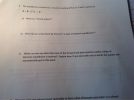 The equilibrium constant for a reaction involving only A, B. C and D Is given byA + B C + D a) What is a "closed system"? b) What do you understand by the term "a state of dynamic equilibrium"? c) What can you say about the rates of the forward and back reactions when a state of dynamic equilibrium is reached? Explain how, if you start with only A and B. the system will automatically get to this point.
password 23. ILO 2.1) List the six Medisoft databases. 24. ILo 2.3/ What is the purpose...
 password 23. ILO 2.1) List the six Medisoft databases. 24. ILo 2.3/ What is the purpose of the Medisoft toolbar? APPLYING YOUR KNOWLEDGE 25. ILo z.61 Use Medisoft' s built-in help feature to look up information on the following topics: a. How to enter diagnosis codes b. How to print procedure code lists from the Medisoft database 26 до 2.7/ You come to work on a Monday morning and find that the offi ec omputer is not working. The system...
TER REXIA NERVOSA Medications Need Who is 23. What is the main reason for acute back...
 TER REXIA NERVOSA Medications Need Who is 23. What is the main reason for acute back Reaching, twisting, or bending when lining Lifting items too heavy for the back to support Bad body mechanics when lifting d Poor footing of constrained posture h. r escrie pad be 24. For practices that do not In the eum room In the provider's pocket in a locked cabinet d. Any of the above 25. The use of phonetic writing in the medical office...
7. Which Windows API function reads a single character from input? a. ReadChar b. ReadConsole c....
7. Which Windows API function reads a single character from input? a. ReadChar b. ReadConsole c. ReadConsoleBuffer d. ReadInputByte 8. The WriteString procedure in the Irvine32 library is actually a wrapper around which Windows API function? a. WriteFile b. WriteOutputBuffer c. PrintConsole d. WriteConsole 9. Which Windows API function copies an array of characters to consecutive cells of the console screen buffer, beginning at a specified location? a. WriteArray b. WriteConsoleOutputCharacter c. WriteConsoleScreenBuffer d. WriteConsoleArray 10. Which Windows API function...
 15
c. CheckedChanged d. Click a. Changed b.ClickedChanged 15. In a Windows application, where do automatically generated statements that set the properties of the labels and buttons end up? a in the Form's class declaration b. Within the Main(O method. c. In the Click() method for the object involved d. within the InitializeComponent() method 3 of 8 implementations handle the heavy lifting for you 0D F4 F5 F6 F7 F8 F9 % & 5 6 7
c. CheckedChanged d. Click...
15
c. CheckedChanged d. Click a. Changed b.ClickedChanged 15. In a Windows application, where do automatically generated statements that set the properties of the labels and buttons end up? a in the Form's class declaration b. Within the Main(O method. c. In the Click() method for the object involved d. within the InitializeComponent() method 3 of 8 implementations handle the heavy lifting for you 0D F4 F5 F6 F7 F8 F9 % & 5 6 7
c. CheckedChanged d. Click...
 The equilibrium constant for a reaction involving only A, B. C and D Is given byA + B C + D a) What is a "closed system"? b) What do you understand by the term "a state of dynamic equilibrium"? c) What can you say about the rates of the forward and back reactions when a state of dynamic equilibrium is reached? Explain how, if you start with only A and B. the system will automatically get to this point.
 password 23. ILO 2.1) List the six Medisoft databases. 24. ILo 2.3/ What is the purpose of the Medisoft toolbar? APPLYING YOUR KNOWLEDGE 25. ILo z.61 Use Medisoft' s built-in help feature to look up information on the following topics: a. How to enter diagnosis codes b. How to print procedure code lists from the Medisoft database 26 до 2.7/ You come to work on a Monday morning and find that the offi ec omputer is not working. The system...
 TER REXIA NERVOSA Medications Need Who is 23. What is the main reason for acute back Reaching, twisting, or bending when lining Lifting items too heavy for the back to support Bad body mechanics when lifting d Poor footing of constrained posture h. r escrie pad be 24. For practices that do not In the eum room In the provider's pocket in a locked cabinet d. Any of the above 25. The use of phonetic writing in the medical office...
Most questions answered within 3 hours.
-
Where is the error in this code sequence?
String s1 = "Hello";
String s2 = "ello";...
asked 10 months ago -
Financial data for Joel de Paris, Inc., for last year
follow:
Joel de Paris, Inc.
Balance...
asked 10 months ago -
Consider this reaction:
Al2(SO4)3 (aq)+ BaCl3
(aq) Al2Cl6 (aq)- +
3BaSO4(s) . What is the...
asked 10 months ago -
Suppose that Savneet is considering increasing her
recent random sample from 20 car rentals to 40...
asked 10 months ago -
Trucks arrive at an unloading terminal at an average rate of 120
per hour.
Trucks arrive...
asked 10 months ago -
Why are methanol and ethanol completely soluble in water while
octanol is not very little soluble....
asked 10 months ago -
A facilities manager at a university reads in a research report
that the mean amount of...
asked 10 months ago -
When the CuSO4 is rehydrated by adding water to the anhydrous
compound, is this an endothermic...
asked 10 months ago -
A ray of sunlight is passing from diamond into crown glass; the
angle of incidence is...
asked 10 months ago -
A block of mass 0.249 kg is placed on top of a light, vertical
spring of...
asked 10 months ago -
how do the kidneys compensate in the presences of acidosis
a) trigger hyperventilate
b) reserve acid...
asked 10 months ago -
Question 501 pts
The rental rate of capital to the firm increases. Which of the
following...
asked 10 months ago