Please USE JAVA only
Write a class named InputSplitter. This class will take input from the keyboard (using a Scanner) and split the incoming tokens into integers, floating point numbers, and strings. The incoming tokens will be added to one of three accumulators which start out at zero, and which keep a running total.
Thus, the class will have an accumulator for integers. It starts out with the value zero. Every time another integer is read in, it is added to the integer accumulator. The accumulator keeps a running total of all the integers which have been seen so far. Likewise, there is an accumulator for floating point values. It starts at zero, but adds every floating point value which is seen. Finally, there is a string accumulator. It starts out as an empty string, but appends to the string every time another string token is read. Your class will need to be able to decide the type of each input token (hint: a Scanner has the methods hasNextInt(), hasNextDouble(), and hasNext()) as well as to keep track of the running totals (hint: you can use instance variables).
The only import statement you may use in this implementation is the Scanner class. Any data elements should be declared private, although this will not be graded. If you think it is necessary you may include helper methods of your own. The class should implement the following public methods:
- public InputSplitter() this constructor will initialize the three accumulators as well as the Scanner which is used for input.
- public void next() read the next token, and print its type and
value. This method will use the input Scanner object which was
initialized earlier to read the next token from the input.
Depending on the type of the input token, method will print the
value of the token in one of the following three formats:
integer: 1
double: 2.0
string: abc
In addition to the printed output, the value will be added (appended, in the case of a string) to the accumulator for the specific type. - public int getIntTotal() retrieves the total value summed in the integer accumulator.
- public double getDoubleTotal() retrieves the total value summed in the floating point accumulator.
- public String getStringTotal() retrieves the complete value concatenated in the string accumulater.
- public String toString() returns the current contents of each
of the three accumulators as a single string in the following
format:
integer: 1 double: 2.0 string: abc
-
Below is a sample run demonstrating how the class would function using the following input:
1 abc 2.0 3 def 4.0 6 7 xyz 5.5
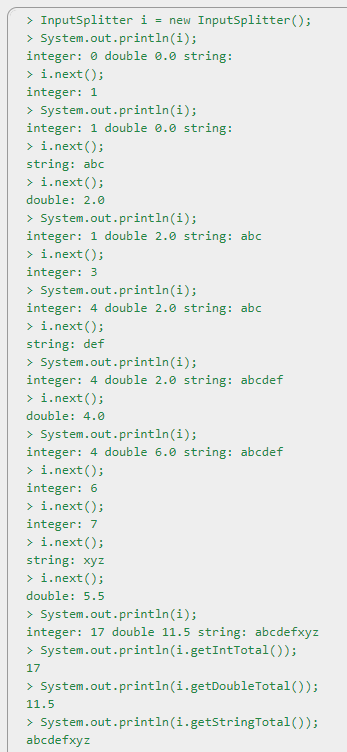
Please make sure that it passes the following: https://repl.it/@micky123/NeglectedWoozyTruetype
Homework Answers
Note: Many of the test cases input data are wrong kindly correct and run the test.
############# InputSplitter.java ##############
package input_splitter;
import java.util.Scanner;
/**
* The Class InputSplitter.
*/
public class InputSplitter {
/** The int accumlator. */
private int intAccumlator;
/** The double accumlator. */
private double doubleAccumlator;
/** The string accumlator. */
private String stringAccumlator;
/** The scan. */
private Scanner scan;
/**
* Instantiates a new input splitter.
*/
public InputSplitter() {
this.intAccumlator = 0;
this.doubleAccumlator = 0.0;
this.stringAccumlator = "";
this.scan = new
Scanner(System.in);
}
/**
* Next.
*/
public void next() {
if (scan.hasNextInt()) {
this.intAccumlator += scan.nextInt();
}
else if (scan.hasNextDouble())
{
this.doubleAccumlator += scan.nextDouble();
}
else if (scan.hasNext()) {
this.stringAccumlator = this.stringAccumlator + scan.next();
}
System.out.println(toString());
}
/**
* Gets the int total.
*
* @return the int total
*/
public int getIntTotal() {
return intAccumlator;
}
/**
* Gets the double total.
*
* @return the double total
*/
public double getDoubleTotal() {
return doubleAccumlator;
}
/**
* Gets the string total.
*
* @return the string total
*/
public String getStringTotal() {
return stringAccumlator;
}
@Override
public String toString() {
return String.format("integer: %d
double: %.2f string: %s", intAccumlator, doubleAccumlator,
stringAccumlator);
}
}
############### E3tester.java #################
package input_splitter;
import static org.junit.Assert.assertEquals;
import java.io.ByteArrayInputStream;
import java.io.ByteArrayOutputStream;
import java.io.IOException;
import java.io.InputStream;
import java.io.PrintStream;
import org.junit.AfterClass;
import org.junit.BeforeClass;
import org.junit.Test;
public class E3tester {
private final double ERR = 0.00001;
public static void main(String args[]) {
org.junit.runner.JUnitCore.main("E3tester");
}
private Object[][] inputData = {
{ "1 2 3 4 5",
5, "", "integer: 0 double: 0.0 string: ", 0, 0.0, "", "integer:
1\n", "integer: 1 double: 0.0 string: ", 1, 0.0, "", "integer:
2\n",
"integer: 3 double: 0.0
string: ", 3, 0.0, "", "integer: 3\n", "integer: 6 double: 0.0
string: ", 6, 0.0, "", "integer: 4\n",
"integer: 10 double: 0.0
string: ", 10, 0.0, "", "integer: 5\n", "integer: 15 double: 0.0
string: ", 15, 0.0, "" },
{ "1.0 2.0 3.0
4.0 5.0", 5, "", "integer: 0 double: 0.0 string: ", 0, 0.0, "",
"double: 1.0\n", "integer: 0 double: 1.0 string: ", 0, 1.0, "",
"double: 2.0\n",
"integer: 0 double: 3.0
string: ", 0, 3.0, "", "double: 3.0\n", "integer: 0 double: 6.0
string: ", 0, 6.0, "", "double: 4.0\n",
"integer: 0 double: 10.0
string: ", 0, 10.0, "", "double: 5.0\n", "integer: 0 double: 15.0
string: ", 0, 15.0, "" },
{ "ab cd ef 12g
hijk", 5, "", "integer: 0 double: 0.0 string: ", 0, 0.0, "",
"string: ab\n", "integer: 0 double: 0.0 string: ab", 0, 0.0, "ab",
"string: cd\n",
"integer: 0 double: 0.0
string: abcd", 0, 0.0, "abcd", "string: ef\n", "integer: 0 double:
0.0 string: abcdef", 0, 0.0, "abcdef", "string: 12g\n",
"integer: 0 double: 0.0
string: abcdef12g", 0, 0.0, "abcdef12g", "string: hijk\n",
"integer: 0 double: 0.0 string: abcdef12ghijk", 0, 0.0,
"abcdef12ghijk" },
{ "6 2.4 XY! 4
5.0 5.A", 6, "", "integer: 0 double: 0.0 string: ", 0, 0.0, "",
"integer: 6\n", "integer: 6 double: 0.0 string: ", 6, 0.0, "",
"double: 2.4\n",
"integer: 6 double: 2.4
string: ", 6, 2.4, "", "string: XY!\n", "integer: 6 double: 2.4
string: XY!", 6, 2.4, "XY!", "integer: 4\n",
"integer: 10 double: 2.4
string: XY!", 10, 2.4, "XY!", "double: 5.0\n", "integer: 10 double:
7.4 string: XY!", 10, 7.4, "XY!", "string: 5.A\n",
"integer: 10 double: 7.4
string: XY!5.A", 10, 7.4, "XY!5.A" } };
@Test
public void test_inputsplitter() throws Exception
{
int count =1;
for (Object[] testcase : inputData)
{
System.out.println(count++);
String input =
(String) testcase[0];
int tokens =
(Integer) testcase[1];
setInput(input);
setCapture();
InputSplitter
iSplit = new InputSplitter();
for (int i = 0,
j = 2; i <= tokens; i++, j += 5) {
String expectedOutput = (String)
testcase[j];
String expectedToString = (String) testcase[j +
1];
int expectedInt = (Integer) testcase[j +
2];
double expectedDouble = (Double) testcase[j +
3];
String expectedString = (String) testcase[j +
4];
String actualOutput = getCapture();
String actualToString = iSplit.toString();
int actualInt = iSplit.getIntTotal();
double actualDouble =
iSplit.getDoubleTotal();
String actualString =
iSplit.getStringTotal();
unsetCapture();
assertEquals(String.format("output mismatch
after token %d of input %s", i, input), expectedOutput,
actualOutput);
assertEquals(String.format("toString mismatch
after token %d of input %s", i, input), expectedToString,
actualToString);
assertEquals(String.format("integer accumulator
mismatch after token %d of input %s", i, input), expectedInt,
actualInt);
assertEquals(String.format("floating point
accumulator mismatch after token %d of input %s", i, input),
expectedDouble, actualDouble, ERR);
assertEquals(String.format("string accumulator
mismatch after token %d of input %s", i, input), expectedString,
actualString);
if (i < tokens) {
setCapture();
iSplit.next();
}
}
unsetInput();
}
}
/**
* the lines below are for setting up input/output
redirection so that the
* tests can see what is being set to the screen as
well as produce its own
* pseudo-keyboard input. No test appear below
here.
*/
static ByteArrayOutputStream localOut,
localErr;
static ByteArrayInputStream localIn;
static PrintStream sOut, sErr;
static InputStream sIn;
@BeforeClass
public static void setup() throws Exception {
sOut = System.out;
sErr = System.err;
sIn = System.in;
}
@AfterClass
public static void cleanup() throws Exception {
unsetCapture();
unsetInput();
}
private static void setCapture() {
localOut = new
ByteArrayOutputStream();
localErr = new
ByteArrayOutputStream();
System.setOut(new
PrintStream(localOut));
System.setErr(new
PrintStream(localErr));
}
private static String getCapture() {
return
localOut.toString().replaceAll("\\r?\\n", "\n");
}
private static void unsetCapture() {
System.setOut(null);
System.setOut(sOut);
System.setErr(null);
System.setErr(sErr);
}
private static void setInput(String input) {
localIn = new
ByteArrayInputStream(input.getBytes());
System.setIn(localIn);
}
private static void unsetInput() throws IOException
{
if (localIn != null)
localIn.close();
System.setIn(null);
System.setIn(sIn);
}
}
############# InputSplitterTester.java ################
package input_splitter;
/**
* The Class InputSplitterTester.
*/
public class InputSplitterTester {
public static void main(String[] args) {
InputSplitter i = new
InputSplitter();
i.next();
}
}
Add Answer to:
Please USE JAVA only
Write a class named InputSplitter. This class will take input
from the...
Solve it by JAVA please. Now, write a class named InputSplitter. This class will take input...
Solve it by JAVA please. Now, write a class named InputSplitter. This class will take input from the keyboard (using a Scanner) and split the incoming tokens into integers, floating point numbers, and strings. The incoming tokens will be added to one of three accumulators which start out at zero, and which keep a running total. Thus, the class will have an accumulator for integers. It starts out with the value zero. Every time another integer is read in, it...
Write a complete Java program in a file caled Module1Progrom.java that reads all the tokens from...
 Write a complete Java program in a file caled Module1Progrom.java that reads all the tokens from a file named dota.txt that is to be found in the same directory as the running program. The program should ignore al tokens that cannot be read as an integer and read only the ones that can. After reading all of the integers, the program should print all the integers back to the screen, one per line, from the smalest to the largest. For...
Must be done in Java. Provide the rest of the code with full comments and explanation and with proper indentation. Use...
 Must be done in Java.
Provide the rest of the code with full comments and
explanation and with proper indentation.
Use simple methods for better
understanding.
Must compile.
CODE PROVIDED:
import java.util.ArrayList;
import java.util.Scanner;
public class Problem3 {
public static void main( String [] args )
{
Scanner in = new
Scanner( System.in );
//PLEASE START YOUR WORK
HERE
//**********************************************************
//**********************************************************
// PLEASE END YOUR WORK
HERE
System.out.print("END OF
OUTPUT");
}
}
20 points! PROBLEM 3: EXTENDED FAMILY Complete this...
Must be done in Java.
Provide the rest of the code with full comments and
explanation and with proper indentation.
Use simple methods for better
understanding.
Must compile.
CODE PROVIDED:
import java.util.ArrayList;
import java.util.Scanner;
public class Problem3 {
public static void main( String [] args )
{
Scanner in = new
Scanner( System.in );
//PLEASE START YOUR WORK
HERE
//**********************************************************
//**********************************************************
// PLEASE END YOUR WORK
HERE
System.out.print("END OF
OUTPUT");
}
}
20 points! PROBLEM 3: EXTENDED FAMILY Complete this...
Write a Java method that should take an ArrayList as a parameter, print its element in...
Write a Java method that should take an ArrayList as a parameter, print its element in the reverse order. The main function that calls the method is the following: import java.util.*; public class ReverseGen { public static void main(String[] args) { Scanner input = new Scanner(System.in); System.out.println("How many numbers do you want to input?"); int num = input.nextInt(); ArrayList<Double> d = new ArrayList<Double>(num); for(int i = 0 ; i < num; i++){ System.out.print("Enter...
You will need to think about problem solving. There are several multi-step activities. Design, compile and...
You will need to think about problem solving. There are several multi-step activities. Design, compile and run a single Java program, StringEx.java, to accomplish all of the following tasks. Add one part at a time and test before trying the next one. The program can just include a main method, or it is neater to split things into separate methods (all static void, with names like showLength, sentenceType, lastFirst1, lastFirst), and have main call all the ones you have written...
Language Java Step 1: Design a class called Student. The Student class should contain the following...
Language Java Step 1: Design a class called Student. The Student class should contain the following data: firstName lastName studentID totalCredits gpa Your class should implement the “sets” and “gets” for the class. Include methods: equals, compareTo, toString. Change the toString method (from class) to put each member variable on a new line. Step 2: Write a driver program to test that Student works correctly. Test is with 3 students as given in class. Step 3: Write a “registration” program...
Programming Language: Java Write a class named ColoredRectangle that extends the Rectangle class (given below). The...
Programming Language: Java Write a class named ColoredRectangle that extends the Rectangle class (given below). The ColoredRectangle class will have an additional private String field named Color. The ColoredRectangle class should have four constructors: a no-arg constructor; a three-arg constructor; a two-arg constructor that accepts a Rectangle object and a color; and a copy constructor. The ColoredRectangle class should have an Equals and toString methods. The ColoredRectangle class should have mutators and accessors for all three fields. public class Rectangle...
JAVA: Rewrite the following code to where the inputs are from a file. The file name...
JAVA: Rewrite the following code to where the inputs are from a file. The file name will be from the input from the user scanner. CODE: import java.util.*; public class Q1 { public static int sumOD (int k) { int sumOD = 0; int in = k; while (in != 0) { int digitON = in % 10; sumOD += digitON; in /= 10; } return sumOD; } public static void main(String[] args) { int n, i, k; System.out.println("Enter...
Java Program 1. Write a class that reads in a group of test scores (positive integers...
Java Program 1. Write a class that reads in a group of test scores (positive integers from 1 to 100) from the keyboard. The main method of the class calls a few other methods to calculate the average of all the scores as well as the highest and lowest score. The number of scores is undetermined but there will be no more than 50. A negative value is used to end the input loop. import java.util.Scanner; public class GradeStat {...
Write code that uses the input string stream inSS to read input data from string userInput,...
Write code that uses the input string stream inSS to read input data from string userInput, and updates variables userMonth, userDate, and userYear. Sample output if userinput is "Jan 12 1992": Month: Jan Date: 12 Year: 1992 import java.util.Scanner; public class StringInputStream { public static void main (String [] args) { Scanner inSS = null; String userInput = "Jan 12 1992"; inSS = new Scanner(userInput); String userMonth; int userDate; int userYear; /* Your solution goes here */ System.out.println("Month: " +...
 Write a complete Java program in a file caled Module1Progrom.java that reads all the tokens from a file named dota.txt that is to be found in the same directory as the running program. The program should ignore al tokens that cannot be read as an integer and read only the ones that can. After reading all of the integers, the program should print all the integers back to the screen, one per line, from the smalest to the largest. For...
 Must be done in Java.
Provide the rest of the code with full comments and
explanation and with proper indentation.
Use simple methods for better
understanding.
Must compile.
CODE PROVIDED:
import java.util.ArrayList;
import java.util.Scanner;
public class Problem3 {
public static void main( String [] args )
{
Scanner in = new
Scanner( System.in );
//PLEASE START YOUR WORK
HERE
//**********************************************************
//**********************************************************
// PLEASE END YOUR WORK
HERE
System.out.print("END OF
OUTPUT");
}
}
20 points! PROBLEM 3: EXTENDED FAMILY Complete this...
Must be done in Java.
Provide the rest of the code with full comments and
explanation and with proper indentation.
Use simple methods for better
understanding.
Must compile.
CODE PROVIDED:
import java.util.ArrayList;
import java.util.Scanner;
public class Problem3 {
public static void main( String [] args )
{
Scanner in = new
Scanner( System.in );
//PLEASE START YOUR WORK
HERE
//**********************************************************
//**********************************************************
// PLEASE END YOUR WORK
HERE
System.out.print("END OF
OUTPUT");
}
}
20 points! PROBLEM 3: EXTENDED FAMILY Complete this...
Most questions answered within 3 hours.
-
Where is the error in this code sequence?
String s1 = "Hello";
String s2 = "ello";...
asked 11 months ago -
Financial data for Joel de Paris, Inc., for last year
follow:
Joel de Paris, Inc.
Balance...
asked 11 months ago -
Consider this reaction:
Al2(SO4)3 (aq)+ BaCl3
(aq) Al2Cl6 (aq)- +
3BaSO4(s) . What is the...
asked 11 months ago -
Suppose that Savneet is considering increasing her
recent random sample from 20 car rentals to 40...
asked 11 months ago -
Trucks arrive at an unloading terminal at an average rate of 120
per hour.
Trucks arrive...
asked 11 months ago -
Why are methanol and ethanol completely soluble in water while
octanol is not very little soluble....
asked 11 months ago -
A facilities manager at a university reads in a research report
that the mean amount of...
asked 11 months ago -
When the CuSO4 is rehydrated by adding water to the anhydrous
compound, is this an endothermic...
asked 11 months ago -
A ray of sunlight is passing from diamond into crown glass; the
angle of incidence is...
asked 11 months ago -
A block of mass 0.249 kg is placed on top of a light, vertical
spring of...
asked 11 months ago -
how do the kidneys compensate in the presences of acidosis
a) trigger hyperventilate
b) reserve acid...
asked 11 months ago -
Question 501 pts
The rental rate of capital to the firm increases. Which of the
following...
asked 11 months ago