Fill in the TODO parts of this skeleton to implement a miniature version of the GNU...
Fill in the TODO parts of this skeleton to implement a miniature version of the GNU readline library. i.e. Store the characters in a malloc buffer as they come to you from stdio, and return the buffer.
skeleton code is:
#include <stdlib.h>
#include <stdio.h>
char *readline(const char *prompt)
{
fputs(prompt ? prompt : "> ", stdout);
fflush(stdout);
int c;
// TODO: declare a char *
while ((c=fgetc(stdin)) != EOF)
{
// TODO: store c inside char * on the heap
// Use malloc and realloc as appropriate.
// Remember to zero terminate your buffers!
// Stop if you see '\n'
}
// TODO: return char*
}
int main()
{
char *buf = NULL;
while ((buf = readline(NULL)))
{
puts(buf);
free(buf);
}
return 0;
}
Homework Answers
Given below is the code for the question. Please do rate the answer
if it helped. Thank you.
#include <stdlib.h>
#include <stdio.h>
char *readline(const char *prompt)
{
fputs(prompt ? prompt : "> ", stdout);
fflush(stdout);
int c;
char *str = NULL;
int n = 0;
while ((c=fgetc(stdin)) != EOF)
{
// store c inside char * on the heap
// Use malloc and realloc as appropriate.
if(str == NULL){
str = malloc(sizeof(char) *
2);
}
else{
str = realloc(str, sizeof(char) *
(n+1));
}
if(c != '\n'){
str[n] = c;
n++;
}
// Remember to zero terminate your buffers!
str[n] = '\0';
// Stop if you see '\n'
if(c == '\n')
break;
}
return str;
}
int main()
{
char *buf = NULL;
while ((buf = readline(NULL)))
{
puts(buf);
free(buf);
}
return 0;
}
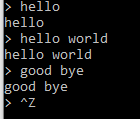
Add Answer to:
Fill in the TODO parts of this skeleton to implement a miniature
version of the GNU...
My question is listed the below please any help this assignment ; There is a skeleton...
My question is listed the below please any help this assignment ; There is a skeleton code: copy_file_01.c #include <stdio.h> #include <stdlib.h> int main(int argc, char* argv[]) { char ch ; FILE *source , *target; if(argc != 3){ printf ("Usage: copy file1 file2"); exit(EXIT_FAILURE); } source = fopen(argv[1], "r"); if (source == NULL) { printf("Press any key to exit...\n"); exit(EXIT_FAILURE); } target = fopen(argv[2], "w"); if (target == NULL) { fclose(source); printf("Press any key to exit...\n"); exit(EXIT_FAILURE); } while ((ch...
Below is a basic implementation of the Linux command "cat". This command is used to print...
 Below is a basic implementation of the Linux command "cat". This command is used to print the contents of a file on the console/terminal window. #include <stdio.h> #include <stdlib.h> int main(int argc, char* argv[]) {FILE *fp; if(2 != argc) {priritf ("Usage: cat <filename>\n"); exit(1);} if ((fp = fopen(argv[1], "r")) == NULL) {fprintf (stderr, "Can't. open input file %s\n", argv[1]); exit (1);} char buffer[256]; while (fgets(X, 256, fp) != NULL) fprintf(Y, "%s", buffer); fclose(Z); return 0;} Which one of the following...
One can incidentally terminate sushi by pressing Ctrl+C (Ctrl+Break, Command+dot) or a similar combination of keys...
One can incidentally terminate sushi by pressing Ctrl+C (Ctrl+Break, Command+dot) or a similar combination of keys that sends SIGNIT to the shell. Function prevent_interruption() sets up a signal handler that intercepts SIGINT and displays message “Type exit to exit the shell” on stderr. The name of the handler is refuse_to_die(), its skeleton and the skeleton of prevent_interruption() are provided in sushi.c. Hint: use system call sigaction() to set up the handler. As a result, when you attempt to interrupt the...
Convert C to C++ I need these 4 C file code convert to C++. Please Convert...
Convert C to C++ I need these 4 C file code convert to C++. Please Convert it to C++ //////first C file: Wunzip.c #include int main(int argc, char* argv[]) { if(argc ==1){ printf("wunzip: file1 [file2 ...]\n"); return 1; } else{ for(int i =1; i< argc;i++){ int num=-1; int numout=-1; int c; int c1; FILE* file = fopen(argv[i],"rb"); if(file == NULL){ printf("Cannot Open File\n"); return 1; } else{ while(numout != 0){ numout = fread(&num, sizeof(int), 1, file); c...
Writing a program in C please help!! My file worked fine before but when I put...
Writing a program in C please help!! My file worked fine before but when I put the functions in their own files and made a header file the diplayadj() funtion no longer works properly. It will only print the vertices instead of both the vertices and the adjacent like below. example input form commnd line file: A B B C E X C D A C The directed edges in this example are: A can go to both B and...
Implement a program that: reads a number of personal records (for example, using PERSON struct from...
Implement a program that: reads a number of personal records (for example, using PERSON struct from the earlier lab) from the standard input, creates a database of personal records, allows for adding new entries to the database, allows for deleting entries from the database, includes functions to acquire a record of personal data, and includes functions to display (print) a single selected record from the database, and also allows for printing all records in the database. NOTES: if name is...
C Language Programming. Using the program below - When executing on the command line only this...
C Language Programming. Using the program below - When executing on the command line only this program name, the program will accept keyboard input and display such until the user does control+break to exit the program. The new code should within only this case situation “if (argc == 1){ /* no args; copy standard input */” Replace line #20 “filecopy(stdin, stdout);” with new code. Open read a text file “7NoInputFileResponse.txt” that contains a message “There were no arguments on the...
Modify When executing on the command line having only this program name, the program will accept...
Modify When executing on the command line having only this program name, the program will accept keyboard input and display such until the user does control+break to exit the program. The new code should within only this case situation “if (argc == 1){ /* no args; copy standard input */” Replace line #20 “filecopy(stdin, stdout);” with your new code. Open read a text file “7NoInputFileResponse.txt” that contains a message “There were no arguments on the command line to be tested...
Step 2: Implement adder, multiplier, and degrouper -------------------------------------------------- Write the code to implement these functions. They...
Step 2: Implement adder, multiplier, and degrouper -------------------------------------------------- Write the code to implement these functions. They should only consider the current expression, which is the first expression in the buffer, or, equivilently, everything up until the first semicolon. Do not implement synchronization and mutual exclusion yet. Tip: See sentinel() for an example invocation of strcpy() that shifts the characters in a string to the left. Tip: If you are not certain which stdlib functions to use for string/number manipulation, feel...
I wrote a program that takes a person's name and their 10 quiz scores from an...
I wrote a program that takes a person's name and their 10 quiz scores from an input file and then prints it to an output file in a slightly different format that also has the average of their quiz scores. Here is an example INPUT Mike Johnson 100 45 68 99 34 66 88 99 88 66 OUTPUT Student Name Quiz Scores Average Johnson, Mike 100 45 68 99 34 66 88 99 88 66 75.30 It works fine when...
 Below is a basic implementation of the Linux command "cat". This command is used to print the contents of a file on the console/terminal window. #include <stdio.h> #include <stdlib.h> int main(int argc, char* argv[]) {FILE *fp; if(2 != argc) {priritf ("Usage: cat <filename>\n"); exit(1);} if ((fp = fopen(argv[1], "r")) == NULL) {fprintf (stderr, "Can't. open input file %s\n", argv[1]); exit (1);} char buffer[256]; while (fgets(X, 256, fp) != NULL) fprintf(Y, "%s", buffer); fclose(Z); return 0;} Which one of the following...
Most questions answered within 3 hours.
-
Where is the error in this code sequence?
String s1 = "Hello";
String s2 = "ello";...
asked 11 months ago -
Financial data for Joel de Paris, Inc., for last year
follow:
Joel de Paris, Inc.
Balance...
asked 11 months ago -
Consider this reaction:
Al2(SO4)3 (aq)+ BaCl3
(aq) Al2Cl6 (aq)- +
3BaSO4(s) . What is the...
asked 11 months ago -
Suppose that Savneet is considering increasing her
recent random sample from 20 car rentals to 40...
asked 11 months ago -
Trucks arrive at an unloading terminal at an average rate of 120
per hour.
Trucks arrive...
asked 11 months ago -
Why are methanol and ethanol completely soluble in water while
octanol is not very little soluble....
asked 11 months ago -
A facilities manager at a university reads in a research report
that the mean amount of...
asked 11 months ago -
When the CuSO4 is rehydrated by adding water to the anhydrous
compound, is this an endothermic...
asked 11 months ago -
A ray of sunlight is passing from diamond into crown glass; the
angle of incidence is...
asked 11 months ago -
A block of mass 0.249 kg is placed on top of a light, vertical
spring of...
asked 11 months ago -
how do the kidneys compensate in the presences of acidosis
a) trigger hyperventilate
b) reserve acid...
asked 11 months ago -
Question 501 pts
The rental rate of capital to the firm increases. Which of the
following...
asked 11 months ago