
Homework Answers
Test.java
import java.applet.Applet;
import java.awt.Button;
import java.awt.Label;
import java.awt.TextField;
import java.awt.event.ActionEvent;
import java.awt.event.ActionListener;
public class Test extends Applet implements ActionListener {
private TextField name;
private Button clickMe;
private Label errorLabel;
private SampleFrame frame;
public void init() {
name = new TextField(50);
clickMe = new Button("Open Frame");
errorLabel = new Label("");
add(new Label("Enter Your Name"));
add(name);
add(clickMe);
add(errorLabel);
frame = new SampleFrame();
clickMe.addActionListener(this);
}
public void actionPerformed(ActionEvent e) {
if (name.getText().equalsIgnoreCase("GOPAL")) {
frame.setVisible(true);
frame.repaint();
}
else {
errorLabel.setText("Sorry, You entered wrong");
}
}
}
TestFrame.java
import java.awt.FlowLayout;
import javax.swing.JFrame;
import javax.swing.JLabel;
import javax.swing.JPanel;
public class SampleFrame extends JFrame{
private static final long serialVersionUID = -8826233187452187097L;
private JFrame frame;
JPanel panel;
JLabel label;
public SampleFrame() {
setTitle("Sample Frame");
panel = new JPanel();
panel.setLayout(new FlowLayout());
frame = new JFrame();
frame.add(panel);
setVisible(false);
setSize(400, 400);
//setDefaultCloseOperation(JFrame.EXIT_ON_CLOSE);
}
public static void main(String[] args) {
SampleFrame s = new SampleFrame();
s.setVisible(true);
s.setSize(400, 400);
s.setDefaultCloseOperation(JFrame.EXIT_ON_CLOSE);
}
HelloWorld.java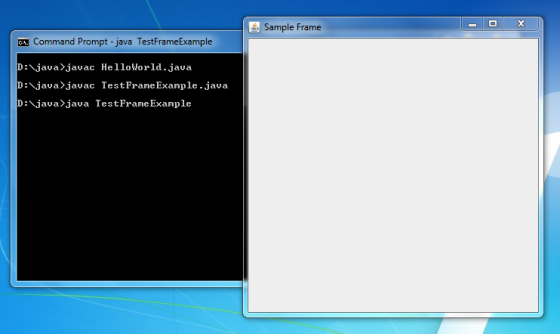
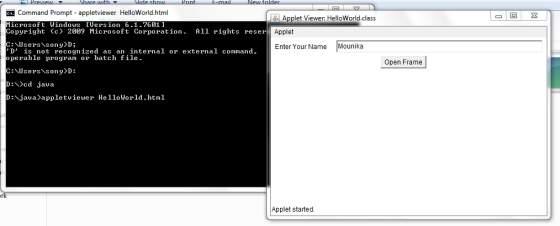
}
| <HTML> | |
| <HEAD> | |
| <TITLE> A Simple Program </TITLE> | |
| </HEAD> | |
| <BODY> | |
| Here is the output of my program: | |
| <APPLET CODE="HelloWorld.class" WIDTH="500" HEIGHT="300"></APPLET> | |
| </BODY> | |
| </HTML> |
Add Answer to:
You are creating a JAVA Applet that will run a Frame window class (just a class...
Task 3: Creating a Simple jQuery Application 1. Launch HTML-Kit. 2. Create a new HTML file...
Task 3: Creating a Simple jQuery Application 1. Launch HTML-Kit. 2. Create a new HTML file and save it as nnLab8.htm. 3. Add the following HTML to the file: <!DOCTYPE HTML> <html> <head> <title>Hello World - jQuery Style</title> </head> <body> <div id="first"></div> <div id="second"></div> <a href="#" id="link">Click Me!</a><br /> <span id="greeting"></span> </body> </html> 4. Add the following<script> element to the<head> section. NOTE: Use the jQuery version number that matches the file name of the file you downloaded in Step 1....
Java language (a) Create a class HexEditor with a constructor which creates a 5x10 text area...
 Java language
(a) Create a class HexEditor with a constructor which creates a
5x10 text area in a Frame. Also add a pull-down menu with a menu
item "Load". Copy the class as the answer to this part.
(b) Create another class TestHexEditor with a main() method
which creates an object anEditor of the class HexEditor and
displays the frame in part (a) using setVisible(true). Copy the
class as the answer to this part.
(c) Make changes to the class...
Java language
(a) Create a class HexEditor with a constructor which creates a
5x10 text area in a Frame. Also add a pull-down menu with a menu
item "Load". Copy the class as the answer to this part.
(b) Create another class TestHexEditor with a main() method
which creates an object anEditor of the class HexEditor and
displays the frame in part (a) using setVisible(true). Copy the
class as the answer to this part.
(c) Make changes to the class...
URGENT HELP NEEDED: JQuery. PLEASE POST SCREEN SHOTS Task 1: Downloading jQuery Right-click the link to...
URGENT HELP NEEDED: JQuery. PLEASE POST SCREEN SHOTS Task 1: Downloading jQuery Right-click the link to download the uncompressed latest version of jQuery Copy the jQuery.x.x.x.js file in the folder and specified as source file. Task 2: Download and install HTML-Kit 1. Navigate to htmlkit.com. 2. Click Download HTML-Kit 292. After it downloads, launch HKSetup.exe. Choose Full installation (the default) Uncheck Yes, download and install HTML-Kit Tools Trial. 6. Click Next>Finish. Task 3: Creating a Simple jQuery Application Launch HTML-Kit....
You will be designing and creating a Java GUI-based course application. Create a “Student” class. You...
You will be designing and creating a Java GUI-based course application. Create a “Student” class. You need to have at least 3 instance variables (student characteristics like name,…), at least 2 constructors (1 should be a no-arg constructor), set and get methods. Create a “Course” class that consists of 2 instance variables: the course name and an array of Students (using your Student class). Design and create a JavaFX-based GUI interface that allows you to : INPUT information for Course...
Java please answer A and B a. Describe the purpose of action listener in push button...
Java please answer A and B a. Describe the purpose of action listener in push button jbtnCompare.(from the code below) b. Explain why there are not action listeners added to text fields of this program.(from the code below) code import java.awt.*; import java.awt.event.*; import javax.swing.*; import java.io.*; class SwingFC implements ActionListener { JTextField jtfFirst; // holds the first file name JTextField jtfSecond; // holds the second file name JButton jbtnComp; // button to compare the files JLabel jlabFirst, jlabSecond; //...
Can you please help me to run this Java program? I have no idea why it...
Can you please help me to run this Java program? I have no idea why it is not running. import java.awt.GridLayout; import java.awt.event.ActionEvent; import java.awt.event.ActionListener; import java.text.DecimalFormat; import javax.swing.JFrame; import javax.swing.JLabel; import javax.swing.JList; import javax.swing.JPanel; import javax.swing.ListSelectionModel; import javax.swing.event.ListSelectionEvent; import javax.swing.event.ListSelectionListener; @SuppressWarnings({"unchecked", "rawtypes"}) public class SmartPhonePackages extends JFrame { private static final long serialVersionID= 6548829860028144965L; private static final int windowWidth = 400; private static final int windowHeight = 200; private static final double SalesTax = 1.06; private static JPanel panel;...
java This lab is intended to give you practice creating a class with a constructor method,...
java This lab is intended to give you practice creating a class with a constructor method, accessor methods, mutator methods, equals method , toString method and a equals method. In this lab you need to create two separate classes, one Student class and other Lab10 class. You need to define your instance variables, accessor methods, mutator methods, constructor, toString method and equals method in Student class. You need to create objects in Lab10 class which will have your main method...
Java Programming The following is about creating a class Fish and testing it. In every part,...
Java Programming The following is about creating a class Fish and testing it. In every part, correct any syntax errors indicated by NetBeans until no such error messages. (i) Create a class Fish with the attributes name and price. The attributes are used to store the name and the price of the fish respectively. Choose suitable types for them. You can copy the class Counter on p.17 of the unit and modify the content. Copy the content of the file...
Java: student directory GUI You need to implement three classes: Person Student StudentDirectory StudentMain Start by...
Java: student directory GUI You need to implement three classes: Person Student StudentDirectory StudentMain Start by implementing Person and Student classes. Once you are sure you can serialize and deserialize and ArrayList of Students to and from a file, move on to building the GUI application. Person: The Person class should implement serializable interface. It contains the following: Person's first name (String) Person's last name (String) Person's id number Person's date of birth (Date) public String toString(): This method method...
***This is a JAVA question*** ------------------------------------------------------------------------------------------------ import java.awt.*; import java.awt.event.*; import java.awt.image.*; import javax.imageio.*; import javax.swing.*;...
 ***This is a JAVA question***
------------------------------------------------------------------------------------------------
import java.awt.*;
import java.awt.event.*;
import java.awt.image.*;
import javax.imageio.*;
import javax.swing.*;
import javax.swing.event.*;
public class DrawingPanel implements ActionListener {
public static final int DELAY = 50; // delay between repaints in
millis
private static final String DUMP_IMAGE_PROPERTY_NAME =
"drawingpanel.save";
private static String TARGET_IMAGE_FILE_NAME = null;
private static final boolean PRETTY = true; // true to
anti-alias
private static boolean DUMP_IMAGE = true; // true to write
DrawingPanel to file
private int width, height; // dimensions...
***This is a JAVA question***
------------------------------------------------------------------------------------------------
import java.awt.*;
import java.awt.event.*;
import java.awt.image.*;
import javax.imageio.*;
import javax.swing.*;
import javax.swing.event.*;
public class DrawingPanel implements ActionListener {
public static final int DELAY = 50; // delay between repaints in
millis
private static final String DUMP_IMAGE_PROPERTY_NAME =
"drawingpanel.save";
private static String TARGET_IMAGE_FILE_NAME = null;
private static final boolean PRETTY = true; // true to
anti-alias
private static boolean DUMP_IMAGE = true; // true to write
DrawingPanel to file
private int width, height; // dimensions...
 Java language
(a) Create a class HexEditor with a constructor which creates a
5x10 text area in a Frame. Also add a pull-down menu with a menu
item "Load". Copy the class as the answer to this part.
(b) Create another class TestHexEditor with a main() method
which creates an object anEditor of the class HexEditor and
displays the frame in part (a) using setVisible(true). Copy the
class as the answer to this part.
(c) Make changes to the class...
Java language
(a) Create a class HexEditor with a constructor which creates a
5x10 text area in a Frame. Also add a pull-down menu with a menu
item "Load". Copy the class as the answer to this part.
(b) Create another class TestHexEditor with a main() method
which creates an object anEditor of the class HexEditor and
displays the frame in part (a) using setVisible(true). Copy the
class as the answer to this part.
(c) Make changes to the class...
 ***This is a JAVA question***
------------------------------------------------------------------------------------------------
import java.awt.*;
import java.awt.event.*;
import java.awt.image.*;
import javax.imageio.*;
import javax.swing.*;
import javax.swing.event.*;
public class DrawingPanel implements ActionListener {
public static final int DELAY = 50; // delay between repaints in
millis
private static final String DUMP_IMAGE_PROPERTY_NAME =
"drawingpanel.save";
private static String TARGET_IMAGE_FILE_NAME = null;
private static final boolean PRETTY = true; // true to
anti-alias
private static boolean DUMP_IMAGE = true; // true to write
DrawingPanel to file
private int width, height; // dimensions...
***This is a JAVA question***
------------------------------------------------------------------------------------------------
import java.awt.*;
import java.awt.event.*;
import java.awt.image.*;
import javax.imageio.*;
import javax.swing.*;
import javax.swing.event.*;
public class DrawingPanel implements ActionListener {
public static final int DELAY = 50; // delay between repaints in
millis
private static final String DUMP_IMAGE_PROPERTY_NAME =
"drawingpanel.save";
private static String TARGET_IMAGE_FILE_NAME = null;
private static final boolean PRETTY = true; // true to
anti-alias
private static boolean DUMP_IMAGE = true; // true to write
DrawingPanel to file
private int width, height; // dimensions...
Most questions answered within 3 hours.
-
Where is the error in this code sequence?
String s1 = "Hello";
String s2 = "ello";...
asked 10 months ago -
Financial data for Joel de Paris, Inc., for last year
follow:
Joel de Paris, Inc.
Balance...
asked 10 months ago -
Consider this reaction:
Al2(SO4)3 (aq)+ BaCl3
(aq) Al2Cl6 (aq)- +
3BaSO4(s) . What is the...
asked 10 months ago -
Suppose that Savneet is considering increasing her
recent random sample from 20 car rentals to 40...
asked 10 months ago -
Trucks arrive at an unloading terminal at an average rate of 120
per hour.
Trucks arrive...
asked 10 months ago -
Why are methanol and ethanol completely soluble in water while
octanol is not very little soluble....
asked 10 months ago -
A facilities manager at a university reads in a research report
that the mean amount of...
asked 10 months ago -
When the CuSO4 is rehydrated by adding water to the anhydrous
compound, is this an endothermic...
asked 10 months ago -
A ray of sunlight is passing from diamond into crown glass; the
angle of incidence is...
asked 10 months ago -
A block of mass 0.249 kg is placed on top of a light, vertical
spring of...
asked 10 months ago -
how do the kidneys compensate in the presences of acidosis
a) trigger hyperventilate
b) reserve acid...
asked 10 months ago -
Question 501 pts
The rental rate of capital to the firm increases. Which of the
following...
asked 10 months ago