
Homework Answers
Add Answer to:
2. Instead of using the "cook book" procedure, repeat #1 using 'rltoor in Matlab. The input...
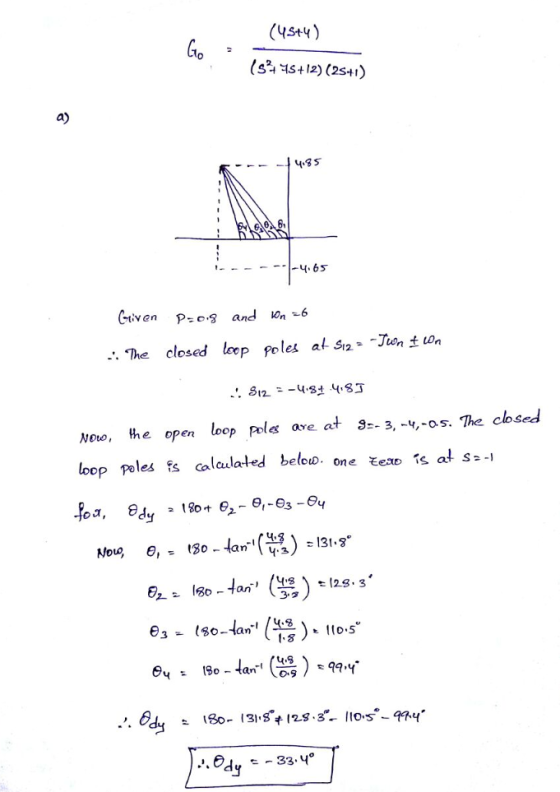
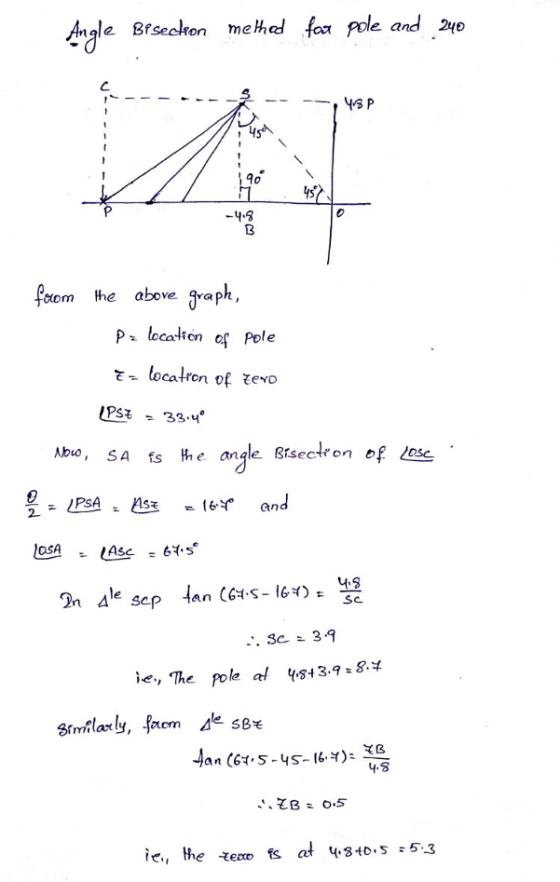
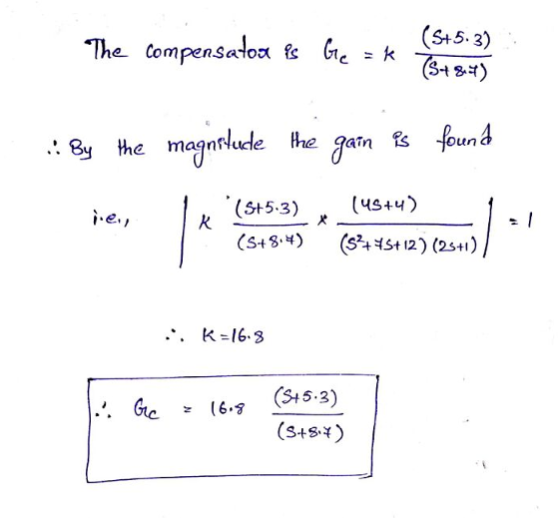
3. Consider the tilt control block diagram shown below R(s) DesiredG(s) 12 s(s+10)(s+70) Y(s) Til...
 3. Consider the tilt control block diagram shown below R(s) DesiredG(s) 12 s(s+10)(s+70) Y(s) Tilt tilt Design specifications require an overshoot of less than 5% and a settling time of less than 0.6 seconds. (a) Use MATLAB to sketch the root locus (rlocus command) with a proportional controller and use the root locus to determine a value for K (if any) that will satisfy the design requirements (b) Design a lead compensator Ge(s) to satisfy the design specifications. You can...
1. Using the MATLAB rltool command (or rlocus and rlocfind), plot the K > 0 root...
 1. Using the MATLAB rltool command (or rlocus and rlocfind), plot the K > 0 root locus for What is the value of the largest damping ra- 2+2s+1 s(s120)7,7 -2,12). 1 + KL(s) = 0, where L(s) = tio associated with the pair of complex poles? At which value of K is it achieved? Turn in a printout of your plot showing the location of the poles on the damping ratio line that you found. 2. Suppose the unity feedback...
Lag Compensator Design Using Root-Locus 2. Consider the unity feedback system in Figure 1 for G(s...
 Lag Compensator Design Using Root-Locus 2. Consider the unity feedback system in Figure 1 for G(s)- s(s+3(s6) Design a lag compensation to meet the following specifications The step response settling time is to be less than 5 sec. . The step response overshoot is to be less than 17% . The steady-state error to a unit ramp input must not exceed 10%. Dynamic specifications (overshoot and settling time) can be met using proportional feedback, but a lag compensator is needed...
please show work thank you! Use Matlab to and the SISOTool construct the system for analysis...
 please show work
thank you!
Use Matlab to and the SISOTool construct the system for analysis (You may want to preview the tf and sisotool commands from matlab by typing help tf or doc tf etc...) Each Block B1, B2, B3 and B4 will be constructed individually and then concatenated together As shown in the block diagram let K=0.1 Set B1 = 0.1 by typing in matlab >>B1=0.1 To assign the Blockl values use the TF command to construct a...
please show work
thank you!
Use Matlab to and the SISOTool construct the system for analysis (You may want to preview the tf and sisotool commands from matlab by typing help tf or doc tf etc...) Each Block B1, B2, B3 and B4 will be constructed individually and then concatenated together As shown in the block diagram let K=0.1 Set B1 = 0.1 by typing in matlab >>B1=0.1 To assign the Blockl values use the TF command to construct a...
SOLVE USING MATLAB A servomechanism position control has the plant transfer function 10 s(s +1) (s 10) You are to desig...
 SOLVE USING MATLAB
A servomechanism position control has the plant transfer function 10 s(s +1) (s 10) You are to design a series compensation transfer function D(s) in the unity feedback configuration to meet the following closed-loop specifications: . The response to a reference step input is to have no more than 16% overshoot. . The response to a reference step input is to have a rise time of no more than 0.4 sec. The steady-state error to a unit...
SOLVE USING MATLAB
A servomechanism position control has the plant transfer function 10 s(s +1) (s 10) You are to design a series compensation transfer function D(s) in the unity feedback configuration to meet the following closed-loop specifications: . The response to a reference step input is to have no more than 16% overshoot. . The response to a reference step input is to have a rise time of no more than 0.4 sec. The steady-state error to a unit...
A second-order process is described by its transfer function G(s) = (s+1)(843) and a PI controlle...
 A second-order process is described by its transfer function G(s) = (s+1)(843) and a PI controller by Consider feedback control with unit feedback gain as shown in Figure 1 A disturbance D(s) exists, and to achieve zero steady-state error, a small integral component is applied. Technical limitations restrict the controller gain kp to values of 0.2 or less. The goal is to examine the influence of the controller parameter k on the dynamic response. D(s) Controller Process X(s) Y(s) Figure...
C+ HelloVisualWorld, pages 121-125 (in the 3-6 Deciding Which Interface to Use Section) We were unable...
 C+
HelloVisualWorld, pages 121-125 (in the 3-6 Deciding Which
Interface to Use Section)
We were unable to transcribe this imageCHAPTER 3 Using Guy Objects and the Visual Studio IDE Using Gul Objects (continued) Forn click the Form, its Properties window appears in the lower right portion of the screen, and you can see that the Text property for the Form IS set to Forml. Take a moment to scroll through the list in the Properties Window, examining the values of...
C+
HelloVisualWorld, pages 121-125 (in the 3-6 Deciding Which
Interface to Use Section)
We were unable to transcribe this imageCHAPTER 3 Using Guy Objects and the Visual Studio IDE Using Gul Objects (continued) Forn click the Form, its Properties window appears in the lower right portion of the screen, and you can see that the Text property for the Form IS set to Forml. Take a moment to scroll through the list in the Properties Window, examining the values of...
. Question 1 (40 marks) This question asks you to demonstrate your understanding of the following...
 . Question 1 (40 marks) This question asks you to demonstrate your understanding of the following learning objectives LO 1.6 Express the Laplace Transform of common mathematical functions and linear ordinary differential equations using both first principles and mathematical tables. LO 1.7 Construct transfer functions for linear dynamic systems from (i) differential equations and (ii) reduction of block diagrams. LO1.8 Determine the time response of a Linear SISO system to an arbitrary input and having arbitrary initial conditions. LO 1.9...
Consider the aircraft model shown in Figure 1. We will assume that the aircraft is in steady-crui...
 Consider the aircraft model shown in Figure 1. We will assume that the aircraft is in steady-cruise at constant altitude and velocity; thus, the thrust, drag, weight and lift forces balance each other in the x- and y directions. We will also assume that a change in pitch angle will not change the speed of the aircraft under any circumstance (unrealistic but simplifies the problem a bit). Under these assumptions the longitudinal equations of motion for the aircraft can be...
Newton's Method in MATLAB During this module, we are going to use Newton's method to compute...
 Newton's Method in MATLAB During this module, we are going to use Newton's method to compute the root(s) of the function f(x) = x° + 3x² – 2x – 4 Since we need an initial approximation ('guess') of each root to use in Newton's method, let's plot the function f(x) to see many roots there are, and approximately where they lie. Exercise 1 Use MATLAB to create a plot of the function f(x) that clearly shows the locations of its...
 3. Consider the tilt control block diagram shown below R(s) DesiredG(s) 12 s(s+10)(s+70) Y(s) Tilt tilt Design specifications require an overshoot of less than 5% and a settling time of less than 0.6 seconds. (a) Use MATLAB to sketch the root locus (rlocus command) with a proportional controller and use the root locus to determine a value for K (if any) that will satisfy the design requirements (b) Design a lead compensator Ge(s) to satisfy the design specifications. You can...
 1. Using the MATLAB rltool command (or rlocus and rlocfind), plot the K > 0 root locus for What is the value of the largest damping ra- 2+2s+1 s(s120)7,7 -2,12). 1 + KL(s) = 0, where L(s) = tio associated with the pair of complex poles? At which value of K is it achieved? Turn in a printout of your plot showing the location of the poles on the damping ratio line that you found. 2. Suppose the unity feedback...
 Lag Compensator Design Using Root-Locus 2. Consider the unity feedback system in Figure 1 for G(s)- s(s+3(s6) Design a lag compensation to meet the following specifications The step response settling time is to be less than 5 sec. . The step response overshoot is to be less than 17% . The steady-state error to a unit ramp input must not exceed 10%. Dynamic specifications (overshoot and settling time) can be met using proportional feedback, but a lag compensator is needed...
 please show work
thank you!
Use Matlab to and the SISOTool construct the system for analysis (You may want to preview the tf and sisotool commands from matlab by typing help tf or doc tf etc...) Each Block B1, B2, B3 and B4 will be constructed individually and then concatenated together As shown in the block diagram let K=0.1 Set B1 = 0.1 by typing in matlab >>B1=0.1 To assign the Blockl values use the TF command to construct a...
please show work
thank you!
Use Matlab to and the SISOTool construct the system for analysis (You may want to preview the tf and sisotool commands from matlab by typing help tf or doc tf etc...) Each Block B1, B2, B3 and B4 will be constructed individually and then concatenated together As shown in the block diagram let K=0.1 Set B1 = 0.1 by typing in matlab >>B1=0.1 To assign the Blockl values use the TF command to construct a...
 SOLVE USING MATLAB
A servomechanism position control has the plant transfer function 10 s(s +1) (s 10) You are to design a series compensation transfer function D(s) in the unity feedback configuration to meet the following closed-loop specifications: . The response to a reference step input is to have no more than 16% overshoot. . The response to a reference step input is to have a rise time of no more than 0.4 sec. The steady-state error to a unit...
SOLVE USING MATLAB
A servomechanism position control has the plant transfer function 10 s(s +1) (s 10) You are to design a series compensation transfer function D(s) in the unity feedback configuration to meet the following closed-loop specifications: . The response to a reference step input is to have no more than 16% overshoot. . The response to a reference step input is to have a rise time of no more than 0.4 sec. The steady-state error to a unit...
 A second-order process is described by its transfer function G(s) = (s+1)(843) and a PI controller by Consider feedback control with unit feedback gain as shown in Figure 1 A disturbance D(s) exists, and to achieve zero steady-state error, a small integral component is applied. Technical limitations restrict the controller gain kp to values of 0.2 or less. The goal is to examine the influence of the controller parameter k on the dynamic response. D(s) Controller Process X(s) Y(s) Figure...
 C+
HelloVisualWorld, pages 121-125 (in the 3-6 Deciding Which
Interface to Use Section)
We were unable to transcribe this imageCHAPTER 3 Using Guy Objects and the Visual Studio IDE Using Gul Objects (continued) Forn click the Form, its Properties window appears in the lower right portion of the screen, and you can see that the Text property for the Form IS set to Forml. Take a moment to scroll through the list in the Properties Window, examining the values of...
C+
HelloVisualWorld, pages 121-125 (in the 3-6 Deciding Which
Interface to Use Section)
We were unable to transcribe this imageCHAPTER 3 Using Guy Objects and the Visual Studio IDE Using Gul Objects (continued) Forn click the Form, its Properties window appears in the lower right portion of the screen, and you can see that the Text property for the Form IS set to Forml. Take a moment to scroll through the list in the Properties Window, examining the values of...
 . Question 1 (40 marks) This question asks you to demonstrate your understanding of the following learning objectives LO 1.6 Express the Laplace Transform of common mathematical functions and linear ordinary differential equations using both first principles and mathematical tables. LO 1.7 Construct transfer functions for linear dynamic systems from (i) differential equations and (ii) reduction of block diagrams. LO1.8 Determine the time response of a Linear SISO system to an arbitrary input and having arbitrary initial conditions. LO 1.9...
 Consider the aircraft model shown in Figure 1. We will assume that the aircraft is in steady-cruise at constant altitude and velocity; thus, the thrust, drag, weight and lift forces balance each other in the x- and y directions. We will also assume that a change in pitch angle will not change the speed of the aircraft under any circumstance (unrealistic but simplifies the problem a bit). Under these assumptions the longitudinal equations of motion for the aircraft can be...
 Newton's Method in MATLAB During this module, we are going to use Newton's method to compute the root(s) of the function f(x) = x° + 3x² – 2x – 4 Since we need an initial approximation ('guess') of each root to use in Newton's method, let's plot the function f(x) to see many roots there are, and approximately where they lie. Exercise 1 Use MATLAB to create a plot of the function f(x) that clearly shows the locations of its...
Most questions answered within 3 hours.
-
Where is the error in this code sequence?
String s1 = "Hello";
String s2 = "ello";...
asked 10 months ago -
Financial data for Joel de Paris, Inc., for last year
follow:
Joel de Paris, Inc.
Balance...
asked 10 months ago -
Consider this reaction:
Al2(SO4)3 (aq)+ BaCl3
(aq) Al2Cl6 (aq)- +
3BaSO4(s) . What is the...
asked 10 months ago -
Suppose that Savneet is considering increasing her
recent random sample from 20 car rentals to 40...
asked 10 months ago -
Trucks arrive at an unloading terminal at an average rate of 120
per hour.
Trucks arrive...
asked 10 months ago -
Why are methanol and ethanol completely soluble in water while
octanol is not very little soluble....
asked 10 months ago -
A facilities manager at a university reads in a research report
that the mean amount of...
asked 10 months ago -
When the CuSO4 is rehydrated by adding water to the anhydrous
compound, is this an endothermic...
asked 10 months ago -
A ray of sunlight is passing from diamond into crown glass; the
angle of incidence is...
asked 10 months ago -
A block of mass 0.249 kg is placed on top of a light, vertical
spring of...
asked 10 months ago -
how do the kidneys compensate in the presences of acidosis
a) trigger hyperventilate
b) reserve acid...
asked 10 months ago -
Question 501 pts
The rental rate of capital to the firm increases. Which of the
following...
asked 10 months ago