COP 2660, Programming for Mobile Devices Using Android Studio Create the working application as You can...
COP 2660, Programming for Mobile Devices
Using Android Studio
Create the working application as You can design a different listView of your choice.
Try to have at-least 3 items in your listView.
Zip your project file link and upload the code
Purpose: is designed to assess the implementation of ListView activities.
Homework Answers
HERE ARE STEPS TO COMPLETE THIS ASSIGNMENT QUESTIONS .PLEASE FOLLOW AS I CAN NOT DIRECTLY UPLOAD ZIP ON THIS PLATFORM I AM PROVIDING PROPER STEP BY STEP SOLUTION:
- Open android studio, create new application ,give it a name List_demo.
- make two java files CustomAdapter.java & DemoList.java .
- code for CustomAdapter.java
package com.example.jigyasagyanani.list_demo;   //change this pacakage name

import android.app.Activity;
import android.content.Context;
import android.view.LayoutInflater;
import android.view.View;
import android.view.ViewGroup;
import android.widget.BaseAdapter;
import android.widget.ImageView;
import android.widget.TextView;

import org.w3c.dom.Text;

import java.util.zip.Inflater;


public class CustomAdapter extends BaseAdapter {
    LayoutInflater inflater;
    Context context;
    int imag[];
    String name[];
    public  CustomAdapter(Context context,String name[],int imag[])
    {
        this.context=context;
        this.imag=imag;
        this.name=name;
        inflater=LayoutInflater.from(context);

    }

    @Override
    public int getCount()
    {
        return name.length;
    }

    @Override
    public Object getItem(int position) {

        return position;
    }

    @Override
    public long getItemId(int position) {

        return position;
    }

    @Override
    public View getView(int position, View convertView, ViewGroup parent) {
        convertView=inflater.inflate(R.layout.row_list_item,null);
        TextView t1=(TextView)convertView.findViewById(R.id.name);

        ImageView imageView=(ImageView)convertView.findViewById(R.id.listimg);
        t1.setText(name[position]);
        imageView.setImageResource(imag[position]);

        return convertView;
    }
}
- code for DemoList
-
package com.example.jigyasagyanani.list_demo;   //change pacakge name here

import android.app.Activity;
import android.os.Bundle;
import android.widget.ListView;


public class DemoList extends Activity{
    ListView list;
    int images[]={R.mipmap.ic_launcher,R.mipmap.mybg1,R.mipmap.mybg2};
        String name[]={"android","iphone","ios"};
CustomAdapter adapter; @Override protected void onCreate(Bundle savedInstanceState) { super.onCreate(savedInstanceState); setContentView(R.layout.demolist); initView(); } private void initView(){ list=(ListView)findViewById(R.id.list); adapter=new CustomAdapter(DemoList.this,name,images); list.setAdapter(adapter); } } - now make two xml files in res folder->layout folder->demolist.xml & row_list_item.xml
- now add following code in files
- code for demolist.xml
-
<?xml version="1.0" encoding="utf-8"?> <LinearLayout xmlns:android="http://schemas.android.com/apk/res/android" xmlns:tools="http://schemas.android.com/tools" android:layout_width="match_parent" android:layout_height="match_parent" android:orientation="vertical" tools:context="com.example.jigyasagyanani.list_demo.demolist"> <ListView android:layout_width="match_parent" android:layout_height="match_parent" android:id="@+id/list" /> </LinearLayout> - code for row_list_item.xml
-
<?xml version="1.0" encoding="utf-8"?> <LinearLayout xmlns:android="http://schemas.android.com/apk/res/android" android:layout_width="match_parent" android:layout_height="match_parent" android:orientation="vertical"> <LinearLayout android:layout_width="match_parent" android:layout_height="wrap_content" android:orientation="horizontal" android:padding="20dp"> <ImageView android:layout_width="wrap_content" android:layout_height="wrap_content" android:id="@+id/listimg" android:src="@mipmap/ic_launcher"/> <TextView android:layout_width="match_parent" android:layout_height="wrap_content" android:text="Android" android:padding="20dp" android:textColor="@android:color/holo_red_dark" android:gravity="center" android:id="@+id/name"/> </LinearLayout> </LinearLayout> - add three pictures in mipmap folder which is under res folder
.ic_launcher.png,mybg1.jpg,mybg2.jpg.these will show in list view
![List demo [EAandroid_pendrivelolandroid_pendrive Android_103\List demo] [appl.. ,appisrc)mainres layout\row_list item.xml - Android Studio 2.1.1 File Edit View Nevigate Code Analyze Refactor Build Run Iools VC Window Help a B ?, ? ( I × | ? colors.xml × | ? styles.xml x | ? demolist.xml x | ? row-list-item.xml x |-22 | Preview app R- ?· - Til Nexus 4. @appTheme O, ?23 manifests java version=1.0 encoding=utf-8?> © | <7xml <LinearLayout mins : android-http://schenas.android.com/apk/res/android, android: layout width-natch parent android:layout height-match parent android:orientation-vertical> ?b CustomAdapter- DemoList 600 com.example.jigyosagyanani.list_demo (test) res android: layout width-natch parent android:layout height-wrap content android:orientation-horizontal android:padding-20dp> drawable ??layout android:layout width-vrap content android:layout height-wrap content android:id-8+id/listing android: src-en1pmap/ic launcher /> demolist.xml ??mipmap ic louncher.png (5) mybgl.jpg hdp) android:layout width-natch parent android:layout height-wrap content android:text-Android android:padding-20dp android:textColor-@android:color holo red dark android:gravity-center android:1d-8+1d/name> ? values dimens.xml (2) strings.xml Gradie Scripts </LinearLayout> </LinearLayout> Design Text Terminal 0: Messages ?6: Android Monitor Gradle build finished in 1m 3s 370ms (15 minutes ago) TODO 1 Event Log Gradle Console 2:31 CRLF: UTF-8 Context: <no context ? :-. ? -.11 ENG 10:12PM 3/23/2018](//img.homeworklib.com/questions/ea43ff00-00a8-11ec-a49a-33b6bf031cf8.png?x-oss-process=image/resize,w_560)
- have a look at screenshot attached .this is how you have to make files .look at left side .
- add this code in manifest.java file
-
<?xml version="1.0" encoding="utf-8"?> <manifest xmlns:android="http://schemas.android.com/apk/res/android" package="com.example.jigyasagyanani.list_demo"> <application android:allowBackup="true" android:icon="@mipmap/ic_launcher" android:label="@string/app_name" android:supportsRtl="true" android:theme="@style/AppTheme"> <activity android:name=".DemoList"> <intent-filter> <action android:name="android.intent.action.MAIN" /> <category android:name="android.intent.category.LAUNCHER" /> </intent-filter> </activity> </application> </manifest> - whenever you create new application in android studio you get a package written in manifest file .so do not forget to change pacakage in my provided code in all java files .then only this code will work .
- now have a look at provided image .statically we have added one image on left and first list item as android . but in java file by the help of array we have added 3 list items android,iphone ,ios .
- so when you run this code in phone then this list view gets generated dynamically .
- and on final mobile screen you see this
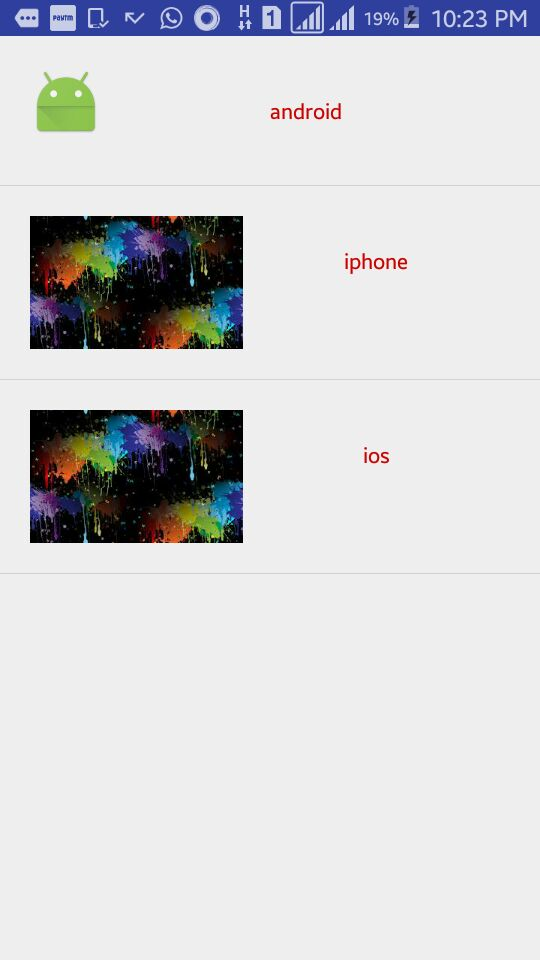
- you can see two same pictures .i have used same images with different name mybg1.jpg and mybg2.jpg are same .you can use three different images and addin mipmap folder .to get result .this is my tested correct code .it will surely help you .
- i hope you like this .
![List demo [EAandroid_pendrivelolandroid_pendrive Android_103\List demo] [appl.. ,appisrc)mainres layout\row_list item.xml - Android Studio 2.1.1 File Edit View Nevigate Code Analyze Refactor Build Run Iools VC Window Help a B ?, ? ( I × | ? colors.xml × | ? styles.xml x | ? demolist.xml x | ? row-list-item.xml x |-22 | Preview app R- ?· - Til Nexus 4. @appTheme O, ?23 manifests java version=1.0 encoding=utf-8?> © | <7xml <LinearLayout mins : android-http://schenas.android.com/apk/res/android, android: layout width-natch parent android:layout height-match parent android:orientation-vertical> ?b CustomAdapter- DemoList 600 com.example.jigyosagyanani.list_demo (test) res android: layout width-natch parent android:layout height-wrap content android:orientation-horizontal android:padding-20dp> drawable ??layout android:layout width-vrap content android:layout height-wrap content android:id-8+id/listing android: src-en1pmap/ic launcher /> demolist.xml ??mipmap ic louncher.png (5) mybgl.jpg hdp) android:layout width-natch parent android:layout height-wrap content android:text-Android android:padding-20dp android:textColor-@android:color holo red dark android:gravity-center android:1d-8+1d/name> ? values dimens.xml (2) strings.xml Gradie Scripts </LinearLayout> </LinearLayout> Design Text Terminal 0: Messages ?6: Android Monitor Gradle build finished in 1m 3s 370ms (15 minutes ago) TODO 1 Event Log Gradle Console 2:31 CRLF: UTF-8 Context: <no context ? :-. ? -.11 ENG 10:12PM 3/23/2018](http://img.homeworklib.com/questions/ea43ff00-00a8-11ec-a49a-33b6bf031cf8.png?x-oss-process=image/resize,w_560)
Add Answer to:
COP 2660, Programming for Mobile Devices
Using Android Studio
Create the working application as You can...
Use android studio to create a concert ticket mobile application. The app will calculate the total...
Use android studio to create a concert ticket mobile application. The app will calculate the total cost of concert tickets. These types of apps make it very easy for consumers to buy tickets via their mobile devices. In this app, the user will select an event, enter data, and the mobile app will conduct data processing by performing mathematical calculations. The mobile app details are below: Mobile Application Title: “Ticket Hub” Overview: Provide an app that will calculate the total...
Using Android Studios. Scenario: You recently started working as the mobile app developer for a University...
Using Android Studios. Scenario: You recently started working as the mobile app developer for a University and have been assigned to build a mobile app that calculates the students' grade. Your app should contain following screens: Screen 1 Labels for subject1, subject2, and subject3 Textboxes for subject1, subject2, and subject3 Labels for MaxGrade, MinGrade, and Avg.Grade Submit button Once user clicks submit button, you need to display letter grade in a label Screen 2 Screen that allows students to register...
Android Problem Using JAVA Problem: You need to create an app on Android Studios that allows...
Android Problem Using JAVA Problem: You need to create an app on Android Studios that allows users to register and login into the system. The focus of this project is for you to create an app with several activities and has data validation. You should have for your app: A welcome screen (splash screen) with your app name and a picture. You should then move to a screen that asks the user for either to log in or to register....
Q) MyBooks is an android application has a homepage "Activity_MyBooks.xml" that shows a simple li...
Q) MyBooks is an android application has a homepage "Activity_MyBooks.xml" that shows a simple list. This list displays only the book title for each book in the user’s book database. The database has a table name “Books” which has the following fields (Book_id, BookTitle, Author, Year). This App connected to the Database by BookstDataSource class and BooksDBHelper class. Explain the following questions on your own words and no need to write a code. Explain how to create the Layout for...
You are now working for a department store, and your task is to create a point-of-sale application to allow customers to calculate the total cost of their sale, including taxes.
Assignment Content You are now working for a department store, and your task is to create a point-of-sale application to allow customers to calculate the total cost of their sale, including taxes. Create a C++ program that does the following: Include the proper header and make sure you properly comment your program. Also, make sure you use proper coding conventions so your program runs and compiles correctly. Compress all your Microsoft® Visual Studio® source code files from the console application folder into a ZIP file. Submit your assignment. Calculates sales tax and total cost based on the type of purchased product using the following categories and tax percentages: Category 1 - Clothing: 6% Category 2 - Beauty products: 7% Category 3 - Grocery: 3% Category 4 - Gardening: 6% Category 5 - School supplies: 3% Category 6 - Tobacco products: 10% Creates an array to store the numbers users input and uses the switch statement to calculate the sales tax and final cost based on the category of the purchased product Prompts the user for category and price of the product Calculates and displays the final cost
Can you solve this proble by using C# application? C# is one of programming languages supported...
Can you solve this proble by using C# application? C# is one of programming languages supported by Visual Studio 2015. It combines the features of Java and C ++ and is suitbale for rapid application development. A retail company must file a monthly sales tax report listing the total sales for the month, and the amount of state and county sales tax collected. The state sales tax rate is 4% and the county sales tax rate is 2%. Create an...
Create a working proof of concept of one of the following applications which meets all of...
Create a working proof of concept of one of the following applications which meets all of the minimum requirements. The application may be written in any programming language(s). The application should be sent with the following: ● All of the source code required for building ● A completed binary of the application (if applicable) ● Any required database files (if applicable) Each application requires a README. Please ensure the README includes the following components: ● Which application you choose to...
PHP Programming Question. Use the techniques you learned so far to create an Address Book application...
PHP Programming Question. Use the techniques you learned so far to create an Address Book application that stores names, e-mail addresses, and phone numbers in a text file. Validate all input fields and include functionality that allows the user to view the address book. Also, include code that sorts the address book by name and deletes duplicate entries. Each page in the application should have a link back to the main page. Be creative and add extra features if you...
Understand the Application For this lab you will create a basic application programming interface (API) for...
Understand the Application For this lab you will create a basic application programming interface (API) for spawning multiple threads in a program using Python3's threading module. The Program Spec Write a program that creates a minimum of two threads with different target functions. Each thread will perform the work of each function. Each function will compute a task (described below) and print out a result. Implementation Details Write a program that creates a minimum of two threads using Python's threading...
Programming Assignment 9 The purpose of this programming project is to demonstrate a significant culmination of...
Programming Assignment 9 The purpose of this programming project is to demonstrate a significant culmination of most constructs learned thus far in the course. This includes Lists, Classes, accessors, mutators, constructors, implementation of Comparable, Comparator, use of Collections sort, iterators, properly accessing fields of complex objects, and fundamental File I/O. BACKGROUND Look over Programming Project #4 at the end of the Searching & Sorting Chapter (13), page 869. Programming Assignment 9 is similar with some added features as described below....
Most questions answered within 3 hours.
-
Where is the error in this code sequence?
String s1 = "Hello";
String s2 = "ello";...
asked 10 months ago -
Financial data for Joel de Paris, Inc., for last year
follow:
Joel de Paris, Inc.
Balance...
asked 10 months ago -
Consider this reaction:
Al2(SO4)3 (aq)+ BaCl3
(aq) Al2Cl6 (aq)- +
3BaSO4(s) . What is the...
asked 10 months ago -
Suppose that Savneet is considering increasing her
recent random sample from 20 car rentals to 40...
asked 10 months ago -
Trucks arrive at an unloading terminal at an average rate of 120
per hour.
Trucks arrive...
asked 10 months ago -
Why are methanol and ethanol completely soluble in water while
octanol is not very little soluble....
asked 10 months ago -
A facilities manager at a university reads in a research report
that the mean amount of...
asked 10 months ago -
When the CuSO4 is rehydrated by adding water to the anhydrous
compound, is this an endothermic...
asked 10 months ago -
A ray of sunlight is passing from diamond into crown glass; the
angle of incidence is...
asked 10 months ago -
A block of mass 0.249 kg is placed on top of a light, vertical
spring of...
asked 10 months ago -
how do the kidneys compensate in the presences of acidosis
a) trigger hyperventilate
b) reserve acid...
asked 10 months ago -
Question 501 pts
The rental rate of capital to the firm increases. Which of the
following...
asked 10 months ago