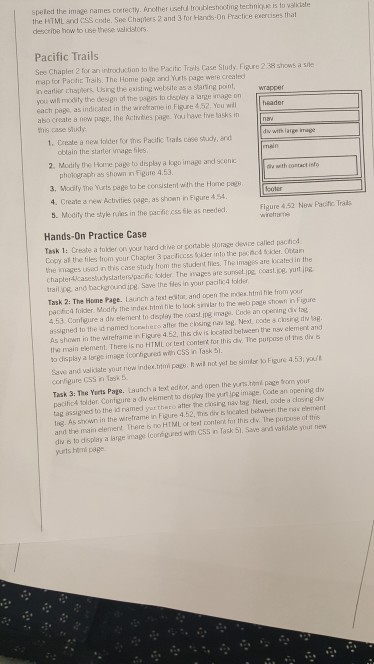
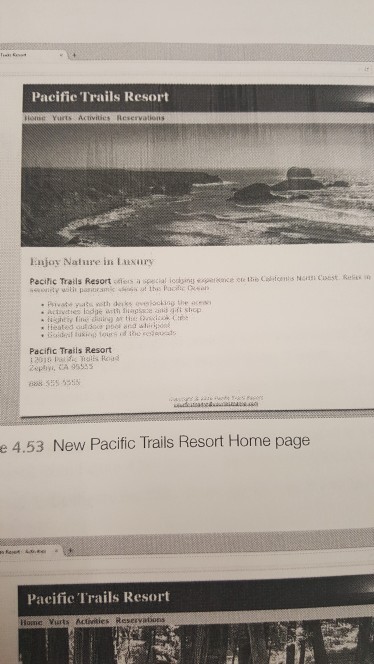
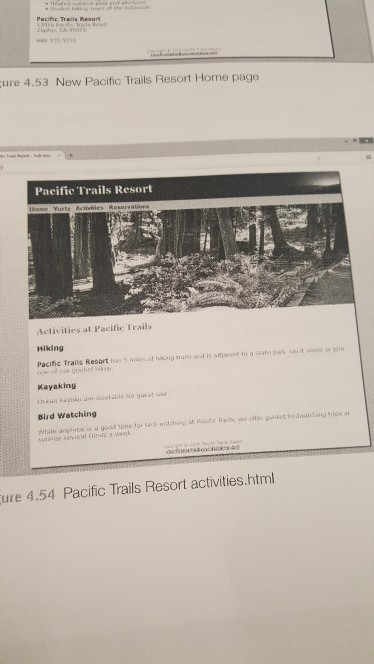
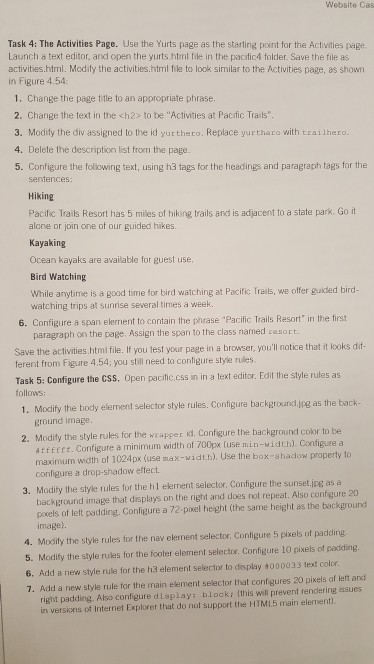
I'm need help in the Pacific Trails section of the assignment. I posted my chapter 2 assignment on the bottom of the picture. I'm using Notepad++.
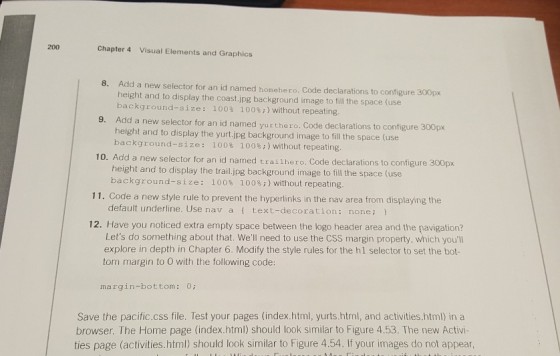
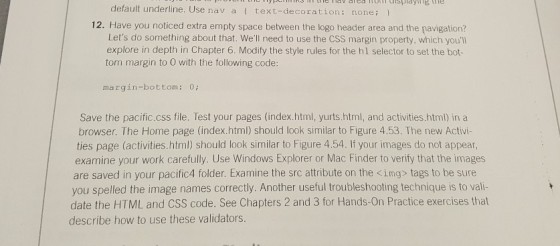
This was the previous assignment: CHAPTER 2 ASSIGMENT
paste the first content to index.html file and second to yurts.html.
First: (index.html contents are below)
<!DOCTYPE html>
<head>
<title>Pacific Trails Resorts</title>
</head>
<style>
a{
padding-right:14px; /* padding anchor tage to right
15px for nav menu */
}
</style>
<body>
<header>
<h1>Pacific Trails Resort</h1>
<nav>
<a
href="index.html">Home</a>
<a
href="yurts.html">Yurts</a>
<a
href="#">Activities</a>
<a
href="#">Reservation</a>
</nav>
</header>
<main>
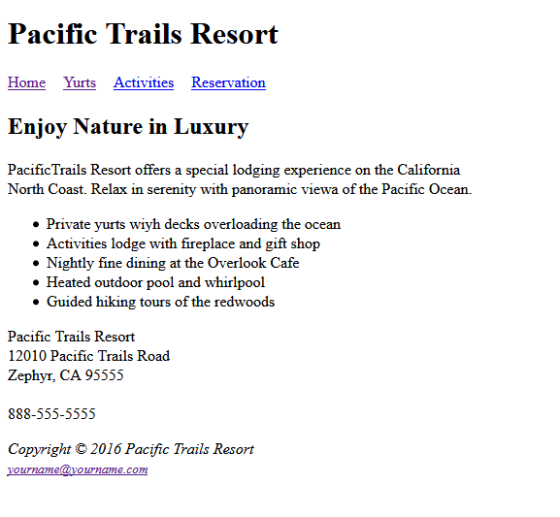
<h2>Enjoy Nature in Luxury</h2>
<p>PacificTrails Resort offers a special lodging
experience on the California <br>North Coast. Relax in
serenity with panoramic viewa of the Pacific Ocean.</p>
<ul>
<li>Private yurts wiyh decks
overloading the ocean</li>
<li>Activities lodge with
fireplace and gift shop</li>
<li>Nightly fine dining at
the Overlook Cafe</li>
<li>Heated outdoor pool and
whirlpool</li>
<li>Guided hiking tours of
the redwoods</li>
</ul>
<div>
<p>Pacific Trails
Resort<br>12010 Pacific Trails Road<br>Zephyr, CA
95555<br><br>888-555-5555</p>
</div>
</main>
<footer>
<p><i>Copyright © 2016 Pacific Trails
Resort<br><small><a
href="">yourname@yourname.com</a></small></i></p>
</footer>
</div>
</body>
</html>
Second: (yurts.html contents are below)
<!DOCTYPE html>
<head>
<title>Pacific Trails Resorts</title>
</head>
<style>
a{
padding-right:14px; /* padding anchor tage to right
15px for nav menu */
}
</style>
<body>
<header>
<h1>Pacific Trails Resort</h1>
<nav>
<a
href="index.html">Home</a>
<a
href="yurts.html">Yurts</a>
<a
href="#">Activities</a>
<a
href="#">Reservation</a>
</nav>
</header>
<main>
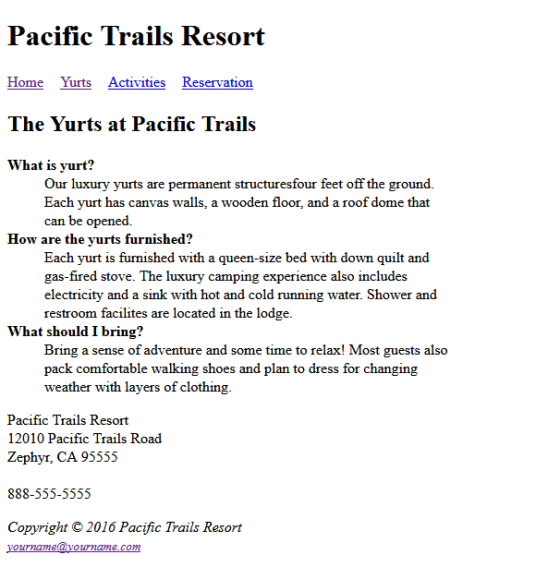
<h2>The Yurts at Pacific Trails</h2>
<div>
<dl>
<dt><strong>What is
yurt?</strong></dt>
<dd>Our luxury
yurts are permanent structuresfour feet off the
ground.<br>Each yurt has canvas walls, a wooden floor, and a
roof dome that <br>can be opened.</dd>
<dt><strong>How are the yurts
furnished?</strong></dt>
<dd>Each yurt is
furnished with a queen-size bed with down quilt and
<br>gas-fired stove. The luxury camping experience also
includes <br>electricity and a sink with hot and cold running
water. Shower and <br>restroom facilites are located in the
lodge.</dd>
<dt><strong>What should I
bring?</strong></dt>
<dd>Bring a
sense of adventure and some time to relax! Most guests also
<br>pack comfortable walking shoes and plan to dress for
changing <br>weather with layers of
clothing.</dd>
</dl>
<p>Pacific Trails
Resort<br>12010 Pacific Trails Road<br>Zephyr, CA
95555<br><br>888-555-5555</p>
</div>
</main>
<footer>
<p><i>Copyright © 2016 Pacific Trails
Resort<br><small><a
href="">yourname@yourname.com</a></small></i></p>
</footer>
</div>
</body>
</html>
output:(index.html)
Homework Answers
<!DOCTYPE html>
<head>
<title>Pacific Trails Resorts</title>
</head>
<style>
a{
padding-right:14px; /* padding anchor tage to right
15px for nav menu */
}
</style>
<body>
<header>
<h1>Pacific Trails Resort</h1>
<nav>
<a
href="index.html">Home</a>
<a
href="yurts.html">Yurts</a>
<a
href="#">Activities</a>
<a
href="#">Reservation</a>
</nav>
</header>
<main>
<h2>The Yurts at Pacific Trails</h2>
<div>
<dl>
<dt><strong>What is
yurt?</strong></dt>
<dd>Our luxury
yurts are permanent structuresfour feet off the
ground.<br>Each yurt has canvas walls, a wooden floor, and a
roof dome that <br>can be opened.</dd>
<dt><strong>How are the yurts
furnished?</strong></dt>
<dd>Each yurt is
furnished with a queen-size bed with down quilt and
<br>gas-fired stove. The luxury camping experience also
includes <br>electricity and a sink with hot and cold running
water. Shower and <br>restroom facilites are located in the
lodge.</dd>
<dt><strong>What should I
bring?</strong></dt>
<dd>Bring a
sense of adventure and some time to relax! Most guests also
<br>pack comfortable walking shoes and plan to dress for
changing <br>weather with layers of
clothing.</dd>
</dl>
<p>Pacific Trails
Resort<br>12010 Pacific Trails Road<br>Zephyr, CA
95555<br><br>888-555-5555</p>
</div>
</main>
<footer>
<p><i>Copyright © 2016 Pacific Trails
Resort<br><small><a
href="">yourname@yourname.com</a></small></i></p>
</footer>
</div>
</body>
</html>
Add Answer to:
I'm need help in the Pacific Trails section of
the assignment. I posted my chapter 2...
Hi, can someone explain to me why my image is not in the middle but all...
Hi, can someone explain to me why my image is not in the middle but all the way to the top of the page? <!DOCTYPE html> <html lang=”en”> <head> <title> Pacific Trails Resort :: Yurts </title> <meta charset="utf-8"> <link rel="stylesheet" type="text/css" href="pacific.css"> <div id="yurthero"></div> </head> <body> <div id="wrapper"></div> <header> <h1 id="hh"> Pacific Trails Resort </h1> </header> <div id=”navbar”></div> <b><a href=”index.html”> Home </a> <a href=”yurt.html”> Yurt </a> <a href=”activities.html”> Activities</a> <a href=”reservation.html”> Reservation </a> </ul> </b> <div> <img src="images/yurts.jpg" alt="Yurt" height="250"...
I have never created an external style before. This is the main Html that I am...
I have never created an external style before. This is the main Html that I am using. <!doctype html> <html lang="en"> <head> <!--Madison McCuiston--> <meta charset="utf-8"> <title>Amelie Boulangerie</title> <link href="style.css" rel="stylesheet" type="text/css"> </head> <body> <div id="wrapper"> <header>Amelie Boulangerie</header> <!-- change this to header tag --> <nav> <ul> <li><a href="index.html">Home</a></li> <li><a href="pastries.html">Pastries</a></li> <li><a href="events.html">Events</a></li> <li><a href="contact.html">Contact</a></li> </ul> </nav> <main> <H2>Experience the Difference</H2> <p><span class="bakery">Amelie Boulangerie</span> is the master of flavor combinations.The jewel-colored macarons come in the most tempting of flavors. Experience...
I cant seem to get the CSS at the bottom of this HTML to work. <!doctype...
I cant seem to get the CSS at the bottom of this HTML to work. <!doctype html> <html lang="en"> <head> <!--Madison McCuiston--> <meta charset="utf-8"> <title>Amelie Boulangerie</title> <link href="style.css" rel="stylesheet" type="text/css"> </head> <body> <div id="wrapper"> <header>Amelie Boulangerie</header> <!-- change this to header tag --> <nav> <ul> <li><a href="index.html">Home</a></li> <li><a href="pastries.html">Pastries</a></li> <li><a href="events.html">Events</a></li> <li><a href="contact.html">Contact</a></li> </ul> </nav> <main> <H2>Experience the Difference</H2> <p><span class="bakery">Amelie Boulangerie</span> is the master of flavor combinations.The jewel-colored macarons come in the most tempting of flavors. Experience the difference...
Path of Light Yoga Chapter 7 Please help!! Here is my code for the index page:...
 Path of Light Yoga Chapter 7
Please help!!
Here is my code for the index page:
<html lang="en">
<head>
<title>Path of Light Yoga Studio</title>
<link rel="stylesheet" href="yoga.css" />
</head>
<body>
<div id="wrapper">
<header>
<h1>Path of Light Yoga Studio</h1>
</header>
<nav>
<a href="index.html">Home</a>
<a href="classes.html">Classes</a>
<a href="schedule.html">Schedule</a>
<a href="contact.html">Contact</a>
</nav>
<main>
<img class="floatleft" src="yogadoor2.jpg" alt="yogadoor2"
height="300px" width="250px">
<h2>Find Your Inner Light</h2>
<p>
Path of Light Yoga Studio provides all levels of yoga practice
in a tranquil, peaceful environment....
Path of Light Yoga Chapter 7
Please help!!
Here is my code for the index page:
<html lang="en">
<head>
<title>Path of Light Yoga Studio</title>
<link rel="stylesheet" href="yoga.css" />
</head>
<body>
<div id="wrapper">
<header>
<h1>Path of Light Yoga Studio</h1>
</header>
<nav>
<a href="index.html">Home</a>
<a href="classes.html">Classes</a>
<a href="schedule.html">Schedule</a>
<a href="contact.html">Contact</a>
</nav>
<main>
<img class="floatleft" src="yogadoor2.jpg" alt="yogadoor2"
height="300px" width="250px">
<h2>Find Your Inner Light</h2>
<p>
Path of Light Yoga Studio provides all levels of yoga practice
in a tranquil, peaceful environment....
Hello, I was wondering if you could possibly think of ways to improve my home page then I would l...
 Hello, I was wondering if you could possibly think of ways to
improve my home page then I would like you to do so. I know it
could be better. Thank you.
index.html
<!DOCTYPE html>
<html lang="en">
<head>
<meta charset="utf-8">
<meta http-equiv="X-UA-Compatible" content="IE=edge">
<meta name="viewport" content="width=device-width,
initial-scale=1">
<title>Untitled Document</title>
<!-- Bootstrap -->
<link rel="stylesheet"
href="https://maxcdn.bootstrapcdn.com/bootstrap/3.4.0/css/bootstrap.min.css">
<!-- jQuery library -->
<script
src="https://ajax.googleapis.com/ajax/libs/jquery/3.3.1/jquery.min.js"></script>
<!-- Latest compiled JavaScript -->
<script
src="https://maxcdn.bootstrapcdn.com/bootstrap/3.4.0/js/bootstrap.min.js"></script>
<link href="style.css" rel="stylesheet"
type="text/css">
<link rel="stylesheet"
href="https://cdnjs.cloudflare.com/ajax/libs/font-awesome/4.7.0/css/font-awesome.min.css">
</head>
<body>
<header>
<nav class="navbar...
Hello, I was wondering if you could possibly think of ways to
improve my home page then I would like you to do so. I know it
could be better. Thank you.
index.html
<!DOCTYPE html>
<html lang="en">
<head>
<meta charset="utf-8">
<meta http-equiv="X-UA-Compatible" content="IE=edge">
<meta name="viewport" content="width=device-width,
initial-scale=1">
<title>Untitled Document</title>
<!-- Bootstrap -->
<link rel="stylesheet"
href="https://maxcdn.bootstrapcdn.com/bootstrap/3.4.0/css/bootstrap.min.css">
<!-- jQuery library -->
<script
src="https://ajax.googleapis.com/ajax/libs/jquery/3.3.1/jquery.min.js"></script>
<!-- Latest compiled JavaScript -->
<script
src="https://maxcdn.bootstrapcdn.com/bootstrap/3.4.0/js/bootstrap.min.js"></script>
<link href="style.css" rel="stylesheet"
type="text/css">
<link rel="stylesheet"
href="https://cdnjs.cloudflare.com/ajax/libs/font-awesome/4.7.0/css/font-awesome.min.css">
</head>
<body>
<header>
<nav class="navbar...
Kindly assist in fixing the error i got when I pasted my codes to validate it....
Kindly assist in fixing the error i got when I pasted my codes to validate it. The error is in bold. Error: Table column 2 established by element th has no cells beginning in it. From line 53, column 25; to line 55, column 40 <tr> <th colspan="2"> <!DOCTYPE HTML> <html lang="en"><!-- language is English--> <head> <meta charset="utf-8"/> <title>DA Website</title> <link rel="stylesheet" type="text/css" href="styles.css" /> </head> <body> <div id="wrapper"> <!-- start html...
Hello, I am designing a website for my class. I am using HTML/CSS/Jscript. I need to...
Hello, I am designing a website for my class. I am using HTML/CSS/Jscript. I need to have my text in the body, white. All text and the picture centered but how do I have margins on the left and right side?. I have a figcaption and I dont know have to place it under the picture but I am having a hard time. Can you help me? Thank you! HTML <!DOCTYPE html> <html> <head> <meta name="viewport" content="width=device-width, initial-scale=1"> <link rel="stylesheet"...
Please edit and add all the code needed to make the images side by side and to put the buttons in...
 Please edit and add all the code needed to make the images side
by side and to put the buttons in the middle of the images. Thank
you
index.html
<!DOCTYPE html>
<html lang="en">
<head>
<meta charset="utf-8">
<meta http-equiv="X-UA-Compatible"
content="IE=edge">
<meta name="viewport" content="width=device-width,
initial-scale=1">
<title>Untitled Document</title>
<!-- Bootstrap -->
<link href="css/bootstrap-4.0.0.css"
rel="stylesheet">
<link href="style.css" rel="stylesheet"
type="text/css">
<link rel="stylesheet"
href="https://cdnjs.cloudflare.com/ajax/libs/font-awesome/4.7.0/css/font-awesome.min.css">
</head>
<body>
<header>
<nav class="navbar navbar-expand-lg navbar-light
bg-light"> <a class="navbar-brand" href="#">Lakeside
Resort Spot</a>
<button class="navbar-toggler"
type="button" data-toggle="collapse"
data-target="#navbarSupportedContent1"
aria-controls="navbarSupportedContent1" aria-expanded="false"
aria-label="Toggle navigation">...
Please edit and add all the code needed to make the images side
by side and to put the buttons in the middle of the images. Thank
you
index.html
<!DOCTYPE html>
<html lang="en">
<head>
<meta charset="utf-8">
<meta http-equiv="X-UA-Compatible"
content="IE=edge">
<meta name="viewport" content="width=device-width,
initial-scale=1">
<title>Untitled Document</title>
<!-- Bootstrap -->
<link href="css/bootstrap-4.0.0.css"
rel="stylesheet">
<link href="style.css" rel="stylesheet"
type="text/css">
<link rel="stylesheet"
href="https://cdnjs.cloudflare.com/ajax/libs/font-awesome/4.7.0/css/font-awesome.min.css">
</head>
<body>
<header>
<nav class="navbar navbar-expand-lg navbar-light
bg-light"> <a class="navbar-brand" href="#">Lakeside
Resort Spot</a>
<button class="navbar-toggler"
type="button" data-toggle="collapse"
data-target="#navbarSupportedContent1"
aria-controls="navbarSupportedContent1" aria-expanded="false"
aria-label="Toggle navigation">...
below is an html code, Modify the design to implement the following pattern. “Sticky Footer”. <!DOCTYPE...
below is an html code, Modify the design to implement the following pattern. “Sticky Footer”. <!DOCTYPE html> <html lang="en"> <head> <meta name="viewport" content="width=device-width, initial-scale=1"> <title>Responsive Menu Lab</title> <style type="text/css"> div { border: 1px solid blue; margin: 5px; } #container { width: 98%; margin: auto; } #main { padding: 10px; } #menu { list-style: none; padding-left: 2px; } #menu li { display: inline-block; width: 70px; } #menu li a { display: block; text-decoration: none; } </style> </head>...
As part of this assignment we are using the base Gallery HTML and writing JavaScript code...
As part of this assignment we are using the base Gallery HTML and writing JavaScript code that will: 1) preload the images provided to us, 2) Create rollover functionality for each of the thumbnails in your image gallery 3) Use appropriate images found in the images folder. 4) Write developer comments to describe the variables being declared and explain the functions and logical blocks of JavaScript code pertaining to the gallery. I know it has to be an external JS...
 Path of Light Yoga Chapter 7
Please help!!
Here is my code for the index page:
<html lang="en">
<head>
<title>Path of Light Yoga Studio</title>
<link rel="stylesheet" href="yoga.css" />
</head>
<body>
<div id="wrapper">
<header>
<h1>Path of Light Yoga Studio</h1>
</header>
<nav>
<a href="index.html">Home</a>
<a href="classes.html">Classes</a>
<a href="schedule.html">Schedule</a>
<a href="contact.html">Contact</a>
</nav>
<main>
<img class="floatleft" src="yogadoor2.jpg" alt="yogadoor2"
height="300px" width="250px">
<h2>Find Your Inner Light</h2>
<p>
Path of Light Yoga Studio provides all levels of yoga practice
in a tranquil, peaceful environment....
Path of Light Yoga Chapter 7
Please help!!
Here is my code for the index page:
<html lang="en">
<head>
<title>Path of Light Yoga Studio</title>
<link rel="stylesheet" href="yoga.css" />
</head>
<body>
<div id="wrapper">
<header>
<h1>Path of Light Yoga Studio</h1>
</header>
<nav>
<a href="index.html">Home</a>
<a href="classes.html">Classes</a>
<a href="schedule.html">Schedule</a>
<a href="contact.html">Contact</a>
</nav>
<main>
<img class="floatleft" src="yogadoor2.jpg" alt="yogadoor2"
height="300px" width="250px">
<h2>Find Your Inner Light</h2>
<p>
Path of Light Yoga Studio provides all levels of yoga practice
in a tranquil, peaceful environment....
 Hello, I was wondering if you could possibly think of ways to
improve my home page then I would like you to do so. I know it
could be better. Thank you.
index.html
<!DOCTYPE html>
<html lang="en">
<head>
<meta charset="utf-8">
<meta http-equiv="X-UA-Compatible" content="IE=edge">
<meta name="viewport" content="width=device-width,
initial-scale=1">
<title>Untitled Document</title>
<!-- Bootstrap -->
<link rel="stylesheet"
href="https://maxcdn.bootstrapcdn.com/bootstrap/3.4.0/css/bootstrap.min.css">
<!-- jQuery library -->
<script
src="https://ajax.googleapis.com/ajax/libs/jquery/3.3.1/jquery.min.js"></script>
<!-- Latest compiled JavaScript -->
<script
src="https://maxcdn.bootstrapcdn.com/bootstrap/3.4.0/js/bootstrap.min.js"></script>
<link href="style.css" rel="stylesheet"
type="text/css">
<link rel="stylesheet"
href="https://cdnjs.cloudflare.com/ajax/libs/font-awesome/4.7.0/css/font-awesome.min.css">
</head>
<body>
<header>
<nav class="navbar...
Hello, I was wondering if you could possibly think of ways to
improve my home page then I would like you to do so. I know it
could be better. Thank you.
index.html
<!DOCTYPE html>
<html lang="en">
<head>
<meta charset="utf-8">
<meta http-equiv="X-UA-Compatible" content="IE=edge">
<meta name="viewport" content="width=device-width,
initial-scale=1">
<title>Untitled Document</title>
<!-- Bootstrap -->
<link rel="stylesheet"
href="https://maxcdn.bootstrapcdn.com/bootstrap/3.4.0/css/bootstrap.min.css">
<!-- jQuery library -->
<script
src="https://ajax.googleapis.com/ajax/libs/jquery/3.3.1/jquery.min.js"></script>
<!-- Latest compiled JavaScript -->
<script
src="https://maxcdn.bootstrapcdn.com/bootstrap/3.4.0/js/bootstrap.min.js"></script>
<link href="style.css" rel="stylesheet"
type="text/css">
<link rel="stylesheet"
href="https://cdnjs.cloudflare.com/ajax/libs/font-awesome/4.7.0/css/font-awesome.min.css">
</head>
<body>
<header>
<nav class="navbar...
 Please edit and add all the code needed to make the images side
by side and to put the buttons in the middle of the images. Thank
you
index.html
<!DOCTYPE html>
<html lang="en">
<head>
<meta charset="utf-8">
<meta http-equiv="X-UA-Compatible"
content="IE=edge">
<meta name="viewport" content="width=device-width,
initial-scale=1">
<title>Untitled Document</title>
<!-- Bootstrap -->
<link href="css/bootstrap-4.0.0.css"
rel="stylesheet">
<link href="style.css" rel="stylesheet"
type="text/css">
<link rel="stylesheet"
href="https://cdnjs.cloudflare.com/ajax/libs/font-awesome/4.7.0/css/font-awesome.min.css">
</head>
<body>
<header>
<nav class="navbar navbar-expand-lg navbar-light
bg-light"> <a class="navbar-brand" href="#">Lakeside
Resort Spot</a>
<button class="navbar-toggler"
type="button" data-toggle="collapse"
data-target="#navbarSupportedContent1"
aria-controls="navbarSupportedContent1" aria-expanded="false"
aria-label="Toggle navigation">...
Please edit and add all the code needed to make the images side
by side and to put the buttons in the middle of the images. Thank
you
index.html
<!DOCTYPE html>
<html lang="en">
<head>
<meta charset="utf-8">
<meta http-equiv="X-UA-Compatible"
content="IE=edge">
<meta name="viewport" content="width=device-width,
initial-scale=1">
<title>Untitled Document</title>
<!-- Bootstrap -->
<link href="css/bootstrap-4.0.0.css"
rel="stylesheet">
<link href="style.css" rel="stylesheet"
type="text/css">
<link rel="stylesheet"
href="https://cdnjs.cloudflare.com/ajax/libs/font-awesome/4.7.0/css/font-awesome.min.css">
</head>
<body>
<header>
<nav class="navbar navbar-expand-lg navbar-light
bg-light"> <a class="navbar-brand" href="#">Lakeside
Resort Spot</a>
<button class="navbar-toggler"
type="button" data-toggle="collapse"
data-target="#navbarSupportedContent1"
aria-controls="navbarSupportedContent1" aria-expanded="false"
aria-label="Toggle navigation">...
Most questions answered within 3 hours.
-
Where is the error in this code sequence?
String s1 = "Hello";
String s2 = "ello";...
asked 10 months ago -
Financial data for Joel de Paris, Inc., for last year
follow:
Joel de Paris, Inc.
Balance...
asked 10 months ago -
Consider this reaction:
Al2(SO4)3 (aq)+ BaCl3
(aq) Al2Cl6 (aq)- +
3BaSO4(s) . What is the...
asked 10 months ago -
Suppose that Savneet is considering increasing her
recent random sample from 20 car rentals to 40...
asked 10 months ago -
Trucks arrive at an unloading terminal at an average rate of 120
per hour.
Trucks arrive...
asked 10 months ago -
Why are methanol and ethanol completely soluble in water while
octanol is not very little soluble....
asked 10 months ago -
A facilities manager at a university reads in a research report
that the mean amount of...
asked 10 months ago -
When the CuSO4 is rehydrated by adding water to the anhydrous
compound, is this an endothermic...
asked 10 months ago -
A ray of sunlight is passing from diamond into crown glass; the
angle of incidence is...
asked 10 months ago -
A block of mass 0.249 kg is placed on top of a light, vertical
spring of...
asked 10 months ago -
how do the kidneys compensate in the presences of acidosis
a) trigger hyperventilate
b) reserve acid...
asked 10 months ago -
Question 501 pts
The rental rate of capital to the firm increases. Which of the
following...
asked 10 months ago