This is done in Linux terminal. Modify the .bashrc file using command line which would add...
This is done in Linux terminal. Modify the .bashrc file using command line which would add the following functionality to your shell upon opening a new terminal:
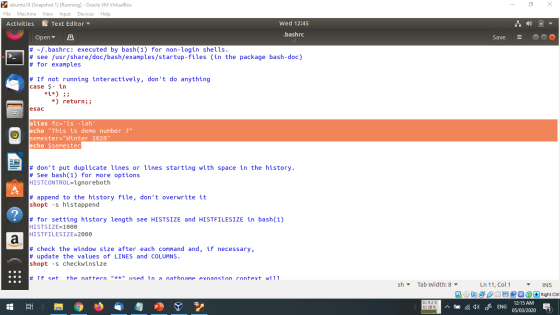
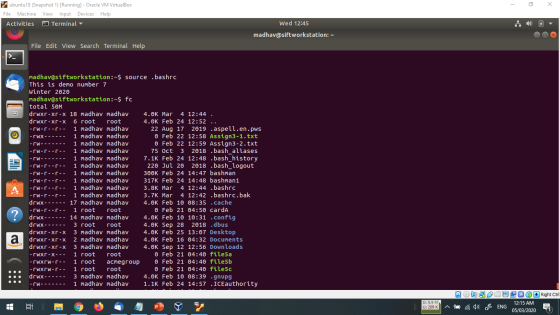
1. Alias called “fc” (short for “folder contents) invoking the command “ls -lah”B. Welcome message “This is demo number 7” C. Variable “semester” being equal to “Winter 2020” and print the value on screen
2. Create any directory of your choice and add it to PATH variable.
3. Show an example of local and environment variable
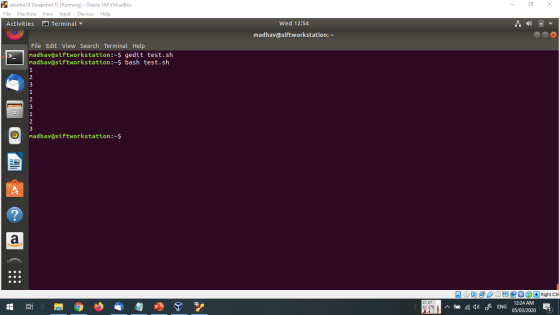
4. Create a small shell script to give value to a variable and display it three times and execute the script
5. Study the configuration file .bashrc Make changes to HISTFILESIZE environment variable and see what happens
6. When you change the PATH variable completely, show what happens and why?
Homework Answers
Answer 1
***************
alias fc='ls -lah'
echo "This is demo number 7"
semester="Winter 2020"
echo $semester
Answer 2
************
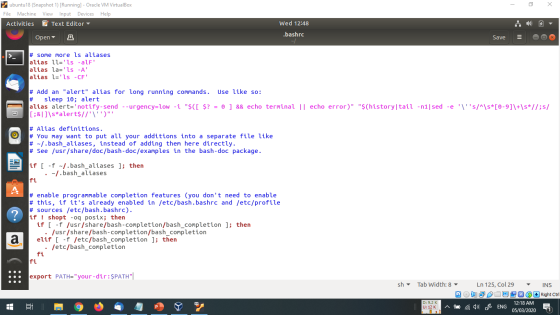
- Open the .bashrc file in your home directory (for example, /home/your-user-name/.bashrc) in a text editor.
- Add export PATH="your-dir:$PATH" to the last line of the file, where your-dir is the directory you want to add.
- Save the .bashrc file.
- Restart your terminal.
Answer 3
************
madhav@siftworkstation:~$ test=madhav
madhav@siftworkstation:~$ echo $test
madhav
madhav@siftworkstation:~$
local variable is test and assigned values in it
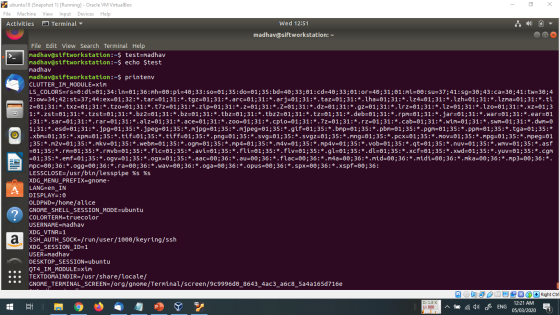
environment variable
printenv is command with values like shown in above screenshot you can type
printenv USERNAME will print madhav or printenv USER will print madhav as well because in environment variable they are set.
Answer 4
************
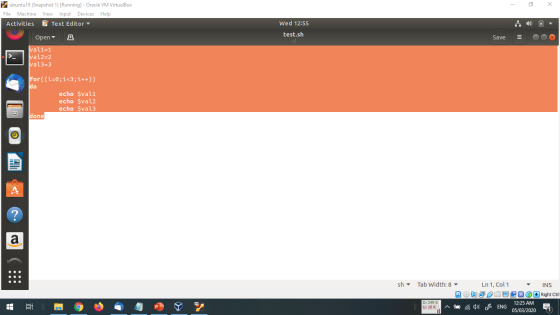
val1=1
val2=2
val3=3
for((i=0;i<3;i++))
do
echo $val1
echo $val2
echo $val3
done
Answer 5
************
HISTSIZE is the number of lines or commands that are stored in memory in a history list while your bash session is ongoing.
HISTFILESIZE is the number of lines or commands that (a) are allowed in the history file at startup time of a session, and (b) are stored in the history file at the end of your bash session for use in future sessions.
Answer 6
*************
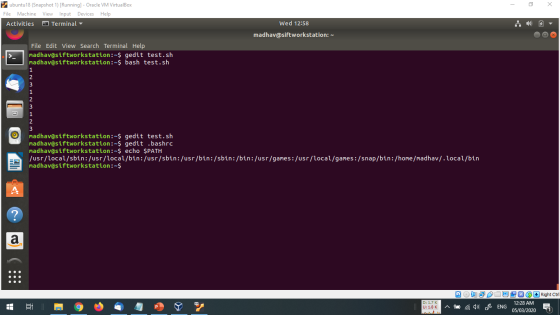
if you change the path say /usr/local/bin to /usr/local/bin1 then no commands will be execute like cp , mv cat etc because they are all mapped in the bin folder
if you have any doubt then please ask me without any hesitation
in the comment section below , if you like my answer then please
thumbs up for the answer , before giving thumbs down please discuss
the question it may possible that we may understand the question
different way and we can edit and change the answers if you argue,
thanks :)
Add Answer to:
This is done in Linux terminal. Modify the .bashrc file using
command line which would add...
I need help with the following Linux bash assignment: Display the value of all environment variables...
I need help with the following Linux bash assignment: Display the value of all environment variables to the screen. Add a temporary environment variable called Semester with a value of Spring to your currently running shell only. Modify your .bashrc file to create an environment variable called CLASS with a value of "CIS 220" that is available to all processes. Modify your .bashrc file to add $HOME/scripts to your path without removing any other items from your path. Modify your...
Write the Linux command that will add the current directory to the beginning of the PATH...
Write the Linux command that will add the current directory to the beginning of the PATH environment variable. Linux Command: Write the command that will create a compressed archive of your Chap12 directory. Name the archive Chap12Backup.tgz Linux Command:
In Linux we are doing environment variables: Display value of all environment variables to the screen....
In Linux we are doing environment variables: Display value of all environment variables to the screen. Add a temporary environment variable called Semester with a value of Fall to your currently running shell only. Modify your .bashrc file to create an environment variable called CLASS with a value of "CIS 220" that is available to all processes. Modify your .bashrc file to add $HOME/scripts to your path without removing any other items from your path.
Task 1: Using the adduser Command Execute the following commands in the root command-line environment: #...
Task 1: Using the adduser Command Execute the following commands in the root command-line environment: # ls /home # adduser newuser1 # ls /home Contrast the contents of home before and after the adduser command. ? ------------------------------------------------------------------------------------------------------------------------------------------------------------------------- ---------------------------------------------------------------------------------------------------------------------------------------------------------------------------- # cd /home/newuser1 # ls -al # tail -n 5 /etc/passwd What is the absolute path of newuser1's home directory? ------------------------------------------------------------------------------------------------------------------------------------------------------------------------- ---------------------------------------------------------------------------------------------------------------------------------------------------------------------------- What is the default shell for newuser1? ------------------------------------------------------------------------------------------------------------------------------------------------------------------------- ---------------------------------------------------------------------------------------------------------------------------------------------------------------------------- # tail -n 5 /etc/shadow Contrast the newuser1 record with your...
LINUX 140U Create a file named script1.sh that contains a bash script that: Accepts NO command...
LINUX 140U Create a file named script1.sh that contains a bash script that: Accepts NO command line arguments and does NOT use the read command. I will give you no credit if your bash script includes a read command. Also, you need to have at least one for..in loop in your code even if there may be other ways to do this problem. The script will go through a list of entries in the current directory (do not process subdirectories):...
How do I do the following on a Unix Command Line Prompt: Change you command-line prompt...
How do I do the following on a Unix Command Line Prompt: Change you command-line prompt to some interesting phrase/word of your choice Change the command-line prompt to display your user name and your current working directory (this includes your interesting phrase/word) Create a short alias for “ls -l -a”, it is up to you, but maybe “lsa” Execute the “who” command together with the “grep” command to identify whether your peer group (or any 3 or more people) are...
On your Linux machine, use ___________ command that displays the memory Using the previous command, add...
On your Linux machine, use ___________ command that displays the memory Using the previous command, add the ability to have the command output in "human readable" format Physical Memory___________________ Total Cached___________________ Available ___________________ Free___________________ Again, use the previous two commands and add the ability to watch the memory in real time. Leave that running in the background and open new terminal. Run the command that create a flag file that will dump your cache memory. What is that command? What...
Using Kali Linux, the Windows Linux Sub-System, or another Debian based Linux distribution, perform the following...
 Using Kali Linux, the Windows Linux Sub-System, or another Debian based Linux distribution, perform the following tasks based on the Linux Fundamentals lecture. For this lab, take screenshots for all major steps completed to illustrate that each task was successfully completed the same method as would be used for other labs). Tasks: 1. Create a new user named Billy Bob using the command linter face 2. Add Billy Bob to the sudoers group 3. Update and upgrade your Linux distribution...
Question 2 0/1 point (graded) What happens when you remove a directory using the command rm...
Question 2 0/1 point (graded) What happens when you remove a directory using the command rm -r? You cannot remove a directory using the rm command. You permanently remove the entire directory, including all files and subdirectories. You move the entire directory to a trash folder, but it can be restored later. You get a warning message asking if you want to proceed, then you delete the directory. incorrect Answer Incorrect: Try again. Unix does not warn you before permanently...
SHELL SCRIPT: Provide the following questions with the codes and command line Problem 5: Take 5...
SHELL SCRIPT: Provide the following questions with the codes and command line Problem 5: Take 5 input arguments in a for loop, but only add the even i values to sum and display the result. Problem 6: Write a shell script that accepts path of the directory and returns a count of all the files within the specified directory. (Hint: use alias to perform cd operation) Problem 7: Write a shell script that takes an ‘count’ value as an input...
 Using Kali Linux, the Windows Linux Sub-System, or another Debian based Linux distribution, perform the following tasks based on the Linux Fundamentals lecture. For this lab, take screenshots for all major steps completed to illustrate that each task was successfully completed the same method as would be used for other labs). Tasks: 1. Create a new user named Billy Bob using the command linter face 2. Add Billy Bob to the sudoers group 3. Update and upgrade your Linux distribution...
Most questions answered within 3 hours.
-
Where is the error in this code sequence?
String s1 = "Hello";
String s2 = "ello";...
asked 11 months ago -
Financial data for Joel de Paris, Inc., for last year
follow:
Joel de Paris, Inc.
Balance...
asked 11 months ago -
Consider this reaction:
Al2(SO4)3 (aq)+ BaCl3
(aq) Al2Cl6 (aq)- +
3BaSO4(s) . What is the...
asked 11 months ago -
Suppose that Savneet is considering increasing her
recent random sample from 20 car rentals to 40...
asked 11 months ago -
Trucks arrive at an unloading terminal at an average rate of 120
per hour.
Trucks arrive...
asked 11 months ago -
Why are methanol and ethanol completely soluble in water while
octanol is not very little soluble....
asked 11 months ago -
A facilities manager at a university reads in a research report
that the mean amount of...
asked 11 months ago -
When the CuSO4 is rehydrated by adding water to the anhydrous
compound, is this an endothermic...
asked 11 months ago -
A ray of sunlight is passing from diamond into crown glass; the
angle of incidence is...
asked 11 months ago -
A block of mass 0.249 kg is placed on top of a light, vertical
spring of...
asked 11 months ago -
how do the kidneys compensate in the presences of acidosis
a) trigger hyperventilate
b) reserve acid...
asked 11 months ago -
Question 501 pts
The rental rate of capital to the firm increases. Which of the
following...
asked 11 months ago