WEEK 6: COURSE PROJECT The Week 6 portion of your Course Project is due this week....
WEEK 6: COURSE PROJECT
The Week 6 portion of your Course Project is due this week. Please refer to the Course Project Overview in the Introduction and Resources module for full details. Use this report (Links to an external site.)Links to an external site. to complete this portion of the project.
Guess the number!
You will add to the program you created last week. This week you will add quite a bit of code to your project. You will add an option for the computer to guess as well as the user to guess a number. In addition, you will add a menu system. Be sure to import random at the beginning of your code and use a comment block explaining what your program does
#Guess the number week 6
#Name:
#Date:
#Menu system displays - ask user if they want to guess a number, have computer guess a number, or exit
#Random number, loop while true
#ask user for number. Check to see if the value is a number between 1 and 10
#if number is too high or too low, tell user, if they guessed it break out of loop
#ask user to enter a number, computer randomly guesses
Display "Welcome to my Guess the number program!"
while true
Display "1. You guess the number"
Display "2. You type a number and see if the computer can guess
it"
Display "3. Exit"
Get option
if(option ==1)
random mynumber
count=1
while True
try
Display "Guess a number between 1 and 10"
Get guess
while guess<1 or guess>10
Display "Guess a number between 1 and 10"
Get guess
except
Display "numbers only"
continue
if (guess<mynumber)
Display "Too low"
count=count+1
else if (guess>mynumber)
Display "Too high"
count=count+1
else if (guess==mynumber)
Display "You guessed it in "+ count + " attempts"
if(option ==2)
Get number from user
count=1
while True
Get randomval from computer
if (number<randomval)
Display "Too low"
count=count+1
else if (number>randomval)
Display "Too high"
count=count+1
else if (number==randomval)
Display "The computer guessed it in "+ count + " attempts. The number was "+randomval
else
break
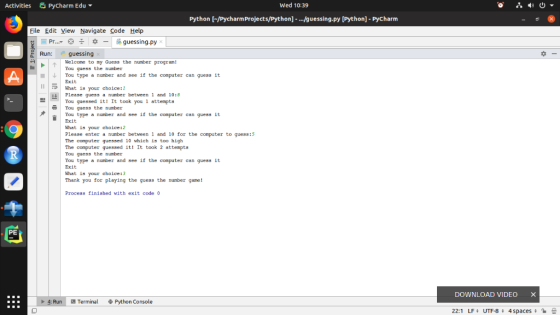
When you run the program you should see something like the following:
Welcome to my Guess the number program!
- You guess the number
- You type a number and see if the computer can guess it
- Exit
What is your choice: 1
Please guess a number between 1 and 10: 8
Too high
Please guess a number between 1 and 10: 7
You guessed it! It took you 2 attempts
- You guess the number
- You type a number and see if the computer can guess it
- Exit
What is your choice: 2
Please enter a number between 1 and 10 for the computer to guess: 5
The computer guessed 7 which is too high
The computer guessed 2 which is too low
The computer guessed 9 which is too high
The computer guessed 8 which is too high
The computer guessed 8 which is too high
The computer guessed 1 which is too low
The computer guessed 3 which is too low
The computer guessed 4 which is too low
The computer guessed 2 which is too low
The computer guessed 8 which is too high
The computer guessed 3 which is too low
The computer guessed 1 which is too low
The computer guessed 4 which is too low
The computer guessed 7 which is too high
The computer guessed 1 which is too low
The computer guessed 7 which is too high
The computer guessed 1 which is too low
The computer guessed 4 which is too low
The computer guessed 4 which is too low
The computer guessed it! It took 20 attempts
- You guess the number
- You type a number and see if the computer can guess it
- Exit
What is your choice: 3
Thank you for playing the guess the number game!
Be sure to submit your assignment.
Homework Answers
Solution:
import random

numbers = [1, 2, 3, 4, 5, 6, 7, 8, 9, 10]
print("Welcome to my Guess the number program!")
while True:
    print("You guess the number")
    print("You type a number and see if the computer can guess it")
    print("Exit")
    option = int(input("What is your choice:"))
    if option == 1:
        mynumber = random.choice(numbers)
        count = 1
        while True:
            try:
                guess = int(input("Please guess a number between 1 and 10:"))
                while guess < 1 or guess > 10:
                    guess = int(input("Please guess a number between 1 and 10:"))
            except:
                print("Numbers only")
                continue
            if guess < mynumber:
                print("Too low")
                count = count + 1
            elif guess > mynumber:
                print("Too High")
                count = count + 1
            elif guess == mynumber:
                print("You guessed it! It took you " + str(count) + " attempts")
                break
        if option == 1 or option == 2:
            continue
        else:
            break
    elif option == 2:
        number = int(input("Please enter a number between 1 and 10 for the computer to guess:"))
        count = 1
        while True:
            random_val = random.choice(numbers)
            if number < random_val:
                print("The computer guessed " + str(random_val) + " which is too high")
                count = count + 1
            elif number > random_val:
                print("The computer guessed " + str(random_val) + " which is too low")
                count = count + 1
            elif number == random_val:
                print("The computer guessed it! It took " + str(count) + " attempts")
                break
        if option == 1 or option == 2:
            continue
        else:
            break
    else:
        break

print('Thank you for playing the guess the number game!')
Output:
Add Answer to:
WEEK 6: COURSE PROJECT
The Week 6 portion of your Course Project is due this week....
Guess the number! You will create a program that will ask the user to guess a...
Guess the number! You will create a program that will ask the user to guess a number between 1 and 10. The pseudocode is below. Be sure to import random at the beginning of your code and use a comment block explaining what your program does #Guess the number week 4 #Name: #Date: #Random number, loop while true #ask user for number. #if number is too high or too low, tell user, if they guessed it break out of loop...
Can you please enter this python program code into an IPO Chart? import random def menu():...
Can you please enter this python program code into an IPO Chart? import random def menu(): print("\n\n1. You guess the number\n2. You type a number and see if the computer can guess it\n3. Exit") while True: #using try-except for the choice will handle the non-numbers #if user enters letters, then except will show the message, Numbers only! try: c=int(input("Enter your choice: ")) if(c>=1 and c<=3): return c else: print("Enter number between 1 and 3 inclusive.") except: #print exception print("Numbers Only!")...
Can you add code comments where required throughout this Python Program, Guess My Number Program, and...
Can you add code comments where required throughout this Python Program, Guess My Number Program, and describe this program as if you were presenting it to the class. What it does and everything step by step. import random def menu(): #function for getting the user input on what he wants to do print("\n\n1. You guess the number\n2. You type a number and see if the computer can guess it\n3. Exit") while True: #using try-except for the choice will handle the...
Write a program that prompts the user for an integer that the player (maybe the user,...
Write a program that prompts the user for an integer that the player (maybe the user, maybe someone else) will try to guess. If the player's guess is higher than the target number, the program should display "too high" If the user's guess is lower than the target number, the program should display "too low" The program should use a loop that repeats until the user correctly guesses the number. Then the program should print how many guesses it took....
7.30 - Guess-the-Number Game (Project Name: GuessTheNumber) - Write an app that plays “Guess the Number”...
7.30 - Guess-the-Number Game (Project Name: GuessTheNumber) - Write an app that plays “Guess the Number” as follows: Your app chooses the number to be guessed by selecting a random integer in the range 1 to 1000. The app displays the prompt "Guess a number between 1 and 1000: ". The player inputs a first guess. If the player’s guess is incorrect, your app should display Too high. Try again. or Too low. Try again. to help the player “zero...
In Java You’re going to make a Guess the Number game. The computer will "think" of...
In Java You’re going to make a Guess the Number game. The computer will "think" of a secret number from 1 to 20 and ask the user to guess it. After each guess, the computer will tell the user whether the number is too high or too low. The user wins if they can guess the number within six tries. The program should look like this in the console, player input is in bold: Hello! What is your name? Abaddon...
WRITE IN PYTHON: 2. Guess the Number The Goal: Similar to the first project, this project...
WRITE IN PYTHON: 2. Guess the Number The Goal: Similar to the first project, this project also uses the random module in Python. The program will first randomly generate a number unknown to the user. The user needs to guess what that number is. (In other words, the user needs to be able to input information.) If the user’s guess is wrong, the program should return some sort of indication as to how wrong (e.g. The number is too high...
help me do flowchart please Project Design: Project Scop To create a "guess the number" game...
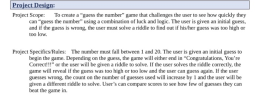 help me do flowchart please
Project Design: Project Scop To create a "guess the number" game that challenges the user to see how quickly they can "guess the number" using a combination of luck and logic. The user is given an initial guess, and if the guess is wrong, the user must solve a riddle to find out if his/her guess was too high or too low. Project Specifics/Rules: The number must fall between 1 and 20. The user is...
help me do flowchart please
Project Design: Project Scop To create a "guess the number" game that challenges the user to see how quickly they can "guess the number" using a combination of luck and logic. The user is given an initial guess, and if the guess is wrong, the user must solve a riddle to find out if his/her guess was too high or too low. Project Specifics/Rules: The number must fall between 1 and 20. The user is...
In c# create a program that generates a random number from 1 to 1000. Then, ask...
In c# create a program that generates a random number from 1 to 1000. Then, ask the user to guess the random number. If the user's guess is too high, then the program should print "Too High, Try again". If the user's guess is too low, then the program should print "Too low, Try again". Use a loop to allow the user to keep entering guesses until they guess the random number correctly. Once they figure it, congratulate the user....
This is a basic Java Question referencing Chapter 5 methods. The goal is to make a...
This is a basic Java Question referencing Chapter 5 methods. The goal is to make a quick program that has the computer guess a number, after which the user will input if they would like to play the easy, medium or hard level. After this point the user will be allowed to guess a certain amount of times, before the computer tells them they are correct, incorrect, and gives them the guessed number. The Question is as follows: Define a...
 help me do flowchart please
Project Design: Project Scop To create a "guess the number" game that challenges the user to see how quickly they can "guess the number" using a combination of luck and logic. The user is given an initial guess, and if the guess is wrong, the user must solve a riddle to find out if his/her guess was too high or too low. Project Specifics/Rules: The number must fall between 1 and 20. The user is...
help me do flowchart please
Project Design: Project Scop To create a "guess the number" game that challenges the user to see how quickly they can "guess the number" using a combination of luck and logic. The user is given an initial guess, and if the guess is wrong, the user must solve a riddle to find out if his/her guess was too high or too low. Project Specifics/Rules: The number must fall between 1 and 20. The user is...
Most questions answered within 3 hours.
-
Where is the error in this code sequence?
String s1 = "Hello";
String s2 = "ello";...
asked 11 months ago -
Financial data for Joel de Paris, Inc., for last year
follow:
Joel de Paris, Inc.
Balance...
asked 11 months ago -
Consider this reaction:
Al2(SO4)3 (aq)+ BaCl3
(aq) Al2Cl6 (aq)- +
3BaSO4(s) . What is the...
asked 11 months ago -
Suppose that Savneet is considering increasing her
recent random sample from 20 car rentals to 40...
asked 11 months ago -
Trucks arrive at an unloading terminal at an average rate of 120
per hour.
Trucks arrive...
asked 11 months ago -
Why are methanol and ethanol completely soluble in water while
octanol is not very little soluble....
asked 11 months ago -
A facilities manager at a university reads in a research report
that the mean amount of...
asked 11 months ago -
When the CuSO4 is rehydrated by adding water to the anhydrous
compound, is this an endothermic...
asked 11 months ago -
A ray of sunlight is passing from diamond into crown glass; the
angle of incidence is...
asked 11 months ago -
A block of mass 0.249 kg is placed on top of a light, vertical
spring of...
asked 11 months ago -
how do the kidneys compensate in the presences of acidosis
a) trigger hyperventilate
b) reserve acid...
asked 11 months ago -
Question 501 pts
The rental rate of capital to the firm increases. Which of the
following...
asked 11 months ago