Using Netbeans •Create a GUI consisting of two JTextFields and two JButtons. –When the first button...
Using Netbeans
•Create a GUI consisting of two JTextFields and two JButtons.
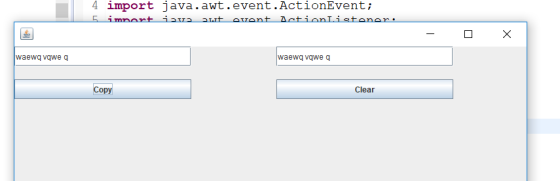
–When the first button is clicked, the contents of the first textfield is copied to the second textfield.
–When the second button is clicked, both textfields are cleared.
•Remember, the Javadocs are your friends.
Homework Answers
Please find the code below:::
CopyData.java
package graphichal;
import java.awt.Dimension;
import java.awt.event.ActionEvent;
import java.awt.event.ActionListener;
import javax.swing.JButton;
import javax.swing.JFrame;
import javax.swing.JTextField;
public class CopyData{
CopyData(){
final JFrame f=new JFrame(); //we
are using jframe
f.setPreferredSize(new
Dimension(800,300));
f.setLayout(null);
final JButton copy=new
JButton("Copy");
copy.setBounds(0, 50,
270,30);
f.add(copy);
final JButton clear=new
JButton("Clear");
clear.setBounds(400, 50,
270,30);
f.add(clear);
final JTextField field1=new
JTextField("");
field1.setBounds(0, 0,
270,30);
f.add(field1);
final JTextField field2=new
JTextField("");
field2.setBounds(400, 0,
270,30);
f.add(field2);
copy.addActionListener(new
ActionListener() {
@Override
public void
actionPerformed(ActionEvent arg0) {
field2.setText(field1.getText());
}
});
clear.addActionListener(new
ActionListener() {
@Override
public void
actionPerformed(ActionEvent arg0) {
field2.setText("");
field1.setText("");
}
});
f.pack();
f.setVisible(true);
}
public static void main(String[] args){
CopyData f = new CopyData();
}
}
output:
Add Answer to:
Using Netbeans
•Create a GUI consisting of two JTextFields and two
JButtons.
–When the first button...
In JavaFX Create a GUI program shown below. User enters information through the first window. When...
 In JavaFX
Create a GUI program shown below. User enters information through the first window. When “Close” button is clicked, your program stops, when “Show Info” button is clicked, the input information is displayed on the TextArea; while when “Modify" button is clicked, the second window pops up and the information user enters to the first window automatically fills in the second window. User can change the information on the second window. After clicking the “Change” button on the second...
In JavaFX
Create a GUI program shown below. User enters information through the first window. When “Close” button is clicked, your program stops, when “Show Info” button is clicked, the input information is displayed on the TextArea; while when “Modify" button is clicked, the second window pops up and the information user enters to the first window automatically fills in the second window. User can change the information on the second window. After clicking the “Change” button on the second...
Create a GUI or JavaFX application with two buttons and two labels. Add an Image Icon of your choice to the first button...
Create a GUI or JavaFX application with two buttons and two labels. Add an Image Icon of your choice to the first button and the first label.
For this question you will need to complete the methods to create a JavaFX GUI application...
 For this question you will need to complete the methods to create a JavaFX GUI application that implements two String analysis algorithms. Each algorithm is activated when its associated button is pressed. They both take their input from the text typed by the user in a TextField and they both display their output via a Text component at the bottom of the GUI, which is initialized to “Choose a string methods as indicated in the partially completed class shown after...
in JAVA please please include a main() and show output!! Create a GUI program shown below....
 in JAVA please please include a main() and show output!!
Create a GUI program shown below. User enters information
through the first window. When “Close” button is clicked, your
program stops; when “Show Info” button is clicked, the input
information is displayed on the TextArea; while when “Modify”
button is clicked, the second window pops up and the information
user enters to the first window automatically fills in the second
window. User can change the information on the second window....
in JAVA please please include a main() and show output!!
Create a GUI program shown below. User enters information
through the first window. When “Close” button is clicked, your
program stops; when “Show Info” button is clicked, the input
information is displayed on the TextArea; while when “Modify”
button is clicked, the second window pops up and the information
user enters to the first window automatically fills in the second
window. User can change the information on the second window....
Please, build calculator to exact image as below using Python. Write a GUI that implements the...
 Please, build calculator to exact image as below using
Python.
Write a GUI that implements the calculator shown in the following image: Calculator х Plus Equals: Add Clear Quit - User enters two integers into the text fields. - When Add button is pressed, the sum of the values in the text fields are shown after the Equals: as a label. - The Clear button clears the values in the text fields. The cleared values can be blank or zero....
Please, build calculator to exact image as below using
Python.
Write a GUI that implements the calculator shown in the following image: Calculator х Plus Equals: Add Clear Quit - User enters two integers into the text fields. - When Add button is pressed, the sum of the values in the text fields are shown after the Equals: as a label. - The Clear button clears the values in the text fields. The cleared values can be blank or zero....
Using JavaFX create a Roll application that implements the GUI shown When the user clicks the Rol...
Using JavaFX create a Roll application that implements the GUI shown When the user clicks the Roll button, the program must roll the dice, change the figures randomly, calculate the sum of the dice and show it in a label
Python 3+ (using TKinter): 1.) Develop new TKinter GUI widget class Ed that can be used to teach first-graders addition and subtraction. The GUI should contain two Entry widgets and a Button widget la...
Python 3+ (using TKinter): 1.) Develop new TKinter GUI widget class Ed that can be used to teach first-graders addition and subtraction. The GUI should contain two Entry widgets and a Button widget labeled "Enter". At start-up, your program should generate (1) two single-digit pseudorandom numbers a and b and (2) an operation op, which could be addition or subtraction—with equal likelihood—using the randrange() function in the random module. The expression a op b will then be displayed in the...
GUI Programming Creating a Kilometer to Miles Converter Lab Assignment Objectives Understand the basics of tkinter...
GUI Programming Creating a Kilometer to Miles Converter Lab Assignment Objectives Understand the basics of tkinter GUI development. Based on an informal application specification be able to develop a tkinter GUI program that contains one or more Label widgets. Be able to prompt user for input to a GUI application using a messagebox. Obtain user input into a GUI application that can be used for event driven selection. Be able to develop a tkinter GUI program that supports event-based widgets....
Tip Calculator App & Order Using NetBeans create a new JavaFX project with two classes TipCalculator...
Tip Calculator App & Order Using NetBeans create a new JavaFX project with two classes TipCalculator (the JavaFX class) and Order Create the Tip Calculator as follows: Start with an Order class with two instance variables, item a String and price a double; include two constructors, a no-parameter constructor that passes default values empty String and zero (0) to the second constructor which then calls the set methods for item and price; the set method for price validates that price...
You may adjust the code as you want. Thank you! CODING HERE: import javafx.application.Application; import javafx.event.*;...
 You may adjust the code as you want. Thank
you!
CODING HERE:
import javafx.application.Application;
import javafx.event.*;
import javafx.scene.*;
import javafx.scene.control.*;
import javafx.scene.layout.*;
import javafx.stage.*;
import javafx.geometry.*;
public class OrderSystem extends Application implements
EventHandler<ActionEvent>
{
// Attributes for GUI
private Stage stage; // The entire window, including title bar and
borders
private Scene scene; // Interior of window
private BorderPane layout;
// Add four labels
private Label itemLabel = new Label("Item Name:");
private Label numberLabel = new Label("Number:");
private Label costLabel...
You may adjust the code as you want. Thank
you!
CODING HERE:
import javafx.application.Application;
import javafx.event.*;
import javafx.scene.*;
import javafx.scene.control.*;
import javafx.scene.layout.*;
import javafx.stage.*;
import javafx.geometry.*;
public class OrderSystem extends Application implements
EventHandler<ActionEvent>
{
// Attributes for GUI
private Stage stage; // The entire window, including title bar and
borders
private Scene scene; // Interior of window
private BorderPane layout;
// Add four labels
private Label itemLabel = new Label("Item Name:");
private Label numberLabel = new Label("Number:");
private Label costLabel...
 In JavaFX
Create a GUI program shown below. User enters information through the first window. When “Close” button is clicked, your program stops, when “Show Info” button is clicked, the input information is displayed on the TextArea; while when “Modify" button is clicked, the second window pops up and the information user enters to the first window automatically fills in the second window. User can change the information on the second window. After clicking the “Change” button on the second...
In JavaFX
Create a GUI program shown below. User enters information through the first window. When “Close” button is clicked, your program stops, when “Show Info” button is clicked, the input information is displayed on the TextArea; while when “Modify" button is clicked, the second window pops up and the information user enters to the first window automatically fills in the second window. User can change the information on the second window. After clicking the “Change” button on the second...
 For this question you will need to complete the methods to create a JavaFX GUI application that implements two String analysis algorithms. Each algorithm is activated when its associated button is pressed. They both take their input from the text typed by the user in a TextField and they both display their output via a Text component at the bottom of the GUI, which is initialized to “Choose a string methods as indicated in the partially completed class shown after...
 in JAVA please please include a main() and show output!!
Create a GUI program shown below. User enters information
through the first window. When “Close” button is clicked, your
program stops; when “Show Info” button is clicked, the input
information is displayed on the TextArea; while when “Modify”
button is clicked, the second window pops up and the information
user enters to the first window automatically fills in the second
window. User can change the information on the second window....
in JAVA please please include a main() and show output!!
Create a GUI program shown below. User enters information
through the first window. When “Close” button is clicked, your
program stops; when “Show Info” button is clicked, the input
information is displayed on the TextArea; while when “Modify”
button is clicked, the second window pops up and the information
user enters to the first window automatically fills in the second
window. User can change the information on the second window....
 Please, build calculator to exact image as below using
Python.
Write a GUI that implements the calculator shown in the following image: Calculator х Plus Equals: Add Clear Quit - User enters two integers into the text fields. - When Add button is pressed, the sum of the values in the text fields are shown after the Equals: as a label. - The Clear button clears the values in the text fields. The cleared values can be blank or zero....
Please, build calculator to exact image as below using
Python.
Write a GUI that implements the calculator shown in the following image: Calculator х Plus Equals: Add Clear Quit - User enters two integers into the text fields. - When Add button is pressed, the sum of the values in the text fields are shown after the Equals: as a label. - The Clear button clears the values in the text fields. The cleared values can be blank or zero....
 You may adjust the code as you want. Thank
you!
CODING HERE:
import javafx.application.Application;
import javafx.event.*;
import javafx.scene.*;
import javafx.scene.control.*;
import javafx.scene.layout.*;
import javafx.stage.*;
import javafx.geometry.*;
public class OrderSystem extends Application implements
EventHandler<ActionEvent>
{
// Attributes for GUI
private Stage stage; // The entire window, including title bar and
borders
private Scene scene; // Interior of window
private BorderPane layout;
// Add four labels
private Label itemLabel = new Label("Item Name:");
private Label numberLabel = new Label("Number:");
private Label costLabel...
You may adjust the code as you want. Thank
you!
CODING HERE:
import javafx.application.Application;
import javafx.event.*;
import javafx.scene.*;
import javafx.scene.control.*;
import javafx.scene.layout.*;
import javafx.stage.*;
import javafx.geometry.*;
public class OrderSystem extends Application implements
EventHandler<ActionEvent>
{
// Attributes for GUI
private Stage stage; // The entire window, including title bar and
borders
private Scene scene; // Interior of window
private BorderPane layout;
// Add four labels
private Label itemLabel = new Label("Item Name:");
private Label numberLabel = new Label("Number:");
private Label costLabel...
Most questions answered within 3 hours.
-
Where is the error in this code sequence?
String s1 = "Hello";
String s2 = "ello";...
asked 10 months ago -
Financial data for Joel de Paris, Inc., for last year
follow:
Joel de Paris, Inc.
Balance...
asked 10 months ago -
Consider this reaction:
Al2(SO4)3 (aq)+ BaCl3
(aq) Al2Cl6 (aq)- +
3BaSO4(s) . What is the...
asked 10 months ago -
Suppose that Savneet is considering increasing her
recent random sample from 20 car rentals to 40...
asked 10 months ago -
Trucks arrive at an unloading terminal at an average rate of 120
per hour.
Trucks arrive...
asked 10 months ago -
Why are methanol and ethanol completely soluble in water while
octanol is not very little soluble....
asked 10 months ago -
A facilities manager at a university reads in a research report
that the mean amount of...
asked 10 months ago -
When the CuSO4 is rehydrated by adding water to the anhydrous
compound, is this an endothermic...
asked 10 months ago -
A ray of sunlight is passing from diamond into crown glass; the
angle of incidence is...
asked 10 months ago -
A block of mass 0.249 kg is placed on top of a light, vertical
spring of...
asked 10 months ago -
how do the kidneys compensate in the presences of acidosis
a) trigger hyperventilate
b) reserve acid...
asked 10 months ago -
Question 501 pts
The rental rate of capital to the firm increases. Which of the
following...
asked 10 months ago