Create a webpage in which the user is allowed to select the page's background and color...
Create a webpage in which the user is allowed to select the page's background and color whether the page uses serif or sans serif fonts. The change the body element's style attribute accordingly.
If the user onclicks any of the options, the webpage will turn into that format. For example, if the user clicks "Gray background", the background color of the webpage will be Gray. If the user clicks Serif-text, the text in the web page will be in Serif text.
CODE SO FAR:
<!DOCTYPE html>
<html>
<head>
<meta charset =
"utf-8">
<title>Week 4 Page
420</title>
<style type =
"text/css">
a {
font-family: serif;
color: blue; }
p {
font-size: 14pt;
font-family: arial; }
</style>
<style type =
"text/javascript">
funtion
changeBGC(color)
{
document.bgColor = orange;
}
function
changeFontFamily(fontFamliy)
{
document.getElementById("para").style.fontFamliy=sans-serif;
}
</style>
</head>
<body>
href="#" onClick =
"javascript:changeBGC('pink')">Click Pink
href="#" onClick =
"javascript:changeBGC('red')">Click Red
href="#" onClick =
"javascript:changeBGC('orange')">Click Green
href="#" onClick =
"javascript:changeFontFamily('serif')">Click SansSerif
href="#" onClick =
"javascript:changeFontFamily('sans-serif')">Click Serif
</body>
</html>
Homework Answers
Code:
<html>
<head>
<meta charset = "utf-8">
<title>Week 4 Page 420</title>
<style type = "text/css">
a { font-family: serif;
color: blue; }
p { font-size: 14pt;
font-family: arial; }
</style>
<script type = "text/javascript">
function changeBGC(color)
{
document.bgColor = color;
}
function changeFontFamily(fontFamliy)
{
document.getElementById("myP").style.fontFamily = fontFamliy;
}
</script>
</head>
<body>
<p id="myP">Hello World</p>
<a href="#" onClick = "changeBGC('pink')">Click
Pink</a>
<br>
<a href="#" onClick = "changeBGC('red')">Click
Red</a>
<br>
<a href="#" onClick = "changeBGC('green')">Click
Green</a>
<br>
<a href="#" onClick = "changeFontFamily('serif')">Click
SansSerif</a>
<br>
<a href="#" onClick = "changeFontFamily('sans-serif')">Click
Serif</a>
<br>
</body>
</html>
 Output:
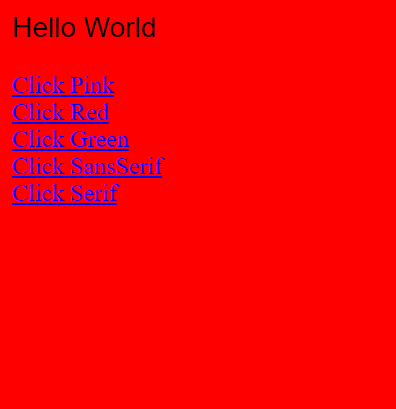
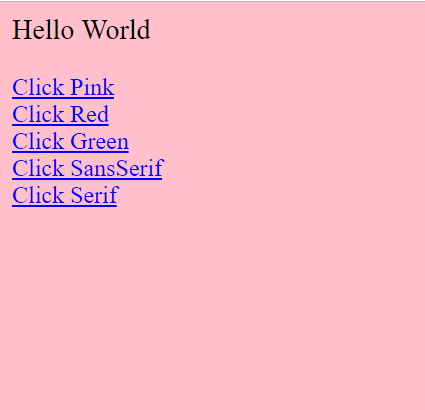
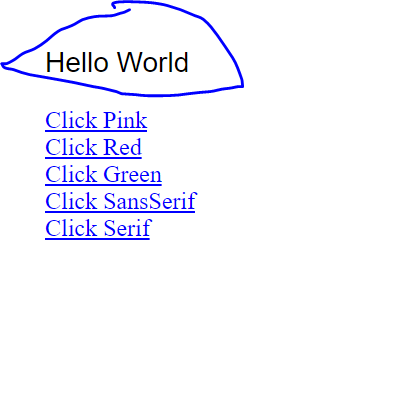
Add Answer to:
Create a webpage in which the user is allowed to select the
page's background and color...
In the DOM of the HTML document of the previous question (included again below), which of...
 In the DOM of the HTML document of the previous question (included again below), which of the following statements is FALSE? <!DOCTYPE html> <html> <head> <title>Question 4</title> <style> body em { font-size: 1.4em; color: yellow; } р { color: blue; font-size: 1.2em; font-family: arial, sans-serif; } #q7 { color: green; } </style> </head> <body> <p>The magician said <em id="q7">abracadabra</em>, and the exam disappeared...</p> </body> </html> O the <html> element has 2 children the grandfather of the <title> element is <html>...
1. Predict the Result.Draw and write a brief description of the Web page that will becreated...
1. Predict the Result.Draw and write a brief description of the Web page that will becreated with the following XHTML code:<!DOCTYPE html PUBLIC "-//W3C//DTD XHTML 1.0 Transitional//EN""http://www.w3.org/TR/xhtml1/DTD/xhtml1-transitional.dtd"><html xmlns="http://www.w3.org/1999/xhtml" lang="en" xml:lang="en"><head><title>CircleSoft Designs</title> <meta http-equiv="Content-Type" content="text/html; charset=utf-8" /><style type="text/css">body { background-color: #FFFFCC;color: #330000;font-family Arial,Helvetica,sans-serif; }.content { width: 750px; }</style></head>Apply Your Knowledge<body><div class="content"><h1>CircleSoft Design</h1><div><strong>CircleSoft Designs will </strong><ul><li>work with you to create a Web presence that fits yourcompany</li><li>listen to you and answer your questions</li><li>utilize the most appropriate technology for your sites:JavaScript, Java, PHP, databases,...
How do I get my HTML and CSS to look similar to this mockup? HTML: <!DOCTYPE...
 How do I get my HTML and CSS to look similar to this mockup?
HTML:
<!DOCTYPE html>
<html lang="en">
<head>
<meta charset="UTF-8">
<meta name="viewport"
content="width=device-width, initial-scale=1.0">
<title>nitro
site</title>
<link href="css/main.css"
rel="stylesheet"/>
</head>
<body>
<header class="header">
<section class="navlist">
<img
class="logo" src="assets/logobeans.png"/>
<h2
class="headertitle">nitro</h2>
<nav>
<ul>
<li><a
href="index.html"
target="_parent">About</a></li>
<li><a
href="/html/menu.html"
target="_blank">Menu</a></li>
<li><a
href="/html/menu.html">Shop Now</a></li>
</ul>
</nav>
</section>
<section
class="headerContainer">
<h1
class="heading">Nitro Coffee</h1>
<p
class="productDesc">Coffee is a brewed drink prepared from
roasted coffee beans, the seeds of berries from certain Coffea
species.</p>...
How do I get my HTML and CSS to look similar to this mockup?
HTML:
<!DOCTYPE html>
<html lang="en">
<head>
<meta charset="UTF-8">
<meta name="viewport"
content="width=device-width, initial-scale=1.0">
<title>nitro
site</title>
<link href="css/main.css"
rel="stylesheet"/>
</head>
<body>
<header class="header">
<section class="navlist">
<img
class="logo" src="assets/logobeans.png"/>
<h2
class="headertitle">nitro</h2>
<nav>
<ul>
<li><a
href="index.html"
target="_parent">About</a></li>
<li><a
href="/html/menu.html"
target="_blank">Menu</a></li>
<li><a
href="/html/menu.html">Shop Now</a></li>
</ul>
</nav>
</section>
<section
class="headerContainer">
<h1
class="heading">Nitro Coffee</h1>
<p
class="productDesc">Coffee is a brewed drink prepared from
roasted coffee beans, the seeds of berries from certain Coffea
species.</p>...
I have never created an external style before. This is the main Html that I am...
I have never created an external style before. This is the main Html that I am using. <!doctype html> <html lang="en"> <head> <!--Madison McCuiston--> <meta charset="utf-8"> <title>Amelie Boulangerie</title> <link href="style.css" rel="stylesheet" type="text/css"> </head> <body> <div id="wrapper"> <header>Amelie Boulangerie</header> <!-- change this to header tag --> <nav> <ul> <li><a href="index.html">Home</a></li> <li><a href="pastries.html">Pastries</a></li> <li><a href="events.html">Events</a></li> <li><a href="contact.html">Contact</a></li> </ul> </nav> <main> <H2>Experience the Difference</H2> <p><span class="bakery">Amelie Boulangerie</span> is the master of flavor combinations.The jewel-colored macarons come in the most tempting of flavors. Experience...
finished the web page ********************************************************* .js // I've added a span with the id "count" which...
finished the web page ********************************************************* .js // I've added a span with the id "count" which you can use to modify // the number of clicks on the page // you can do this by getting the value; incrementing it and then // modifying the value of the span function changeColor(){ const colors = ['red', 'green', 'blue', 'cyan', 'yellow', 'black', 'silver', 'tan']; // Choose a random float from [0, 1) the multiply by length to get random index // Math.floor()...
<!-- DOCTYPE declaration --> <!DOCTYPE html> <!-- HTML boilerplate code --> <html lang="en"> <!-- head...
<!-- DOCTYPE declaration --> <!DOCTYPE html> <!-- HTML boilerplate code --> <html lang="en"> <!-- head tag --> <head> <meta http-equiv="content-type" content="text/html; charset=UTF-8"> <title>Personal Webpage</title> </head> <!-- body tag --> <body> <style> .sidenav { height: 100%; width: 160px; position: fixed; z-index: 1; top: 0; left: 0; ...
The code below modifies the CSS style on button click. Give the output of the code...
The code below modifies the CSS style on button click. Give the output of the code and modify the code such that background color of title should also be modified . <!DOCTYPE html> <html lang="en"> <head> <title>JavaScript and HTML</title> <meta charset="utf-8"/> <style> h1 { color:blue; background-color:lightGreen; border:12px solid green; padding: 5px; border-radius: 15px; text-align: center; } p, h1 { } } </style> <script> function changeTitleCSSStyle() { var title = document.querySelector("#mainTitle"); title.style.color = 'black'; title.style.border = "5px dashed red"; } </script>...
Given the HTML5 code below, please add embedded css snippets in the code to configure it...
Given the HTML5 code below, please add embedded css snippets in the code to configure it with the requirements below: (4%) for the entire web page, set text color as black and background color as white (3%); for text in heading 1 tags, set text font-size as 200%, text font type face as Arial, or sans-serif. (3%) You can copy the code below, paste it in answer area, and then insert your code appropriately): <!DOCTYPE html> <html lang="en"> <head> <meta...
HTML css When i refresh the page, the picture doesnt move at all for #i1 i...
HTML css When i refresh the page, the picture doesnt move at all for #i1 i have width and height but the pictuers doesn't move please fix it. <!DOCTYPE html> <html> <head> <meta charset="UTF-8"> <title>Title of the document</title> <style> body{ background-color:#FFA07A; } #h1{ color:white; text-decoration:none; padding:30px; } #h2{ color:white; text-decoration:none; padding:30px; } #navbar1{ background-color:grey; text-align:center; font-size:35px; height:100%px; border:1px solid black; position:absolute; text-decoration:none; margin-left:300px; } #h3{ color:white; text-decoration:none; padding:30px; } #b1{ background-color:grey; font-size:30px; } i1{ width:10px; height:20px; } </style> <body> <div...
body { color: black; background-color:white; } p { color: orange; } Given the css rules above,...
body { color: black; background-color:white; } p { color: orange; } Given the css rules above, predict what the following HTML code in a web page will look like. <body> <p style="color:blue;background-color:yellow;"> Here is the first paragraph </p> </body> a. The text "Here is the first paragraph" will be black with white background color. b. The text "Here is the first paragraph" will be orange with white background color. c. The text "Here is the first paragraph" will be orange...
 In the DOM of the HTML document of the previous question (included again below), which of the following statements is FALSE? <!DOCTYPE html> <html> <head> <title>Question 4</title> <style> body em { font-size: 1.4em; color: yellow; } р { color: blue; font-size: 1.2em; font-family: arial, sans-serif; } #q7 { color: green; } </style> </head> <body> <p>The magician said <em id="q7">abracadabra</em>, and the exam disappeared...</p> </body> </html> O the <html> element has 2 children the grandfather of the <title> element is <html>...
 How do I get my HTML and CSS to look similar to this mockup?
HTML:
<!DOCTYPE html>
<html lang="en">
<head>
<meta charset="UTF-8">
<meta name="viewport"
content="width=device-width, initial-scale=1.0">
<title>nitro
site</title>
<link href="css/main.css"
rel="stylesheet"/>
</head>
<body>
<header class="header">
<section class="navlist">
<img
class="logo" src="assets/logobeans.png"/>
<h2
class="headertitle">nitro</h2>
<nav>
<ul>
<li><a
href="index.html"
target="_parent">About</a></li>
<li><a
href="/html/menu.html"
target="_blank">Menu</a></li>
<li><a
href="/html/menu.html">Shop Now</a></li>
</ul>
</nav>
</section>
<section
class="headerContainer">
<h1
class="heading">Nitro Coffee</h1>
<p
class="productDesc">Coffee is a brewed drink prepared from
roasted coffee beans, the seeds of berries from certain Coffea
species.</p>...
How do I get my HTML and CSS to look similar to this mockup?
HTML:
<!DOCTYPE html>
<html lang="en">
<head>
<meta charset="UTF-8">
<meta name="viewport"
content="width=device-width, initial-scale=1.0">
<title>nitro
site</title>
<link href="css/main.css"
rel="stylesheet"/>
</head>
<body>
<header class="header">
<section class="navlist">
<img
class="logo" src="assets/logobeans.png"/>
<h2
class="headertitle">nitro</h2>
<nav>
<ul>
<li><a
href="index.html"
target="_parent">About</a></li>
<li><a
href="/html/menu.html"
target="_blank">Menu</a></li>
<li><a
href="/html/menu.html">Shop Now</a></li>
</ul>
</nav>
</section>
<section
class="headerContainer">
<h1
class="heading">Nitro Coffee</h1>
<p
class="productDesc">Coffee is a brewed drink prepared from
roasted coffee beans, the seeds of berries from certain Coffea
species.</p>...
Most questions answered within 3 hours.
-
Where is the error in this code sequence?
String s1 = "Hello";
String s2 = "ello";...
asked 10 months ago -
Financial data for Joel de Paris, Inc., for last year
follow:
Joel de Paris, Inc.
Balance...
asked 10 months ago -
Consider this reaction:
Al2(SO4)3 (aq)+ BaCl3
(aq) Al2Cl6 (aq)- +
3BaSO4(s) . What is the...
asked 10 months ago -
Suppose that Savneet is considering increasing her
recent random sample from 20 car rentals to 40...
asked 10 months ago -
Trucks arrive at an unloading terminal at an average rate of 120
per hour.
Trucks arrive...
asked 10 months ago -
Why are methanol and ethanol completely soluble in water while
octanol is not very little soluble....
asked 10 months ago -
A facilities manager at a university reads in a research report
that the mean amount of...
asked 10 months ago -
When the CuSO4 is rehydrated by adding water to the anhydrous
compound, is this an endothermic...
asked 10 months ago -
A ray of sunlight is passing from diamond into crown glass; the
angle of incidence is...
asked 10 months ago -
A block of mass 0.249 kg is placed on top of a light, vertical
spring of...
asked 10 months ago -
how do the kidneys compensate in the presences of acidosis
a) trigger hyperventilate
b) reserve acid...
asked 10 months ago -
Question 501 pts
The rental rate of capital to the firm increases. Which of the
following...
asked 10 months ago