Add style rules in css file to accomplish the following: In the following order, use the...
Add style rules in css file to accomplish the following:
- In the following order, use the Calibri font, Arial font, or any available sans-serif font for the text.
- Set the font size for the body to 85% of the browser’s default font size.
- Set the width of the window to display the document to 950.
- Center the text in the header.
- Set the font size for the level-one heading in the header to two and one-half times the browser’s default font size.
- Set the font size for the level-two heading in the header and the level-one heading in the section to one and three-quarter times the browser’s default font size.
- Set the text to undecorated and one and one-quarter times the browser’s default font size when the user hovers over or focuses on the links in the table of contents.
- Set the width of figures to 300.
- Display figures on the right with the paragraph text flowing to the left of the figures.
- Set the margin for figures to the equivalent of one capital M on all sides.
- Set the padding for figures to the equivalent of one capital M on all sides.
- Display a one pixel black border to the left of figures.
- Bold the text of figure captions.
- Set the size of the font of figure captions to one and one-quarter times the browser’s default font size.
- Center the text of figure captions.
- Clear the float of the figures in the paragraphs that return the user to the table of contents.
- Center the text of the paragraphs that return the user to the table of contents.
- Display the footer in the center of the page.
- Display a one pixel black border around the table, all table data and table headers.
- Center the text in the table footer.
- Bold the text in the table footer.
Validate the CSS style rules.
Homework Answers
file.html:
<style type="text/css">
body{
font-family:"Calibri","Arial","sans-serif";/*rule-1*/
font-size:80%;/*rule-2*/
width:950;/*rule-3*/
}
header{
text-align: center;/*rule-4*/
}
header h1{
font-size:250%!important;/*rule-5*/
}
header h2, section h1{
font-size:175%!important;/*rule-6*/
}
table a:hover, table a:focus{
font-size:125%!important;/*rule-7*/
text-decoration:
none;/*rule-7*/
}
p img{
font-size:300px;/*rule-8*/
float:right;/*rule-9*/
margin: M;/*rule-10*/
padding: M;/*rule-11*/
border-left:1px solid
black;/*rule-12*/
}
p{
float:left;/*rule-9*/
}
figcaption{
font-weight:bold!important;/*rule-13*/
font-size:125%!important;/*rule-14*/
text-align:
center;/*rule-15*/
}
p img{
clear:both!important;/*rule-16*/
}
table td p{
text-align:
center;/*rule-17*/
}
footer{
text-align:
center;/*rule-18*/
}
table,th,td{
border:1px solid
black;/*rule-19*/
}
tfoot td{
text-align:
center;/*rule-20*/
font-weight: bold;/*rule-21*/
}
</style>
<body>
<header>
<h1>Heading-1</h1>
<h2>Heading-2</h2>
<section>
<h1>Heading in section</h1>
</section>
<table>
<tr>
<th>Table Column</th>
</tr>
<tr>
<td><a href="#">Table
Data</a></td>
</tr>
<tr>
<td>
<p>Description about
image Description about image<img src="image.png">
<figcaption>Caption for
figure</figcaption></p>
</td>
</tr>
<tfoot>
<tr>
<td>
<footer>This is footer</footer>
</td>
</tr>
</tfoot>
</table>
</header>
</body>
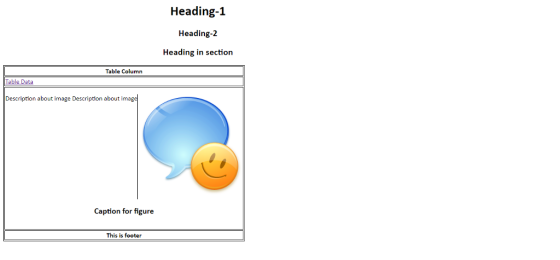
Sample Image:

Output:
Add Answer to:
Add style rules in css
file to accomplish the following:
In the following order, use the...
Does my css style sheet look okay? /* Author: Your Name --> Natasha Strange /*...
 Does my css style sheet look okay?
/* Author: Your Name -->
Natasha Strange
/* Date: Today's
Date --> September 22, 2019
/* Description: Lab Number --> Lab04
/*doctype css*/
@import url(fonts/chuckfive.css);
@import url(fonts/merriweather.css);
body { background-color: rgb(199,201,191);
}
div { border: 1px solid black;
padding: 100px 100px 100px
100px;
background-color: gray;
}
nav { text-align: center;
color: rgb( 7,20,138);
}
header,
footer { background-color: rgb(199,201,199);
color:...
Does my css style sheet look okay?
/* Author: Your Name -->
Natasha Strange
/* Date: Today's
Date --> September 22, 2019
/* Description: Lab Number --> Lab04
/*doctype css*/
@import url(fonts/chuckfive.css);
@import url(fonts/merriweather.css);
body { background-color: rgb(199,201,191);
}
div { border: 1px solid black;
padding: 100px 100px 100px
100px;
background-color: gray;
}
nav { text-align: center;
color: rgb( 7,20,138);
}
header,
footer { background-color: rgb(199,201,199);
color:...
Could you create a website based on html and css? Details in the below: Note: You...
 Could you create a website based on html and css? Details in the
below: Note: You can put link that I can download
that folder
Based on Project 2-1, do the necessary changes to have a webpage
structure of a header, main, and footer sections. Then:
•Set the width of the page to 700px
•Use the font family starting with Verdana
•Move one of the images from your Project 2-1 to the header.
•Set the width of the header image...
Could you create a website based on html and css? Details in the
below: Note: You can put link that I can download
that folder
Based on Project 2-1, do the necessary changes to have a webpage
structure of a header, main, and footer sections. Then:
•Set the width of the page to 700px
•Use the font family starting with Verdana
•Move one of the images from your Project 2-1 to the header.
•Set the width of the header image...
How do I get my HTML and CSS to look similar to this mockup? HTML: <!DOCTYPE...
 How do I get my HTML and CSS to look similar to this mockup?
HTML:
<!DOCTYPE html>
<html lang="en">
<head>
<meta charset="UTF-8">
<meta name="viewport"
content="width=device-width, initial-scale=1.0">
<title>nitro
site</title>
<link href="css/main.css"
rel="stylesheet"/>
</head>
<body>
<header class="header">
<section class="navlist">
<img
class="logo" src="assets/logobeans.png"/>
<h2
class="headertitle">nitro</h2>
<nav>
<ul>
<li><a
href="index.html"
target="_parent">About</a></li>
<li><a
href="/html/menu.html"
target="_blank">Menu</a></li>
<li><a
href="/html/menu.html">Shop Now</a></li>
</ul>
</nav>
</section>
<section
class="headerContainer">
<h1
class="heading">Nitro Coffee</h1>
<p
class="productDesc">Coffee is a brewed drink prepared from
roasted coffee beans, the seeds of berries from certain Coffea
species.</p>...
How do I get my HTML and CSS to look similar to this mockup?
HTML:
<!DOCTYPE html>
<html lang="en">
<head>
<meta charset="UTF-8">
<meta name="viewport"
content="width=device-width, initial-scale=1.0">
<title>nitro
site</title>
<link href="css/main.css"
rel="stylesheet"/>
</head>
<body>
<header class="header">
<section class="navlist">
<img
class="logo" src="assets/logobeans.png"/>
<h2
class="headertitle">nitro</h2>
<nav>
<ul>
<li><a
href="index.html"
target="_parent">About</a></li>
<li><a
href="/html/menu.html"
target="_blank">Menu</a></li>
<li><a
href="/html/menu.html">Shop Now</a></li>
</ul>
</nav>
</section>
<section
class="headerContainer">
<h1
class="heading">Nitro Coffee</h1>
<p
class="productDesc">Coffee is a brewed drink prepared from
roasted coffee beans, the seeds of berries from certain Coffea
species.</p>...
MyMenuFrame.java, MyMenuFrameTest.java, a. The title of the frame is “MyNotepad”. b. Create and add border layout....
MyMenuFrame.java, MyMenuFrameTest.java, a. The title of the frame is “MyNotepad”. b. Create and add border layout. c. Create a text area to display contents. Add the text area to the center of the border layout. d. Create a menu bar. e. Create a file menu. Set mnemonic for file menu. It is “F”. File menu includes three menu items. f. Add a separator between each menu item in the file menu. i. Open 1. Add a short cut for...
I have to make a pixel art maker using javascript. HTML and CSS were already provided....
I have to make a pixel art maker using javascript. HTML and CSS were already provided. I only had to do the JavaScript part. Every time I run the HTML folder nothing happens when I choose the width, height, and color. This is my code: (ONLY JS IS SUPPOSED TO BE FIXED). JS: // Select color input // Select size input const colorPicker = document.getElementsById('colorPicker'); const rowNum = document.getElementsById('inputHeight'); const cellNum = document.getElementById('inputWidth'); const pixelCanvas = document.getElementById('pixelCanvas'); const form =...
You will use your text editor to create a table and apply table styles. First, you...
You will use your text editor to create a table and apply table styles. First, you insert a table element. Next, you add a table caption, table rows, table headers, and table data. Then, you create style rules to format the table. Work with the apply08.html file and the applystyles08.css file. You will also use professional web development practices to indent, space, comment, and validate your code. 3. In the apply08.html file, add a table element within the main element....
Apply the following styles: Set the width of the body element to 1000 pixels. Set the...
 Apply the following styles:
Set the width of the body element to 1000 pixels.
Set the width of the navigation element to 100%.
Adjust the css and html to have your navigation list display
horizontally (think floats and widths).
Center the navigation element by setting the margin to auto.
Clear the float for the section element.
Set the width of all articles to 75%.
Add a class to the articles that contains your favorite
websites.
Set the width of that...
Apply the following styles:
Set the width of the body element to 1000 pixels.
Set the width of the navigation element to 100%.
Adjust the css and html to have your navigation list display
horizontally (think floats and widths).
Center the navigation element by setting the margin to auto.
Clear the float for the section element.
Set the width of all articles to 75%.
Add a class to the articles that contains your favorite
websites.
Set the width of that...
<!DOCTYPE html> <html> <head> <title>Products</title> <style> .heading { text-align: center; font-size: 40px; } #menu { text-align:...
<!DOCTYPE html> <html> <head> <title>Products</title> <style> .heading { text-align: center; font-size: 40px; } #menu { text-align: center; } #menu li { display: inline; font-size: 26px; margin-left: 20px; } .container{ overflow: hidden; margin: 30px; } img { float: left; width: 40vh; height: 40vh; margin-left: 10%; } table { float: right; margin-right: 10%; } table, th, td { border: 1px solid black; border-collapse: collapse; } th, td { font-size: 26px; padding: 10px; text-align: left; } a { color: black; } a:visted {...
As part of this assignment we are using the base Gallery HTML and writing JavaScript code...
As part of this assignment we are using the base Gallery HTML and writing JavaScript code that will: 1) preload the images provided to us, 2) Create rollover functionality for each of the thumbnails in your image gallery 3) Use appropriate images found in the images folder. 4) Write developer comments to describe the variables being declared and explain the functions and logical blocks of JavaScript code pertaining to the gallery. I know it has to be an external JS...
I have the code buts its not working as this below instruction can anyone help Use...
I have the code buts its not working as this below instruction can anyone help Use the requirements from the pizza part of Assignment 6 and do the following using CSS and an internal style sheet: 1. Your Javascript function should be in an external file (don’t forget to move it up to studentweb too) 2. Put a red border of 300px in width around the form 3. There should be three Div sections: header, main_body, and footer. 4. Center the name of your...
 Could you create a website based on html and css? Details in the
below: Note: You can put link that I can download
that folder
Based on Project 2-1, do the necessary changes to have a webpage
structure of a header, main, and footer sections. Then:
•Set the width of the page to 700px
•Use the font family starting with Verdana
•Move one of the images from your Project 2-1 to the header.
•Set the width of the header image...
Could you create a website based on html and css? Details in the
below: Note: You can put link that I can download
that folder
Based on Project 2-1, do the necessary changes to have a webpage
structure of a header, main, and footer sections. Then:
•Set the width of the page to 700px
•Use the font family starting with Verdana
•Move one of the images from your Project 2-1 to the header.
•Set the width of the header image...
 How do I get my HTML and CSS to look similar to this mockup?
HTML:
<!DOCTYPE html>
<html lang="en">
<head>
<meta charset="UTF-8">
<meta name="viewport"
content="width=device-width, initial-scale=1.0">
<title>nitro
site</title>
<link href="css/main.css"
rel="stylesheet"/>
</head>
<body>
<header class="header">
<section class="navlist">
<img
class="logo" src="assets/logobeans.png"/>
<h2
class="headertitle">nitro</h2>
<nav>
<ul>
<li><a
href="index.html"
target="_parent">About</a></li>
<li><a
href="/html/menu.html"
target="_blank">Menu</a></li>
<li><a
href="/html/menu.html">Shop Now</a></li>
</ul>
</nav>
</section>
<section
class="headerContainer">
<h1
class="heading">Nitro Coffee</h1>
<p
class="productDesc">Coffee is a brewed drink prepared from
roasted coffee beans, the seeds of berries from certain Coffea
species.</p>...
How do I get my HTML and CSS to look similar to this mockup?
HTML:
<!DOCTYPE html>
<html lang="en">
<head>
<meta charset="UTF-8">
<meta name="viewport"
content="width=device-width, initial-scale=1.0">
<title>nitro
site</title>
<link href="css/main.css"
rel="stylesheet"/>
</head>
<body>
<header class="header">
<section class="navlist">
<img
class="logo" src="assets/logobeans.png"/>
<h2
class="headertitle">nitro</h2>
<nav>
<ul>
<li><a
href="index.html"
target="_parent">About</a></li>
<li><a
href="/html/menu.html"
target="_blank">Menu</a></li>
<li><a
href="/html/menu.html">Shop Now</a></li>
</ul>
</nav>
</section>
<section
class="headerContainer">
<h1
class="heading">Nitro Coffee</h1>
<p
class="productDesc">Coffee is a brewed drink prepared from
roasted coffee beans, the seeds of berries from certain Coffea
species.</p>...
 Apply the following styles:
Set the width of the body element to 1000 pixels.
Set the width of the navigation element to 100%.
Adjust the css and html to have your navigation list display
horizontally (think floats and widths).
Center the navigation element by setting the margin to auto.
Clear the float for the section element.
Set the width of all articles to 75%.
Add a class to the articles that contains your favorite
websites.
Set the width of that...
Apply the following styles:
Set the width of the body element to 1000 pixels.
Set the width of the navigation element to 100%.
Adjust the css and html to have your navigation list display
horizontally (think floats and widths).
Center the navigation element by setting the margin to auto.
Clear the float for the section element.
Set the width of all articles to 75%.
Add a class to the articles that contains your favorite
websites.
Set the width of that...
Most questions answered within 3 hours.
-
Where is the error in this code sequence?
String s1 = "Hello";
String s2 = "ello";...
asked 10 months ago -
Financial data for Joel de Paris, Inc., for last year
follow:
Joel de Paris, Inc.
Balance...
asked 10 months ago -
Consider this reaction:
Al2(SO4)3 (aq)+ BaCl3
(aq) Al2Cl6 (aq)- +
3BaSO4(s) . What is the...
asked 10 months ago -
Suppose that Savneet is considering increasing her
recent random sample from 20 car rentals to 40...
asked 10 months ago -
Trucks arrive at an unloading terminal at an average rate of 120
per hour.
Trucks arrive...
asked 10 months ago -
Why are methanol and ethanol completely soluble in water while
octanol is not very little soluble....
asked 10 months ago -
A facilities manager at a university reads in a research report
that the mean amount of...
asked 10 months ago -
When the CuSO4 is rehydrated by adding water to the anhydrous
compound, is this an endothermic...
asked 10 months ago -
A ray of sunlight is passing from diamond into crown glass; the
angle of incidence is...
asked 10 months ago -
A block of mass 0.249 kg is placed on top of a light, vertical
spring of...
asked 10 months ago -
how do the kidneys compensate in the presences of acidosis
a) trigger hyperventilate
b) reserve acid...
asked 10 months ago -
Question 501 pts
The rental rate of capital to the firm increases. Which of the
following...
asked 10 months ago