Write a Visual C# program that will input the user's name and a message. The user...
Write a Visual C# program that will input the user's name and a
message. The user will be able to choose from an option of
formatting tools to change the way the message (and only the
message) will look. The user can choose from bold, underline,
italic, along with several different color options. All changes the
user selects will be displayed in the message textbox.
Once the user selects the Finish button, the two pieces of
information entered by the user will be concatenated and added to
the "previous messages" listbox or a textbox (you decide). The
previous listbox/textbox will display all the concatenated messages
entered by users along with their formatting changes.
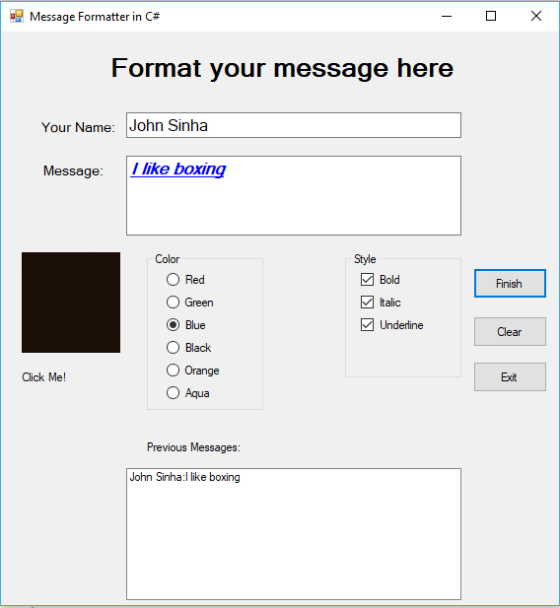
For example: if the user enters "Suzie Student" as the name and the
message "I like programming!" and changes the font color to Orange
with Bold and Underline selected, the message should look like
this: "I like programming!" When the
user clicks the Finish button, the previous listbox/textbox should
display:
Suzie Student: I like programming!
It is an error if the user does not enter a name and/or a message
and clicks the Finish button. You may want to consider disabling
the Finish button until content is typed in both textboxes.
If the user enters a name and message and does not choose any color
or formatting options and presses the Finish button, the name and
message should be concatenated as is.
When the user selects the Clear button, the previous user's name
and message will be cleared from their respective textboxes, but
not the listbox. The next user is now ready to enter their name and
message.
Find a logo image to add to the form. Every time the user clicks on
the logo image, toggle the image to either large and small versions
of the image OR to a different image of a similar nature.
Homework Answers
Application Name :MessageFormatterUsingCsharp
Form Name :Form1.cs[Design]
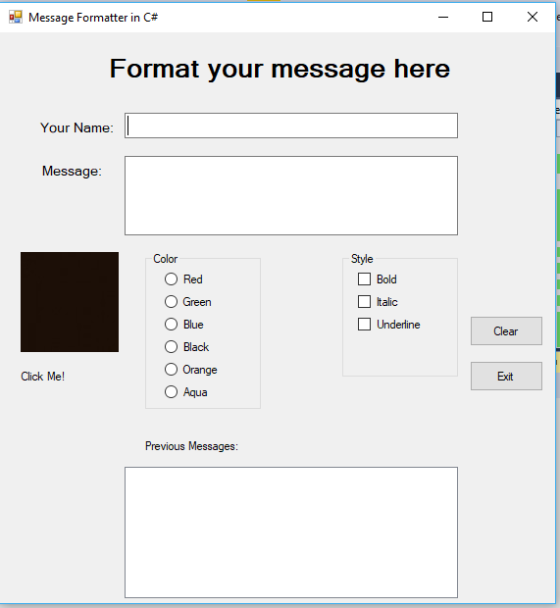
Code :Form1.cs
//namespaces required for the application
using System;
using System.Drawing;
using System.Windows.Forms;
//application namespace created by user
namespace MessageFormatterUsingCsharp
{
public partial class Form1 : Form
{
public Form1()
{
InitializeComponent();
}
Color c = new Color();
//this event will be called when application loads this form that
is form load event
private void Form1_Load(object sender, EventArgs e)
{
buttonFinish.Visible = false;//hide button when first form
load
}
// radio button for red color is selected
private void radioButtonRed_CheckedChanged(object sender, EventArgs
e)
{
textboxMessage.ForeColor = Color.Red;//set color to red
}
//radio button for green color is selected
private void radioButtonGreen_CheckedChanged(object sender,
EventArgs e)
{
textboxMessage.ForeColor = Color.Green;//set color to green
}
//radio button for blue color is selected
private void radioButtonBlue_CheckedChanged(object sender,
EventArgs e)
{
textboxMessage.ForeColor = Color.Blue;//set color to blue
}
//radio button for black color is selected
private void radioButtonBlack_CheckedChanged(object sender,
EventArgs e)
{
textboxMessage.ForeColor = Color.Black;//set color to black
}
//radio button for orange color is selected
private void radioButtonOrange_CheckedChanged(object sender,
EventArgs e)
{
textboxMessage.ForeColor = Color.Orange;//set color to orange
}
//radio button for aqua color is selected
private void radioButtonAqua_CheckedChanged(object sender,
EventArgs e)
{
textboxMessage.ForeColor = Color.Aqua;//set color to aqua
}
//checkbox bold is selected
private void checkBoxBold_CheckedChanged(object sender, EventArgs
e)
{
textboxMessage.Font = new Font(textboxMessage.Font,
FontStyle.Bold);//font style bold
}
//checkbox italic is selected
private void checkBoxItalic_CheckedChanged(object sender, EventArgs
e)
{
//font styleitalics
textboxMessage.Font = new Font(textboxMessage.Font,
textboxMessage.Font.Style | FontStyle.Italic);
}
//checkbox underline is selected
private void checkBoxUnderline_CheckedChanged(object sender,
EventArgs e)
{
//underline
textboxMessage.Font = new Font(textboxMessage.Font,
textboxMessage.Font.Style | FontStyle.Underline);
}
//finish button event
private void buttonFinish_Click(object sender, EventArgs e)
{
//add name and message in the list box
lPreviousMessages.Items.Add(textboxName.Text + ":" +
textboxMessage.Text);
}
// picture box is click event
private void pictureBoxLogo_Click(object sender, EventArgs e)
{
//height of the image
if (pictureBoxLogo.Height != 100)
{
pictureBoxLogo.Height = 100;//set height
}
else
{
pictureBoxLogo.Height = 60;//set height
}
}
//event when mouse leave the message textbox
private void textBoxMessage_Leave(object sender, EventArgs e)
{
if (textboxName.Text != "" && textboxMessage.Text !=
"")
{
//if both name and message is entered then show finish button
buttonFinish.Visible = true;
}
}
//clear button click
private void buttonClear_Click(object sender, EventArgs e)
{
//clear textboxes
textboxMessage.Text = "";
textboxName.Text = "";
}
//Exit button click
private void buttonExit_Click(object sender, EventArgs e)
{
this.Close();//close the form
}
}
}
=============================
Screen 1:
Add Answer to:
Write a Visual C# program that will input the user's name and a
message. The user...
Project 2 Description Create a Visual C# project that when an employee's biweekly sales amount is...
Project 2 Description Create a Visual C# project that when an employee's biweekly sales amount is entered and the Calculate button is pressed, the gross pay, deductions, and net pay will be displayed. Each employee will receive a base pay of $1200 plus a sales commission of 8% of sales. Once the net pay has been calculated, display the budget amount for each category listed below based on the percentages given. base pay = $1200; use a named...
In Python Calculator Write a program that allows the user to enter two numbers and then...
In Python Calculator Write a program that allows the user to enter two numbers and then adds, subtracts, divides or multiplies them when the user clicks on the appropriate button. Make sure you have a Quit button. Modification and requirements”: _____Window title should be your name Calculate self.main_window.title("?????") _____Labels - change the attributes of the color, font, size and bold the answerExample self.label = tkinter.Label(self.main_window, \ text='?????????!', font=(" should Arial", 12, "bold"), fg="blue", bg="pink")Tip: choose a color from the...
JAVA CODING Must be compilable, thanks The purpose is to provide an exercise in event-driven programming...
 JAVA CODING
Must be compilable, thanks
The purpose is to provide an exercise in event-driven
programming and image handling using JavaFX. Create an application
that responds to the user clicking command buttons. Initially, it
will display one of two graphic images and, based upon the button
clicked by the user, will switch the image displayed. If the user
clicks the mouse button to display the same image as is currently
displayed, the image is not changed, but a message at...
JAVA CODING
Must be compilable, thanks
The purpose is to provide an exercise in event-driven
programming and image handling using JavaFX. Create an application
that responds to the user clicking command buttons. Initially, it
will display one of two graphic images and, based upon the button
clicked by the user, will switch the image displayed. If the user
clicks the mouse button to display the same image as is currently
displayed, the image is not changed, but a message at...
Write a C# Windows Form program that asks the user to enter a name (in a TextBox) and displays the following message (in...
Write a C# Windows Form program that asks the user to enter a name (in a TextBox) and displays the following message (in a Label): Hello, yourName! https://youtu.be/6nNiMeWK37w can be helpful... (unfortunately the sound did not record) You will use Visual studio to complete this task. The final deliverable to be uploaded to the assignment dropbox is the entire visual studio solution folder that has been compressed or zipped.
Please Read it all and carefully In visual basic(vba)do the following program Summary INGE Industry, Inc....
Please Read it all and carefully In visual basic(vba)do the following program Summary INGE Industry, Inc. needs a program in which the date and temperature in Celsius degrees of an industry laboratory are recorded and stored in a sequential file. In addition, you can see the recorded data and convert the temperatures in the following units: Fahrenheit, Kelvin and Rankine. In addition, they want to see a linear graph that reflects how the temperature has fluctuated day by day, for...
The programming language is C# we are using wpf forms. Hello, I would like to get...
 The programming language is C# we are using wpf
forms.
Hello, I would like to get my clear button to work. So when
clear is click everything is clear not only the total, tax or
subtotal but also the combox and the data grid. For the Delete
button if the user selects a specific item it will be deleted and
for the receipt button, it should create a pdf that contains the
Name, Price, quantity, tax, total and subtotal. it...
The programming language is C# we are using wpf
forms.
Hello, I would like to get my clear button to work. So when
clear is click everything is clear not only the total, tax or
subtotal but also the combox and the data grid. For the Delete
button if the user selects a specific item it will be deleted and
for the receipt button, it should create a pdf that contains the
Name, Price, quantity, tax, total and subtotal. it...
C++ programming For this assignment, write a program that will act as a geometry calculator. The...
C++ programming For this assignment, write a program that will act as a geometry calculator. The program will be menu-driven and should continue to execute as long as the user wants to continue. Basic Program Logic The program should start by displaying a menu similar to the following: Geometry Calculator 1. Calculate the area of a circle 2. Calculate the area of a triangle 3. Quit Enter your choice(1-3): and get the user's choice as an integer. After the choice...
need this in #c . You will now add server side validation code to the frmPersonnel...
 need this in #c
. You will now add server side validation code to the
frmPersonnel page. Currently, when the Submit button is pressed,
the frmPersonnelVerified page is displayed. This is because the
frmPersonnelVerified page is set as the Submit button's PostBackUrl
property. Instead of having the page go directly to the
frmPersonnelVerified page when the Submit button is pressed, we
want to do some server side validation. If any of the validation
rules fail, we will redisplay the frmPersonnel...
need this in #c
. You will now add server side validation code to the
frmPersonnel page. Currently, when the Submit button is pressed,
the frmPersonnelVerified page is displayed. This is because the
frmPersonnelVerified page is set as the Submit button's PostBackUrl
property. Instead of having the page go directly to the
frmPersonnelVerified page when the Submit button is pressed, we
want to do some server side validation. If any of the validation
rules fail, we will redisplay the frmPersonnel...
programming language: C++ *Include Line Documenatations* Overview For this assignment, write a program that will simulate...
programming language: C++ *Include Line Documenatations* Overview For this assignment, write a program that will simulate a game of Roulette. Roulette is a casino game of chance where a player may choose to place bets on either a single number, the colors red or black, or whether a number is even or odd. (Note: bets may also be placed on a range of numbers, but we will not cover that situation in this program.) A winning number and color is...
could you please help me with this problem, also I need a little text so I...
 could you please help me with this problem, also I
need a little text so I can understand how you solved the
problem?
import java.io.File; import java.util.Scanner; /** *
This program lists the files in a directory specified by * the
user. The user is asked to type in a directory name. * If the name
entered by the user is not a directory, a * message is printed and
the program ends. */ public class DirectoryList { public static...
could you please help me with this problem, also I
need a little text so I can understand how you solved the
problem?
import java.io.File; import java.util.Scanner; /** *
This program lists the files in a directory specified by * the
user. The user is asked to type in a directory name. * If the name
entered by the user is not a directory, a * message is printed and
the program ends. */ public class DirectoryList { public static...
 JAVA CODING
Must be compilable, thanks
The purpose is to provide an exercise in event-driven
programming and image handling using JavaFX. Create an application
that responds to the user clicking command buttons. Initially, it
will display one of two graphic images and, based upon the button
clicked by the user, will switch the image displayed. If the user
clicks the mouse button to display the same image as is currently
displayed, the image is not changed, but a message at...
JAVA CODING
Must be compilable, thanks
The purpose is to provide an exercise in event-driven
programming and image handling using JavaFX. Create an application
that responds to the user clicking command buttons. Initially, it
will display one of two graphic images and, based upon the button
clicked by the user, will switch the image displayed. If the user
clicks the mouse button to display the same image as is currently
displayed, the image is not changed, but a message at...
 The programming language is C# we are using wpf
forms.
Hello, I would like to get my clear button to work. So when
clear is click everything is clear not only the total, tax or
subtotal but also the combox and the data grid. For the Delete
button if the user selects a specific item it will be deleted and
for the receipt button, it should create a pdf that contains the
Name, Price, quantity, tax, total and subtotal. it...
The programming language is C# we are using wpf
forms.
Hello, I would like to get my clear button to work. So when
clear is click everything is clear not only the total, tax or
subtotal but also the combox and the data grid. For the Delete
button if the user selects a specific item it will be deleted and
for the receipt button, it should create a pdf that contains the
Name, Price, quantity, tax, total and subtotal. it...
 need this in #c
. You will now add server side validation code to the
frmPersonnel page. Currently, when the Submit button is pressed,
the frmPersonnelVerified page is displayed. This is because the
frmPersonnelVerified page is set as the Submit button's PostBackUrl
property. Instead of having the page go directly to the
frmPersonnelVerified page when the Submit button is pressed, we
want to do some server side validation. If any of the validation
rules fail, we will redisplay the frmPersonnel...
need this in #c
. You will now add server side validation code to the
frmPersonnel page. Currently, when the Submit button is pressed,
the frmPersonnelVerified page is displayed. This is because the
frmPersonnelVerified page is set as the Submit button's PostBackUrl
property. Instead of having the page go directly to the
frmPersonnelVerified page when the Submit button is pressed, we
want to do some server side validation. If any of the validation
rules fail, we will redisplay the frmPersonnel...
 could you please help me with this problem, also I
need a little text so I can understand how you solved the
problem?
import java.io.File; import java.util.Scanner; /** *
This program lists the files in a directory specified by * the
user. The user is asked to type in a directory name. * If the name
entered by the user is not a directory, a * message is printed and
the program ends. */ public class DirectoryList { public static...
could you please help me with this problem, also I
need a little text so I can understand how you solved the
problem?
import java.io.File; import java.util.Scanner; /** *
This program lists the files in a directory specified by * the
user. The user is asked to type in a directory name. * If the name
entered by the user is not a directory, a * message is printed and
the program ends. */ public class DirectoryList { public static...
Most questions answered within 3 hours.
-
Where is the error in this code sequence?
String s1 = "Hello";
String s2 = "ello";...
asked 11 months ago -
Financial data for Joel de Paris, Inc., for last year
follow:
Joel de Paris, Inc.
Balance...
asked 11 months ago -
Consider this reaction:
Al2(SO4)3 (aq)+ BaCl3
(aq) Al2Cl6 (aq)- +
3BaSO4(s) . What is the...
asked 11 months ago -
Suppose that Savneet is considering increasing her
recent random sample from 20 car rentals to 40...
asked 11 months ago -
Trucks arrive at an unloading terminal at an average rate of 120
per hour.
Trucks arrive...
asked 11 months ago -
Why are methanol and ethanol completely soluble in water while
octanol is not very little soluble....
asked 11 months ago -
A facilities manager at a university reads in a research report
that the mean amount of...
asked 11 months ago -
When the CuSO4 is rehydrated by adding water to the anhydrous
compound, is this an endothermic...
asked 11 months ago -
A ray of sunlight is passing from diamond into crown glass; the
angle of incidence is...
asked 11 months ago -
A block of mass 0.249 kg is placed on top of a light, vertical
spring of...
asked 11 months ago -
how do the kidneys compensate in the presences of acidosis
a) trigger hyperventilate
b) reserve acid...
asked 11 months ago -
Question 501 pts
The rental rate of capital to the firm increases. Which of the
following...
asked 11 months ago