1. Run script to create a file named Ch7/hands-on7 2. Run the find command searching all...
1. Run script to create a file named Ch7/hands-on7
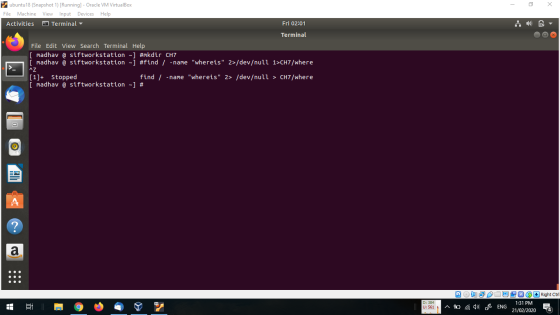
2. Run the find command searching all directories beginning with root and search for a file named whereis. Send standard error to /dev/null and the standard output to Ch7/where. As soon as you submit the command, press Ctrl-z.
3. Note the number that appears on the screen [job id] that appears on the screen.
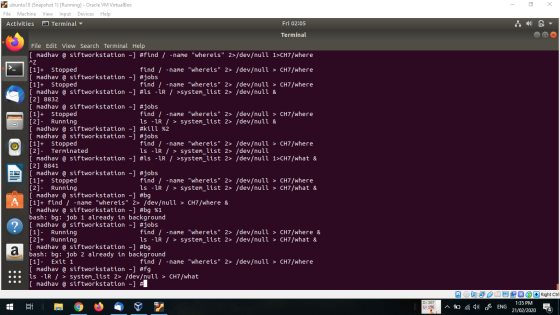
4. Type: jobs
5. Run the command: ls –lR / >system_list 2> /dev/null &
6. Type: jobs
7. Type: kill %[job id o f the ls c ommand]
8. Submit the same job you submitted in step 2 with the & following the command line. Change the standard output to Ch7/what
9. Type: jobs
10. Enter the foreground command, fg, followed by the job id of the job you suspended.
11. Send the job to the background by thing: bg %[job id]
12. Type: jobs
13. Bring all background jobs to the foreground and allow them to complete.
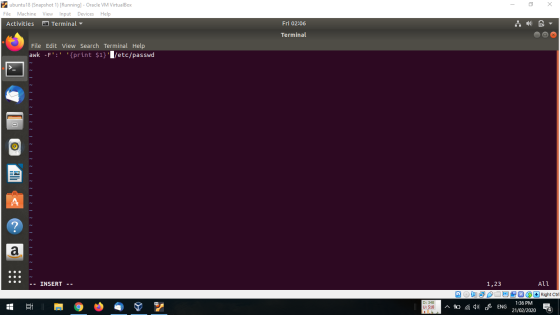
14. If you don’t have one, create a file users.sh that contains a command to list all users on the sy stem and save the output to Ch7/users. (hint: using vi, create users.sh with following command: awk –F’:’ ‘{print $1}’ /etc/passwd)
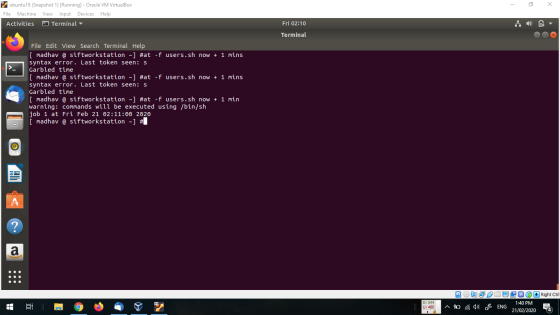
15. Use the at command to run the file in the background 1 minute from now.
16. Use the batch c ommand to execute the file in the background 2 minutes from now
Homework Answers
Step 2 to 13
**************
Step 14
**********
Step 15
**********
if you have any doubt then please ask me without any hesitation in
the comment section below , if you like my answer then please
thumbs up for the answer , before giving thumbs down please discuss
the question it may possible that we may understand the question
different way and we can edit and change the answers if you argue,
thanks :)
Add Answer to:
1. Run script to create a file named Ch7/hands-on7
2. Run the find command searching all...
WITH SCREENSHOTS PLEASE Linux+ Guide to Linux Certification Project 9-3 In this hands-on project, you run...
WITH SCREENSHOTS PLEASE Linux+ Guide to Linux Certification Project 9-3 In this hands-on project, you run processes in the background, kill them using the kill and killall commands, and change their priorities using the nice and renice commands. 1. On your Fedora Linux virtual machine, switch to a command-line terminal (tty2) by pressing Ctrl+Alt+F2 and log in to the terminal using the user name of root and the password of LNXrocks!. 2. At the command prompt, type sleep 6000 and...
QUESTION 1 From YOUR home directory, execute a find command string that will locate the file...
 QUESTION 1 From YOUR home directory, execute a find command string that will locate the file called resolv.conf. Include the -exec flag in the find command to cat the file to the screen. Begin your find search from the letc directory Select the correct find command string below that will accomplish this. find /etc-name 'resolv.conf -cat D find /etc-name 'resolv.conf -exec cat 0 find. -name 'resolv.conf -exec cat 0\ find /-name 'resolv.conf' -exec cat 0 QUESTION 2 What find command...
What are the exact commands I should use to complete the task? 1. Run command (date;...
What are the exact commands I should use to complete the task? 1. Run command (date; sleep 45; echo “Done.”; date) > date.out in the foreground (i.e. without &) 2. Suspend it with Ctrl-Z. Pay attention to the number in the [], it will become handy later. This number is the job number of the command that has been suspended. 3. Run command top to display only processes started by you (i.e. associated with your userid). Write down the process...
LINUX 140U Create a file named script1.sh that contains a bash script that: Accepts NO command...
LINUX 140U Create a file named script1.sh that contains a bash script that: Accepts NO command line arguments and does NOT use the read command. I will give you no credit if your bash script includes a read command. Also, you need to have at least one for..in loop in your code even if there may be other ways to do this problem. The script will go through a list of entries in the current directory (do not process subdirectories):...
1. Write the command to set the following permissions on a script file with the following...
1. Write the command to set the following permissions on a script file with the following name; myscript.sh Owner: full access; read, write and execute Group: read and execute Other: no access 2. Create a new file with the name "myfirstscript.sh". Write a new script that performs the following tasks in sequence; Display the usernames of currently logged in users; sorted from a-z HINT: You will need to filter the output of the whocommand Display a list of usernames who...
1. Explain the difference between the /etc/profile and the ~/.bash_profile file. Which one is executed first?...
1. Explain the difference between the /etc/profile and the ~/.bash_profile file. Which one is executed first? 2. Edit your .bash_profile file as follows: 1. Welcome the user 2. Add your home directory to the path if it is not there 3. Set erase to the Backspace key using stty. 4. Type source .bash_profile. What is the function of the source command? 3. What is the default primary prompt? 1. Change the prompt to include the time of day and your...
In this exercise, you will create a script called file_ops.sh that uses the various file operators...
In this exercise, you will create a script called file_ops.sh that uses the various file operators The file_ops.sh script will Use one command line argument Use four IF THEN statement to compare the first command line argument Determine which file operators to use that produces the following output when the script run with the arguments shown WARNING: In the IF THEN statements, to avoid syntax error messages, there must be a space before and after each bracket and also between...
1) Copy bother10.sh from /home/ghoffman/course_files/it244_files to your hw6 directory. Run this program in the background redirecting...
1) Copy bother10.sh from /home/ghoffman/course_files/it244_files to your hw6 directory. Run this program in the background redirecting output to /dev/null. Be sure you copy and run bother10.sh, NOT bother.sh. 2) Run a command that shows the job number of the process running bother10.sh. 3) Run a command that shows the process ID of the process running bother10.sh. 4) Copy the script make_foo.sh from ~ghoffman/course_files/it244_files to your current directory. Run this script. Using touch, create the file foo.txt. Perform a long listing...
Objective: Create programs that are run independently and can use simple IPC using FIFOs/named pipes to...
Objective: Create programs that are run independently and can use simple IPC using FIFOs/named pipes to pass information back and forth in a client/server fashion. The information/request from the client will look like simple semaphore system calls and will include information for the server to be able to identify which client requested it and what request it is and its associated parameters. This assignment requires the analysis, implementation, testing and documentation of two C program that use C on the...
 QUESTION 1 From YOUR home directory, execute a find command string that will locate the file called resolv.conf. Include the -exec flag in the find command to cat the file to the screen. Begin your find search from the letc directory Select the correct find command string below that will accomplish this. find /etc-name 'resolv.conf -cat D find /etc-name 'resolv.conf -exec cat 0 find. -name 'resolv.conf -exec cat 0\ find /-name 'resolv.conf' -exec cat 0 QUESTION 2 What find command...
Most questions answered within 3 hours.
-
Where is the error in this code sequence?
String s1 = "Hello";
String s2 = "ello";...
asked 10 months ago -
Financial data for Joel de Paris, Inc., for last year
follow:
Joel de Paris, Inc.
Balance...
asked 10 months ago -
Consider this reaction:
Al2(SO4)3 (aq)+ BaCl3
(aq) Al2Cl6 (aq)- +
3BaSO4(s) . What is the...
asked 10 months ago -
Suppose that Savneet is considering increasing her
recent random sample from 20 car rentals to 40...
asked 10 months ago -
Trucks arrive at an unloading terminal at an average rate of 120
per hour.
Trucks arrive...
asked 10 months ago -
Why are methanol and ethanol completely soluble in water while
octanol is not very little soluble....
asked 10 months ago -
A facilities manager at a university reads in a research report
that the mean amount of...
asked 10 months ago -
When the CuSO4 is rehydrated by adding water to the anhydrous
compound, is this an endothermic...
asked 10 months ago -
A ray of sunlight is passing from diamond into crown glass; the
angle of incidence is...
asked 10 months ago -
A block of mass 0.249 kg is placed on top of a light, vertical
spring of...
asked 10 months ago -
how do the kidneys compensate in the presences of acidosis
a) trigger hyperventilate
b) reserve acid...
asked 10 months ago -
Question 501 pts
The rental rate of capital to the firm increases. Which of the
following...
asked 10 months ago