In this step, you will list all available commands in Windows PowerShell. 1. To view the...
In this step, you will list all available commands in Windows PowerShell.
1. To view the list of available commands, at the Windows PowerShell command prompt, type the following command, and then press ENTER.
PS >Get-Command
2. Review the list of commands available. Take note of the naming convention for commands with a CommandType of Cmdlet.
3. At the command prompt, type the following command, but do not press ENTER.
PS >Get-C
4. Press TAB. Windows PowerShell expands the command to Get-ChildItem
For all the steps show input and output as well a screen shot!!!!!
Homework Answers
1. INPUT IN CONSOLE: Get-Command

OUTPUT :


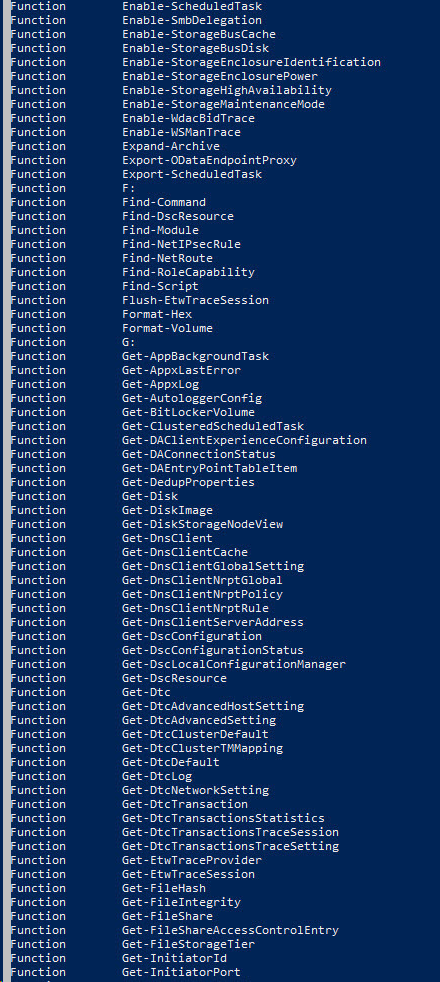
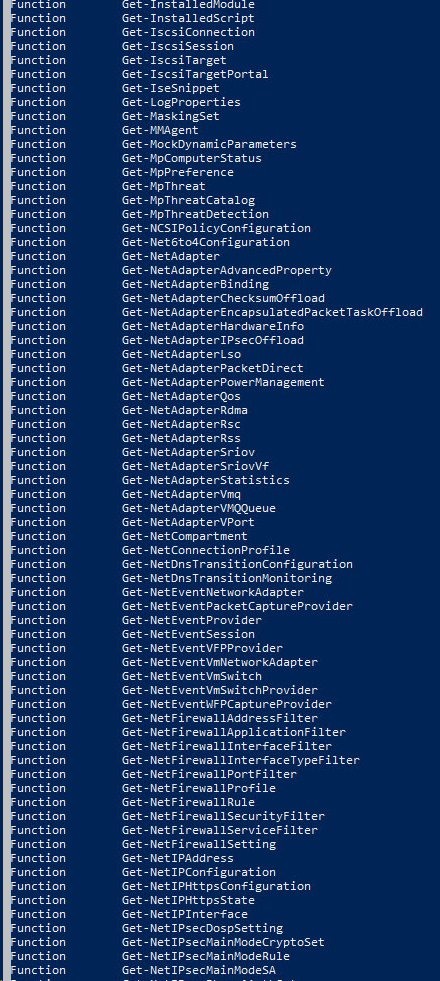
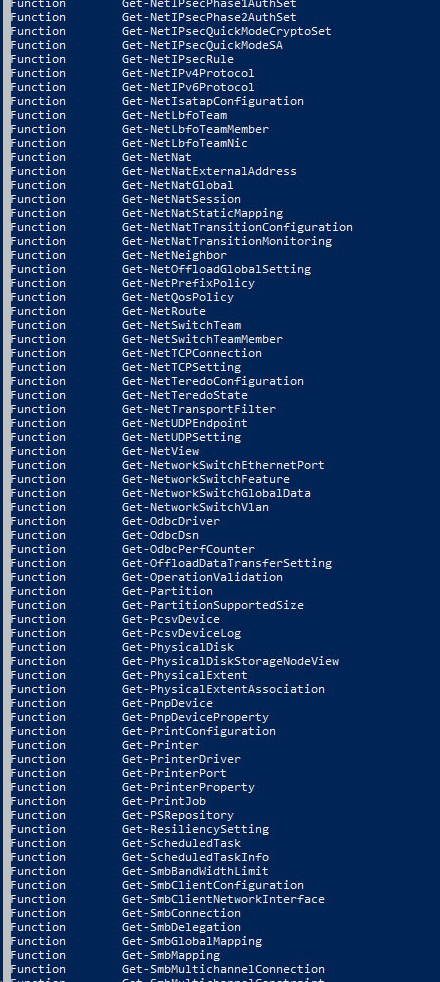
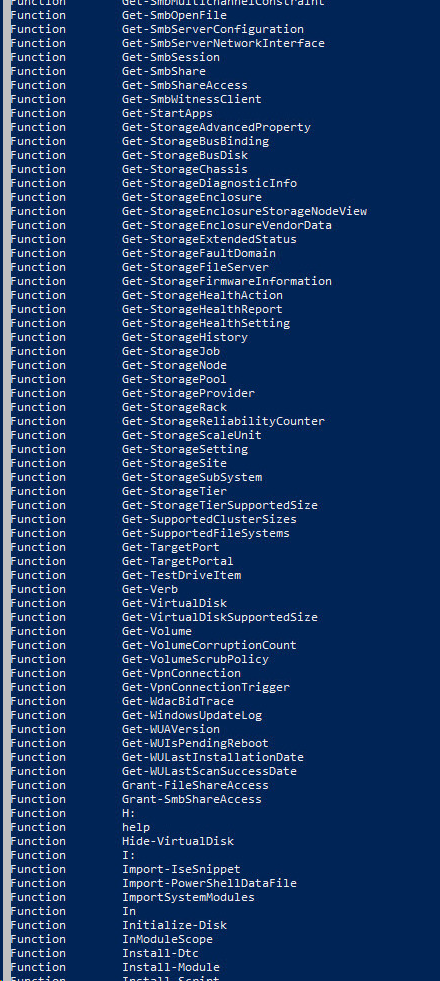
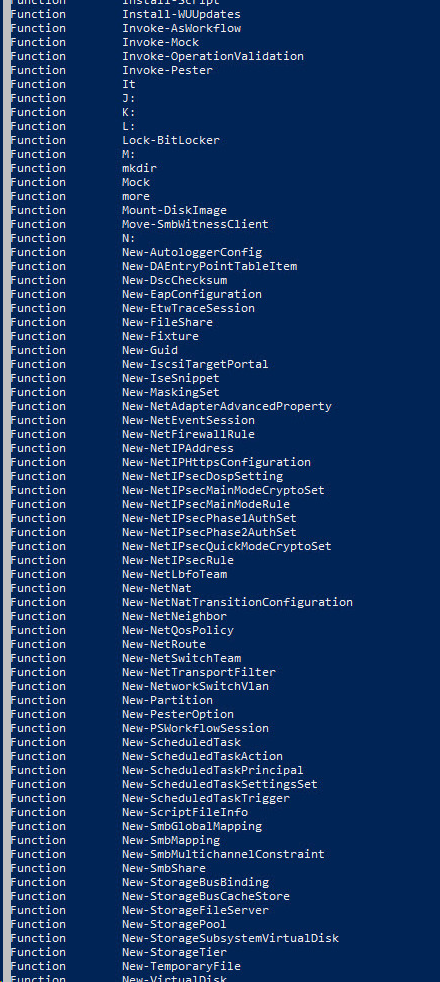
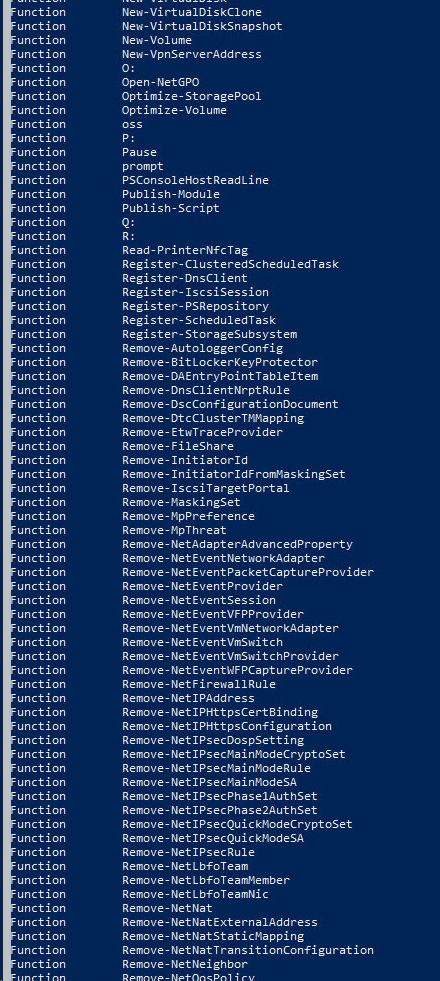
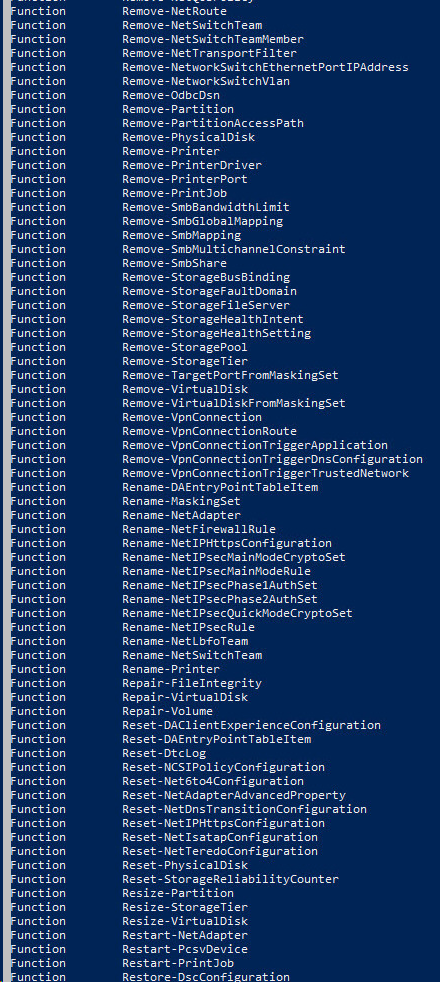
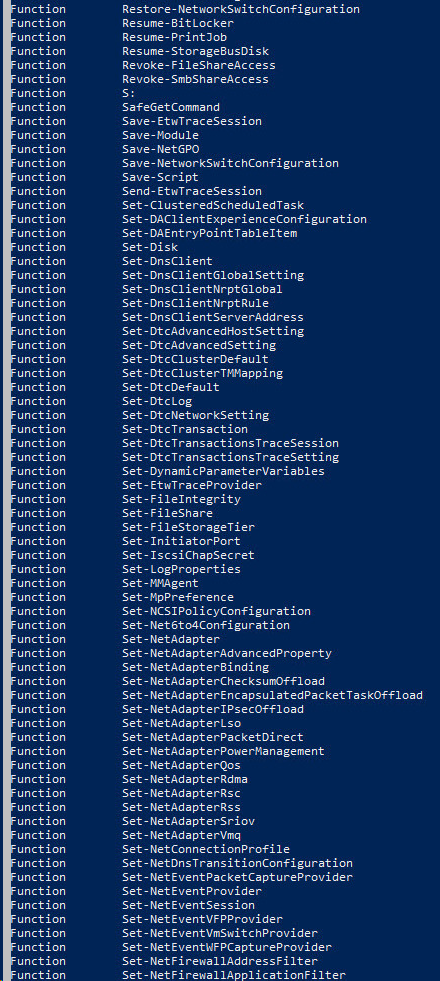
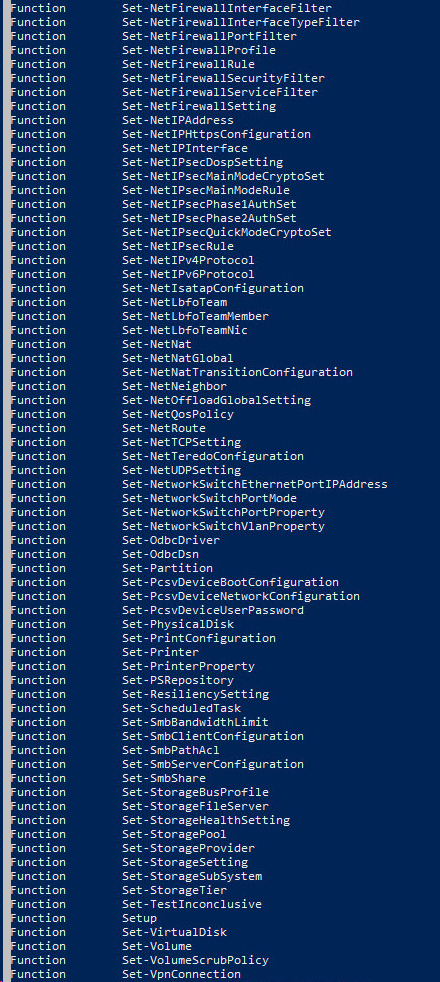
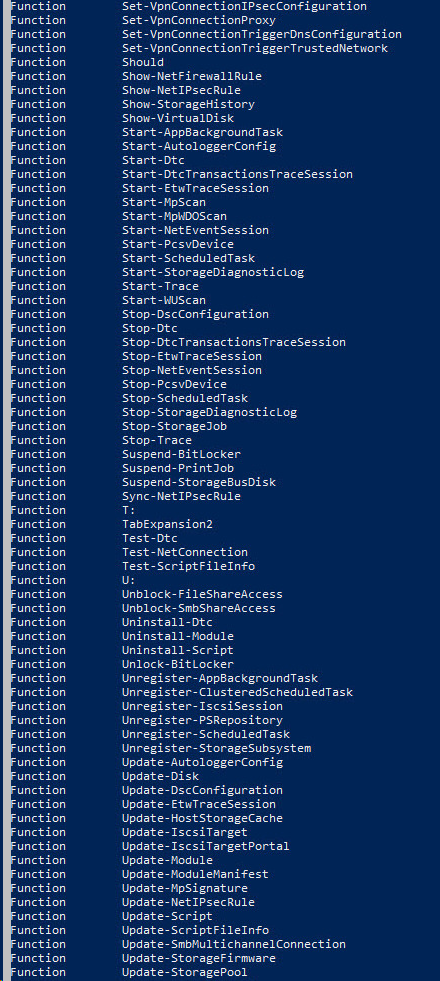
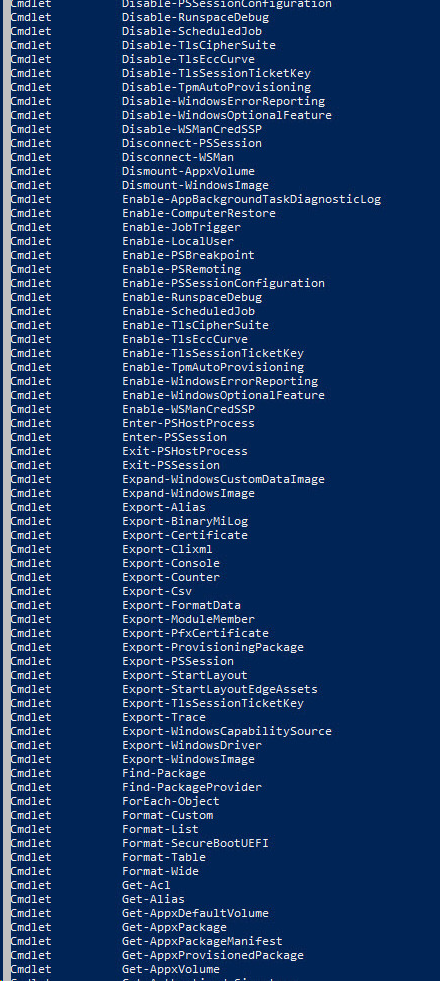
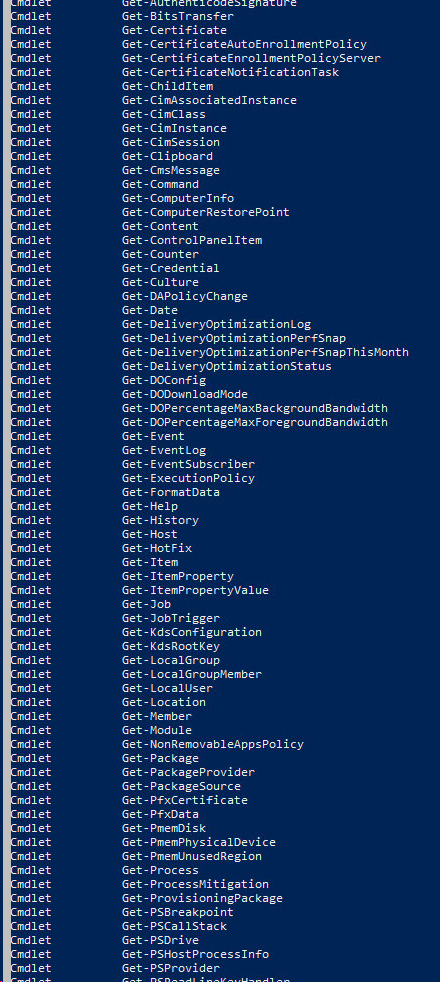
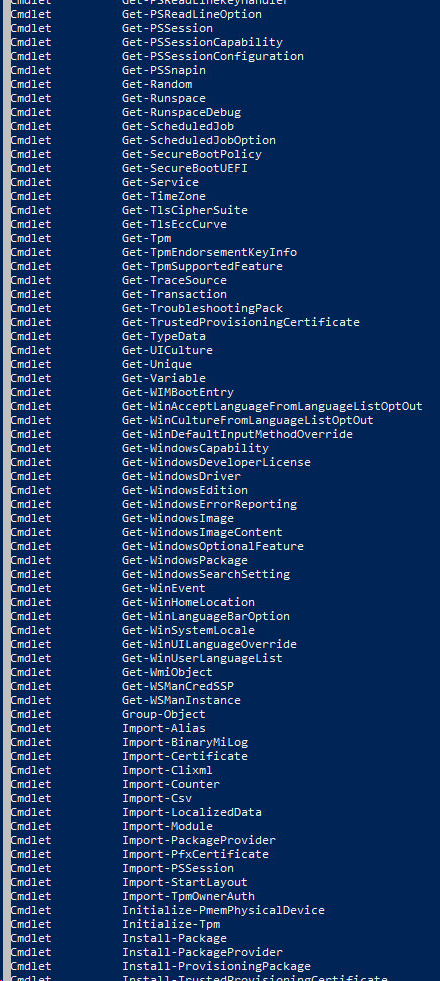
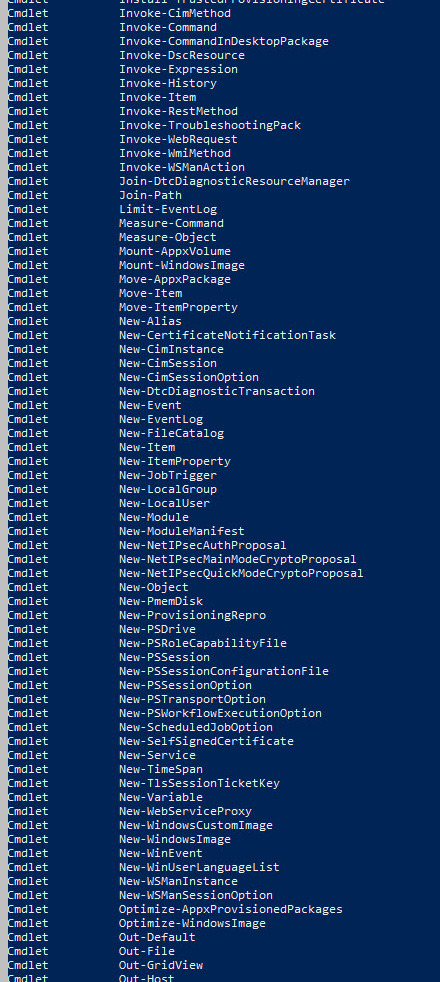
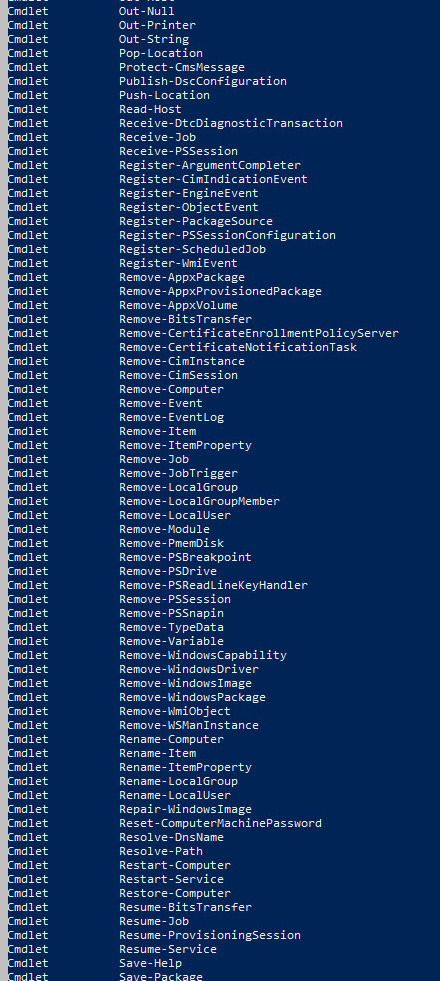
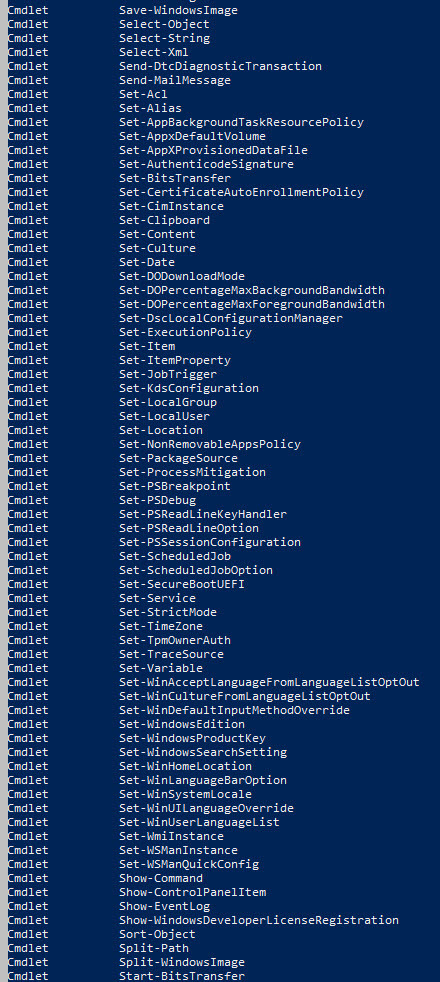
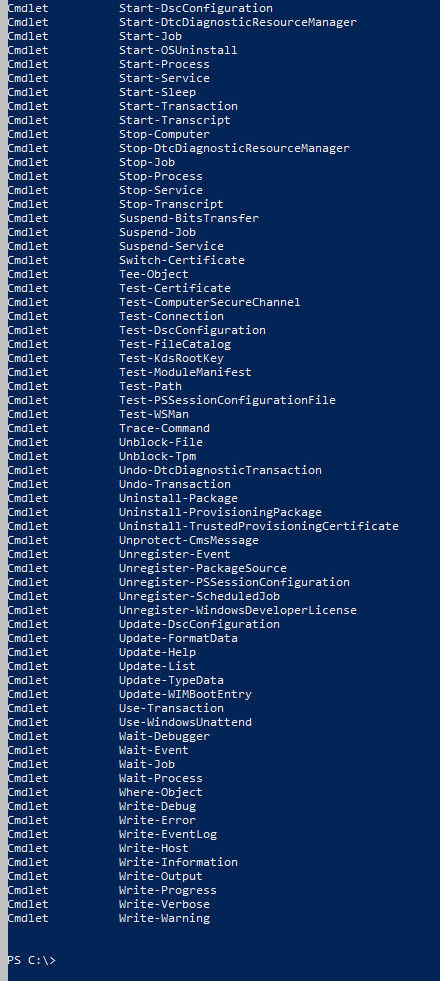

2. The naming convention of Cmdlet type commands is Verb-Noun, i.e. Verb signifies what you want to do and Noun means the name of the "thing" upon which you want to act. Let's take an example for a better understanding!
Ex. Get-Date.Here, Get is the Verb and
Date is the Noun.
The verb Get means to fetch "something" and that
"something" is the noun Date.
3. Get-C before pressing any key!

4. Get-C after pressing TAB key!

Add Answer to:
In this step, you will list all available commands in
Windows PowerShell.
1. To view the...
Task 12: Working with Windows PowerShell ISE You can use the Windows PowerShell Integrated Scripting Environment...
 Task 12: Working with Windows PowerShell
ISE
You can use the Windows PowerShell Integrated Scripting
Environment (ISE) to create, run, and debug commands and scripts.
The Windows PowerShell ISE consists of the menu bar, Windows
PowerShell tabs, the toolbar, script tabs, a script pane, a console
pane, a status bar, a text-size slider and context-sensitive Help.
It works for both local and remote scripts.
Using the Windows PowerShell ISE gives you many
different advantages when creating scripts. Although it can...
Task 12: Working with Windows PowerShell
ISE
You can use the Windows PowerShell Integrated Scripting
Environment (ISE) to create, run, and debug commands and scripts.
The Windows PowerShell ISE consists of the menu bar, Windows
PowerShell tabs, the toolbar, script tabs, a script pane, a console
pane, a status bar, a text-size slider and context-sensitive Help.
It works for both local and remote scripts.
Using the Windows PowerShell ISE gives you many
different advantages when creating scripts. Although it can...
Task 10: Creating functions In Windows PowerShell, you can declare functions. Functions are reusable pieces of...
Task 10: Creating functions In Windows PowerShell, you can declare functions. Functions are reusable pieces of code that can be called as many times as you want after you declare them. In this step, you will declare a function, learn about using different types of parameters, and specify default values for these parameters. 1. In the Windows PowerShell ISE, press CTRL+N. 2. In the script pane, type the following code. function Get-Soup ( [switch] $please, [string] $soup = "chicken noodle"...
To complete this challenge, list the Windows PowerShell commands needed to delete all of the storage...
To complete this challenge, list the Windows PowerShell commands needed to delete all of the storage components you created during this lab on the SCSI disks of SERVERC. Then, restart SERVERC and take a screen shot of the Storage Pools page, showing the removal of the storage pool and the virtual disk you created. Press Ctrl+V to paste the resulting image into the Lab 3 worksheet file in the page provided
Please complete the following assignment by running the appropriate commands for each step. 1, View the...
Please complete the following assignment by running the appropriate commands for each step. 1, View the help files of the Get-Process cmdlet, but only shows the Examples 2, Get a list of all available cmdlets that starts with Get- 3, Use a cmdlet to open up a Pop up GUI window to run or copy the cmdlet Get-Service 4, Display a list of all available PowerShell Providers
Project 3-7 In this hands-on project, you use the grep and egrep commands alongside regular ex...
Project 3-7 In this hands-on project, you use the grep and egrep commands alongside regular ex pression metacharacters to ex plore the contents of tex t files. 1. Switch to a command-line terminal (tty2) by pressing Ctrl+Alt+F2 and log in to the terminal using the user name of root and the password of LNXrocks!. 2. At the command prompt, type grep “Inn” sample1 and press Enter. What is displayed and why? 3. At the command prompt, type grep -v “Inn”...
I need screenshots of every step please Case Projects Case Project 7-1: Use SSH in Ubuntu...
 I need screenshots of every step please
Case Projects Case Project 7-1: Use SSH in Ubuntu In this project, you learn to use SSH in Ubuntu. Using the Ubuntu VMs you created in the case projects in Chapters 2 and 3, follow the steps to use SSH. Using the VM that has Ubuntu Server installed, do the following: 1. Start the VM and log on 2. SSH is included in Ubuntu Server but is not installed. Enter this command to...
I need screenshots of every step please
Case Projects Case Project 7-1: Use SSH in Ubuntu In this project, you learn to use SSH in Ubuntu. Using the Ubuntu VMs you created in the case projects in Chapters 2 and 3, follow the steps to use SSH. Using the VM that has Ubuntu Server installed, do the following: 1. Start the VM and log on 2. SSH is included in Ubuntu Server but is not installed. Enter this command to...
. Long on to a PC with the administrator account, or an account that has administrator privilege....
 . Long on to a PC with the administrator account, or an account that has administrator privilege. Please take a note of your system information and location where you perform the lab. Open the command prompt. For Windows 10, type cmd in Cortona. For Windows XP. choose Start à Run, and type cmd in the Open field. For Windows 7, click on Start, enter cmd in "Search program and file, and choose "cmd.exe from search result. For Windows 8 press...
All commands must be in the command line. The expense data file is separate. Programming Project...
All commands must be in the command line. The expense data file is separate. Programming Project #2: Manage Spending Using Commands Objectives: • Understand how to create and manipulate list of objects using array or vector class • Handle input errors and invalid values • Design and create a well-structure program using C++ basic programming constructs and classes. Description: Each “expense” contains 2 values: the spending amount (double) and its description (string) Here is an example of the “expense” data...
Windows operating system 1. Write a simple batch file named LastName Final.bat (where LastName is your...
 Windows operating system
1. Write a simple batch file named LastName Final.bat (where LastName is your own last name), which accomplishes the following: a Disable echo output b. Clear the screen c. Welcome the user with the following message (where current Date and curent Time is the computer's current date and current time, respectfully-these values should be output using a command line command, meaning do not type in the date or time into your batch file). A sample of this...
Windows operating system
1. Write a simple batch file named LastName Final.bat (where LastName is your own last name), which accomplishes the following: a Disable echo output b. Clear the screen c. Welcome the user with the following message (where current Date and curent Time is the computer's current date and current time, respectfully-these values should be output using a command line command, meaning do not type in the date or time into your batch file). A sample of this...
Step 1: Explore View Encounters. The View Encounters screen allows you to view all the...
Step 1: Explore View Encounters. The View Encounters screen allows you to view all the patient records in Nuance Clintegrity. Review the View Encounters screen and locates important patient information such as the account number, a medical record number (MRN), facility, patient name, payor, patient type (PT), charges, admission and discharge dates, and coding status. What types of information can be found on this patient's detail screen? Select all that apply. Demographic information Facility Patient’s socioeconomic status Administrative...
 Task 12: Working with Windows PowerShell
ISE
You can use the Windows PowerShell Integrated Scripting
Environment (ISE) to create, run, and debug commands and scripts.
The Windows PowerShell ISE consists of the menu bar, Windows
PowerShell tabs, the toolbar, script tabs, a script pane, a console
pane, a status bar, a text-size slider and context-sensitive Help.
It works for both local and remote scripts.
Using the Windows PowerShell ISE gives you many
different advantages when creating scripts. Although it can...
Task 12: Working with Windows PowerShell
ISE
You can use the Windows PowerShell Integrated Scripting
Environment (ISE) to create, run, and debug commands and scripts.
The Windows PowerShell ISE consists of the menu bar, Windows
PowerShell tabs, the toolbar, script tabs, a script pane, a console
pane, a status bar, a text-size slider and context-sensitive Help.
It works for both local and remote scripts.
Using the Windows PowerShell ISE gives you many
different advantages when creating scripts. Although it can...
 I need screenshots of every step please
Case Projects Case Project 7-1: Use SSH in Ubuntu In this project, you learn to use SSH in Ubuntu. Using the Ubuntu VMs you created in the case projects in Chapters 2 and 3, follow the steps to use SSH. Using the VM that has Ubuntu Server installed, do the following: 1. Start the VM and log on 2. SSH is included in Ubuntu Server but is not installed. Enter this command to...
I need screenshots of every step please
Case Projects Case Project 7-1: Use SSH in Ubuntu In this project, you learn to use SSH in Ubuntu. Using the Ubuntu VMs you created in the case projects in Chapters 2 and 3, follow the steps to use SSH. Using the VM that has Ubuntu Server installed, do the following: 1. Start the VM and log on 2. SSH is included in Ubuntu Server but is not installed. Enter this command to...
 . Long on to a PC with the administrator account, or an account that has administrator privilege. Please take a note of your system information and location where you perform the lab. Open the command prompt. For Windows 10, type cmd in Cortona. For Windows XP. choose Start à Run, and type cmd in the Open field. For Windows 7, click on Start, enter cmd in "Search program and file, and choose "cmd.exe from search result. For Windows 8 press...
 Windows operating system
1. Write a simple batch file named LastName Final.bat (where LastName is your own last name), which accomplishes the following: a Disable echo output b. Clear the screen c. Welcome the user with the following message (where current Date and curent Time is the computer's current date and current time, respectfully-these values should be output using a command line command, meaning do not type in the date or time into your batch file). A sample of this...
Windows operating system
1. Write a simple batch file named LastName Final.bat (where LastName is your own last name), which accomplishes the following: a Disable echo output b. Clear the screen c. Welcome the user with the following message (where current Date and curent Time is the computer's current date and current time, respectfully-these values should be output using a command line command, meaning do not type in the date or time into your batch file). A sample of this...
Most questions answered within 3 hours.
-
Where is the error in this code sequence?
String s1 = "Hello";
String s2 = "ello";...
asked 10 months ago -
Financial data for Joel de Paris, Inc., for last year
follow:
Joel de Paris, Inc.
Balance...
asked 10 months ago -
Consider this reaction:
Al2(SO4)3 (aq)+ BaCl3
(aq) Al2Cl6 (aq)- +
3BaSO4(s) . What is the...
asked 10 months ago -
Suppose that Savneet is considering increasing her
recent random sample from 20 car rentals to 40...
asked 10 months ago -
Trucks arrive at an unloading terminal at an average rate of 120
per hour.
Trucks arrive...
asked 10 months ago -
Why are methanol and ethanol completely soluble in water while
octanol is not very little soluble....
asked 10 months ago -
A facilities manager at a university reads in a research report
that the mean amount of...
asked 10 months ago -
When the CuSO4 is rehydrated by adding water to the anhydrous
compound, is this an endothermic...
asked 10 months ago -
A ray of sunlight is passing from diamond into crown glass; the
angle of incidence is...
asked 10 months ago -
A block of mass 0.249 kg is placed on top of a light, vertical
spring of...
asked 10 months ago -
how do the kidneys compensate in the presences of acidosis
a) trigger hyperventilate
b) reserve acid...
asked 10 months ago -
Question 501 pts
The rental rate of capital to the firm increases. Which of the
following...
asked 10 months ago