The challenging portion of the assignment is an efficient way of performing the calculations through the...
The challenging portion of the assignment is an efficient way of
performing the calculations through the use of jQuery. The
calculations should be performed by either using user defined
functions or the jQuery each() function. I prefer the latest one
but I will be fine with user defined functions as long as they are
properly implemented.
You may price your list items as you wish but you need to keep in
mind that the prices are assigned to the text boxes only
after the page is ready.
you must come up with yourself. Note: The tax rate for
this assignment is 8.625%
this code to start with:
<!doctype html>
<html>
<head>
<meta charset="utf-8">
<title>Untitled Document</title>
</head>
<body>
<h1>Fresh Food Supermaket</h1>
<h2>Shopping List</h2>
<table class="list">
<tbody>
<tr>
<td
class="tdDesc"><p>Bananas.</p></td>
<td
class="baseline"><input type="number"
class="price"></td>
</tr>
<tr>
<td><p>snacks
</p></td>
<td
class="baseline"><input type="number"
class="price"></td>
</tr>
<tr>
<td><p> Frank's RedHot
chikens wings </p></td>
<td
class="baseline"><input type="number"
class="price"></td>
</tr>
<tr>
<td><p>Whole Wheat
Bread </p></td>
<td
class="baseline"><input type="number"
class="price"></td>
</tr>
<tr>
<td><p>milk
catoon</p></td>
<td
class="baseline"><input type="number"
class="price"></td>
</tr>
<tr>
<td><p> pizza
</p></td>
<td
class="baseline"><input type="number"
class="price"></td>
</tr>
<tr>
<td><p>Oatmeal
</p></td>
<td
class="baseline"><input type="number"
class="price"></td>
</tr>
<tr>
<td><p>Organic
straweberries </p></td>
<td
class="baseline"><input type="number"
class="price"></td>
</tr>
<tr>
<td
rowspan="3"> </td>
<td
class="rAlign">Sub Total</td>
<td>00.00</td>
</tr>
<tr>
<td
class="lightgray rAlign" >Sales Tax</td>
<td
class="lightgray">00.00</td>
</tr>
<tr>
<td
class="rAlign">Grand Total</td>
<td><strong>00.00</strong></td>
</tr>
</tbody>
</table>
</body>
</html>
Homework Answers
index.html
<!doctype html>
<html>
<head>
<meta charset="utf-8">
<title>Untitled Document</title>
</head>
<body>
<h1>Fresh Food Supermaket</h1>
<h2>Shopping List</h2>
<table class="list">
<tbody>
<tr>
<!-- add onchange="calculate()"
to every input -->
<td
class="tdDesc"><p>Bananas.</p></td>
<td
class="baseline"><input type="number" class="price"
onchange="calculate()"></td>
</tr>
<tr>
<td><p>snacks
</p></td>
<td
class="baseline"><input type="number"
class="price" onchange="calculate()"></td>
</tr>
<tr>
<td><p> Frank's
RedHot chikens wings </p></td>
<td
class="baseline"><input type="number" class="price"
onchange="calculate()"></td>
</tr>
<tr>
<td><p>Whole Wheat
Bread </p></td>
<td
class="baseline"><input type="number" class="price"
onchange="calculate()"></td>
</tr>
<tr>
<td><p>milk
catoon</p></td>
<td
class="baseline"><input type="number" class="price"
onchange="calculate()"></td>
</tr>
<tr>
<td><p> pizza
</p></td>
<td
class="baseline"><input type="number" class="price"
onchange="calculate()"></td>
</tr>
<tr>
<td><p>Oatmeal
</p></td>
<td
class="baseline"><input type="number" class="price"
onchange="calculate()"></td>
</tr>
<tr>
<td><p>Organic
straweberries </p></td>
<td
class="baseline"><input type="number" class="price"
onchange="calculate()"></td>
</tr>
<tr>
<td
rowspan="3"> </td>
<td
class="rAlign">Sub Total</td>
<td
id="sub_total">00.00</td>
</tr>
<tr>
<td
class="lightgray rAlign" >Sales Tax</td>
<td
class="lightgray" id="sales_tax">00.00</td>
</tr>
<tr>
<td
class="rAlign">Grand Total</td>
<td
id="grand_total"><strong>00.00</strong></td>
</tr>
</tbody>
</table>
<!-- Download jquery-3.3.1.min.js from
internet -->
<script type="text/javascript" >
var sub_total=0;
var tax_rate=8.625;
var grand_total=0;
function calculate() {
sub_total=0;
inputs = document.getElementsByTagName('input');
//loop through all input values
for (index = 0; index < inputs.length; ++index)
{
var
v=parseFloat(inputs[index].value);
if (!isNaN(v)) {//check if parsed
value is number and only continue
sub_total
+=v;
}
}
document.getElementById("sub_total").innerHTML=sub_total;
var
tax=(sub_total*tax_rate)/100;
document.getElementById("sales_tax").innerHTML=tax;
grand_total=sub_total+tax;
document.getElementById("grand_total").innerHTML=grand_total;
}
</script>
</body>
</html>
output
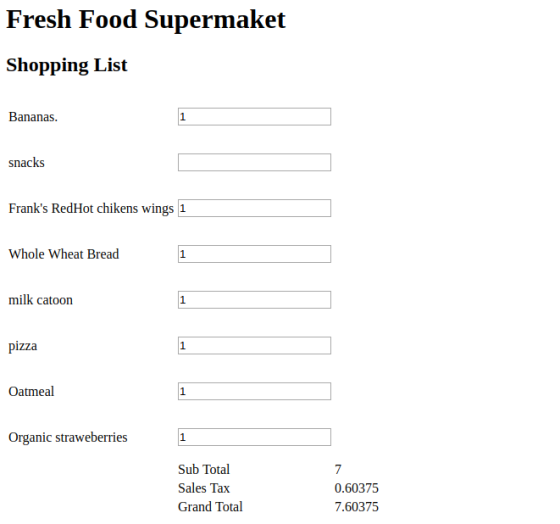
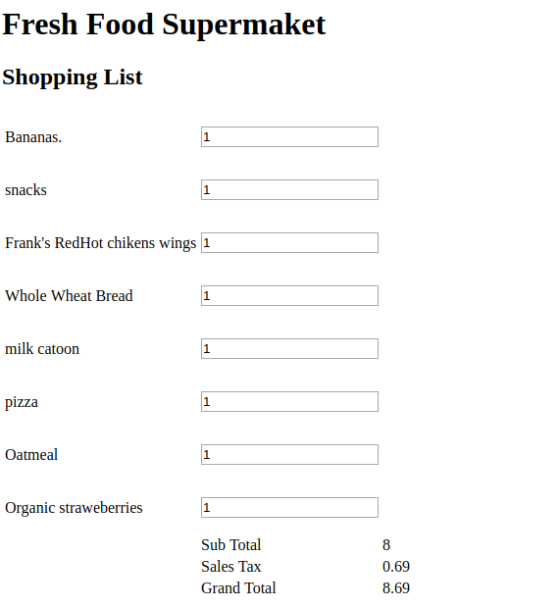
Note: onchange() method works when input is out of focus, so when you enter number in input then you need to click to outside screen or press enter
Add Answer to:
The challenging portion of the assignment is an efficient way of
performing the calculations through the...
Both codes <!DOCTYPE html> <html> <head> <title>Week 8 Lab - JavaScript DOM and Arrays</title> <meta charset="utf-8">...
Both codes <!DOCTYPE html> <html> <head> <title>Week 8 Lab - JavaScript DOM and Arrays</title> <meta charset="utf-8"> </head> <body> <h2>Order Form</h2> <form name="orderForm" method="post" action="processForm.html"> <table> <tr> <th colspan="2">Personal Information</th> </tr> <tr> <td>First Name:</td> <td><input type="text" name="firstName" id="firstName" size="30"></td> </tr> <tr> <td>Last Name:</td> <td><input type="text" name="lastName" id="lastName" size="30"></td> </tr> <tr> <td>Address:</td> <td><input type="text" name="address" id="address" size="30"></td> </tr> <tr> <td>City:</td> <td><input type="text" name="city" id="city" size="30"></td> </tr> <tr> <td>Province:</td> <td><select name="province" id="province" size="1"> <option disabled>Select a province</option> <option value="BC">British Columbia</option> <option value="AB">Alberta</option> <option...
Im working with php but having problem displaying the correct result. I need to show Order...
Im working with php but having problem displaying the correct result. I need to show Order processed at (time) HTML file: <!DOCTYPE html> <html> <head> <title>Bob's Auto Parts - Order Form</title> </head> <body> <form action="processorder.php" method="post"> <table style="border: 0px;"> <tr style="background: #cccccc;"> <td style="width: 150px; text-align: center;">Item</td> <td style="width: 15px; text-align: center;">Quantity</td> </tr> <tr> <td>Tires</td> <td><input type="text" name="tireqty" size="3" maxlength="3" /></td> </tr> <tr> <td>Oil</td> <td><input type="text" name="oilqty" size="3" maxlength="3" /></td> </tr> <tr> <td>Spark Plugs</td> <td><input type="text" name="sparkqty" size="3" maxlength="3" /></td>...
Hello Ive been tryting to add the CDN of jquery to my html code and I...
Hello Ive been tryting to add the CDN of jquery to my html code and I keep getting an error Need help with this : Navigate to www.code.jquery.com in your Chrome browser. On this page, you'll find different stable versions of jQuery. Select uncompressed for jQuery Core 3.3.1. Copy the <script> tag that is given to you. In store_hours.html, paste that tag directly above your body's closing tag. This is the jQuery CDN. After you paste this code into...
Below is the code created for a previous assignment. I now need to create functions to...
Below is the code created for a previous assignment. I now need to create functions to validate the name, age, and item selection in an external JavaScript file. Specifically, check for the following: The user has entered a name Age is a number between 18 and 110 An item is selected Ensure that a handler returns true if the input is acceptable and false otherwise. Add an onSubmit attribute to the form tag so that a validation failure prevents the...
I have to make a pixel art maker using javascript. HTML and CSS were already provided....
I have to make a pixel art maker using javascript. HTML and CSS were already provided. I only had to do the JavaScript part. Every time I run the HTML folder nothing happens when I choose the width, height, and color. This is my code: (ONLY JS IS SUPPOSED TO BE FIXED). JS: // Select color input // Select size input const colorPicker = document.getElementsById('colorPicker'); const rowNum = document.getElementsById('inputHeight'); const cellNum = document.getElementById('inputWidth'); const pixelCanvas = document.getElementById('pixelCanvas'); const form =...
HTML Coding <html> <head> <title> Contact -- Charles Robertson </title> </head> <body bgcolor="white"> <table width="700" height="500"...
HTML Coding <html> <head> <title> Contact -- Charles Robertson </title> </head> <body bgcolor="white"> <table width="700" height="500" border="10"> <!-----row---1----logo---> <tr><td> <img src="20150516_084745" width="700" height="200"> </td></tr> <!-----row-2-navigation-----> <tr><td> <!----start-navigation-table----> <table width="700" height="100" border="5" bgcolor="lightgreen" > <tr><td><a href="HerbFarm.html"> <center> HOME </center></a></td> <td><a href="about3.html"> <center> ABOUT </center></a></td> <td><a href="contact3.html"> <center> CONTACT </center></a></td> <td><a href="gallery3.html"> <center> GALLERY </center></a></td> </tr> </table> <!------end-navigation-table----> </td></tr> <tr><td> <h1>Contact </h1> <form action="thankyou.html"> </form> <div class="row"> <div class="col-75"> <div class="container"> <form action="/action_page.php"> <div class="row"> <div class="col-50"> <h3>Billing Address</h3> <label for="fname"><i...
I need help incorporating javascript into my page. The Lessons page has a message box (not...
I need help incorporating javascript into my page. The Lessons page has a message box (not an alert box) that becomes visible/invisible when the mouse is moved over/off the small, red hyperlink on the last line that says, "note." The note is 10pt, red, and italic. The message box contains the text, "Students who pre-pay for the entire term will have the registration fee waved." It is 150px wide, with an "azure" background and a black border. It has 5px...
Hey I am having an issue with my HTML5 document. Everything is working fine except that...
Hey I am having an issue with my HTML5 document. Everything is working fine except that I am not sure how to make my <h1> Objective </h1> to align towards the left. I have tried for instance <p align = "Left"> <h1> <strong>Objective </strong> </h1> </p> Any help would be great. Thanks <!DOCTYPE html> <html> <!-- Do I need to use <head> right here? I tried it without head or urf-8 and it worked--> <!-- I'm still a bit confused...
i'm having trouble with 1 and 3 using html, javascript and jquery 1) Change the "Search"...
i'm having trouble with 1 and 3 using html, javascript and jquery 1) Change the "Search" link on the left to a button that when clicked, hide all the fields on the form and display the text "This is a search feature..." 3) When the user fills the form and clicks "Login", the values inputted should be displayed in the empty row (under Login) of the page. The display should be in the form: Student ID: <input value> Student Name:...
How do I make these sheets into three different tabs for one website? This is all...
How do I make these sheets into three different tabs for one website? This is all using HTML. - Chade's Bicycle Company <!DOCTYPE html> <html> <head> <img src="Chade'sLogo.png"> </head> <body bgcolor= "white"> <center> Welcome to Chade's Bicycle Company!</center> <center> We aim towards making our customers happy. </center> <br> <center> Chade's Bicycle Company </center> <center>2900 Bicycle Ave.</center> <center>Seattle, Washington</center> <center>98101</center> <br> <center><img src="HappyCustomer.png" alt="Satisfied customers"></center> <br> <p align="right">Our mission statement:</p> <p align="right">Bicycles have always been a </p> <p align="right">positive part of...
Most questions answered within 3 hours.
-
Where is the error in this code sequence?
String s1 = "Hello";
String s2 = "ello";...
asked 10 months ago -
Financial data for Joel de Paris, Inc., for last year
follow:
Joel de Paris, Inc.
Balance...
asked 10 months ago -
Consider this reaction:
Al2(SO4)3 (aq)+ BaCl3
(aq) Al2Cl6 (aq)- +
3BaSO4(s) . What is the...
asked 10 months ago -
Suppose that Savneet is considering increasing her
recent random sample from 20 car rentals to 40...
asked 10 months ago -
Trucks arrive at an unloading terminal at an average rate of 120
per hour.
Trucks arrive...
asked 10 months ago -
Why are methanol and ethanol completely soluble in water while
octanol is not very little soluble....
asked 10 months ago -
A facilities manager at a university reads in a research report
that the mean amount of...
asked 10 months ago -
When the CuSO4 is rehydrated by adding water to the anhydrous
compound, is this an endothermic...
asked 10 months ago -
A ray of sunlight is passing from diamond into crown glass; the
angle of incidence is...
asked 10 months ago -
A block of mass 0.249 kg is placed on top of a light, vertical
spring of...
asked 10 months ago -
how do the kidneys compensate in the presences of acidosis
a) trigger hyperventilate
b) reserve acid...
asked 10 months ago -
Question 501 pts
The rental rate of capital to the firm increases. Which of the
following...
asked 10 months ago