It's not showing anything. I've tried many things but only a small window pops up. Below...
It's not showing anything. I've tried many things but only a small window pops up. Below is my code so far.
It's creating a Mortgage Calculator with GUI. Having user input the principle, term, and rate.
**************************************************************************************************************************
import java.awt.*;
import java.awt.event.*;
import javax.swing.*;
public class Mortgage extends JFrame implements
ActionListener
{
//declaring components
private JTextField principle, rate, terms, result;
private JButton calculate, reset, exit;
//constructor
public Mortgage()
{
setLayout(new GridLayout(0,2));
//adding labels and textfields
add(new JLabel("Principle:"));
principle = new JTextField();
add(principle);
add(new JLabel("Rate:"));
rate = new JTextField();
add(rate);
add(new JLabel("Terms:"));
terms = new JTextField();
add(terms);
add(new JLabel("Monthly Payment:"));
result = new JTextField();
result.setEditable(false); //set to read-only
add(result);
//create buttons and adding action listeners
calculate = new JButton("Calculate Monthly Payments");
calculate.addActionListener(this);
reset = new JButton("Reset");
reset.addActionListener(this);
exit = new JButton("Exit");
exit.addActionListener(this);
//create panel and addint buttons
JPanel buttons = new JPanel();
buttons.add(calculate);
buttons.add(reset);
buttons.add(exit);
//adding panel to frame
add(buttons);
//exit on close button
setDefaultCloseOperation(EXIT_ON_CLOSE);
setVisible(true);
}
public static void main(String[] args)
{
new Mortgage();
}
public void actionPerformed(ActionEvent e)
{
double loan = Double.parseDouble(principle.getText());
double intRate = Double.parseDouble(rate.getText());
int years = Integer.parseInt(terms.getText());
double monthlyInterestRate = getMonthlyInterest(intRate);
double monthlyPayment = getMonthlyPayment(loan, years,
monthlyInterestRate);
if(e.getSource().equals(reset))
{
principle.setText("");
rate.setText("");
terms.setText("");
result.setText("");
}
else
System.exit(0);
}
private double getMonthlyInterest(double intRate)
{
double monthlyInterest = ((intRate / 100) / 12);
return monthlyInterest;
}
private double getMonthlyPayment(double principle, int terms,
double rate)
{
double m = terms * 12;
rate = (rate/1200);
double monthlyPayment = (principle * rate )/ (1.0 -Math.pow(rate+
1, -m));
return monthlyPayment;
}
}
Homework Answers
The code given has missing setSize() method along with some changes have done to show result correctly and changes are documented .
JAVA CODE
import java.awt.*;
import java.awt.event.*;
import javax.swing.*;
import java.math.RoundingMode; /* ADDEDD FOR ROUNDING*/
import java.text.DecimalFormat; /* ADDEDD FOR DECIMAL SPACE
FORMATTING */
public class Mortgage extends JFrame implements
ActionListener
{
//declaring components
private JTextField principle, rate, terms,
result;
private JButton calculate, reset, exit;
//constructor
public Mortgage()
{
setLayout(new
GridLayout(0,2));
//adding labels and
textfields
add(new
JLabel("Principle:"));
principle = new JTextField();
add(principle);
add(new JLabel("Rate:"));
rate = new JTextField();
add(rate);
add(new JLabel("Terms:"));
terms = new JTextField();
add(terms);
add(new JLabel("Monthly
Payment:"));
result = new JTextField();
result.setEditable(false); //set to
read-only
add(result);
//create buttons and adding
action listeners
calculate = new JButton("Calculate
Monthly Payments");
calculate.addActionListener(this);
reset = new
JButton("Reset");
reset.addActionListener(this);
exit = new
JButton("Exit");
exit.addActionListener(this);
//create panel and addint
buttons
JPanel buttons = new
JPanel();
buttons.add(calculate);
buttons.add(reset);
buttons.add(exit);
//adding panel to frame
add(buttons);
//exit on close button
setDefaultCloseOperation(EXIT_ON_CLOSE);
setVisible(true);
setSize(600,400); /* code missed
*/
}
public static void main(String[] args)
{
new Mortgage();
}
public void actionPerformed(ActionEvent e)
{
double loan =
Double.parseDouble(principle.getText());
double intRate =
Double.parseDouble(rate.getText());
int years =
Integer.parseInt(terms.getText());
double monthlyInterestRate =
getMonthlyInterest(intRate);
double monthlyPayment =
getMonthlyPayment(loan, years, monthlyInterestRate);
/* code missed */
if(e.getSource().equals(calculate))
///
{
DecimalFormat df
= new DecimalFormat("0.00");
result.setText(df.format((monthlyPayment)));
} /* end */
else
if(e.getSource().equals(reset))
{
principle.setText("");
rate.setText("");
terms.setText("");
result.setText("");
}
else
System.exit(0);
}
private double getMonthlyInterest(double
intRate)
{
double monthlyInterest = ((intRate
/ 100) / 12);
return monthlyInterest;
}
private double getMonthlyPayment(double principle, int
terms, double rate)
{
double m = terms * 12;
rate = (rate/1200);
double monthlyPayment =
(principle * rate )/ (1.0 -Math.pow(rate+ 1, -m));
return monthlyPayment;
}
}
SCREEN SHOT OF CODE
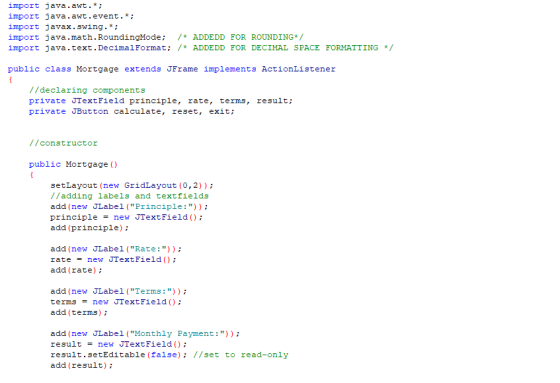
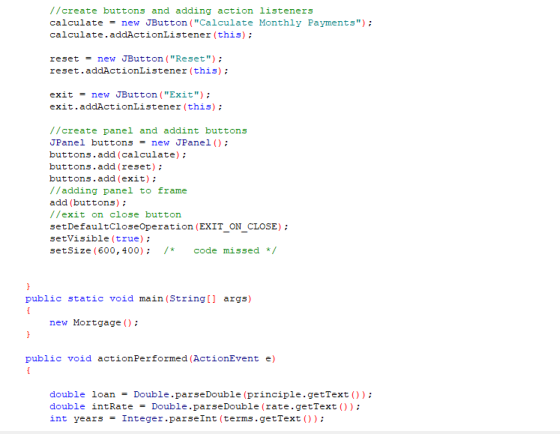
 SCREEN
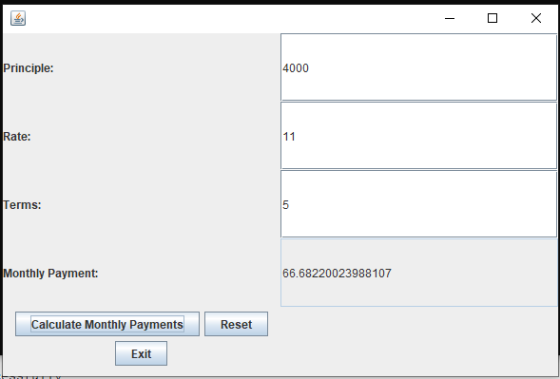
SHOT OUTPUT
SCREEN
SHOT OUTPUT
Add Answer to:
It's not showing anything. I've tried many things but only a
small window pops up. Below...
please help me debug this Create a GUI for an application that lets the user calculate...
please help me debug this Create a GUI for an application that lets the user calculate the hypotenuse of a right triangle. Use the Pythagorean Theorem to calculate the length of the third side. The Pythagorean Theorem states that the square of the hypotenuse of a right-triangle is equal to the sum of the squares of the opposite sides: alidate the user input so that the user must enter a double value for side A and B of the triangle....
JAVA Hello I am trying to add a menu to my Java code if someone can...
JAVA Hello I am trying to add a menu to my Java code if someone can help me I would really appreacite it thank you. I found a java menu code but I dont know how to incorporate it to my code this is the java menu code that i found. import java.awt.event.ActionEvent; import java.awt.event.ActionListener; import javax.swing.ButtonGroup; import javax.swing.JCheckBoxMenuItem; import javax.swing.JFrame; import javax.swing.JMenu; import javax.swing.JMenuBar; import javax.swing.JMenuItem; import javax.swing.JRadioButtonMenuItem; public class MenuExp extends JFrame { public MenuExp() { setTitle("Menu Example");...
Program #2 Write a program to simulate showing an NBA Team on a Basketball court Here...
 Program #2 Write a program to simulate showing an NBA Team on a Basketball court Here is an example of the screenshot when running the program: Tony Parker T. Splitter T. Duncan M. Gineb Player Kame: M Ginobil Player Age 2 Add A Player Ce An example of the JFrame subclass with main method is as follows import java.awt. import java.awt.event." import javax.swing. public class NBA Playoff extends JFrame private JTextField txtName: private JTextField txtAge: private NBATeam spurs private NBAcourtPanel...
Add appropriate descriptive comments to each line of code in the project explaining why the code...
Add appropriate descriptive comments to each line of code in the project explaining why the code is in the application. public class FutureValueFrame extends JFrame { private JTextField investmentField; private JTextField interestRateField; private JComboBox yearsComboBox; private JList futureValueList; private DefaultListModel futureValueModel; public FutureValueFrame() { initComponents(); } private void initComponents() { try { UIManager.setLookAndFeel( UIManager.getSystemLookAndFeelClassName()); } catch (ClassNotFoundException | InstantiationException | IllegalAccessException | UnsupportedLookAndFeelException e) { System.out.println(e); } setTitle("Future Value Calculator"); setDefaultCloseOperation(JFrame.EXIT_ON_CLOSE); setLocationByPlatform(true); investmentField = new JTextField(); interestRateField = new JTextField();...
Need help debugging Create a GUI application that accepts student registration data. Specifications: The text box...
Need help debugging Create a GUI application that accepts student registration data. Specifications: The text box that displays the temporary password should be read-only. The temporary password consists of the user’s first name, an asterisk (*), and the user’s birth year. If the user enters data in the first three fields, display a temporary password in the appropriate text field and a welcome message in the label below the text fields. If the user does not enter data, clear the...
Can someone modify my code so that I do not get this error: Exception in thread...
Can someone modify my code so that I do not get this error: Exception in thread "main" java.lang.NullPointerException at java.awt.Container.addImpl(Container.java:1043) at java.awt.Container.add(Container.java:363) at RatePanel.<init>(RatePanel.java:64) at CurrencyConverter.main(CurrencyConverter.java:16) This code should get the amount of money in US dollars from user and then let them select which currency they are trying to convert to and then in the textfield print the amount //********************************************************************* //File name: RatePanel.java //Name: Brittany Hines //Purpose: Panel for a program that convers different currencyNamerencies to use dollars //*********************************************************************...
With the Code below, how would i add a "Back" Button to the bottom of the...
With the Code below, how would i add a "Back" Button to the bottom of the history page so that it takes me back to the main function and continues to work? import java.awt.BorderLayout; import java.awt.Color; import java.awt.Dimension; import java.awt.GridLayout; import java.awt.event.ActionEvent; import java.awt.event.ActionListener; import java.io.File; import java.io.FileNotFoundException; import java.io.FileWriter; import java.io.IOException; import java.util.ArrayList; import java.util.List; import java.util.Scanner; import javax.swing.BoxLayout; import javax.swing.JButton; import javax.swing.JFrame; import javax.swing.JLabel; import javax.swing.JPanel; import javax.swing.JScrollPane; import javax.swing.JTextField; public class RecipeFinder { public static void main(String[]...
Please fix and test my code so that all the buttons and function are working in...
Please fix and test my code so that all the buttons and function are working in the Sudoku. CODE: SudokuLayout.java: import java.awt.BorderLayout; import java.awt.Color; import java.awt.Dimension; import java.awt.GridLayout; import java.awt.event.ActionEvent; import java.awt.event.ActionListener; import javax.swing.BorderFactory; import javax.swing.Box; import javax.swing.BoxLayout; import javax.swing.JButton; import javax.swing.JComboBox; import javax.swing.JFrame; import javax.swing.JPanel; import javax.swing.JTextArea; import javax.swing.JTextField; public class SudokuLayout extends JFrame{ JTextArea txtArea;//for output JPanel gridPanel,butPanel;//panels for sudoku bord and buttons JButton hint,reset,solve,newPuzzel;//declare buttons JComboBox difficultyBox; SudokuLayout() { setName("Sudoku Bord");//set name of frame // setTitle("Sudoku Bord");//set...
Lab Assignment : In this lab, you are going to implement QueueADT interface that defines a...
Lab Assignment : In this lab, you are going to implement QueueADT interface that defines a queue. Then you are going to use the queue to store animals. 1. Write a LinkedQueue class that implements the QueueADT.java interface using links. 2. Textbook implementation uses a count variable to keep track of the elements in the queue. Don't use variable count in your implementation (points will be deducted if you use instance variable count). You may use a local integer variable...
please help me debug this Create a Future Value Calculator that displays error messages in labels.GUISpecificationsStart...
please help me debug this Create a Future Value Calculator that displays error messages in labels.GUISpecificationsStart with the JavaFX version of the Future Value application presented in chapter 17. Create error message labels for each text field that accepts user input. Use the Validation class from chapter 17 to validate user input.Format the application so that the controls don’t change position when error messages are displayed. package murach.business; public class Calculation { public static final int MONTHS_IN_YEAR =...
 Program #2 Write a program to simulate showing an NBA Team on a Basketball court Here is an example of the screenshot when running the program: Tony Parker T. Splitter T. Duncan M. Gineb Player Kame: M Ginobil Player Age 2 Add A Player Ce An example of the JFrame subclass with main method is as follows import java.awt. import java.awt.event." import javax.swing. public class NBA Playoff extends JFrame private JTextField txtName: private JTextField txtAge: private NBATeam spurs private NBAcourtPanel...
Most questions answered within 3 hours.
-
Where is the error in this code sequence?
String s1 = "Hello";
String s2 = "ello";...
asked 10 months ago -
Financial data for Joel de Paris, Inc., for last year
follow:
Joel de Paris, Inc.
Balance...
asked 10 months ago -
Consider this reaction:
Al2(SO4)3 (aq)+ BaCl3
(aq) Al2Cl6 (aq)- +
3BaSO4(s) . What is the...
asked 10 months ago -
Suppose that Savneet is considering increasing her
recent random sample from 20 car rentals to 40...
asked 10 months ago -
Trucks arrive at an unloading terminal at an average rate of 120
per hour.
Trucks arrive...
asked 10 months ago -
Why are methanol and ethanol completely soluble in water while
octanol is not very little soluble....
asked 10 months ago -
A facilities manager at a university reads in a research report
that the mean amount of...
asked 10 months ago -
When the CuSO4 is rehydrated by adding water to the anhydrous
compound, is this an endothermic...
asked 10 months ago -
A ray of sunlight is passing from diamond into crown glass; the
angle of incidence is...
asked 10 months ago -
A block of mass 0.249 kg is placed on top of a light, vertical
spring of...
asked 10 months ago -
how do the kidneys compensate in the presences of acidosis
a) trigger hyperventilate
b) reserve acid...
asked 10 months ago -
Question 501 pts
The rental rate of capital to the firm increases. Which of the
following...
asked 10 months ago