Add appropriate descriptive comments to each line of code in the project explaining why the code...
Add appropriate descriptive comments to each line of code in the project explaining why the code is in the application.
public class FutureValueFrame extends JFrame {
private JTextField investmentField;
private JTextField interestRateField;
private JComboBox yearsComboBox;
private JList futureValueList;
private DefaultListModel futureValueModel;
public FutureValueFrame() {
initComponents();
}
private void initComponents() {
try {
UIManager.setLookAndFeel(
UIManager.getSystemLookAndFeelClassName());
} catch (ClassNotFoundException | InstantiationException |
IllegalAccessException | UnsupportedLookAndFeelException e) {
System.out.println(e);
}
setTitle("Future Value Calculator");
setDefaultCloseOperation(JFrame.EXIT_ON_CLOSE);
setLocationByPlatform(true);
investmentField = new JTextField();
interestRateField = new JTextField();
yearsComboBox = new JComboBox();
futureValueList = new JList();
futureValueModel = new DefaultListModel<>();
JScrollPane futureValuePane = new
JScrollPane(futureValueList);
Dimension dim = new Dimension(150, 20);
investmentField.setPreferredSize(dim);
investmentField.setMinimumSize(dim);
interestRateField.setPreferredSize(dim);
interestRateField.setMinimumSize(dim);
yearsComboBox.setPreferredSize(dim);
yearsComboBox.setMinimumSize(dim);
Dimension dim2 = new Dimension(150, 80);
futureValuePane.setPreferredSize(dim2);
futureValuePane.setMinimumSize(dim2);
JButton calculateButton = new JButton("Calculate");
JButton exitButton = new JButton("Exit");
calculateButton.addActionListener(e ->
calculateButtonClicked());
exitButton.addActionListener(e -> exitButtonClicked());
// button panel
JPanel buttonPanel = new JPanel();
buttonPanel.setLayout(new FlowLayout(FlowLayout.RIGHT));
buttonPanel.add(calculateButton);
buttonPanel.add(exitButton);
for (int i = 1; i < 21; i++) {
yearsComboBox.addItem(i);
}
yearsComboBox.setSelectedIndex(2);
// main panel
JPanel panel = new JPanel();
panel.setLayout(new GridBagLayout());
panel.add(new JLabel("Monthly Investment:"), getConstraints(0,
0));
panel.add(investmentField, getConstraints(1, 0));
panel.add(new JLabel("Yearly Interest Rate:"), getConstraints(0,
1));
panel.add(interestRateField, getConstraints(1, 1));
panel.add(new JLabel("Years:"), getConstraints(0, 2));
panel.add(yearsComboBox, getConstraints(1, 2));
panel.add(new JLabel("Future Value:"), getConstraints(0, 3));
panel.add(futureValuePane, getConstraints(1, 3));
add(panel, BorderLayout.CENTER);
add(buttonPanel, BorderLayout.SOUTH);
pack();
setVisible(true);
}
// helper method for getting a GridBagConstraints object
private GridBagConstraints getConstraints(int x, int y) {
GridBagConstraints c = new GridBagConstraints();
c.anchor = GridBagConstraints.LINE_START;
c.insets = new Insets(5, 5, 0, 5);
c.gridx = x;
c.gridy = y;
return c;
}
private void calculateButtonClicked() {
double investment =
Double.parseDouble(investmentField.getText());
double interestRate =
Double.parseDouble(interestRateField.getText());
int years = (int) yearsComboBox.getSelectedItem();
NumberFormat currency =
NumberFormat.getCurrencyInstance();
futureValueModel.clear();
double futureValue;
String yearlyString;
for (int year = 1; year <= years; year++) {
futureValue = FinancialCalculations.calculateFutureValue(
investment, interestRate, year);
yearlyString = "Year " + year + ": " +
currency.format(futureValue);
futureValueModel.addElement(yearlyString);
}
futureValueList.setModel(futureValueModel);
}
private void exitButtonClicked() {
System.exit(0);
}
public static void main(String args[]) {
java.awt.EventQueue.invokeLater(() -> {
JFrame frame = new FutureValueFrame();
});
}
}
Homework Answers
/***************************************FutureValueFrame.java*******************************/
import java.awt.BorderLayout;
import java.awt.Dimension;
import java.awt.FlowLayout;
import java.awt.GridBagConstraints;
import java.awt.GridBagLayout;
import java.awt.Insets;
import java.text.NumberFormat;
import javax.swing.DefaultListModel;
import javax.swing.JButton;
import javax.swing.JComboBox;
import javax.swing.JFrame;
import javax.swing.JLabel;
import javax.swing.JList;
import javax.swing.JPanel;
import javax.swing.JScrollPane;
import javax.swing.JTextField;
import javax.swing.UIManager;
import javax.swing.UnsupportedLookAndFeelException;
/**
*
* @author Insert Your Name Here
*
*/
public class FutureValueFrame extends JFrame {
/*
* TextField for investment and
* TextField for interestRate
* By using TextField type variable
* year ComboBox which is drop down list
* list contain
*/
private JTextField investmentField;
private JTextField interestRateField;
private JComboBox yearsComboBox;
private JList futureValueList;
private DefaultListModel futureValueModel;
public FutureValueFrame() {
initComponents();
}
private void initComponents() {
/*
* try catch block to encounter the
exception
*/
try {
UIManager.setLookAndFeel(UIManager.getSystemLookAndFeelClassName());
} catch (ClassNotFoundException |
InstantiationException | IllegalAccessException
| UnsupportedLookAndFeelException e) {
System.out.println(e);
}
/*
* set the title of the
application
*/
setTitle("Future Value
Calculator");
setDefaultCloseOperation(JFrame.EXIT_ON_CLOSE);
setLocationByPlatform(true);
/*
* creating text fields
*/
investmentField = new
JTextField();
interestRateField = new
JTextField();
yearsComboBox = new
JComboBox();
futureValueList = new
JList();
futureValueModel = new
DefaultListModel<>();
/*
* JScrollPane creates a scroll
pane
*/
JScrollPane futureValuePane = new
JScrollPane(futureValueList);
/*
* Dimension will create a new
object with specified height and width
*/
Dimension dim = new Dimension(150,
20);
/*
* Set all field and combo box
size
*/
investmentField.setPreferredSize(dim);
investmentField.setMinimumSize(dim);
interestRateField.setPreferredSize(dim);
interestRateField.setMinimumSize(dim);
yearsComboBox.setPreferredSize(dim);
yearsComboBox.setMinimumSize(dim);
/*
* set futureValuePane size
*/
Dimension dim2 = new Dimension(150,
80);
futureValuePane.setPreferredSize(dim2);
futureValuePane.setMinimumSize(dim2);
/*
* Create two buttons by JButton
class
*/
JButton calculateButton = new
JButton("Calculate");
JButton exitButton = new
JButton("Exit");
/*
* Apply the ActionListener to the
buttons
*/
calculateButton.addActionListener(e
-> calculateButtonClicked());
exitButton.addActionListener(e
-> exitButtonClicked());
// button panel
JPanel buttonPanel = new
JPanel();
/*
* Create the button panel
* and add button to the
buttonPanel
*/
buttonPanel.setLayout(new
FlowLayout(FlowLayout.RIGHT));
buttonPanel.add(calculateButton);
buttonPanel.add(exitButton);
for (int i = 1; i < 21; i++)
{
yearsComboBox.addItem(i);
}
yearsComboBox.setSelectedIndex(2);
// main panel
JPanel panel = new JPanel();
/*
* set the GridBagLayout
* add labels and text field to
GridBagLayout in the panel
*/
panel.setLayout(new
GridBagLayout());
panel.add(new JLabel("Monthly
Investment:"), getConstraints(0, 0));
panel.add(investmentField,
getConstraints(1, 0));
panel.add(new JLabel("Yearly
Interest Rate:"), getConstraints(0, 1));
panel.add(interestRateField,
getConstraints(1, 1));
panel.add(new JLabel("Years:"),
getConstraints(0, 2));
panel.add(yearsComboBox,
getConstraints(1, 2));
panel.add(new JLabel("Future
Value:"), getConstraints(0, 3));
panel.add(futureValuePane,
getConstraints(1, 3));
//adjust the panel to
center
add(panel,
BorderLayout.CENTER);
//adjust the button panel to
bottom
add(buttonPanel,
BorderLayout.SOUTH);
pack();
setVisible(true);
}
// helper method for getting a GridBagConstraints
object
private GridBagConstraints getConstraints(int x, int
y) {
/*
* GridBagConstraints specifies how
to display a specific component.
* Every component added to a
GridBagLayout container should have a GridBagConstraints object
associated with it.
*/
GridBagConstraints c = new
GridBagConstraints();
c.anchor =
GridBagConstraints.LINE_START;
c.insets = new Insets(5, 5, 0,
5);
c.gridx = x;
c.gridy = y;
return c;
}
private void calculateButtonClicked() {
/*
* get the value from the text field
in the variables
* investment and interestRate
* get the years from the combo
box
*/
double investment =
Double.parseDouble(investmentField.getText());
double interestRate =
Double.parseDouble(interestRateField.getText());
int years = (int)
yearsComboBox.getSelectedItem();
/*
* The NumberFormat class used to
format the currency according to Locale
*/
NumberFormat currency =
NumberFormat.getCurrencyInstance();
futureValueModel.clear();
double futureValue;
String yearlyString;
/*
* add element in the
futureValueModel
* year wise
*/
for (int year = 1; year <=
years; year++) {
/*
* calculate the
future value by calling static method calculateFutureValue of
*
FinancialCalculations Class
*/
futureValue =
FinancialCalculations.calculateFutureValue(investment,
interestRate, year);
/*
* set the
yearString year with currency
*/
yearlyString =
"Year " + year + ": " + currency.format(futureValue);
//add the
yearString to the futureValueModel
futureValueModel.addElement(yearlyString);
}
futureValueList.setModel(futureValueModel);
}
/*
* Exit the Application when clicked on exit
button
*/
private void exitButtonClicked() {
System.exit(0);
}
/*
* Start the application
*/
public static void main(String args[]) {
java.awt.EventQueue.invokeLater(()
-> {
JFrame frame =
new FutureValueFrame();
});
}
}
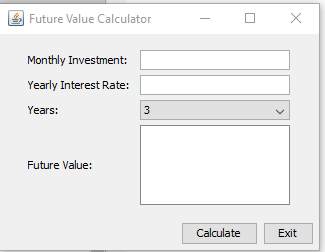
Thanks a lot, Please let me know if you have any problem...........
Add Answer to:
Add appropriate descriptive comments to each line of
code in the project explaining why the code...
Need help debugging Create a GUI application that accepts student registration data. Specifications: The text box...
Need help debugging Create a GUI application that accepts student registration data. Specifications: The text box that displays the temporary password should be read-only. The temporary password consists of the user’s first name, an asterisk (*), and the user’s birth year. If the user enters data in the first three fields, display a temporary password in the appropriate text field and a welcome message in the label below the text fields. If the user does not enter data, clear the...
With the Code below, how would i add a "Back" Button to the bottom of the...
With the Code below, how would i add a "Back" Button to the bottom of the history page so that it takes me back to the main function and continues to work? import java.awt.BorderLayout; import java.awt.Color; import java.awt.Dimension; import java.awt.GridLayout; import java.awt.event.ActionEvent; import java.awt.event.ActionListener; import java.io.File; import java.io.FileNotFoundException; import java.io.FileWriter; import java.io.IOException; import java.util.ArrayList; import java.util.List; import java.util.Scanner; import javax.swing.BoxLayout; import javax.swing.JButton; import javax.swing.JFrame; import javax.swing.JLabel; import javax.swing.JPanel; import javax.swing.JScrollPane; import javax.swing.JTextField; public class RecipeFinder { public static void main(String[]...
tart from the following code, and add Action Listener to make it functional to do the...
 tart from the following code, and add Action Listener to make it
functional to do the temperature conversion in the direction of the
arrow that is clicked.
. (Need about 10 lines)
Note:
import javax.swing.*;
import
java.awt.GridLayout;
import
java.awt.event.*;
import
java.text.DecimalFormat;
public class temperatureConverter extends JFrame {
public static void
main(String[] args) {
JFrame frame = new temperatureConverter();
frame.setTitle("Temp");
frame.setSize(200, 100);
frame.setLocationRelativeTo(null);
frame.setDefaultCloseOperation(JFrame.EXIT_ON_CLOSE);
frame.setVisible(true);
}
public
temperatureConverter() {
JLabel lblC = new...
tart from the following code, and add Action Listener to make it
functional to do the temperature conversion in the direction of the
arrow that is clicked.
. (Need about 10 lines)
Note:
import javax.swing.*;
import
java.awt.GridLayout;
import
java.awt.event.*;
import
java.text.DecimalFormat;
public class temperatureConverter extends JFrame {
public static void
main(String[] args) {
JFrame frame = new temperatureConverter();
frame.setTitle("Temp");
frame.setSize(200, 100);
frame.setLocationRelativeTo(null);
frame.setDefaultCloseOperation(JFrame.EXIT_ON_CLOSE);
frame.setVisible(true);
}
public
temperatureConverter() {
JLabel lblC = new...
Can you please help me to run this Java program? I have no idea why it...
Can you please help me to run this Java program? I have no idea why it is not running. import java.awt.GridLayout; import java.awt.event.ActionEvent; import java.awt.event.ActionListener; import java.text.DecimalFormat; import javax.swing.JFrame; import javax.swing.JLabel; import javax.swing.JList; import javax.swing.JPanel; import javax.swing.ListSelectionModel; import javax.swing.event.ListSelectionEvent; import javax.swing.event.ListSelectionListener; @SuppressWarnings({"unchecked", "rawtypes"}) public class SmartPhonePackages extends JFrame { private static final long serialVersionID= 6548829860028144965L; private static final int windowWidth = 400; private static final int windowHeight = 200; private static final double SalesTax = 1.06; private static JPanel panel;...
JAVA Hello I am trying to add a menu to my Java code if someone can...
JAVA Hello I am trying to add a menu to my Java code if someone can help me I would really appreacite it thank you. I found a java menu code but I dont know how to incorporate it to my code this is the java menu code that i found. import java.awt.event.ActionEvent; import java.awt.event.ActionListener; import javax.swing.ButtonGroup; import javax.swing.JCheckBoxMenuItem; import javax.swing.JFrame; import javax.swing.JMenu; import javax.swing.JMenuBar; import javax.swing.JMenuItem; import javax.swing.JRadioButtonMenuItem; public class MenuExp extends JFrame { public MenuExp() { setTitle("Menu Example");...
I have been messing around with java lately and I have made this calculator. Is there...
I have been messing around with java lately and I have made this calculator. Is there any way that I would be able to get a different sound to play on each different button 1 - 9 like a nokia phone? Thank you. *SOURCE CODE* import java.awt.*; import java.awt.event.*; import javax.swing.*; import javax.swing.event.*; class Calculator extends JFrame { private final Font BIGGER_FONT = new Font("monspaced",Font.PLAIN, 20); private JTextField textfield; private boolean number = true; private String equalOp = "="; private...
I got this programming its used to highlight text, but i couldn't remove highlight again from...
I got this programming its used to highlight text, but i couldn't remove highlight again from the text. i need someone to write me code that removes text highlight here is my code import java.awt.*; import java.awt.event.*; import java.util.Map; import java.util.HashMap; import javax.swing.*; import javax.swing.text.*; public class TextHighlight { private JTextArea textarea; private JComboBox colorbox; private JTextField top; private String[] colorOptions = { "GRAY", "YELLOW", "RED", "CYAN", "ORANGE", "PINK" }; private Highlighter.HighlightPainter grayPainter; private...
Add a timer to the lightbulb ON/OFF program such that the bulb stays on for 10...
 Add a timer to the lightbulb ON/OFF program such that the bulb
stays on for 10 seconds after the ON button is pushed and then goes
off. Put a new label on the lightbulb panel that counts
the number of seconds the bulb is on and displays the number of
seconds as it counts up from 0 to 10. THIS IS A JAVA PROGRAM. The
image above is what it should look like.
// Demonstrates mnemonics and tool tips.
//********************************************************************...
Add a timer to the lightbulb ON/OFF program such that the bulb
stays on for 10 seconds after the ON button is pushed and then goes
off. Put a new label on the lightbulb panel that counts
the number of seconds the bulb is on and displays the number of
seconds as it counts up from 0 to 10. THIS IS A JAVA PROGRAM. The
image above is what it should look like.
// Demonstrates mnemonics and tool tips.
//********************************************************************...
It's not showing anything. I've tried many things but only a small window pops up. Below...
It's not showing anything. I've tried many things but only a small window pops up. Below is my code so far. It's creating a Mortgage Calculator with GUI. Having user input the principle, term, and rate. ************************************************************************************************************************** import java.awt.*; import java.awt.event.*; import javax.swing.*; public class Mortgage extends JFrame implements ActionListener { //declaring components private JTextField principle, rate, terms, result; private JButton calculate, reset, exit; //constructor public Mortgage() { setLayout(new GridLayout(0,2)); //adding labels and textfields add(new JLabel("Principle:")); principle...
Add appropriate descriptive comments to each line of the code, explaining why the code is in...
Add appropriate descriptive comments to each line of the code, explaining why the code is in the application. import java.text.NumberFormat; public class LineItem implements Cloneable { private Product product; private int quantity; private double total; public LineItem() { this.product = new Product(); this.quantity = 0; this.total = 0; } public LineItem(Product product, int quantity) { this.product = product; this.quantity = quantity; } public void setProduct(Product product) { this.product = product; } public Product getProduct() { return product; } public void...
 tart from the following code, and add Action Listener to make it
functional to do the temperature conversion in the direction of the
arrow that is clicked.
. (Need about 10 lines)
Note:
import javax.swing.*;
import
java.awt.GridLayout;
import
java.awt.event.*;
import
java.text.DecimalFormat;
public class temperatureConverter extends JFrame {
public static void
main(String[] args) {
JFrame frame = new temperatureConverter();
frame.setTitle("Temp");
frame.setSize(200, 100);
frame.setLocationRelativeTo(null);
frame.setDefaultCloseOperation(JFrame.EXIT_ON_CLOSE);
frame.setVisible(true);
}
public
temperatureConverter() {
JLabel lblC = new...
tart from the following code, and add Action Listener to make it
functional to do the temperature conversion in the direction of the
arrow that is clicked.
. (Need about 10 lines)
Note:
import javax.swing.*;
import
java.awt.GridLayout;
import
java.awt.event.*;
import
java.text.DecimalFormat;
public class temperatureConverter extends JFrame {
public static void
main(String[] args) {
JFrame frame = new temperatureConverter();
frame.setTitle("Temp");
frame.setSize(200, 100);
frame.setLocationRelativeTo(null);
frame.setDefaultCloseOperation(JFrame.EXIT_ON_CLOSE);
frame.setVisible(true);
}
public
temperatureConverter() {
JLabel lblC = new...
 Add a timer to the lightbulb ON/OFF program such that the bulb
stays on for 10 seconds after the ON button is pushed and then goes
off. Put a new label on the lightbulb panel that counts
the number of seconds the bulb is on and displays the number of
seconds as it counts up from 0 to 10. THIS IS A JAVA PROGRAM. The
image above is what it should look like.
// Demonstrates mnemonics and tool tips.
//********************************************************************...
Add a timer to the lightbulb ON/OFF program such that the bulb
stays on for 10 seconds after the ON button is pushed and then goes
off. Put a new label on the lightbulb panel that counts
the number of seconds the bulb is on and displays the number of
seconds as it counts up from 0 to 10. THIS IS A JAVA PROGRAM. The
image above is what it should look like.
// Demonstrates mnemonics and tool tips.
//********************************************************************...
Most questions answered within 3 hours.
-
Where is the error in this code sequence?
String s1 = "Hello";
String s2 = "ello";...
asked 11 months ago -
Financial data for Joel de Paris, Inc., for last year
follow:
Joel de Paris, Inc.
Balance...
asked 11 months ago -
Consider this reaction:
Al2(SO4)3 (aq)+ BaCl3
(aq) Al2Cl6 (aq)- +
3BaSO4(s) . What is the...
asked 11 months ago -
Suppose that Savneet is considering increasing her
recent random sample from 20 car rentals to 40...
asked 11 months ago -
Trucks arrive at an unloading terminal at an average rate of 120
per hour.
Trucks arrive...
asked 11 months ago -
Why are methanol and ethanol completely soluble in water while
octanol is not very little soluble....
asked 11 months ago -
A facilities manager at a university reads in a research report
that the mean amount of...
asked 11 months ago -
When the CuSO4 is rehydrated by adding water to the anhydrous
compound, is this an endothermic...
asked 11 months ago -
A ray of sunlight is passing from diamond into crown glass; the
angle of incidence is...
asked 11 months ago -
A block of mass 0.249 kg is placed on top of a light, vertical
spring of...
asked 11 months ago -
how do the kidneys compensate in the presences of acidosis
a) trigger hyperventilate
b) reserve acid...
asked 11 months ago -
Question 501 pts
The rental rate of capital to the firm increases. Which of the
following...
asked 11 months ago