Use Java Please File 1 and File 2 at bottom of post. 1. Write a program...
Use Java Please
File 1 and File 2 at bottom of post.
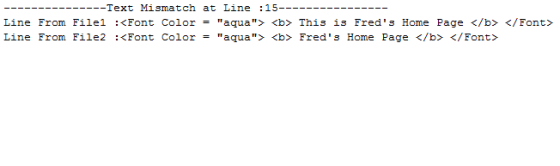
1. Write a program that compares two text files for equality. Print out any lines that are different along with the line number.
2. Include the following:
- File I/O Exception Handling using a Try/Catch Block
- Algorithm: Initial and Refined
- Internal Documentation
- All prologue information
- The two external files
3. Use the following two files: File1.txt and File2.txt. These files are included. I have also attached zip files containing them because sometimes the files are converted to HTML files when downloaded.
4. Zip and Submit the program along with the two files you used for the comparison.
NOTE 1: You may be tempted to use other means of processing File I/O that you come across on the internet. DO NOT USE any other means of processing files other than what is introduced in the lectures. Any program that uses something different will result in a grade of 0. NO EXCEPTIONS.
NOTE 2:
1. Declare all variables within the data declaration section of
each class and method.
2 Do not get input on the same line as a variable
declaration.
3. Do not place an equation for computation on the same line as
declaring a variable.
File 1
<HTML>
<Head>
<Title> Fred's Home Page </Title>
</Head>
<Body bgcolor = "white">
<Center>
<H1>
<Font Color = "aqua"> <b> This is Fred's Home Page </b> </Font>
</H1>
<p> <H2> Hi! My name is Fred, and this web site is all about me! </H2> </p>
</Center>
<HR Align = Center>
<br> <br> <br>
<p> <H> Here are some things I want to share: </H3> </p>
<br>
<br>My Hobbies
<br>My Pets
<p> <H2><Font Color = "White"><b>Here is a picture I like! </b> </Font></H2> </p>
<IMG Src = "bfly1.gif" align = left >
</Body>
</HTML>
File 2
<HTML>
<Head>
<Title> Fred's Home Page </Title>
</Head>
<Body bgcolor = "white">
<Center>
<H1>
<Font Color = "aqua"> <b> Fred's Home Page </b> </Font>
</H1>
<p> <H2> Hi! My name is Fred, and this web site is all about me! </H2> </p>
</Center>
<HR Align = Center>
<br> <br> <br>
<p> <H> Here are some things I want to share: </H3> </p>
<br>
<br>My Hobbies
<br>My Pets
<p> <H2><Font Color = "White"><b>Here is a picture I like! </b> </Font></H2> </p>
<IMG Src = "bfly1.gif" align = left >
</Body>
</HTML>
Homework Answers
import java.io.*;
import java.util.Scanner;
public class CompareFiles {
public static void main(String[] args) {
//taking file inputs
File file1 = new
File("File1.html");
File file2 = new
File("File2.html");
try {
//scanner for each individual
files for read the file
Scanner sc1 = new Scanner(file1);
Scanner sc2 = new Scanner(file2);
//this line number if for to count line number
int lineNumber=0;
//traversing files taking lines text comparing if not
then pritning both lines to console
while (sc1.hasNextLine() && sc2.hasNextLine())
{
String lineFromFile1= sc1.nextLine();
String lineFromFile2= sc2.nextLine();
if(lineFromFile1.equals(lineFromFile2)){
lineNumber++;
}
else{
lineNumber++;
System.out.println("---------------Text Mismatch at Line
:"+lineNumber+"----------------");
System.out.println("Line From File1
:"+lineFromFile1);
System.out.println("Line From File2
:"+lineFromFile2);
System.out.println();
}
}
sc1.close();
}
catch (FileNotFoundException e) {
e.printStackTrace();
}
}
}
Add Answer to:
Use Java Please
File 1 and File 2 at bottom of post.
1. Write a program...
The code below modifies the CSS style on button click. Give the output of the code...
The code below modifies the CSS style on button click. Give the output of the code and modify the code such that background color of title should also be modified . <!DOCTYPE html> <html lang="en"> <head> <title>JavaScript and HTML</title> <meta charset="utf-8"/> <style> h1 { color:blue; background-color:lightGreen; border:12px solid green; padding: 5px; border-radius: 15px; text-align: center; } p, h1 { } } </style> <script> function changeTitleCSSStyle() { var title = document.querySelector("#mainTitle"); title.style.color = 'black'; title.style.border = "5px dashed red"; } </script>...
Convert attached servlet file to use ArrayList instead of using Enumeration string array. import java.io.*; import...
Convert attached servlet file to use ArrayList instead of using Enumeration string array. import java.io.*; import javax.servlet.*; import javax.servlet.annotation.*; import javax.servlet.http.*; import java.util.*; @WebServlet("/show-params") public class ShowParameters extends HttpServlet { @Override public void doGet(HttpServletRequest request, HttpServletResponse response) throws ServletException, IOException { response.setContentType("text/html"); PrintWriter out = response.getWriter(); String docType = "<!DOCTYPE HTML PUBLIC \"-//W3C//DTD HTML 4.0 " + "Transitional//EN\">\n"; String title = "Reading All Request Parameters"; out.println(docType + "<HTML>\n" + "<HEAD><TITLE>" + title + "</TITLE></HEAD>\n" + "<BODY BGCOLOR=\"#FDF5E6\">\n" + "<H1 ALIGN=CENTER>"...
How do I make these sheets into three different tabs for one website? This is all...
How do I make these sheets into three different tabs for one website? This is all using HTML. - Chade's Bicycle Company <!DOCTYPE html> <html> <head> <img src="Chade'sLogo.png"> </head> <body bgcolor= "white"> <center> Welcome to Chade's Bicycle Company!</center> <center> We aim towards making our customers happy. </center> <br> <center> Chade's Bicycle Company </center> <center>2900 Bicycle Ave.</center> <center>Seattle, Washington</center> <center>98101</center> <br> <center><img src="HappyCustomer.png" alt="Satisfied customers"></center> <br> <p align="right">Our mission statement:</p> <p align="right">Bicycles have always been a </p> <p align="right">positive part of...
use the sample html file below with a submit button to modify the style of the...
use the sample html file below with a submit button to modify the style of the paragraph text through JavaScript code. By clicking on the button, the font, the font size, and the color of the paragraph text will be changed. <!DOCTYPE html> · <html> · <head> · <meta charset=utf-8 /> · <title>Change Paragraph Text</title> · </head> · <body> · <p id ='text'>I’m going to change this text, I hope.</p> · <div> · <button id="jschange" · onclick="js_style()">Style</button> · </div> · </body> · </html>
I cant seem to get the CSS at the bottom of this HTML to work. <!doctype...
I cant seem to get the CSS at the bottom of this HTML to work. <!doctype html> <html lang="en"> <head> <!--Madison McCuiston--> <meta charset="utf-8"> <title>Amelie Boulangerie</title> <link href="style.css" rel="stylesheet" type="text/css"> </head> <body> <div id="wrapper"> <header>Amelie Boulangerie</header> <!-- change this to header tag --> <nav> <ul> <li><a href="index.html">Home</a></li> <li><a href="pastries.html">Pastries</a></li> <li><a href="events.html">Events</a></li> <li><a href="contact.html">Contact</a></li> </ul> </nav> <main> <H2>Experience the Difference</H2> <p><span class="bakery">Amelie Boulangerie</span> is the master of flavor combinations.The jewel-colored macarons come in the most tempting of flavors. Experience the difference...
Im working with php but having problem displaying the correct result. I need to show Order...
Im working with php but having problem displaying the correct result. I need to show Order processed at (time) HTML file: <!DOCTYPE html> <html> <head> <title>Bob's Auto Parts - Order Form</title> </head> <body> <form action="processorder.php" method="post"> <table style="border: 0px;"> <tr style="background: #cccccc;"> <td style="width: 150px; text-align: center;">Item</td> <td style="width: 15px; text-align: center;">Quantity</td> </tr> <tr> <td>Tires</td> <td><input type="text" name="tireqty" size="3" maxlength="3" /></td> </tr> <tr> <td>Oil</td> <td><input type="text" name="oilqty" size="3" maxlength="3" /></td> </tr> <tr> <td>Spark Plugs</td> <td><input type="text" name="sparkqty" size="3" maxlength="3" /></td>...
Mark up your resume so that the different sections of the resume are styled using the...
 Mark up your resume so that the different sections of the resume
are styled using the box attributes we discussed in class on
4/4/2018. For example, create different box styles, colors,
thicknesses, margins, padding, alignments, etc. Make sure each
section is style differently so that you have experience with many
different styles.
Here is the resume Code
<html>
<head>
<html>
<head>
<title> My Resume </title>
</head>
<body>
<H1 align ="center"> Resume</H1>
<p align="left">
<em><b>Name: Darryl Johnson</b></em>
</br>
<b>
Address:</b>2011 Aztec...
Mark up your resume so that the different sections of the resume
are styled using the box attributes we discussed in class on
4/4/2018. For example, create different box styles, colors,
thicknesses, margins, padding, alignments, etc. Make sure each
section is style differently so that you have experience with many
different styles.
Here is the resume Code
<html>
<head>
<html>
<head>
<title> My Resume </title>
</head>
<body>
<H1 align ="center"> Resume</H1>
<p align="left">
<em><b>Name: Darryl Johnson</b></em>
</br>
<b>
Address:</b>2011 Aztec...
In this exercise, you’ll modify the Future Value Calculator application to include a header and footer....
In this exercise, you’ll modify the Future Value Calculator application to include a header and footer. Review the project Open the header.jsp file and note that it contains the code necessary for the start of an HTML page including the opening html, head, and body tags, the title for the web page, and a link including the CSS file. Open the footer.jsp file and note that includes a copyright notice and the closing body and html tags. Modify the code...
Hey I am having an issue with my HTML5 document. Everything is working fine except that...
Hey I am having an issue with my HTML5 document. Everything is working fine except that I am not sure how to make my <h1> Objective </h1> to align towards the left. I have tried for instance <p align = "Left"> <h1> <strong>Objective </strong> </h1> </p> Any help would be great. Thanks <!DOCTYPE html> <html> <!-- Do I need to use <head> right here? I tried it without head or urf-8 and it worked--> <!-- I'm still a bit confused...
Question are based on THML code below. Read the code and then answer questions after it...
Question are based on THML code below. Read the code and then answer questions after it <html> <head><title>First Web Page</title></head> <body bgcolor="#310AFC" > <table border="1" width="700" height="600" bgcolor="#1A88BC" align="right"> <tr> <td ><font size="4" color="blue">This is Cell 1</font> </td> <td bgcolor="#FCBB8C"><h2 align="left">This is a heading</h2></td> <td><font size="4" color="red">There is a list below</font> <ul><li>Item 1</li><li>item 2</li></ul> </td> <td><img src="2.jpg" width="100" height="100" border="1" /></td> </tr> <tr> <td>This is <a href="http://www.yahoo.ca">a link to Yahoo</a></td> <td><table border = "1" width="190" height="110" bgcolor="#FD8B08"> <tr><td>inside 1</td><td>inside 2</td></tr>...
Most questions answered within 3 hours.
-
Where is the error in this code sequence?
String s1 = "Hello";
String s2 = "ello";...
asked 10 months ago -
Financial data for Joel de Paris, Inc., for last year
follow:
Joel de Paris, Inc.
Balance...
asked 10 months ago -
Consider this reaction:
Al2(SO4)3 (aq)+ BaCl3
(aq) Al2Cl6 (aq)- +
3BaSO4(s) . What is the...
asked 10 months ago -
Suppose that Savneet is considering increasing her
recent random sample from 20 car rentals to 40...
asked 10 months ago -
Trucks arrive at an unloading terminal at an average rate of 120
per hour.
Trucks arrive...
asked 10 months ago -
Why are methanol and ethanol completely soluble in water while
octanol is not very little soluble....
asked 10 months ago -
A facilities manager at a university reads in a research report
that the mean amount of...
asked 10 months ago -
When the CuSO4 is rehydrated by adding water to the anhydrous
compound, is this an endothermic...
asked 10 months ago -
A ray of sunlight is passing from diamond into crown glass; the
angle of incidence is...
asked 10 months ago -
A block of mass 0.249 kg is placed on top of a light, vertical
spring of...
asked 10 months ago -
how do the kidneys compensate in the presences of acidosis
a) trigger hyperventilate
b) reserve acid...
asked 10 months ago -
Question 501 pts
The rental rate of capital to the firm increases. Which of the
following...
asked 10 months ago