IN php .... I need Help I Need to Modify this application so it uses a...
Homework Answers
In index.php will be as below.
<?php
$lifetime = 60 * 5; // 5 mins in seconds
session_set_cookie_params($lifetime, '/');
session_start();
//set default value of variables for initial page load
if (!isset($investment)) { $investment = ''; }
if (!isset($interest_rate)) { $interest_rate = ''; }
if (!isset($years)) { $years = ''; }
if (!empty($_SESSION['amount']))
$investment = $_SESSION['amount'];
if (!empty($_SESSION['rate']))
$interest_rate = $_SESSION['rate'];
if (! empty($_SESSION['year']))
$years = $_SESSION['year'];
?>
<!DOCTYPE html">
<html>
<head>
<title>Future Value Calculator</title>
<link rel="stylesheet" type="text/css"
href="main.css"/>
</head>
<body>
<main>
<h1>Future Value Calculator</h1>
<?php if (!empty($error_message)) { ?>
<p class="error"><?php echo $error_message;
?></p>
<?php } // end if ?>
<form action="display_results.php" method="post">
<div id="data">
<label>Investment Amount:</label>
<input type="text" name="investment"
value="<?php echo $investment; ?>">
<br>
<label>Yearly Interest Rate:</label>
<input type="text" name="interest_rate"
value="<?php echo $interest_rate; ?>">
<br>
<label>Number of Years:</label>
<input type="text" name="years"
value="<?php echo $years; ?>"><br>
</div>
<div id="buttons">
<label> </label>
<input type="submit" value="Calculate"><br>
</div>
</form>
</main>
</body>
</html>
Modify the top part display_result.php as below
<?php
session_start();
// get the data from the form
$investment = filter_input(INPUT_POST, 'investment',
FILTER_VALIDATE_FLOAT);
$interest_rate = filter_input(INPUT_POST, 'interest_rate',
FILTER_VALIDATE_FLOAT);
$years = filter_input(INPUT_POST, 'years',
FILTER_VALIDATE_INT);
$_SESSION['amount'] = $investment;
$_SESSION['rate'] = $interest_rate;
$_SESSION['year'] = $years;
// validate investment
........
.........
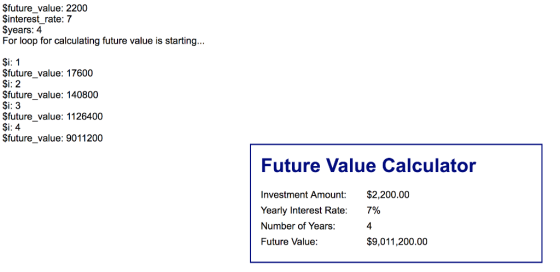
As you run the application, After submitting index.php by clicking the calculate button, it displays the future value result as shown below.
Now again will be displayed as below.
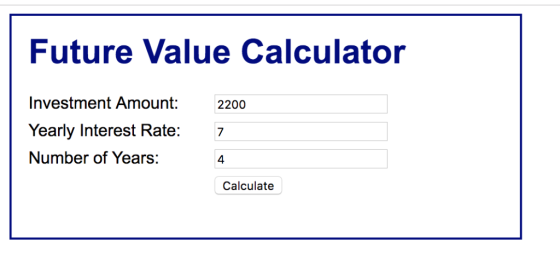
After pressing calculate button , it gives following display
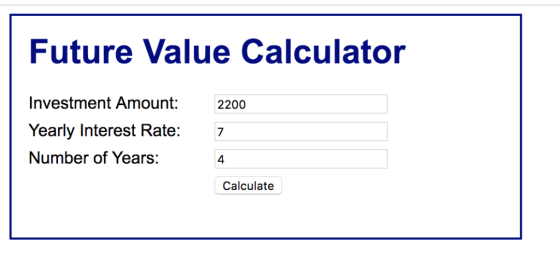
Now in browser, if the index.php page is invoked, user will get the
page with a form filled with value as below.
Add Answer to:
IN php ....
I need Help I Need to Modify this application so it uses a...
Modify an application that lets users add tasks to a list so the tasks can also...
Modify an application that lets users add tasks to a list so the tasks can also be deleted when they’re completed. 1. In the HTML file, enclose the text for each of the three existing list items in a <p> element. Then, Add buttons like the ones shown above preceding the <p> elements. No ids or names are required for these buttons, but they should be assigned to the class named “delete”. 2. In the JavaScript file, modify the event...
In this exercise, you’ll modify the Future Value Calculator application to include a header and footer....
In this exercise, you’ll modify the Future Value Calculator application to include a header and footer. Review the project Open the header.jsp file and note that it contains the code necessary for the start of an HTML page including the opening html, head, and body tags, the title for the web page, and a link including the CSS file. Open the footer.jsp file and note that includes a copyright notice and the closing body and html tags. Modify the code...
Develop the Change Calculator application In this exercise, you’ll create an application that displays the minimum...
Develop the Change Calculator application In this exercise, you’ll create an application that displays the minimum number of quarters, dimes, nickels, and pennies that make up the number of cents specified by the user. Without the use of a JavaScript Library (for coins). 1. Open the HTML and JavaScript files below: 2. In the JavaScript file, note that three functions are supplied. The $ function. The start of a calculateChange function. And an onload event handler that attaches the calculateChange...
In this exercise, you’ll upgrade a version of the MPG application so the error messages are...
 In this exercise, you’ll upgrade a version of the MPG
application so the error messages are displayed in span elements to
the right of the text boxes.
Open the HTML and JavaScript files in this folder:
exercises_short\ch06\mpg\
Then, run the application and click the Calculate MPG button to
see that an error message is displayed in an alert dialog box for
each of the two input fields.
2. In the HTML file, add a span element after the input element...
In this exercise, you’ll upgrade a version of the MPG
application so the error messages are displayed in span elements to
the right of the text boxes.
Open the HTML and JavaScript files in this folder:
exercises_short\ch06\mpg\
Then, run the application and click the Calculate MPG button to
see that an error message is displayed in an alert dialog box for
each of the two input fields.
2. In the HTML file, add a span element after the input element...
PHP code that is given : <?php // Here is where your preprocessing code goes //...
 PHP code that is given :
<?php
// Here is where your preprocessing code goes
// An example is already given to you for the First Name
$fname = $_GET['fname'];
?>
<!DOCTYPE html>
<html lang="en">
<head>
<meta charset="utf-8">
<title>Exercise 2 - GET Echo</title>
<style>
body {
margin:0;
padding:0;
font-family: Arial;
}
form {
margin:20px;
}
input[type="text"], input[type="password"] {
width:150px;
padding:3px;
font-size:1em;
}
input[type="submit"] {
padding:3px;
font-size:1em;
}
label {
display:inline-block;
width:150px;
}
.input-container {
padding:5px;
}
</style>
</head>
<body>
<form...
PHP code that is given :
<?php
// Here is where your preprocessing code goes
// An example is already given to you for the First Name
$fname = $_GET['fname'];
?>
<!DOCTYPE html>
<html lang="en">
<head>
<meta charset="utf-8">
<title>Exercise 2 - GET Echo</title>
<style>
body {
margin:0;
padding:0;
font-family: Arial;
}
form {
margin:20px;
}
input[type="text"], input[type="password"] {
width:150px;
padding:3px;
font-size:1em;
}
input[type="submit"] {
padding:3px;
font-size:1em;
}
label {
display:inline-block;
width:150px;
}
.input-container {
padding:5px;
}
</style>
</head>
<body>
<form...
Posting this again because day limit has run out. Again I really need help with this....
 Posting this again because day limit has run out. Again I really
need help with this. This is for my Advanced Java Programming
class. The book we use is Murach's Java Servlet's and JSP 3rd
Edition. The program used is NetBeans IDE 8.2. I need help
modifying or adding some code. I will post the code I was told to
open that needs to be modified below.
Exercise 9-3 Use
JSTL to add a table to the Future Value
application.
In...
Posting this again because day limit has run out. Again I really
need help with this. This is for my Advanced Java Programming
class. The book we use is Murach's Java Servlet's and JSP 3rd
Edition. The program used is NetBeans IDE 8.2. I need help
modifying or adding some code. I will post the code I was told to
open that needs to be modified below.
Exercise 9-3 Use
JSTL to add a table to the Future Value
application.
In...
Add JavaScript code in the “find_primeV2.js” to allow users to enter a number, and then based...
Add JavaScript code in the “find_primeV2.js” to allow users to enter a number, and then based on the number of user enters, to find out how many prime numbers there are up to and including the user inputted number and then display them on the web page. The following are the detailed steps to complete this assignment: Step 1. [30 points] In “find_primeV2.js”, complete isPrime() function by (1) Adding one parameter in function header. That parameter is used to accept...
6-1 Test and debug the Invoice Application i need help with this please.. all help is...
 6-1 Test and debug the Invoice Application
i need help with this please.. all help is appreciated
Source code Java:
import java.util.Scanner;
import java.text.NumberFormat;
public class InvoiceApp {
public static void main(String[] args) {
Scanner sc = new Scanner(System.in);
String choice = "y";
while (!choice.equalsIgnoreCase("n")) {
// get the input from the user
System.out.print("Enter customer type (r/c): ");
String customerType = sc.next();
System.out.print("Enter subtotal: ");
double subtotal = sc.nextDouble();
// get the discount percent
double discountPercent = 0.0;
switch(customerType) {...
6-1 Test and debug the Invoice Application
i need help with this please.. all help is appreciated
Source code Java:
import java.util.Scanner;
import java.text.NumberFormat;
public class InvoiceApp {
public static void main(String[] args) {
Scanner sc = new Scanner(System.in);
String choice = "y";
while (!choice.equalsIgnoreCase("n")) {
// get the input from the user
System.out.print("Enter customer type (r/c): ");
String customerType = sc.next();
System.out.print("Enter subtotal: ");
double subtotal = sc.nextDouble();
// get the discount percent
double discountPercent = 0.0;
switch(customerType) {...
need this in #c . You will now add server side validation code to the frmPersonnel...
 need this in #c
. You will now add server side validation code to the
frmPersonnel page. Currently, when the Submit button is pressed,
the frmPersonnelVerified page is displayed. This is because the
frmPersonnelVerified page is set as the Submit button's PostBackUrl
property. Instead of having the page go directly to the
frmPersonnelVerified page when the Submit button is pressed, we
want to do some server side validation. If any of the validation
rules fail, we will redisplay the frmPersonnel...
need this in #c
. You will now add server side validation code to the
frmPersonnel page. Currently, when the Submit button is pressed,
the frmPersonnelVerified page is displayed. This is because the
frmPersonnelVerified page is set as the Submit button's PostBackUrl
property. Instead of having the page go directly to the
frmPersonnelVerified page when the Submit button is pressed, we
want to do some server side validation. If any of the validation
rules fail, we will redisplay the frmPersonnel...
I need help with this code: Write a program that calculates the future value of an...
I need help with this code: Write a program that calculates the future value of an investment at a given interest rate for a specified number of years. The formula for the calculation is as follows: futureValue = investmentAmount * (1 + monthlyInterestRate)years*12 Use text fields for interest rate, investment amount, and years. Display the future amount in a text field when the user clicks the Calculate button, as shown in the following figure. It needs to be done in...
 In this exercise, you’ll upgrade a version of the MPG
application so the error messages are displayed in span elements to
the right of the text boxes.
Open the HTML and JavaScript files in this folder:
exercises_short\ch06\mpg\
Then, run the application and click the Calculate MPG button to
see that an error message is displayed in an alert dialog box for
each of the two input fields.
2. In the HTML file, add a span element after the input element...
In this exercise, you’ll upgrade a version of the MPG
application so the error messages are displayed in span elements to
the right of the text boxes.
Open the HTML and JavaScript files in this folder:
exercises_short\ch06\mpg\
Then, run the application and click the Calculate MPG button to
see that an error message is displayed in an alert dialog box for
each of the two input fields.
2. In the HTML file, add a span element after the input element...
 PHP code that is given :
<?php
// Here is where your preprocessing code goes
// An example is already given to you for the First Name
$fname = $_GET['fname'];
?>
<!DOCTYPE html>
<html lang="en">
<head>
<meta charset="utf-8">
<title>Exercise 2 - GET Echo</title>
<style>
body {
margin:0;
padding:0;
font-family: Arial;
}
form {
margin:20px;
}
input[type="text"], input[type="password"] {
width:150px;
padding:3px;
font-size:1em;
}
input[type="submit"] {
padding:3px;
font-size:1em;
}
label {
display:inline-block;
width:150px;
}
.input-container {
padding:5px;
}
</style>
</head>
<body>
<form...
PHP code that is given :
<?php
// Here is where your preprocessing code goes
// An example is already given to you for the First Name
$fname = $_GET['fname'];
?>
<!DOCTYPE html>
<html lang="en">
<head>
<meta charset="utf-8">
<title>Exercise 2 - GET Echo</title>
<style>
body {
margin:0;
padding:0;
font-family: Arial;
}
form {
margin:20px;
}
input[type="text"], input[type="password"] {
width:150px;
padding:3px;
font-size:1em;
}
input[type="submit"] {
padding:3px;
font-size:1em;
}
label {
display:inline-block;
width:150px;
}
.input-container {
padding:5px;
}
</style>
</head>
<body>
<form...
 Posting this again because day limit has run out. Again I really
need help with this. This is for my Advanced Java Programming
class. The book we use is Murach's Java Servlet's and JSP 3rd
Edition. The program used is NetBeans IDE 8.2. I need help
modifying or adding some code. I will post the code I was told to
open that needs to be modified below.
Exercise 9-3 Use
JSTL to add a table to the Future Value
application.
In...
Posting this again because day limit has run out. Again I really
need help with this. This is for my Advanced Java Programming
class. The book we use is Murach's Java Servlet's and JSP 3rd
Edition. The program used is NetBeans IDE 8.2. I need help
modifying or adding some code. I will post the code I was told to
open that needs to be modified below.
Exercise 9-3 Use
JSTL to add a table to the Future Value
application.
In...
 6-1 Test and debug the Invoice Application
i need help with this please.. all help is appreciated
Source code Java:
import java.util.Scanner;
import java.text.NumberFormat;
public class InvoiceApp {
public static void main(String[] args) {
Scanner sc = new Scanner(System.in);
String choice = "y";
while (!choice.equalsIgnoreCase("n")) {
// get the input from the user
System.out.print("Enter customer type (r/c): ");
String customerType = sc.next();
System.out.print("Enter subtotal: ");
double subtotal = sc.nextDouble();
// get the discount percent
double discountPercent = 0.0;
switch(customerType) {...
6-1 Test and debug the Invoice Application
i need help with this please.. all help is appreciated
Source code Java:
import java.util.Scanner;
import java.text.NumberFormat;
public class InvoiceApp {
public static void main(String[] args) {
Scanner sc = new Scanner(System.in);
String choice = "y";
while (!choice.equalsIgnoreCase("n")) {
// get the input from the user
System.out.print("Enter customer type (r/c): ");
String customerType = sc.next();
System.out.print("Enter subtotal: ");
double subtotal = sc.nextDouble();
// get the discount percent
double discountPercent = 0.0;
switch(customerType) {...
 need this in #c
. You will now add server side validation code to the
frmPersonnel page. Currently, when the Submit button is pressed,
the frmPersonnelVerified page is displayed. This is because the
frmPersonnelVerified page is set as the Submit button's PostBackUrl
property. Instead of having the page go directly to the
frmPersonnelVerified page when the Submit button is pressed, we
want to do some server side validation. If any of the validation
rules fail, we will redisplay the frmPersonnel...
need this in #c
. You will now add server side validation code to the
frmPersonnel page. Currently, when the Submit button is pressed,
the frmPersonnelVerified page is displayed. This is because the
frmPersonnelVerified page is set as the Submit button's PostBackUrl
property. Instead of having the page go directly to the
frmPersonnelVerified page when the Submit button is pressed, we
want to do some server side validation. If any of the validation
rules fail, we will redisplay the frmPersonnel...
Most questions answered within 3 hours.
-
Where is the error in this code sequence?
String s1 = "Hello";
String s2 = "ello";...
asked 11 months ago -
Financial data for Joel de Paris, Inc., for last year
follow:
Joel de Paris, Inc.
Balance...
asked 11 months ago -
Consider this reaction:
Al2(SO4)3 (aq)+ BaCl3
(aq) Al2Cl6 (aq)- +
3BaSO4(s) . What is the...
asked 11 months ago -
Suppose that Savneet is considering increasing her
recent random sample from 20 car rentals to 40...
asked 11 months ago -
Trucks arrive at an unloading terminal at an average rate of 120
per hour.
Trucks arrive...
asked 11 months ago -
Why are methanol and ethanol completely soluble in water while
octanol is not very little soluble....
asked 11 months ago -
A facilities manager at a university reads in a research report
that the mean amount of...
asked 11 months ago -
When the CuSO4 is rehydrated by adding water to the anhydrous
compound, is this an endothermic...
asked 11 months ago -
A ray of sunlight is passing from diamond into crown glass; the
angle of incidence is...
asked 11 months ago -
A block of mass 0.249 kg is placed on top of a light, vertical
spring of...
asked 11 months ago -
how do the kidneys compensate in the presences of acidosis
a) trigger hyperventilate
b) reserve acid...
asked 11 months ago -
Question 501 pts
The rental rate of capital to the firm increases. Which of the
following...
asked 11 months ago