PART 1: Explore commands that compare file contents: mkdir ~/mod7 cd mod7 cp /etc/passwd passwd.bak pr...
PART 1: Explore commands that compare file contents:
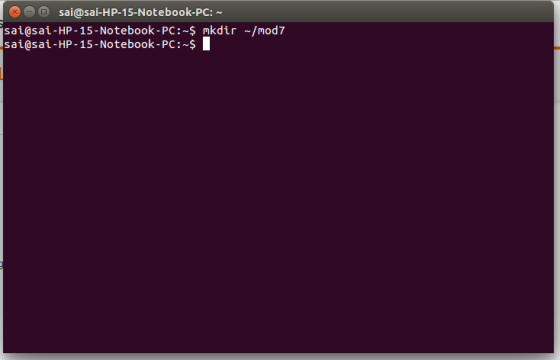
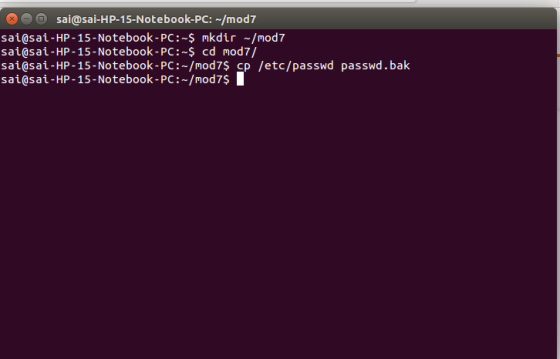
- mkdir ~/mod7
- cd mod7
- cp /etc/passwd passwd.bak
- pr passwd.bak
- pr -n -d passwd.bak
- cp passwd.bak passwd.bak2
- Add a new entry towards the top of the passwd.bak2 file for Albert Morris using vi : amorris:x:29000:0:Albert Morris: /home/amorris: /bin/bash)
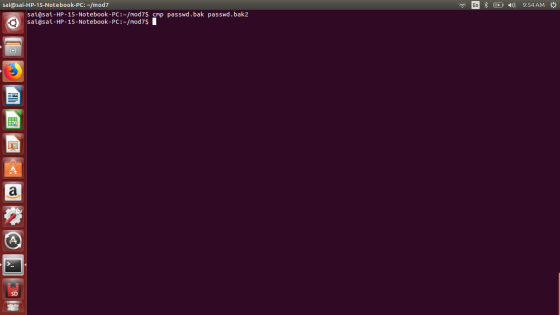
- cmp passwd.bak2 passwd.bak
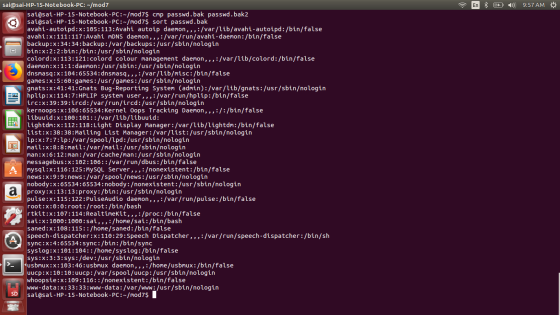
- sort passwd.bak
- more passwd.bak
- sort passwd.bak > passwd.bak3
- sort passwd.bak2 > passwd.bak4
- comm passwd.bak3 passwd.bak4
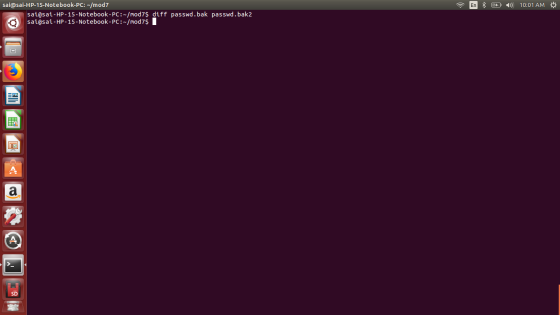
- diff passwd.bak passwd.bak2
- TO HAND IN: Take a screen shot of these commands plus their execution for PART 1.
PART 2: Experiment with additional commands:
- cut -d: -f1 passwd.bak2
- cat passwd.bak >> passwd.bak4
- sort passwd.bak4 > passwd.bak5
- uniq passwd.bak5
- head passwd.bak5 | tr '[a-z]' '[A-Z]'
- TO HAND IN: Take a screen shot of these commands plus their execution for PART 2.
PART 3: Explore grep filter commands in Chapter 10:
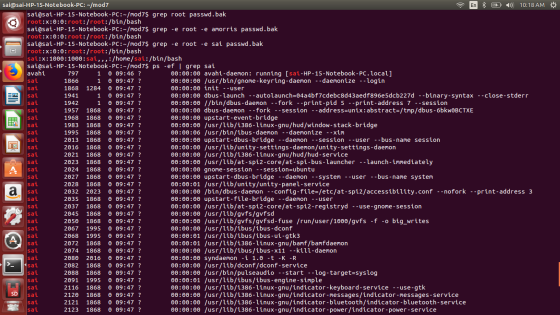
- grep "root" passwd.bak
- grep - e "root" -e "amorris" passwd.bak
- ps -ef | grep "your username" NOTE: replace "your username" with your actual username on the general
- grep "nobody" passwd.bak5
- grep "^nobody" passwd.bak5
- grep "[n*]obody" passwd.bak5
- grep "bash$" passwd.bak5
- TO HAND IN: Take a screen shot of these commands plus their execution for PART 3.
PART 4:
Explore sed filter commands in Chapter 10:
- sed '5q' passwd.bak5
- sed - n '1,5p' passwd.bak5
- sed -n '5,8p' passwd.bak5
- sed -n -e '5,8p' -e '20,24p' passwd.bak5
- sed -n '$p' passwd.bak5
- sed -e '/:x:0/w passwd.root.bak' passwd.bak5
- vi myscript.sh NOTE: Develop your own short script
- sed '1i\#just a comment\' myscript.sh > myscript2.sh
- sed 's/:/|/g' passwd.bak5 | head
- ls -al | sed '/^.....w/p' NOTE: See files with write group permissions
- vi teledir.txt and add the following text:
charles harris 98310200987
bill Johnson 327-100-2345
robert dylan 9632454090
john woodcock 2344987665
barry wood 234-908-3456
gordon lightfoot 345-987-4670
- sed 's /\([a-z]*\) *\([a-z]*\)/\2, \1/' teledir.txt | sort
- TO HAND IN: Take a screen shot of these commands plus their execution for PART 4.
Homework Answers
Answer to part 1)
-> mkdir is a command to make directory. ~ means to make directory in the current directory.
-> cp is a command to copy files from one directory to another.
-> pr is a command to make the executable for printing.
-> cmp is a command that compares two files and reports the location wherever difference is found. If the files are identical it simply returns.
-> sort is a command that sorts the files line by line .
-> comm is a command to compare two sorted files.
-> diff is a command that returns the location where the files are not identical.
Answer to part 3)
-> grep is a command line utility that searches for a pattern in the given file.
-> ps is a comamnd that displays the process that are currently running in the system.
-> grep ^nobody means to search for a line that starts with nobody. ^ is a regular expression that asks to search for a line starting with any pattern.
Add Answer to:
PART 1: Explore commands that compare file
contents:
mkdir ~/mod7
cd mod7
cp /etc/passwd passwd.bak
pr...
Most questions answered within 3 hours.
-
Where is the error in this code sequence?
String s1 = "Hello";
String s2 = "ello";...
asked 10 months ago -
Financial data for Joel de Paris, Inc., for last year
follow:
Joel de Paris, Inc.
Balance...
asked 10 months ago -
Consider this reaction:
Al2(SO4)3 (aq)+ BaCl3
(aq) Al2Cl6 (aq)- +
3BaSO4(s) . What is the...
asked 10 months ago -
Suppose that Savneet is considering increasing her
recent random sample from 20 car rentals to 40...
asked 10 months ago -
Trucks arrive at an unloading terminal at an average rate of 120
per hour.
Trucks arrive...
asked 10 months ago -
Why are methanol and ethanol completely soluble in water while
octanol is not very little soluble....
asked 10 months ago -
A facilities manager at a university reads in a research report
that the mean amount of...
asked 10 months ago -
When the CuSO4 is rehydrated by adding water to the anhydrous
compound, is this an endothermic...
asked 10 months ago -
A ray of sunlight is passing from diamond into crown glass; the
angle of incidence is...
asked 10 months ago -
A block of mass 0.249 kg is placed on top of a light, vertical
spring of...
asked 10 months ago -
how do the kidneys compensate in the presences of acidosis
a) trigger hyperventilate
b) reserve acid...
asked 10 months ago -
Question 501 pts
The rental rate of capital to the firm increases. Which of the
following...
asked 10 months ago