class FileUtility: def __init__ (self, filename): self.__filename = filename def displayFile(self): # use loop structure to...
class FileUtility:
def __init__ (self, filename):
self.__filename = filename
def displayFile(self):
# use loop structure to read and print each line of the file
def main():
#1. create a new file and write the follwing lines to it.
#
#I never saw a Purple Cow,
#I never hope to see one,
#But I can tell you, anyhow,
#I’d rather see than be one!
#
#2. create an object of FileUtility class
#3. call the object's displayFile method
main()
Homework Answers
NOTE: I have completed answer for your question. Please check
and let me know if you have any queries. I will get back to you
within 24 hours. Thanks for your patience.
Code:
#!/usr/local/bin/python3
class FileUtility:
def __init__(self, filename):
# constructor to set the file
self.filename = filename
def displayFile(self):
# opening the file in read
mode
fp = open(self.filename)
# displaying the contents of
file
print('File contents for the file
"%s" are'%self.filename)
for each_line in fp:
print(each_line.strip())
fp.close()
def main():
# setting the file name
file_name = 'testfile'
# creating an object of the class FileUtility
fu = FileUtility(file_name)
# opening the file in write mode and write contents
into it
fp = open(file_name, 'w')
fp.write('I never saw a Purple Cow,\n')
fp.write('I never hope to see one,\n')
fp.write('But I can tell you, anyhow,\n')
fp.write('I’d rather see than be one!\n')
fp.close()
# displaying the contents of file
fu.displayFile()
main()
Code screenshot:
 Code
output screenshot:
Code
output screenshot:
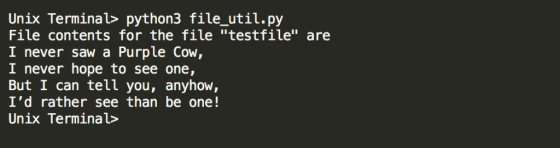
Add Answer to:
class FileUtility:
def __init__ (self, filename):
self.__filename = filename
def displayFile(self):
# use loop structure to...
In PYTHON: Assume there is a class Animal, containing a method with the header: def __init__(self)....
In PYTHON: Assume there is a class Animal, containing a method with the header: def __init__(self). What statement will create an Animal object and store it in the variable 'cat'.
Consider following flower class. class Flower: def __init__(self, Fname, numberofpetals, Fprice): self.Fname = Fname self.numberofpetals =...
Consider following flower class. class Flower: def __init__(self, Fname, numberofpetals, Fprice): self.Fname = Fname self.numberofpetals = numberofpetals self.Fprice = Fprice def getName(self): return self.Fname def getPetalsCount(self): return self.numberofpetals def getPrice(self): return self.Fprice def setName(self, Fname): self.Fname = Fname def setPetalsCount(self, numberofpetals): self.numberofpetals = numberofpetals def setPrice(self, Fprice): self.Fprice = Fprice def main(): flower f, print("name = ", flower.getName()) flower.setName("jasmine") print("name = ", flower.getName()) main() Q. What is the statement to set an object flower with rose , 4 and price...
Write a class called TemperatureFile. • The class has one data attribute: __filename • Write get...
Write a class called TemperatureFile. • The class has one data attribute: __filename • Write getter and setter for the data attribute. • Write a “calculateAverage” function (signature below) to calculate and return average temperature of all temperatures in the file. def calculateAverage(self): • Handle possible exceptions Write a main function: • Create a file ('Temperatures.txt’) and then use “write” method to write temperature values on each line. • Create an object of the TemperaureFile with the filename (‘Temperatures.txt’) just...
class Leibniz: def __init__(self): self.total=0 def calculate_pi(self,n): ...
class Leibniz: def __init__(self): self.total=0 def calculate_pi(self,n): try: self.total, sign = 0, 1 for i in range(n): term = 1 / (2 * i + 1) self.total += term * sign sign *= -1 self.total *= 4 return self.total except Exception as e: ...
PYTHON -------------------------------------------------------- class LinkedList: def __init__(self): self.__head = None self.__tail = None
 PYTHON
--------------------------------------------------------
class LinkedList:
def __init__(self):
self.__head = None
self.__tail = None
self.__size = 0
# Return the head element in the list
def getFirst(self):
if self.__size ==
0:
return
None
else:
return
self.__head.element
# Return the last element in the list
def getLast(self):
if self.__size ==
0:
return
None
else:
return
self.__tail.element
# Add an element to the beginning of the
list
def addFirst(self, e):
newNode = Node(e) #
Create a new node
newNode.next =
self.__head # link...
PYTHON
--------------------------------------------------------
class LinkedList:
def __init__(self):
self.__head = None
self.__tail = None
self.__size = 0
# Return the head element in the list
def getFirst(self):
if self.__size ==
0:
return
None
else:
return
self.__head.element
# Return the last element in the list
def getLast(self):
if self.__size ==
0:
return
None
else:
return
self.__tail.element
# Add an element to the beginning of the
list
def addFirst(self, e):
newNode = Node(e) #
Create a new node
newNode.next =
self.__head # link...
Code Example 14-3 class Multiplier: def __init__(self): self.num1 = 0 self.num2 = 0 def...
Code Example 14-3 class Multiplier: def __init__(self): self.num1 = 0 self.num2 = 0 def getProduct(self): return self.num1 * self.num2 def main(): m = Multiplier() m.num1 = 7 m.num2 = 3 print(m.num1, "X", m.num2, "=", m.getProduct()) if __name__ == "__main__": main() Refer to Code Example 14-3: When this code is executed, what does it print to the console? a. 7 X 3 = 0 b. 3 X 7 = 0 c. 7 X 3...
In Python: Which one is the arguments of the ShowInfo method? class Car(): def __init__(self,model, year):...
In Python: Which one is the arguments of the ShowInfo method? class Car(): def __init__(self,model, year): self._model = model self._year = year def ShowInfo( ): print(self._model + str(self._year)) Question 16 options: model, year No argument is needed self,model, year self
in python and according to this #Creating class for stack class My_Stack: def __init__(self): self.items = [] def isEmpty(self): return self.items == [] def Push(self, d): self.items.append(d) def Po...
 in
python and according to this
#Creating class for stack
class My_Stack:
def __init__(self):
self.items = []
def isEmpty(self):
return self.items == []
def Push(self, d):
self.items.append(d)
def Pop(self):
return self.items.pop()
def Display(self):
for i in reversed(self.items):
print(i,end="")
print()
s = My_Stack()
#taking input from user
str = input('Enter your string for palindrome checking:
')
n= len(str)
#Pushing half of the string into stack
for i in range(int(n/2)):
s.Push(str[i])
print("S",end="")
s.Display()
s.Display()
#for the next half checking the upcoming string...
in
python and according to this
#Creating class for stack
class My_Stack:
def __init__(self):
self.items = []
def isEmpty(self):
return self.items == []
def Push(self, d):
self.items.append(d)
def Pop(self):
return self.items.pop()
def Display(self):
for i in reversed(self.items):
print(i,end="")
print()
s = My_Stack()
#taking input from user
str = input('Enter your string for palindrome checking:
')
n= len(str)
#Pushing half of the string into stack
for i in range(int(n/2)):
s.Push(str[i])
print("S",end="")
s.Display()
s.Display()
#for the next half checking the upcoming string...
class Node(object): def __init__(self, data, next=None): self.data = data self.next = next class List(object): def...
class Node(object): def __init__(self, data, next=None): self.data = data self.next = next class List(object): def __init__(self): self.head = None self.tail = None Implement the following functions for Linked List in Python and use the constructors above : Copy(lList) Builds and returns a copy of list ItemAt(List,i) Returns the data item at position i in list Pop(List,i=0) Remove item at position i in list. If i is not specified, it removes the first item in list Count(List,x) Returns the number...
COMPLETE THE _CONSTRUCT() AND CONSTRUCTTREE() FUNCTIONS class expressionTree: class treeNode: def __init__(self, value, lchild, rchild):...
COMPLETE THE _CONSTRUCT() AND CONSTRUCTTREE() FUNCTIONS class expressionTree: class treeNode: def __init__(self, value, lchild, rchild): self.value, self.lchild, self.rchild = value, lchild, rchild def __init__(self): self.treeRoot = None #utility functions for constructTree def mask(self, s): nestLevel = 0 masked = list(s) for i in range(len(s)): if s[i]==")": nestLevel -=1 elif s[i]=="(": nestLevel += 1 if nestLevel>0 and not (s[i]=="(" and nestLevel==1): masked[i]=" " return "".join(masked) def isNumber(self, expr): mys=s.strip() if len(mys)==0 or not isinstance(mys, str): print("type mismatch error: isNumber")...
 PYTHON
--------------------------------------------------------
class LinkedList:
def __init__(self):
self.__head = None
self.__tail = None
self.__size = 0
# Return the head element in the list
def getFirst(self):
if self.__size ==
0:
return
None
else:
return
self.__head.element
# Return the last element in the list
def getLast(self):
if self.__size ==
0:
return
None
else:
return
self.__tail.element
# Add an element to the beginning of the
list
def addFirst(self, e):
newNode = Node(e) #
Create a new node
newNode.next =
self.__head # link...
PYTHON
--------------------------------------------------------
class LinkedList:
def __init__(self):
self.__head = None
self.__tail = None
self.__size = 0
# Return the head element in the list
def getFirst(self):
if self.__size ==
0:
return
None
else:
return
self.__head.element
# Return the last element in the list
def getLast(self):
if self.__size ==
0:
return
None
else:
return
self.__tail.element
# Add an element to the beginning of the
list
def addFirst(self, e):
newNode = Node(e) #
Create a new node
newNode.next =
self.__head # link...
 in
python and according to this
#Creating class for stack
class My_Stack:
def __init__(self):
self.items = []
def isEmpty(self):
return self.items == []
def Push(self, d):
self.items.append(d)
def Pop(self):
return self.items.pop()
def Display(self):
for i in reversed(self.items):
print(i,end="")
print()
s = My_Stack()
#taking input from user
str = input('Enter your string for palindrome checking:
')
n= len(str)
#Pushing half of the string into stack
for i in range(int(n/2)):
s.Push(str[i])
print("S",end="")
s.Display()
s.Display()
#for the next half checking the upcoming string...
in
python and according to this
#Creating class for stack
class My_Stack:
def __init__(self):
self.items = []
def isEmpty(self):
return self.items == []
def Push(self, d):
self.items.append(d)
def Pop(self):
return self.items.pop()
def Display(self):
for i in reversed(self.items):
print(i,end="")
print()
s = My_Stack()
#taking input from user
str = input('Enter your string for palindrome checking:
')
n= len(str)
#Pushing half of the string into stack
for i in range(int(n/2)):
s.Push(str[i])
print("S",end="")
s.Display()
s.Display()
#for the next half checking the upcoming string...
Most questions answered within 3 hours.
-
Where is the error in this code sequence?
String s1 = "Hello";
String s2 = "ello";...
asked 11 months ago -
Financial data for Joel de Paris, Inc., for last year
follow:
Joel de Paris, Inc.
Balance...
asked 11 months ago -
Consider this reaction:
Al2(SO4)3 (aq)+ BaCl3
(aq) Al2Cl6 (aq)- +
3BaSO4(s) . What is the...
asked 11 months ago -
Suppose that Savneet is considering increasing her
recent random sample from 20 car rentals to 40...
asked 11 months ago -
Trucks arrive at an unloading terminal at an average rate of 120
per hour.
Trucks arrive...
asked 11 months ago -
Why are methanol and ethanol completely soluble in water while
octanol is not very little soluble....
asked 11 months ago -
A facilities manager at a university reads in a research report
that the mean amount of...
asked 11 months ago -
When the CuSO4 is rehydrated by adding water to the anhydrous
compound, is this an endothermic...
asked 11 months ago -
A ray of sunlight is passing from diamond into crown glass; the
angle of incidence is...
asked 11 months ago -
A block of mass 0.249 kg is placed on top of a light, vertical
spring of...
asked 11 months ago -
how do the kidneys compensate in the presences of acidosis
a) trigger hyperventilate
b) reserve acid...
asked 11 months ago -
Question 501 pts
The rental rate of capital to the firm increases. Which of the
following...
asked 11 months ago