I need help with this Java program: ** Note, the main function should be in its...
I need help with this Java program:
** Note, the main function should be in its own class.
The application simulates a mobile phone with a Contacts application. The mobile phone must be able to store, modify, query, and remove contact names. The Contacts class will contain the name. phone number, and email of contacts. Use composition to demonstrate the Mobile Phone class to contains an array of Contacts. The Mobile Phone class should provide a menu of options to include add a new contact, update an existing contact, remove a contact , search for a contact, print all contacts, and quit the application. Do not enable duplicate contacts. Before adding or updating, you must check if the contact exists.
Homework Answers
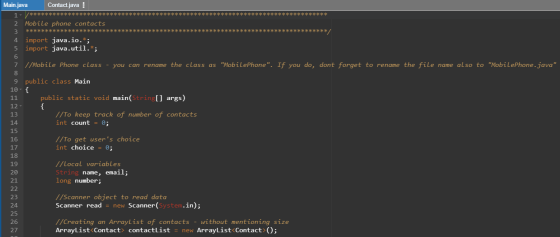
CODE :
Main.java
/************
Mobile phone contacts
*************/
import java.io.*;
import java.util.*;
//Mobile Phone class - you can rename the class as "MobilePhone". If you do, dont forget to rename the file name also to "MobilePhone.java"
public class Main
{
public static void main(String[] args)
{
//To keep track of number of contacts
int count = 0;
//To get user's choice
int choice = 0;
//local variables
String name, email;
long number;
//Scanner object to read data
Scanner read = new Scanner(System.in);
//Creating an ArrayList of contacts - without mentioning size
ArrayList<Contact> contactList = new ArrayList<Contact>();
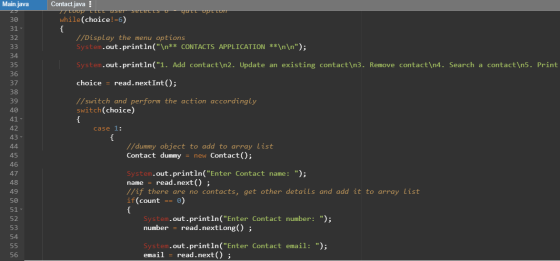
//loop till user selects 6 - quit option
while(choice!=6)
{
//Display the menu options
System.out.println("\n** CONTACTS APPLICATION **\n\n");
System.out.println("1. Add contact\n2. Update an existing contact\n3. Remove contact\n4. Search a contact\n5. Print all contacts\n6. Quit\nEnter an option: ");
choice = read.nextInt();
//switch and perform the action accordingly
switch(choice)
{
case 1:
{
//dummy object to add to array list
Contact dummy = new Contact();
System.out.println("Enter Contact name: ");
name = read.next() ;
//if there are no contacts, get other details and add it to array list
if(count == 0)
{
System.out.println("Enter Contact number: ");
number = read.nextLong() ;
System.out.println("Enter Contact email: ");
email = read.next() ;
dummy.setName(name);
dummy.setEmail(email);
dummy.setNumber(number);
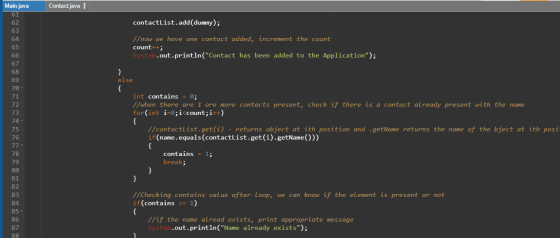
contactList.add(dummy);
//now we have one contact added, increment the count
count++;
System.out.println("Contact has been added to the Application");
}
else
{
int contains = 0;
//when there are 1 ore more contacts present, check if there is a contact already present with the name
for(int i=0;i<count;i++)
{
//contactList.get(i) - returns object at ith position and .getName returns the name of the bject at ith position
if(name.equals(contactList.get(i).getName()))
{
contains = 1;
break;
}}
//Checking contains value after loop, we can know if the element is present or not
if(contains == 1)
{
//if the name alread exists, print appropriate message
System.out.println("Name already exists");
}
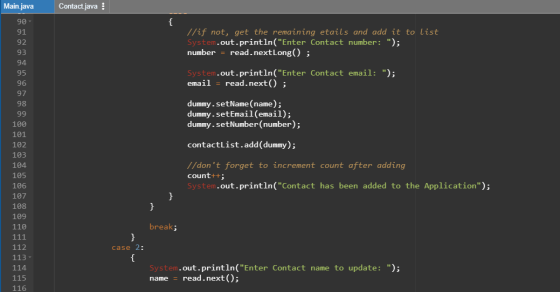
else
{
//if not, get the remaining etails and add it to list
System.out.println("Enter Contact number: ");
number = read.nextLong() ;
System.out.println("Enter Contact email: ");
email = read.next() ;
dummy.setName(name);
dummy.setEmail(email);
dummy.setNumber(number);
contactList.add(dummy);
//don't forget to increment count after adding
count++;
System.out.println("Contact has been added to the Application");
}}
break;
}
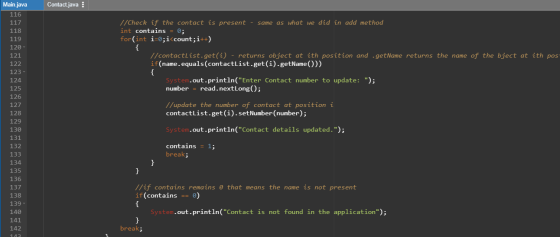
case 2:
{
System.out.println("Enter Contact name to update: ");
name = read.next();
//Check if the contact is present - same as what we did in add method
int contains = 0;
for(int i=0;i<count;i++)
{
//contactList.get(i) - returns object at ith position and .getName returns the name of the bject at ith position
if(name.equals(contactList.get(i).getName()))
{
System.out.println("Enter Contact number to update: ");
number = read.nextLong();
//update the number of contact at position i
contactList.get(i).setNumber(number);
System.out.println("Contact details updated.");
contains = 1;
break;
}
}
//if contains remains 0 that means the name is not present
if(contains == 0)
{
System.out.println("Contact is not found in the application");
}
break;
}
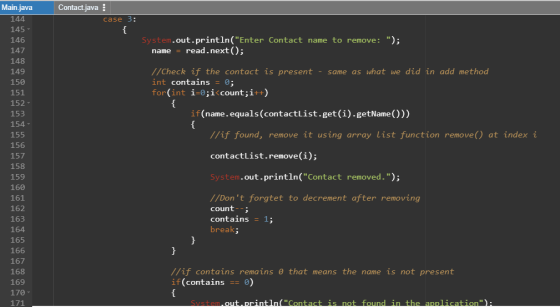
case 3:
{
System.out.println("Enter Contact name to remove: ");
name = read.next();
//Check if the contact is present - same as what we did in add method
int contains = 0;
for(int i=0;i<count;i++)
{
if(name.equals(contactList.get(i).getName()))
{
//if found, remove it using array list function remove() at index i
contactList.remove(i);
System.out.println("Contact removed.");
//Don't forgtet to decrement after removing
count--;
contains = 1;
break;
}
}
//if contains remains 0 that means the name is not present
if(contains == 0)
{
System.out.println("Contact is not found in the application");
}
break;
}
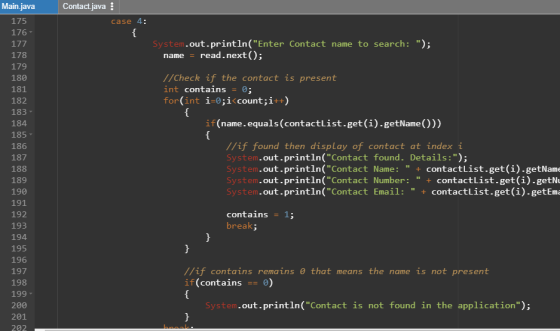
case 4:
{
System.out.println("Enter Contact name to search: ");
name = read.next();
//Check if the contact is present
int contains = 0;
for(int i=0;i<count;i++)
{
if(name.equals(contactList.get(i).getName()))
{
//if found then display of contact at index i
System.out.println("Contact found. Details:");
System.out.println("Contact Name: " + contactList.get(i).getName());
System.out.println("Contact Number: " + contactList.get(i).getNumber());
System.out.println("Contact Email: " + contactList.get(i).getEmail());
contains = 1;
break;
}
}
//if contains remains 0 that means the name is not present
if(contains == 0)
{
System.out.println("Contact is not found in the application");
}
break;
}
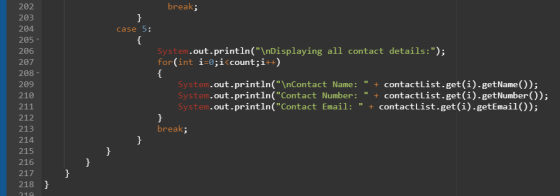
case 5:
{
System.out.println("\nDisplaying all contact details:");
for(int i=0;i<count;i++)
{
System.out.println("\nContact Name: " + contactList.get(i).getName());
System.out.println("Contact Number: " + contactList.get(i).getNumber());
System.out.println("Contact Email: " + contactList.get(i).getEmail());
}
break;
}}}}}
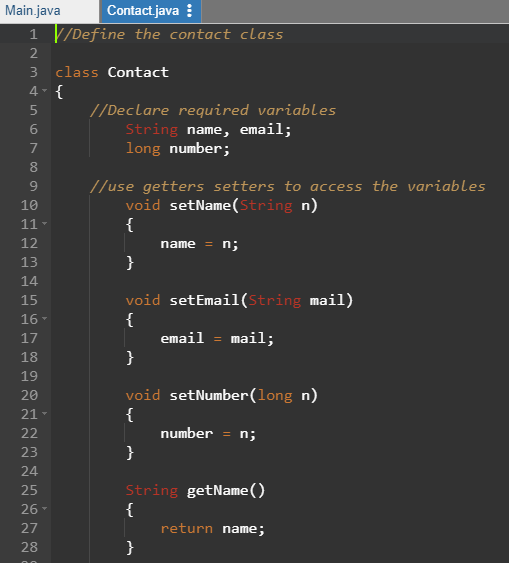
Contact.java:
//Define the contact class
class Contact
{
//Declare required variables
String name, email;
long number;
// to access the variables
void setName(String n)
{
name = n;
}
void setEmail(String mail)
{
email = mail;
}
void setNumber(long n)
{
number = n;
}
String getName()
{
return name;
}
String getEmail()
{
return email;
}
long getNumber()
{
return number;
}}
OUTPUT:
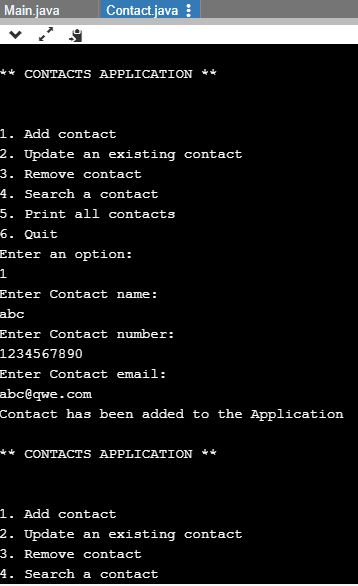
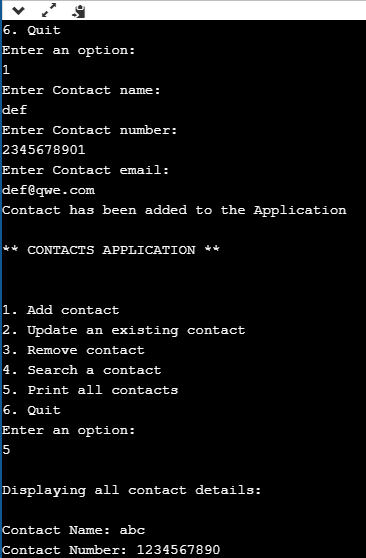
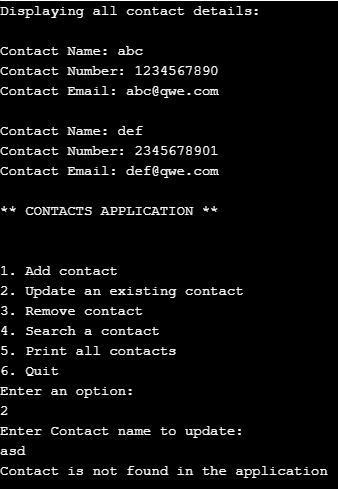
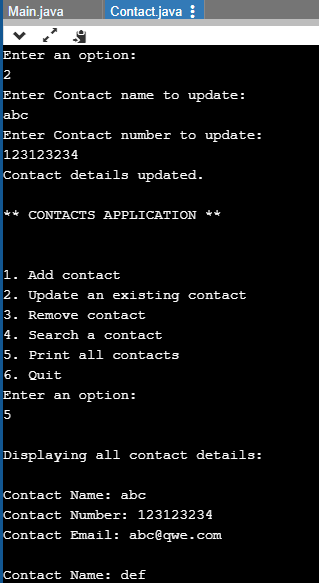
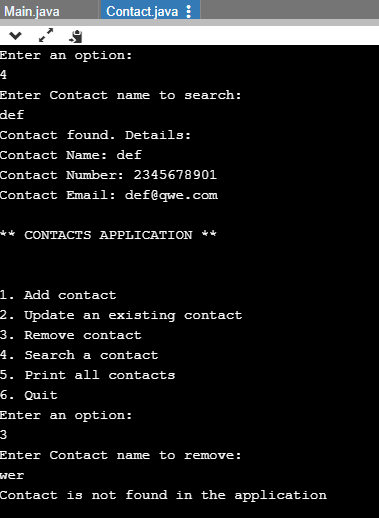
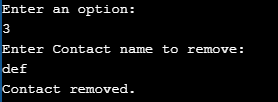
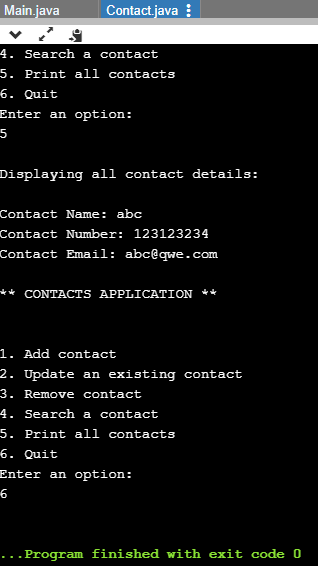
CODE SCREENSHOTS:
Add Answer to:
I need help with this Java program:
** Note, the main function should be in its...
write a ContactBook in C++ ContactBook that holds 10 names with that names corresponding contact (last...
write a ContactBook in C++ ContactBook that holds 10 names with that names corresponding contact (last name and first name of the owner). Ask the user to input up to 10 Contacts (It may be less. The user should have the ability to stop inputting Contacts whenever he wishes). 3.This class will store a list of Contacts in a stack allocated array of default capacity 10. 4.You must be able to add new contacts to a list, delete old contacts,...
Write a contacts database program that presents the user with a menu that allows the user...
Write a contacts database program that presents the user with a menu that allows the user to select between the following options: (In Java) Save a contact. Search for a contact. Print all contacts out to the screen. Quit If the user selects the first option, the user is prompted to enter a person's name and phone number which will get saved at the end of a file named contacts.txt. If the user selects the second option, the program prompts...
Java need help with searching for a contact Question:Write a program that uses an ArrayList of...
Java need help with searching for a contact Question:Write a program that uses an ArrayList of parameter type Contact to store a database of contacts. The Contact class should store the contact’s first and last name, phone number, and email address. Add appropriate accessor and mutator methods. Your database program should present a menu that allows the user to add a contact, display all contacts, search for a specific contact and display it, or search for a specific contact and...
You should implement several functions that the Phone Contacts program will need Each function with take...
 You should implement several functions that the Phone Contacts program will need Each function with take in data through the parameters (i.e., variables names listed in parentheses) and make updates to data structure that holds the contact information, return, or print information for a particular contact. The parameters needed are listed in the table below and each function is described below that 1. Make an empty dictionary and call it 'contacts'. Where in your code would you implement this? Think...
Hello, I needed help on the following In Java: Note that if you intend to append...
Hello, I needed help on the following In Java: Note that if you intend to append data to the end of a file, you need to create an instance of the "FileWriter" class rather than the "File" class: FileWriter fwriter = new FileWriter("RunningList.txt", true); PrintWriter outfile = new PrintWriter(fwriter); Remember that PrintWriter objects can throw an exception, so make sure to amend your main method header with the clause "throws IOException". (Cannot use try-catch, must include clause "throws IOException") Write...
Write in C++ please: Write a class named MyVector using the following UML diagram and class...
 Write in C++ please:
Write a class named MyVector using the following UML diagram and class attribute descriptions. MyVector will use a linked listed instead of an array. Each Contact is a struct that will store a name and a phone number. Demonstrate your class in a program for storing Contacts. The program should present the user with a menu for adding, removing, and retrieving Contact info. MyVector Contact name: string phone: string next: Contact -head: Contact -tail: Contact -list_size:...
Write in C++ please:
Write a class named MyVector using the following UML diagram and class attribute descriptions. MyVector will use a linked listed instead of an array. Each Contact is a struct that will store a name and a phone number. Demonstrate your class in a program for storing Contacts. The program should present the user with a menu for adding, removing, and retrieving Contact info. MyVector Contact name: string phone: string next: Contact -head: Contact -tail: Contact -list_size:...
This is a C++ Program, I need the program broken up into Student.h, Student.cpp, GradeBook.h, GradeBook.cpp,...
 This is a C++ Program, I need the program broken up into
Student.h, Student.cpp, GradeBook.h, GradeBook.cpp, and
Main.cpp
1. The system must be able to manage multiple students (max of 5) and their grades for assignments from three different assignment groups: homework (total of 5), quizzes (total (total of 2) of 4), and exams 2. For each student record, the user should be able to change the grade for any assignment These grades should be accessible to the gradebook for...
This is a C++ Program, I need the program broken up into
Student.h, Student.cpp, GradeBook.h, GradeBook.cpp, and
Main.cpp
1. The system must be able to manage multiple students (max of 5) and their grades for assignments from three different assignment groups: homework (total of 5), quizzes (total (total of 2) of 4), and exams 2. For each student record, the user should be able to change the grade for any assignment These grades should be accessible to the gradebook for...
Java Inventory Management Code Question
 Inventory ManagementObjectives:Use inheritance to create base and child classesUtilize multiple classes in the same programPerform standard input validationImplement a solution that uses polymorphismProblem:A small electronics company has hired you to write an application to manage their inventory. The company requested a role-based access control (RBAC) to increase the security around using the new application. The company also requested that the application menu must be flexible enough to allow adding new menu items to the menu with minimal changes. This includes...
C++ need help programming something like this? This project will help you show your mastery of...
 C++ need help programming something like this?
This project will help you show your mastery of arrays, C-strings, classes, and libraries. Write a program to handle a user's rolodex entries. (A rolodex is a system with tagged cards each representing a contact. It would contain a name, address, and phone number. In this day and age, it would probably have an email address as well.) Typical operations people want to do to a rolodex entry are: 1) Add entry 2)...
C++ need help programming something like this?
This project will help you show your mastery of arrays, C-strings, classes, and libraries. Write a program to handle a user's rolodex entries. (A rolodex is a system with tagged cards each representing a contact. It would contain a name, address, and phone number. In this day and age, it would probably have an email address as well.) Typical operations people want to do to a rolodex entry are: 1) Add entry 2)...
I need help making my array into a function that can called by the main function...
 I need help making my array into a function that can called by
the main function using my program. This is C programming
int prime (int x) {
int i;
i = 2;
while (i < x) {
if (x % i == 0) return 0;
i++;
}
return 1;
}
int main (void){
int n;
scanf ("%d", &n);
if (n < 1) {
printf ("Error: at least one data value must be
provided.\n");
return 1;
}
int a[n];
int...
I need help making my array into a function that can called by
the main function using my program. This is C programming
int prime (int x) {
int i;
i = 2;
while (i < x) {
if (x % i == 0) return 0;
i++;
}
return 1;
}
int main (void){
int n;
scanf ("%d", &n);
if (n < 1) {
printf ("Error: at least one data value must be
provided.\n");
return 1;
}
int a[n];
int...
 You should implement several functions that the Phone Contacts program will need Each function with take in data through the parameters (i.e., variables names listed in parentheses) and make updates to data structure that holds the contact information, return, or print information for a particular contact. The parameters needed are listed in the table below and each function is described below that 1. Make an empty dictionary and call it 'contacts'. Where in your code would you implement this? Think...
 Write in C++ please:
Write a class named MyVector using the following UML diagram and class attribute descriptions. MyVector will use a linked listed instead of an array. Each Contact is a struct that will store a name and a phone number. Demonstrate your class in a program for storing Contacts. The program should present the user with a menu for adding, removing, and retrieving Contact info. MyVector Contact name: string phone: string next: Contact -head: Contact -tail: Contact -list_size:...
Write in C++ please:
Write a class named MyVector using the following UML diagram and class attribute descriptions. MyVector will use a linked listed instead of an array. Each Contact is a struct that will store a name and a phone number. Demonstrate your class in a program for storing Contacts. The program should present the user with a menu for adding, removing, and retrieving Contact info. MyVector Contact name: string phone: string next: Contact -head: Contact -tail: Contact -list_size:...
 This is a C++ Program, I need the program broken up into
Student.h, Student.cpp, GradeBook.h, GradeBook.cpp, and
Main.cpp
1. The system must be able to manage multiple students (max of 5) and their grades for assignments from three different assignment groups: homework (total of 5), quizzes (total (total of 2) of 4), and exams 2. For each student record, the user should be able to change the grade for any assignment These grades should be accessible to the gradebook for...
This is a C++ Program, I need the program broken up into
Student.h, Student.cpp, GradeBook.h, GradeBook.cpp, and
Main.cpp
1. The system must be able to manage multiple students (max of 5) and their grades for assignments from three different assignment groups: homework (total of 5), quizzes (total (total of 2) of 4), and exams 2. For each student record, the user should be able to change the grade for any assignment These grades should be accessible to the gradebook for...
 C++ need help programming something like this?
This project will help you show your mastery of arrays, C-strings, classes, and libraries. Write a program to handle a user's rolodex entries. (A rolodex is a system with tagged cards each representing a contact. It would contain a name, address, and phone number. In this day and age, it would probably have an email address as well.) Typical operations people want to do to a rolodex entry are: 1) Add entry 2)...
C++ need help programming something like this?
This project will help you show your mastery of arrays, C-strings, classes, and libraries. Write a program to handle a user's rolodex entries. (A rolodex is a system with tagged cards each representing a contact. It would contain a name, address, and phone number. In this day and age, it would probably have an email address as well.) Typical operations people want to do to a rolodex entry are: 1) Add entry 2)...
 I need help making my array into a function that can called by
the main function using my program. This is C programming
int prime (int x) {
int i;
i = 2;
while (i < x) {
if (x % i == 0) return 0;
i++;
}
return 1;
}
int main (void){
int n;
scanf ("%d", &n);
if (n < 1) {
printf ("Error: at least one data value must be
provided.\n");
return 1;
}
int a[n];
int...
I need help making my array into a function that can called by
the main function using my program. This is C programming
int prime (int x) {
int i;
i = 2;
while (i < x) {
if (x % i == 0) return 0;
i++;
}
return 1;
}
int main (void){
int n;
scanf ("%d", &n);
if (n < 1) {
printf ("Error: at least one data value must be
provided.\n");
return 1;
}
int a[n];
int...
Most questions answered within 3 hours.
-
Where is the error in this code sequence?
String s1 = "Hello";
String s2 = "ello";...
asked 11 months ago -
Financial data for Joel de Paris, Inc., for last year
follow:
Joel de Paris, Inc.
Balance...
asked 11 months ago -
Consider this reaction:
Al2(SO4)3 (aq)+ BaCl3
(aq) Al2Cl6 (aq)- +
3BaSO4(s) . What is the...
asked 11 months ago -
Suppose that Savneet is considering increasing her
recent random sample from 20 car rentals to 40...
asked 11 months ago -
Trucks arrive at an unloading terminal at an average rate of 120
per hour.
Trucks arrive...
asked 11 months ago -
Why are methanol and ethanol completely soluble in water while
octanol is not very little soluble....
asked 11 months ago -
A facilities manager at a university reads in a research report
that the mean amount of...
asked 11 months ago -
When the CuSO4 is rehydrated by adding water to the anhydrous
compound, is this an endothermic...
asked 11 months ago -
A ray of sunlight is passing from diamond into crown glass; the
angle of incidence is...
asked 11 months ago -
A block of mass 0.249 kg is placed on top of a light, vertical
spring of...
asked 11 months ago -
how do the kidneys compensate in the presences of acidosis
a) trigger hyperventilate
b) reserve acid...
asked 11 months ago -
Question 501 pts
The rental rate of capital to the firm increases. Which of the
following...
asked 11 months ago