Download BankAccount.java and BankAccountTester.java starting files and drag and drop them into your eclipse project. The...
Download BankAccount.java and BankAccountTester.java starting files and drag and drop them into your eclipse project. The BankAccount class declaration in file BankAccount.java is the blueprint of a BankAccount object. Check out the design of a BankAccount class.
1. In BankAccount.java class, all of the method stubs ( methods with a header but empty bodies ) are present to help you get started. Your task is to complete the method bodies. All comments in red in the diagram above indicates what each of these methods is doing. You will find similar comments in BankAccount.java as well.
2. Next, open BankTester.java and follow instructions given as comments to test all of the BankAccount methods. The expected output is provided in BankTester.java. Please read the notes below to master concepts
BankAccount
private int acctNum //a bank account number
private string name // the name of the account owner
private double balance //current balance of an account
public BankAccount() //constructor . Initialize acctNum to 0,
name to “Unknown”, balance to 0.0.
public BankAccount(int aNum, string aName, double amount); //
overloaded constructor . Initialize
acctNum to aNum, name to aName and balance to amount.
public void setAcctNum(int aNum) //sets instance variable
acctNumr
public void setName(string aName) //sets instance variable
name.
public int getAcctNum() // returns the value of instance variable
acctNum.
public string getName() //returns the value of instance variable
name.
public double getBalance() //returns the value of instance variable
balance.
public void deposit(double amount) //adds amount to the
balance.
public void withdraw(double amount) //subtracts amount from the
balance.
Notes on Object Oriented Design Features:
1. Instance variables are mostly private. BankAccount only three
instance variable – name, acctNum and balance. They are all
private.
2. Instance variables are also called as member variables.
3. For every instance variable, there should be an accessor method
(also called a get method) defined. An accessor method’s only task
is to return the value of a member variable. Example: public String
getName( ).
4. For every member variable, there should be a mutator method(also
called a set method) defined. A mutator method’s only task is to
set the value of a member/instance variable. Example: void
setName(String aName).
5. A constructor method is invoked when an object is created. A
constructor’s task is to initialize all member/instance variables.
It is a good practice to initialize all instance variables.
6. A constructor must have the same name as the class, it is public
and has no return data type. Example: public BankAccouont( ) .
Notice there is no return data type.
7. A good programmer will always implement at least one constructor
– the default constructor. Example: BankAccount(). A default
constructor has no parameters.
8. Method is an Object-Oriented Programming (OOP) term.
Constructor Overloading :
There are two constructors in the BankAccouont class
1. public BankAccount( ) , This is default constructor.
2. public BankAccount(int aNum, string aName, double amount), This
constructor has three parameters.
This is called as constructor overloading. A class designer can
overload a constructor by defining multiple constructors differing
in parameter types. When an object is created (Usually in static
main method) with the new operator, arguments can be passed to the
constructor. The constructor with matching parameters will be
called. Now we can create a BankAccount object in two different
ways.
BankAccount myAcct = new BankAccount();
BankAccount yourAcct = new BankAccount(3567, “Henry” , 1000);
A reference is a variable type that refers to an object. It is also
called as object reference or object reference variable. A
reference may be thought of as storing the memory address of an
object. Variables of any class data type (and array types) are
reference variables(object reference). Here myAcct and yourAcct are
references to BankAccount objects.[ myAcct and yourAcct are not the
names of actual object].
Memory diagrams
BankAccount yourAcct = new BankAccount();
myAcct
BankAccount yourAcct = new BankAccount(3567, “Henry” , 1000);
yourAcct
The reference variable declaration and object creation can be
done in two statements instead of just one. BankAccount myAcct ; //
1.Creates a reference myAcct of a BankAccount object
with a null inside. It means that no object exists yet. It you try
to use it as this point compiler will throw a null pointer
exception.
myAcct
null
acctNum
m
0
unknown name
balance
footBall
0.0
Henry
acctNum
name
3567
balance
footBall
1000.0
myAcct = new BankAccount (); // 2. The new operator creates
(allocates memory) for
an object, then write the object's location memory in the reference
variable.
Once the above statement executes, the object is created as
shown
myAcct
Thus, reference variable and its object are separate entities in
memory. As a programmer, we
do not need to know the location of the object in memory, and that
is why the box next to
reference variable myAcct is usually shown empty.
/*
***********************************************************
BankTester.java
Author:
Use BankAccount class to create and manage Henry's and Joe's
bank accounts. Complete code in this class. Use comments as
your guide. Check out the expected output at the bottom.

************************************************************/
public class BankTester
{
        public static void main(String[] args)
        {

         System.out.println(" Welcome to the Bank ");
                BankAccount acct1;  // Creating a reference/pointer to BankAccount object
                            //no objects exist yet only the reference variable acct1
                BankAccount acct2;  // creating  a reference/pointer to another BankAccount object
                            //no object exist yet only the reference variable acct2

        //create BankAccount object using the default constructor refer to by acct1
        acct1 = new BankAccount();


        //create BankAccount object using constructor with parameters
        //(overloaded constructor) refer to by acct2
        //use acctNum as 3567, name as "Henry" and balance of 10000


        //Display summaries (state) of both the objects


        //set the name of acct1 to Joe, acct number to 2345 and deposits $400
        //invoke setName, setAcctNumber and deposit methods of acct1 object


        //deposit $500 to acct1 object


        //withdraw $200 from acct2 object


        //print acct1's new balance (use getBalance())


        //print summaries of both objects refer to by acct1 and acct2
        //reference variables.


        }
}

/*
 * Expected output

Welcome to the Bank

        acct1 summary:
Name: unknown
Account Number: 0
Balance: 0.0
        acct2 Summary:
Name: Henry
Account Number: 3567
Balance: 10000.0

        acct1 summary:
Name: Joe
Account Number: 2345
Balance: 400.0
        acct2 Summary:
Name: Henry
Account Number: 3567
Balance: 10000.0
The acct1 balance : 900.0

        acct1 summary:
Name: Joe
Account Number: 2345
Balance: 900.0
        acct2 Summary:
Name: Henry
Account Number: 3567
Balance: 9800.0


 */
//*******************************************************
//BankAccount.java
//Author:
//A bank account class with methods to deposit to, withdraw from,
//change the name on, charge a fee to, and return a string
//representation of the account.
//*******************************************************

public class BankAccount
{
        private int acctNum;
        private String name;
        private double balance;

/*
The BankAccount constructor. Initializing
instance variables
*/
        public BankAccount()
        {
                balance = 0;
                name = "unknown";
                acctNum = 0;
        }

        /*
         ADD below The BankAccount constructor with parameters. Initializing
        instance variables to the corresponding values
        */


/*
The setAcctNum method stores a value in the
acctNum variable.
@param aNum The value used to set acctNum
 */

          public void setAcctNum(int aNum)
          {
             //complete the body


          }

/*
The setName method stores a value in the
 name field.
@param aName The value used to set name
 */

          public void setName(String aName)
          {

                   //complete the body
          }

/*
The getAcctNum method returns the value of
BankAccount object's instance variable acctNum.
@return the value in the acctNum.
*/

           public int getAcctNum()
           {
              //correct return variable
                   return 0;
           }

/*
The getName method returns the name of
BankAccount object's instance variable name.
@return The value in the name variable.
 */

         public String getName()
         {
              //change the return from null to the variable
                   //it is supposed to return
                 return null;
         }

/*
The getBalance method returns a BankAccount
object's balance instance variable.
 @return The value in the balance instance variable.
 */

          public double getBalance()
          {
                 //change the return from 0 to the variable
                 //it is supposed to return
             return 0;
          }


/*
The deposit method adds amount to the
balance
*/
          public void deposit(double amount)
          {

                //complete the body
          }

/*
The withdraw checks to see if balance is
sufficient for withdrawal.If so, decrement
balance by amount; if not prints message.
 */

        public void withdraw(double amount)
        {

                        //complete the body
        }

/*
Returns a string containing the name, account number, and balance
*/
        public String toString()
        {
                return
                          "\tName: " + name +
                          "\n\tAccount Number: " + acctNum +
                          "\n\tBalance: " + balance;
        }


}Homework Answers
//Completed java code
public class BankAccount
{
    private int acctNum;
    private String name;
    private double balance;

    /*
    The BankAccount constructor. Initializing
    instance variables
    */
    public BankAccount()
    {
        balance = 0;
        name = "unknown";
        acctNum = 0;
    }

        /*
         ADD below The BankAccount constructor with parameters. Initializing
        instance variables to the corresponding values
        */

    public BankAccount(int acctNum, String name, double balance) {
        this.acctNum = acctNum;
        this.name = name;
        this.balance = balance;
    }
/*
The setAcctNum method stores a value in the
acctNum variable.
@param aNum The value used to set acctNum
 */

    public void setAcctNum(int aNum)
    {
        //complete the body
        acctNum= aNum;

    }

/*
The setName method stores a value in the
 name field.
@param aName The value used to set name
 */

    public void setName(String aName)
    {

        //complete the body
        name = aName;
    }

/*
The getAcctNum method returns the value of
BankAccount object's instance variable acctNum.
@return the value in the acctNum.
*/

    public int getAcctNum()
    {
        //correct return variable
        return acctNum;
    }

/*
The getName method returns the name of
BankAccount object's instance variable name.
@return The value in the name variable.
 */

    public String getName()
    {
        //change the return from null to the variable
        //it is supposed to return
        return name;
    }

/*
The getBalance method returns a BankAccount
object's balance instance variable.
 @return The value in the balance instance variable.
 */

    public double getBalance()
    {
        //change the return from 0 to the variable
        //it is supposed to return
        return balance;
    }


    /*
    The deposit method adds amount to the
    balance
    */
    public void deposit(double amount)
    {

        //complete the body
        balance+=amount;
    }

/*
The withdraw checks to see if balance is
sufficient for withdrawal.If so, decrement
balance by amount; if not prints message.
 */

    public void withdraw(double amount)
    {
if(amount>balance)
{
    System.out.println("No sufficient amount to withdraw.");
}
else
{
    balance-=amount;
}
        //complete the body
    }

    /*
    Returns a string containing the name, account number, and balance
    */
    public String toString()
    {
        return
                "\tName: " + name +
                        "\n\tAccount Number: " + acctNum +
                        "\n\tBalance: " + balance;
    }


}
=========================================================
public class BankTester
{
    public static void main(String[] args)
    {

        System.out.println(" Welcome to the Bank ");
        BankAccount acct1;  // Creating a reference/pointer to BankAccount object
        //no objects exist yet only the reference variable acct1
        BankAccount acct2;  // creating  a reference/pointer to another BankAccount object
        //no object exist yet only the reference variable acct2

        //create BankAccount object using the default constructor refer to by acct1
        acct1 = new BankAccount();


        //create BankAccount object using constructor with parameters
        //(overloaded constructor) refer to by acct2
        //use acctNum as 3567, name as "Henry" and balance of 10000

        acct2 = new BankAccount(3567,"Henry",10000);

        //Display summaries (state) of both the objects

        System.out.println("acct1 summary:\n"+acct1);
        System.out.println("acct2 summary:\n"+acct2);


        //set the name of acct1 to Joe, acct number to 2345 and deposits $400
        //invoke setName, setAcctNumber and deposit methods of acct1 object

        acct1.setAcctNum(2345);
        acct1.setName("Joe");
        acct1.deposit(400);
        System.out.println("acct1 summary:\n"+acct1);
        System.out.println("acct2 summary:\n"+acct2);

        //deposit $500 to acct1 object

        acct1.deposit(500);
        System.out.println("acct1 summary:\n"+acct1);
        System.out.println("acct2 summary:\n"+acct2);
        //withdraw $200 from acct2 object
        acct2.withdraw(200);

        //print acct1's new balance (use getBalance())

            System.out.println("acct1's new balance: "+acct1.getBalance());


        //print summaries of both objects refer to by acct1 and acct2
        //reference variables.
        System.out.println("acct1 summary:\n"+acct1);
        System.out.println("acct2 summary:\n"+acct2);


    }
}
==================================================
//output
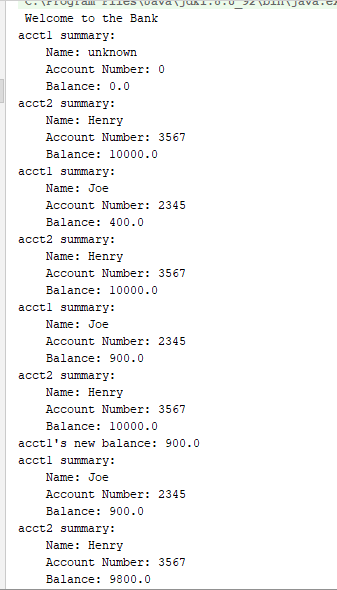
//if you need any help regarding this solution ............... please leave a comment ......... thanks
Add Answer to:
Download BankAccount.java and BankAccountTester.java starting
files and drag and drop them into your eclipse project. The...
[JAVA] < Instruction> You are given two classes, BankAccount and ManageAccounts ManageAccounts is called a Driver...
[JAVA] < Instruction> You are given two classes, BankAccount and ManageAccounts ManageAccounts is called a Driver class that uses BankAccount. associate a member to BankAcount that shows the Date and Time that Accounts is created. You may use a class Date. To find API on class Date, search for Date.java. Make sure to include date information to the method toString(). you must follow the instruction and Upload two java files. BankAccount.java and ManageAccounts.java. -------------------------------------------------------------------------- A Bank Account Class File Account.java...
Write a Java class called BankAccount (Parts of the code is given below), which has two...
Write a Java class called BankAccount (Parts of the code is given below), which has two fields name (String) and balance (double), two constructors and five methods getName(), getBalance(), deposit (double amount), withdraw(double amount) and toString(). The first constructor should initialize name to null and balance to 0. The second constructor initializes name and balance to the parameters passed. deposit method deposits the amount to the account causing the current balance to increase, withdraw method withdraws the amount causing the...
Write a Java class called BankAccount (Parts of the code is given below), which has two...
Write a Java class called BankAccount (Parts of the code is given below), which has two fields name (String) and balance (double), two constructors and five methods getName(), getBalance(), deposit (double amount), withdraw(double amount) and toString(). The first constructor should initialize name to null and balance to 0. The second constructor initializes name and balance to the parameters passed. deposit method deposits the amount to the account causing the current balance to increase, withdraw method withdraws the amount causing the...
Update your Assignment 4 as follows (Assignment 4 codes will be on the bottom) Create a...
Update your Assignment 4 as follows (Assignment 4 codes will be on the bottom) Create a new method called displayAll, that takes an ArrayList (of your base class) as a parameter, and doesn't return anything [25 pts] The displayAll method will loop through the ArrayList, and call the display (or toString) method on each object [25 pts] In the main method, create an ArrayList containing objects of both your base class and subclass. (You should have at least 4 objects) [25...
Update your Assignment 4 as follows (Assignment 4 codes will be on the bottom) Create a...
Update your Assignment 4 as follows (Assignment 4 codes will be on the bottom) Create a new method called displayAll, that takes an ArrayList (of your base class) as a parameter, and doesn't return anything [25 pts] The displayAll method will loop through the ArrayList, and call the display (or toString) method on each object [25 pts] In the main method, create an ArrayList containing objects of both your base class and subclass. (You should have at least 4 objects) [25...
(JAVA NetBeans) Write programs in java Modify the textbook example textbook example: //BankAccount.java import java.tex...
 (JAVA NetBeans)
Write programs in java
Modify the textbook example
textbook example:
//BankAccount.java
import java.text.DecimalFormat;
public class BankAccount
{
public final DecimalFormat MONEY
= new DecimalFormat( "$#,##0.00" );
private double balance;
/** Default constructor
* sets balance to 0.0
*/
public BankAccount( )
{
balance = 0.0;
System.out.println( "In BankAccount default constructor" );
}
/** Overloaded constructor
* @param startBalance beginning balance
*/
public BankAccount( double startBalance )
{
if ( balance >= 0.0 )
balance = startBalance;
else
balance...
(JAVA NetBeans)
Write programs in java
Modify the textbook example
textbook example:
//BankAccount.java
import java.text.DecimalFormat;
public class BankAccount
{
public final DecimalFormat MONEY
= new DecimalFormat( "$#,##0.00" );
private double balance;
/** Default constructor
* sets balance to 0.0
*/
public BankAccount( )
{
balance = 0.0;
System.out.println( "In BankAccount default constructor" );
}
/** Overloaded constructor
* @param startBalance beginning balance
*/
public BankAccount( double startBalance )
{
if ( balance >= 0.0 )
balance = startBalance;
else
balance...
Requirements: Your Java class names must follow the names specified above. Note that they are...
Requirements: Your Java class names must follow the names specified above. Note that they are case sensitive. See our template below. BankAccount: an abstract class. SavingAccount: a concrete class that extends BankAccount. o The constructor takes client's firstname, lastname and social security number. o The constructor should generate a random 6-digit number as the user account number. o The initial balance is 0 and the annual interest rate is fixed at 1.0% (0.01).o The withdraw method signature...
C++ Please create the class named BankAccount with the following properties below: // The BankAccount class...
C++ Please create the class named BankAccount with the following properties below: // The BankAccount class sets up a clients account (name & ID), keeps track of a user's available balance. // It also keeps track of how many transactions (deposits and/or withdrawals) are made. public class BankAccount { Private String name private String id; private double balance; private int numTransactions; // Please define method definitions for Accessors and Mutator functions below Private member variables string getName(); // No set...
TASK 1 Create a new class called CheckingAccount that extends BankAccount. It should contain a static...
TASK 1 Create a new class called CheckingAccount that extends BankAccount. It should contain a static constant FEE that represents the cost of clearing onecheck. Set it equal to 15 cents. Write a constructor that takes a name and an initial amount as parameters. Itshould call the constructor for the superclass. It should initializeaccountNumber to be the current value in accountNumber concatenatedwith -10 (All checking accounts at this bank are identified by the extension -10). There can be only one...
Code in JAVA UML //TEST HARNESS //DO NOT CHANGE CODE FOR TEST HARNESS import java.util.Scanner; //...
 Code in JAVA
UML
//TEST HARNESS
//DO NOT CHANGE CODE FOR TEST HARNESS
import java.util.Scanner; // Scanner class to support user input
public class TestPetHierarchy
{
/*
* All the 'work' of the process takes place in the main method. This is actually poor design/structure,
* but we will use this (very simple) form to begin the semester...
*/
public static void main( String[] args )
{
/*
* Variables required for processing
*/
Scanner input = new Scanner( System.in...
Code in JAVA
UML
//TEST HARNESS
//DO NOT CHANGE CODE FOR TEST HARNESS
import java.util.Scanner; // Scanner class to support user input
public class TestPetHierarchy
{
/*
* All the 'work' of the process takes place in the main method. This is actually poor design/structure,
* but we will use this (very simple) form to begin the semester...
*/
public static void main( String[] args )
{
/*
* Variables required for processing
*/
Scanner input = new Scanner( System.in...
 (JAVA NetBeans)
Write programs in java
Modify the textbook example
textbook example:
//BankAccount.java
import java.text.DecimalFormat;
public class BankAccount
{
public final DecimalFormat MONEY
= new DecimalFormat( "$#,##0.00" );
private double balance;
/** Default constructor
* sets balance to 0.0
*/
public BankAccount( )
{
balance = 0.0;
System.out.println( "In BankAccount default constructor" );
}
/** Overloaded constructor
* @param startBalance beginning balance
*/
public BankAccount( double startBalance )
{
if ( balance >= 0.0 )
balance = startBalance;
else
balance...
(JAVA NetBeans)
Write programs in java
Modify the textbook example
textbook example:
//BankAccount.java
import java.text.DecimalFormat;
public class BankAccount
{
public final DecimalFormat MONEY
= new DecimalFormat( "$#,##0.00" );
private double balance;
/** Default constructor
* sets balance to 0.0
*/
public BankAccount( )
{
balance = 0.0;
System.out.println( "In BankAccount default constructor" );
}
/** Overloaded constructor
* @param startBalance beginning balance
*/
public BankAccount( double startBalance )
{
if ( balance >= 0.0 )
balance = startBalance;
else
balance...
 Code in JAVA
UML
//TEST HARNESS
//DO NOT CHANGE CODE FOR TEST HARNESS
import java.util.Scanner; // Scanner class to support user input
public class TestPetHierarchy
{
/*
* All the 'work' of the process takes place in the main method. This is actually poor design/structure,
* but we will use this (very simple) form to begin the semester...
*/
public static void main( String[] args )
{
/*
* Variables required for processing
*/
Scanner input = new Scanner( System.in...
Code in JAVA
UML
//TEST HARNESS
//DO NOT CHANGE CODE FOR TEST HARNESS
import java.util.Scanner; // Scanner class to support user input
public class TestPetHierarchy
{
/*
* All the 'work' of the process takes place in the main method. This is actually poor design/structure,
* but we will use this (very simple) form to begin the semester...
*/
public static void main( String[] args )
{
/*
* Variables required for processing
*/
Scanner input = new Scanner( System.in...
Most questions answered within 3 hours.
-
Where is the error in this code sequence?
String s1 = "Hello";
String s2 = "ello";...
asked 11 months ago -
Financial data for Joel de Paris, Inc., for last year
follow:
Joel de Paris, Inc.
Balance...
asked 11 months ago -
Consider this reaction:
Al2(SO4)3 (aq)+ BaCl3
(aq) Al2Cl6 (aq)- +
3BaSO4(s) . What is the...
asked 11 months ago -
Suppose that Savneet is considering increasing her
recent random sample from 20 car rentals to 40...
asked 11 months ago -
Trucks arrive at an unloading terminal at an average rate of 120
per hour.
Trucks arrive...
asked 11 months ago -
Why are methanol and ethanol completely soluble in water while
octanol is not very little soluble....
asked 11 months ago -
A facilities manager at a university reads in a research report
that the mean amount of...
asked 11 months ago -
When the CuSO4 is rehydrated by adding water to the anhydrous
compound, is this an endothermic...
asked 11 months ago -
A ray of sunlight is passing from diamond into crown glass; the
angle of incidence is...
asked 11 months ago -
A block of mass 0.249 kg is placed on top of a light, vertical
spring of...
asked 11 months ago -
how do the kidneys compensate in the presences of acidosis
a) trigger hyperventilate
b) reserve acid...
asked 11 months ago -
Question 501 pts
The rental rate of capital to the firm increases. Which of the
following...
asked 11 months ago