MATLAB Image Stitching Code for Panorama image stitching either using MATLAB or Python
Homework Answers
Answered below both MATHLAB and PHYTON image stiching code
MATHLAB code for feature based image stiching
Step 1: Load Images
|
% Load images. buildingDir = fullfile(toolboxdir('vision'), 'visiondata', 'building'); buildingScene = imageDatastore(buildingDir); % Display images to be stitched montage(buildingScene.Files) |
Step 2: Register Image Pairs
To create the panorama, start by registering successive image pairs using the following procedure:
- Detect and match features between I(n) and I(n−1).
- Estimate the geometric transformation, T(n), that maps I(n) to I(n−1).
- Compute the transformation that maps I(n) into the panorama image as T(n)∗T(n−1)∗...∗T(1).
|
% Read the first image from the image set. I = readimage(buildingScene, 1); % Initialize features for I(1) grayImage = rgb2gray(I); points = detectSURFFeatures(grayImage); [features, points] = extractFeatures(grayImage, points); % Initialize all the transforms to the identity matrix. Note that the % projective transform is used here because the building images are fairly close to the camera. % Had the scene been captured from a further distance, an affine transform would suffice. numImages = numel(buildingScene.Files); tforms(numImages) = projective2d(eye(3)); % Initialize variable to hold image sizes. imageSize = zeros(numImages,2); % Iterate over remaining image pairs for n = 2:numImages
% Store points and features for I(n-1). pointsPrevious = points; featuresPrevious = features;
% Read I(n). I = readimage(buildingScene, n);
% Convert image to grayscale. grayImage = rgb2gray(I);
% Save image size. imageSize(n,:) = size(grayImage);
% Detect and extract SURF features for I(n). points = detectSURFFeatures(grayImage); [features, points] = extractFeatures(grayImage, points); % Find correspondences between I(n) and I(n-1). indexPairs = matchFeatures(features, featuresPrevious, 'Unique', true);
matchedPoints = points(indexPairs(:,1), :); matchedPointsPrev = pointsPrevious(indexPairs(:,2), :);
% Estimate the transformation between I(n) and I(n-1). tforms(n) = estimateGeometricTransform(matchedPoints, matchedPointsPrev,... 'projective', 'Confidence', 99.9, 'MaxNumTrials', 2000);
% Compute T(n) * T(n-1) * ... * T(1) tforms(n).T = tforms(n).T * tforms(n-1).T; end |
Start by using the projective2d outputLimits method to find the output limits for each transform. The output limits are then used to automatically find the image that is roughly in the center of the scene.
|
% Compute the output limits for each transform for i = 1:numel(tforms) [xlim(i,:), ylim(i,:)] = outputLimits(tforms(i), [1 imageSize(i,2)], [1 imageSize(i,1)]); end |
Next, compute the average X limits for each transforms and find the image that is in the center. Only the X limits are used here because the scene is known to be horizontal. If another set of images are used, both the X and Y limits may need to be used to find the center image.
|
avgXLim = mean(xlim, 2); [~, idx] = sort(avgXLim); centerIdx = floor((numel(tforms)+1)/2); centerImageIdx = idx(centerIdx); % apply the center image's inverse transform to all the others Tinv = invert(tforms(centerImageIdx)); for i = 1:numel(tforms) tforms(i).T = tforms(i).T * Tinv.T; end |
Step 3: Initialize the Panorama
Now, create an initial, empty, panorama into which all the images are mapped.
Use the outputLimits method to compute the minimum and maximum output limits over all transformations. These values are used to automatically compute the size of the panorama.
|
for i = 1:numel(tforms) [xlim(i,:), ylim(i,:)] = outputLimits(tforms(i), [1 imageSize(i,2)], [1 imageSize(i,1)]); end maxImageSize = max(imageSize); % Find the minimum and maximum output limits xMin = min([1; xlim(:)]); xMax = max([maxImageSize(2); xlim(:)]); yMin = min([1; ylim(:)]); yMax = max([maxImageSize(1); ylim(:)]); % Width and height of panorama. width = round(xMax - xMin); height = round(yMax - yMin); % Initialize the "empty" panorama. panorama = zeros([height width 3], 'like', I); |
Step 4: Create the Panorama
Use imwarp to map images into the panorama and use vision.AlphaBlender to overlay the images together.
|
blender = vision.AlphaBlender('Operation', 'Binary mask', ... 'MaskSource', 'Input port'); % Create a 2-D spatial reference object defining the size of the panorama. xLimits = [xMin xMax]; yLimits = [yMin yMax]; panoramaView = imref2d([height width], xLimits, yLimits); % Create the panorama. for i = 1:numImages I = readimage(buildingScene, i);
% Transform I into the panorama. warpedImage = imwarp(I, tforms(i), 'OutputView', panoramaView);
% Generate a binary mask. mask = imwarp(true(size(I,1),size(I,2)), tforms(i), 'OutputView', panoramaView);
% Overlay the warpedImage onto the panorama. panorama = step(blender, panorama, warpedImage, mask); end figure imshow(panorama) |
Below sample program stitching.py uses Stitcher API from python to stitch panoramas
|
# Python 2/3 compatibility from __future__ import print_function import numpy as np import cv2 as cv import argparse import sys modes = (cv.Stitcher_PANORAMA, cv.Stitcher_SCANS) parser = argparse.ArgumentParser(prog='stitching.py', description='Stitching sample.') parser.add_argument('--mode', type = int, choices = modes, default = cv.Stitcher_PANORAMA, help = 'Determines configuration of stitcher. The default is `PANORAMA` (%d), ' 'mode suitable for creating photo panoramas. Option `SCANS` (%d) is suitable ' 'for stitching materials under affine transformation, such as scans.' % modes) parser.add_argument('--output', default = 'result.jpg', help = 'Resulting image. The default is `result.jpg`.') parser.add_argument('img', nargs='+', help = 'input images') __doc__ += '\n' + parser.format_help() def main(): args = parser.parse_args() # read input images imgs = [] for img_name in args.img: img = cv.imread(cv.samples.findFile(img_name)) if img is None: print("can't read image " + img_name) sys.exit(-1) imgs.append(img) stitcher = cv.Stitcher.create(args.mode) status, pano = stitcher.stitch(imgs) if status != cv.Stitcher_OK: print("Can't stitch images, error code = %d" % status) sys.exit(-1) cv.imwrite(args.output, pano) print("stitching completed successfully. %s saved!" % args.output) print('Done') if __name__ == '__main__': print(__doc__) main() cv.destroyAllWindows() |
Add Answer to:
MATLAB Image Stitching
Code for Panorama image stitching
either using MATLAB or Python
remove noise entire noise from this image using matlab code & get the original image Problem...
 remove noise entire noise from this image using matlab code
& get the original image
Problem 4 (35 points) 1. Describe in details how would you detect and reduce the periodic noise in the input image shown (you should have received a copy of this image via email) and remove it to get an enhanced image. 2. Use MATLAB to show the results of your answer. Include in your submission your code and resulting image. Sinusoldal Nolse Sinusoidal Noise
Problem...
remove noise entire noise from this image using matlab code
& get the original image
Problem 4 (35 points) 1. Describe in details how would you detect and reduce the periodic noise in the input image shown (you should have received a copy of this image via email) and remove it to get an enhanced image. 2. Use MATLAB to show the results of your answer. Include in your submission your code and resulting image. Sinusoldal Nolse Sinusoidal Noise
Problem...
write a matlab code on image using genatic segmentation on a car number plate and make segemnt...
 write a matlab code on image using genatic
segmentation on a car number plate and make segemnt of every word
in image of number plate
see the image above and implement code on above picture and make
segments of of image
A 128 HB 61
write a matlab code on image using genatic
segmentation on a car number plate and make segemnt of every word
in image of number plate
see the image above and implement code on above picture and make
segments of of image
A 128 HB 61
Your assignment it to write code in matlab that takes an image and remove shadow from...
Your assignment it to write code in matlab that takes an image and remove shadow from the image. Write the whole code yourself, without using any built-in function. would anyone please help me?
matlab code needed » Take any random image and read it in Matiab using mread command....
 matlab code needed
» Take any random image and read it in Matiab using mread command. The image should be 2D that is the Matrix obtained after imread should be of order mxn This will be your xit). Then create a mask (filter), using fspecial command. Use your Matlab hetp to learn uce of fspecial. > > (Hint: you haye to use h fspecial (average, hsize)) - Then use com2 to perforh convolution of x with h. » Then use...
matlab code needed
» Take any random image and read it in Matiab using mread command. The image should be 2D that is the Matrix obtained after imread should be of order mxn This will be your xit). Then create a mask (filter), using fspecial command. Use your Matlab hetp to learn uce of fspecial. > > (Hint: you haye to use h fspecial (average, hsize)) - Then use com2 to perforh convolution of x with h. » Then use...
Write a MATLAB script, using either a single or nested for-loop, that will print the factorials...
Write a MATLAB script, using either a single or nested for-loop, that will print the factorials for the numbers between 1 and 100 (inclusive). The factorial of n (n!) is the product of the positive integers less than or equal to n. For example: 3! = 3 * 2 * 1. For this question you cannot use the built-in MATLAB factorial function, but you can use other MATLAB functions if you wish. MATLAB code!MATLAB code!MATLAB code!MATLAB code!
Image histogram code in python?
In this exercise you should write a Python function that computes the histogram of an intensity (gray scale) image. Do not use specifific Python functions for histogram computation (like hist or imhist). Create a new function my_hist and start with the following lines: function [h] = my_hist(im) % H = MY_HIST(IM) computes the histogram for the intensity % image IM (with values from 0 to 255) and returns a vector H % with 256 dimensions % get the image size:...
Read the MATLAB image “coins.png”, convert it to grayscale using rgb2gray(img), and then binarize it with...
Read the MATLAB image “coins.png”, convert it to grayscale using rgb2gray(img), and then binarize it with the threshold value 0.5765. Now, extend your MATLAB code to find the internal boundary by erosion: A – (A ⊖ B).
Hi, I need some help writing matlab code for the conversion of a greyscale image to...
Hi, I need some help writing matlab code for the conversion of a greyscale image to 8-bit per pixel greyscale, using block truncation coding. Can someone please provide some code for me to use?
6. Write Matlab code to open, cameraman.tif and then produce and display an image that is...
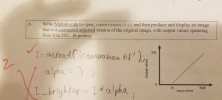 6. Write Matlab code to open, cameraman.tif and then produce and display an image that is a contrasted adjusted version of the original image, with output values spanning from 0 to 255. (6 points) 255 alpMa a. 0 lo Input values high
Using Matlab software to find the following information of the attached image (You need to save...
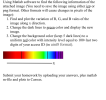 Using Matlab software to find the following information of the attached image (You need to save the image using either jgp or png format. Other formats will cause changes in pixels of the image): 1. Find and plot the variation of R, G, and B vales of the image along x direction image. uniform red color with intensity level equal to 100+last two 2. Change the dark lines to green color and display the new 3. Change the background color...
 remove noise entire noise from this image using matlab code
& get the original image
Problem 4 (35 points) 1. Describe in details how would you detect and reduce the periodic noise in the input image shown (you should have received a copy of this image via email) and remove it to get an enhanced image. 2. Use MATLAB to show the results of your answer. Include in your submission your code and resulting image. Sinusoldal Nolse Sinusoidal Noise
Problem...
remove noise entire noise from this image using matlab code
& get the original image
Problem 4 (35 points) 1. Describe in details how would you detect and reduce the periodic noise in the input image shown (you should have received a copy of this image via email) and remove it to get an enhanced image. 2. Use MATLAB to show the results of your answer. Include in your submission your code and resulting image. Sinusoldal Nolse Sinusoidal Noise
Problem...
 write a matlab code on image using genatic
segmentation on a car number plate and make segemnt of every word
in image of number plate
see the image above and implement code on above picture and make
segments of of image
A 128 HB 61
write a matlab code on image using genatic
segmentation on a car number plate and make segemnt of every word
in image of number plate
see the image above and implement code on above picture and make
segments of of image
A 128 HB 61
 matlab code needed
» Take any random image and read it in Matiab using mread command. The image should be 2D that is the Matrix obtained after imread should be of order mxn This will be your xit). Then create a mask (filter), using fspecial command. Use your Matlab hetp to learn uce of fspecial. > > (Hint: you haye to use h fspecial (average, hsize)) - Then use com2 to perforh convolution of x with h. » Then use...
matlab code needed
» Take any random image and read it in Matiab using mread command. The image should be 2D that is the Matrix obtained after imread should be of order mxn This will be your xit). Then create a mask (filter), using fspecial command. Use your Matlab hetp to learn uce of fspecial. > > (Hint: you haye to use h fspecial (average, hsize)) - Then use com2 to perforh convolution of x with h. » Then use...
 6. Write Matlab code to open, cameraman.tif and then produce and display an image that is a contrasted adjusted version of the original image, with output values spanning from 0 to 255. (6 points) 255 alpMa a. 0 lo Input values high
 Using Matlab software to find the following information of the attached image (You need to save the image using either jgp or png format. Other formats will cause changes in pixels of the image): 1. Find and plot the variation of R, G, and B vales of the image along x direction image. uniform red color with intensity level equal to 100+last two 2. Change the dark lines to green color and display the new 3. Change the background color...
Most questions answered within 3 hours.
-
Where is the error in this code sequence?
String s1 = "Hello";
String s2 = "ello";...
asked 10 months ago -
Financial data for Joel de Paris, Inc., for last year
follow:
Joel de Paris, Inc.
Balance...
asked 10 months ago -
Consider this reaction:
Al2(SO4)3 (aq)+ BaCl3
(aq) Al2Cl6 (aq)- +
3BaSO4(s) . What is the...
asked 10 months ago -
Suppose that Savneet is considering increasing her
recent random sample from 20 car rentals to 40...
asked 10 months ago -
Trucks arrive at an unloading terminal at an average rate of 120
per hour.
Trucks arrive...
asked 10 months ago -
Why are methanol and ethanol completely soluble in water while
octanol is not very little soluble....
asked 10 months ago -
A facilities manager at a university reads in a research report
that the mean amount of...
asked 10 months ago -
When the CuSO4 is rehydrated by adding water to the anhydrous
compound, is this an endothermic...
asked 10 months ago -
A ray of sunlight is passing from diamond into crown glass; the
angle of incidence is...
asked 10 months ago -
A block of mass 0.249 kg is placed on top of a light, vertical
spring of...
asked 10 months ago -
how do the kidneys compensate in the presences of acidosis
a) trigger hyperventilate
b) reserve acid...
asked 10 months ago -
Question 501 pts
The rental rate of capital to the firm increases. Which of the
following...
asked 10 months ago