Exercise 1: Create a file by using any word processing program or text editor. Write an...
Exercise 1: Create a file by using any word processing program or text editor. Write an application that displays the file's name, size, and time of last modification. Save the file as FileStatistics.java. Exercise 2: Create a file that contains your favorite movie quote. Use a text editor, such as Notepad, and save the file as Quote.txt. Copy the file contents and paste them into a word processing program, such as Word. Save the file as Quote.doc. Write an application that displays the sizes of the two files as well as the ratio of the two file sizes. Save the file as FileStatistics2.java. Exercise 3: Write an application using the FileInputStream that opens a file which contains the name of the user's favorite book and then displays it to the user. If the file does not exist, prompt the user for the book's title, and then write it to the file by using a FileOutputStream. Save the file as DisplayBook.java. Place the following files in a folder, and label it "Lesson 4." Zip the folder as described in the Syllabus. FileStatistics.java, FileStatistics2.java, Quote.txt, Quote.doc, and DisplayBook.java
Homework Answers
DisplayBook.java
import java.io.*;
import java.util.*;
public class DisplayBook
{
public static void main(String[] args)
{
int letter;
try
{
File favBook = new
File("FavoriteBook.txt");
if(favBook.exists())
{
FileInputStream in = new FileInputStream(favBook);
while((letter = in.read()) != -1)
{
System.out.print((char)letter);
}
}
else
{
Scanner input = new Scanner(System.in);
FileOutputStream outStream = new FileOutputStream(favBook);
System.out.print("Enter your favorite book >> ");
String book = input.nextLine();
for(int x = 0; x < book.length(); ++x)
outStream.write(book.charAt(x));
outStream.close();
}
}
catch(IOException e)
{
System.out.print("Error with File");
}
}
}
FavoriteBook.txt
winesburg

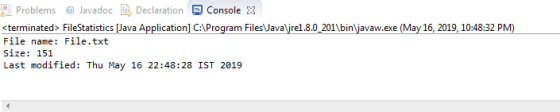
FileStatistics.java
import java.io.*;
import java.util.*;
public class FileStatistics
{
public static void main(String[] args)
{
try
{
File myFile = new
File("File.txt");
//Create Date
object to make time more readable
Date time = new
Date(myFile.lastModified());
System.out.print("File name: " + myFile.getName() + "\nSize: "
+
myFile.length() + "\nLast modified: " + time);
}
catch(Exception e)
{
System.out.println("Error: cannot display file");
}
}
}
File.txt
This is a text file created in atom text editor.
This file was created on December 23rd 2016 at 10:17pm.
This file is used in Chapter 13 exercises.
FileStatistics2.java
import java.io.*;
public class FileStatistics2
{
public static void main(String[] args)
{
try
{
File noteQuote =
new File("Quote.txt");
File wordQuote =
new File("Quote.docx");
double ratio =
wordQuote.length() / noteQuote.length();
System.out.println("Notepad file size: " + noteQuote.length()
+
"\nWord file size: " + wordQuote.length());
System.out.print("The ratio of the two is: " + ratio);
}
catch(Exception e)
{
System.out.println("Error");
}
}
}
Add Answer to:
Exercise 1: Create a file by using any word processing program
or text editor. Write an...
C#: Create a file that contains your favorite movie quote. Use a text editor such as...
C#: Create a file that contains your favorite movie quote. Use a text editor such as Notepad and save the file as Quote.txt. Copy the file contents and paste them into a word-processing program such as Word. Save the file as Quote.doc. Write console application that displays the sizes of the two files as well as the ratio of their sizes to each other. To discover a file's size, you can create a System.IO.FileInfo object using a statement such as...
Java Write an application using the FileInputStream that OPENS a file which contains the name of...
Java Write an application using the FileInputStream that OPENS a file which contains the name of the user's favorite book and then DISPLAYS it to the user. IF the file does not exist, PROMPT the user for the book's title, and then WRITE it to the file by using a FileOutputStream. Save the file as BookApplication.java.
Create a text file named “file1.txt” (by use of the notepad editor in Windows for instance)...
Create a text file named “file1.txt” (by use of the notepad editor in Windows for instance) containing the following integer values, one per line: 12 5 13 56 90 52 82 52 Write a Java program that reads these values from the file and displays their sum on the screen.
Create a New Java Project called YourLastNameUpperCase. Write a program that asks the user for the...
Create a New Java Project called YourLastNameUpperCase. Write a program that asks the user for the names of two files. The first file should be opened for reading and the second file should be opened for writing. The program should read the contents of the first file, change all characters to uppercase, and store the results in the second file. The second file will be a copy of the first file, except that all the characters will be uppercase. Use...
Subject: Advance application development Visual studio exercise The project is to create a simple Notepad style Tex...
 Subject: Advance application development Visual studio exercise The project is to create a simple Notepad style Text Editor. This will demonstrate the C# language basics. user interface controls and how to handle user events. Controls can be found in the Toolbox pane in its default location on the left side of the IDE, with the Control Properties pane on the right side of the IDE. Include the items on the following list in the program Create a C# Windows Forms...
In C write a text analyzer program that reads any text file. The program displays a...
In C write a text analyzer program that reads any text file. The program displays a menu that gives the user the options of counting: • Lines • Words • Characters • Sentences (one or more word ending with a period) • or all of the above Provide a separate function for each option. At the end of the analysis, write an appropriate report.
In java Objectives: In this lab, the following topics will be covered: 1. Text Files 2....
In java Objectives: In this lab, the following topics will be covered: 1. Text Files 2. Binary Files Exercise 1 Create an array of Course objects taken from the user. The class Course has the following attributes: code like "ICS201", name like "Introduction to Computing II", and credit hours like 4. Save the array to both a text file, and a binary file. Exercise 2 Write a program that reads the text file created in Exercise 1 into an array...
3. Use a text editor to create a comma-delimited file of user IDs and passwords. Revise...
3. Use a text editor to create a comma-delimited file of user IDs and passwords. Revise any one of the games you have created throughout this book so the user must first enter a correct ID and its associated password before playing. Save the program as GameWithPassword.java.
in C language 1. Create a data file called superheroes.dat using any text-based editor, and enter...
in C language 1. Create a data file called superheroes.dat using any text-based editor, and enter at least three records storing superheros' names and main superpower. Make sure that each field in the record is separated by a space. 2. Using the superheroes.dat file from problem 1, build another program that uses the fscanf() function for reading each record and printing field information to standard output until the end-of-file is reached. Include an error handling routine that notifies the user...
Java Exceptions Suppose a library is processing an input file containing the titles of books in...
Java Exceptions Suppose a library is processing an input file containing the titles of books in order to remove duplicates. Write a program that reads all of the titles from an input file called bookTitles.inp and writes them to an output file called uniqueTitles.out. When complete, the output file should contain all unique titles found in the input file. Create the input file using Notepad or another text editor, with one title per line. Make sure you have a number...
 Subject: Advance application development Visual studio exercise The project is to create a simple Notepad style Text Editor. This will demonstrate the C# language basics. user interface controls and how to handle user events. Controls can be found in the Toolbox pane in its default location on the left side of the IDE, with the Control Properties pane on the right side of the IDE. Include the items on the following list in the program Create a C# Windows Forms...
Most questions answered within 3 hours.
-
Where is the error in this code sequence?
String s1 = "Hello";
String s2 = "ello";...
asked 11 months ago -
Financial data for Joel de Paris, Inc., for last year
follow:
Joel de Paris, Inc.
Balance...
asked 11 months ago -
Consider this reaction:
Al2(SO4)3 (aq)+ BaCl3
(aq) Al2Cl6 (aq)- +
3BaSO4(s) . What is the...
asked 11 months ago -
Suppose that Savneet is considering increasing her
recent random sample from 20 car rentals to 40...
asked 11 months ago -
Trucks arrive at an unloading terminal at an average rate of 120
per hour.
Trucks arrive...
asked 11 months ago -
Why are methanol and ethanol completely soluble in water while
octanol is not very little soluble....
asked 11 months ago -
A facilities manager at a university reads in a research report
that the mean amount of...
asked 11 months ago -
When the CuSO4 is rehydrated by adding water to the anhydrous
compound, is this an endothermic...
asked 11 months ago -
A ray of sunlight is passing from diamond into crown glass; the
angle of incidence is...
asked 11 months ago -
A block of mass 0.249 kg is placed on top of a light, vertical
spring of...
asked 11 months ago -
how do the kidneys compensate in the presences of acidosis
a) trigger hyperventilate
b) reserve acid...
asked 11 months ago -
Question 501 pts
The rental rate of capital to the firm increases. Which of the
following...
asked 11 months ago