by LabView, Construct a VI in which the user guesses an integer between 1 and 10...
Homework Answers
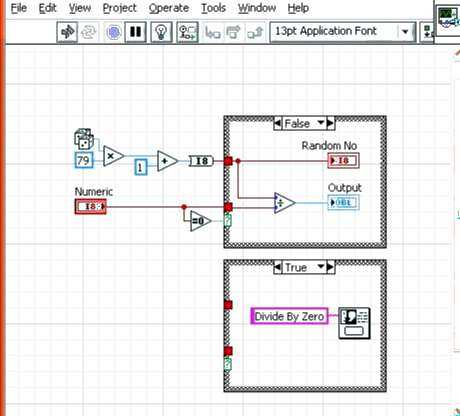
This is the VI in labview where in the user can guess numbers from 0 to 80. This is the required diagram
Add Answer to:
by
LabView, Construct a VI in which the user guesses an integer
between 1 and 10...
In NI LabVIEW please, Construct a VI that displays a random number between 0 and 1...
In NI LabVIEW please, Construct a VI that displays a random number between 0 and 1 once every second. Also, compute and display the average of the last four random numbers generated. Display the average only after four numbers have been generated; otherwise display a 0. Each time the random number exceeds 0.5, generate a beep sound using the Beep.vi.
Labview question: Create a VI using a While Loop that continuously generates random numbers between 0...
Labview question: Create a VI using a While Loop that continuously generates random numbers between 0 and 1000 until it generates a number that matches a number selected by the user. Determine how many random numbers the VI generated before the matching number. conditions to applied on above problem: 1. Convert the “random number” generator floating point numerical output to integer values to make it easier to find a match. 2. The “user selected number control” should be on the...
LabView Coin Toss.vi Build a VI that simulates the toss of a coin. On your block...
 LabView
Coin Toss.vi Build a VI that simulates the toss of a coin. On your block dia- gram, use Random Number (0-1) to generate a random floating-point number x, in the range from 0 up to (but not including1. When run, ifx 20.5, assign the result of the coin toss to be Heads; otherwise, the result is Tails. Then, use a Select icon as shown below to decide which of two strings should be sent to a front-panel String Indicator...
LabView
Coin Toss.vi Build a VI that simulates the toss of a coin. On your block dia- gram, use Random Number (0-1) to generate a random floating-point number x, in the range from 0 up to (but not including1. When run, ifx 20.5, assign the result of the coin toss to be Heads; otherwise, the result is Tails. Then, use a Select icon as shown below to decide which of two strings should be sent to a front-panel String Indicator...
Use LabView instead of matlab please Expert Q&A Done Create a VI that: Generates random integers...
 Use LabView instead of matlab please
Expert Q&A Done Create a VI that: Generates random integers between 0 and 40. Iterate this random process until the random integer equals 13. Display the following non the Front panel (1.) The actual random number (2.) The iteration number Include a time delay so the user can watch the valuse update as the program executes. USE MATLAB
Use LabView instead of matlab please
Expert Q&A Done Create a VI that: Generates random integers between 0 and 40. Iterate this random process until the random integer equals 13. Display the following non the Front panel (1.) The actual random number (2.) The iteration number Include a time delay so the user can watch the valuse update as the program executes. USE MATLAB
Write a user-defined MATLAB function that gives a random integer number within a range between two...
 Write a user-defined MATLAB function that gives a random integer number within a range between two numbers. For the function name and arguments, use n = randint(a,b) where the two input arguments a and b are the two numbers and the output argument n is the random number. Use the function in the command window for the following: (a) Generate a random number between 1 and 49. (b) Generate a random number between -35 and -2
In java, write a program that gets 10 integer numbers from the user using user input,...
In java, write a program that gets 10 integer numbers from the user using user input, and then calculates and display the sum of the numbers that have been read. Program Requirements: Write the program in three versions with three loops. Put all three loops in the main method of your source code. version1: use a while loop. version2: use a do-while loop. version 3: use a for loop. For each version, use a loop to input 10 int numbers from the user...
In java, write a program that gets 10 integer numbers from the user using user input,...
In java, write a program that gets 10 integer numbers from the user using user input, and then calculates and display the sum of the numbers that have been read. Program Requirements: Write the program in three versions with three loops. Put all three loops in the main method of your source code. The program must be in one file. version1: use a while loop. version2: use a do-while loop. version 3: use a for loop. For each version, use a loop to...
2. Write a C++ program that asks the user to enter a integer between 1 and...
2. Write a C++ program that asks the user to enter a integer between 1 and 10. Continue to prompt the user while the value entered does not fall within the range. When the user is successful display a congratulatory message. Save file as OneToTen.
Modular program mathlab: Write a program in Matlab that would continuously ask the user for an...
Modular program mathlab: Write a program in Matlab that would continuously ask the user for an input between 1 and 6, which would represent the result of rolling a die. The program would then generate a random integer between 1 and 6 and compare its value to the value entered by user. If the user’s die is larger, it should display, “You got it” If the user’s die is smaller, it should display, “Nice try” If the results are the...
The method generate() will produce integer arrays of a random size between 10 and 20 members. ...
The method generate() will produce integer arrays of a random size between 10 and 20 members. The method print() will print out the members of an integer array input. The method insert() will accept two arrays as inputs. It will produce a new array long enough to contain both arrays, and both input arrays should be inserted into the new array in the following manner: select a random member of the first array, and insert every member of the second...
 LabView
Coin Toss.vi Build a VI that simulates the toss of a coin. On your block dia- gram, use Random Number (0-1) to generate a random floating-point number x, in the range from 0 up to (but not including1. When run, ifx 20.5, assign the result of the coin toss to be Heads; otherwise, the result is Tails. Then, use a Select icon as shown below to decide which of two strings should be sent to a front-panel String Indicator...
LabView
Coin Toss.vi Build a VI that simulates the toss of a coin. On your block dia- gram, use Random Number (0-1) to generate a random floating-point number x, in the range from 0 up to (but not including1. When run, ifx 20.5, assign the result of the coin toss to be Heads; otherwise, the result is Tails. Then, use a Select icon as shown below to decide which of two strings should be sent to a front-panel String Indicator...
 Use LabView instead of matlab please
Expert Q&A Done Create a VI that: Generates random integers between 0 and 40. Iterate this random process until the random integer equals 13. Display the following non the Front panel (1.) The actual random number (2.) The iteration number Include a time delay so the user can watch the valuse update as the program executes. USE MATLAB
Use LabView instead of matlab please
Expert Q&A Done Create a VI that: Generates random integers between 0 and 40. Iterate this random process until the random integer equals 13. Display the following non the Front panel (1.) The actual random number (2.) The iteration number Include a time delay so the user can watch the valuse update as the program executes. USE MATLAB
 Write a user-defined MATLAB function that gives a random integer number within a range between two numbers. For the function name and arguments, use n = randint(a,b) where the two input arguments a and b are the two numbers and the output argument n is the random number. Use the function in the command window for the following: (a) Generate a random number between 1 and 49. (b) Generate a random number between -35 and -2
Most questions answered within 3 hours.
-
Where is the error in this code sequence?
String s1 = "Hello";
String s2 = "ello";...
asked 10 months ago -
Financial data for Joel de Paris, Inc., for last year
follow:
Joel de Paris, Inc.
Balance...
asked 10 months ago -
Consider this reaction:
Al2(SO4)3 (aq)+ BaCl3
(aq) Al2Cl6 (aq)- +
3BaSO4(s) . What is the...
asked 10 months ago -
Suppose that Savneet is considering increasing her
recent random sample from 20 car rentals to 40...
asked 10 months ago -
Trucks arrive at an unloading terminal at an average rate of 120
per hour.
Trucks arrive...
asked 10 months ago -
Why are methanol and ethanol completely soluble in water while
octanol is not very little soluble....
asked 10 months ago -
A facilities manager at a university reads in a research report
that the mean amount of...
asked 10 months ago -
When the CuSO4 is rehydrated by adding water to the anhydrous
compound, is this an endothermic...
asked 10 months ago -
A ray of sunlight is passing from diamond into crown glass; the
angle of incidence is...
asked 10 months ago -
A block of mass 0.249 kg is placed on top of a light, vertical
spring of...
asked 10 months ago -
how do the kidneys compensate in the presences of acidosis
a) trigger hyperventilate
b) reserve acid...
asked 10 months ago -
Question 501 pts
The rental rate of capital to the firm increases. Which of the
following...
asked 10 months ago