Write in C++ 1. Use the following Person class (Person.cpp, Person.h). You will be writing Person...
Write in C++
1. Use the following Person class (Person.cpp, Person.h). You will be writing Person objects to a random access file.
--------------------- Person.cpp---------------------------------
// Class Person stores customer's credit information.
#include <string>
#include "Person.h"
using namespace std;

// default Person constructor
Person::Person( int idValue,
   string lastNameValue, string firstNameValue, int AgeValue )
{
   setID( idValue );
   setLastName( lastNameValue );
   setFirstName( firstNameValue );
   setAge( AgeValue );
} // end Person constructor

// get id value
int Person::getID() const
{
   return id;
} // end function geID

// set id value
void Person::setID( int idValue )
{
   id = idValue; // should validate
} // end function setID

// get last-name value
string Person::getLastName() const
{
   return lastName;
} // end function getLastName

// set last-name value
void Person::setLastName( string lastNameString )
{
   // copy at most 14 characters from string to lastName
   int length = lastNameString.size();
   length = ( length < 15 ? length : 14 );
   lastNameString._Copy_s(lastName, 15, length);
   lastName[ length ] = '\0'; // append null character to lastName
} // end function setLastName

// get first-name value
string Person::getFirstName() const
{
   return firstName;
} // end function getFirstName

// set first-name value
void Person::setFirstName( string firstNameString )
{
   // copy at most 14 characters from string to firstName
   int length = firstNameString.size();
   length = ( length < 15 ? length : 14 );
   firstNameString._Copy_s(firstName, 15, length);
   firstName[ length ] = '\0'; // append null character to firstName
} // end function setFirstName

// get age value
int Person::getAge() const
{
   return age;
} // end function getAge

// set age value
void Person::setAge( int ageValue )
{
   age = ageValue;
} // end function setAge
--------------------- Person.h ---------------------------------
// Class Person definition
#ifndef PERSON_H
#define PERSON_H

#include <string>
using namespace std;

class Person
{
public:
   // default Person constructor
   Person( int = 0, string = "unassigned", string = "unassigned", int = 0 );

   // accessor functions for id
   void setID( int );
   int getID() const;

   // accessor functions for lastName
   void setLastName( string );
   string getLastName() const;

   // accessor functions for firstName
   void setFirstName( string );
   string getFirstName() const;

   // accessor functions for age
   void setAge( int );
   int getAge() const;
private:
   int id;
   char lastName[ 15 ];
   char firstName[ 15 ];
   int age;
}; // end class Person

#endif
2. Create and initialize a random access file named nameage.dat with 50 records that store the values of 0 for the id, unassigned for the first and last name and 0 for the age. This code only needs to be executed once. Once you have written the code to create and initialize this file comment out this code (do not delete the code because you are being graded on this code also).
3.The user of your program should see a menu allowing them to write a Person object to the file, update an existing Person object's age, delete a Person object, display a particular Person object from the file, or exit the program.
|
a. |
The first four options of the menu should ask the user for a record number (id) which will identify where in the random access file to write, update, delete, or display the Person object. Write the code to make sure the value the user inputs is from 1 to 50 only (an id of 1 should write to position 0 in the file). |
|
b. |
Make sure the user does not overwrite an existing record when writing a new Person object to the file. |
|
c. |
If the user wants to update an existing Person's age, make sure a valid Person object exists in the file for the id the user enters before asking for and updating the age. A valid Person object would be a Person object that does not have, for example, a 0 for the id or unassigned for the first and last name. |
|
d. |
Deleting a Person object from the file involves writing a blank Person object to the file (id set to 0, first and last name set to unassigned, and age set to 0). |
|
e. |
If the user wants to display a Person object, make sure a valid Person object exists in the file for the id the user enters before displaying the Person object. |
4. Sample output.
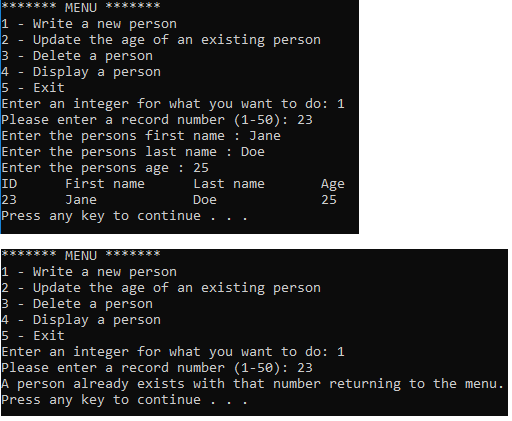
******* MENU *******
1 - Write a new person
2 - Update the age of an existing person
3 - Delete a person
4 - Display a person
5 - Exit
Enter an integer for what you want to do: 1
Please enter a record number (1-50): 23
Enter the persons first name : Jane
Enter the persons last name : Doe
Enter the persons age : 25
New person added
ID First name Last name Age
23 Jane Doe 25
******* MENU *******
1 - Write a new person
2 - Update the age of an existing person
3 - Delete a person
4 - Display a person
5 - Exit
Enter an integer for what you want to do: 1
Please enter a record number (1-50): 23
A person already exists with that number returning to the
menu.
******* MENU *******
1 - Write a new person
2 - Update the age of an existing person
3 - Delete a person
4 - Display a person
5 - Exit
Enter an integer for what you want to do: 4
Please enter a record number (1-50): 44
There is no person with that id.
******* MENU *******
1 - Write a new person
2 - Update the age of an existing person
3 - Delete a person
4 - Display a person
5 - Exit
Enter an integer for what you want to do: 4
Please enter a record number (1-50): 23
ID First name Last name Age
23 Jane Doe 25
******* MENU *******
1 - Write a new person
2 - Update the age of an existing person
3 - Delete a person
4 - Display a person
5 - Exit
Enter an integer for what you want to do:
Homework Answers
Hello,
Here is the complete code. Let me know if any modification are required.
Person.h
// Class Person definition
#ifndef PERSON_H
#define PERSON_H
#include <string>
#include <fstream>
#include<iostream>
using namespace std;
class Person
{
public:
// default Person constructor
Person(int = 0, string = "unassigned", string =
"unassigned", int = 0);
// accessor functions for id
void setID(int);
int getID() const;
// accessor functions for lastName
void setLastName(string);
string getLastName() const;
// accessor functions for firstName
void setFirstName(string);
string getFirstName() const;
// accessor functions for age
void setAge(int);
int getAge() const;
// Static functions to update file and read from
file
static void updateFile(Person *person[], int
size);
static void readFile(Person *person[]);
static const string fileName; // Name of file
private:
int id;
char lastName[15];
char firstName[15];
int age;
}; // end class Person
#endif
Person.cpp
#include "Person.h"
// default Person constructor
Person::Person(int idValue, string lastNameValue,
string firstNameValue, int AgeValue)
{
setID(idValue);
setLastName(lastNameValue);
setFirstName(firstNameValue);
setAge(AgeValue);
} // end Person constructor
// get id value
int Person::getID() const
{
return id;
} // end function geID
// set id value
void Person::setID(int idValue)
{
id = idValue; // should validate
} // end function setID
// get last-name value
string Person::getLastName() const
{
return lastName;
} // end function getLastName
// set last-name value
void Person::setLastName(string lastNameString)
{
// copy at most 14 characters from string to
lastName
int length = lastNameString.size();
length = (length < 15 ? length : 14);
lastNameString._Copy_s(lastName, 15, length);
lastName[length] = '\0'; // append null character to
lastName
} // end function setLastName
// get first-name value
string Person::getFirstName() const
{
return firstName;
} // end function getFirstName
// set first-name value
void Person::setFirstName(string firstNameString)
{
// copy at most 14 characters from string to
firstName
int length = firstNameString.size();
length = (length < 15 ? length : 14);
firstNameString._Copy_s(firstName, 15, length);
firstName[length] = '\0'; // append null character to
firstName
} // end function setFirstName
// get age value
int Person::getAge() const
{
return age;
} // end function getAge
// set age value
void Person::setAge(int ageValue)
{
age = ageValue;
} // end function setAge
// Initialize the file name
const string Person::fileName = "nameage.dat";
// Update details into file
void Person::updateFile(Person *person[], int size)
{
fstream file;
// Open the file in write mode
file.open(fileName, fstream::out);
if (file.fail())
{
cout << "File cannot be
opened for writing";
return;
}
// Write the details into file
for (int i = 0; i < size; i++)
file << person[i]->getID()
<< " " << person[i]->getFirstName() << " "
<< person[i]->getLastName() << " " <<
person[i]->getAge() << "\n";
file.close();
}
// Read the file to get the person details
void Person::readFile(Person *person[])
{
fstream file;
int id, age, i = 0;
string fname, lname;
// Open the file in read mode
file.open(fileName, fstream::in);
if (file.fail())
{
cout << "File cannot be
opened for writing";
return;
}
// Read till the file reaches end of file
while (!file.eof())
{
// Read data from file
file >> id >> fname
>> lname >> age;
// Create new instance of Person
with the read data
person[i++] = new Person(id, fname,
lname, age);
}
file.close();
}
main.cpp
#include "Person.h"
// Number of entries in nameage.dat file
#define SIZE 50
void main()
{
Person *person[SIZE];
int option, i = 0;
bool stop = false, found;
int id, age;
string fname, lname;
/* Uncomment this code to initialize random access
file with initial values for the first execute*/
// Create new instance for given size
/*for (int i = 0; i < SIZE; i++)
person[i] = new Person();
// Update the file with initial values
Person::updateFile(person, SIZE);*/
// Read details from acess file
Person::readFile(person);
// Get into infinate loop where only user is
allowed to exit
while (!stop)
{
found = false;
system("cls");
// Display the initial screen
and options
cout << "******* MENU
*******" << endl;
cout << "1 - Write a new
person" << endl;
cout << "2 - Update the age
of an existing person" << endl;
cout << "3 - Delete a person"
<< endl;
cout << "4 - Display a
person" << endl;
cout << "5 - Exit" <<
endl;
cout << "Enter an integer
for what you want to do: ";
cin >> option;
fflush(stdin);
// Action for the selection
option
switch (option)
{
case 1:
// Write a new person
// Get person
id
cout <<
"Please enter a record number (1-50): ";
cin >>
id;
fflush(stdin);
// Check
whether person is not already created for the given ID
if (person[id -
1]->getID() != 0)
found = true;
// Create new
person for if not found
if
(!found)
{
// Get further details of person
cout << "Enter the persons first name :
";
getline(cin, fname);
cout << "Enter the persons last name :
";
getline(cin, lname);
cout << "Enter the persons age : ";
cin >> age;
person[id - 1]->setID(id);
person[id - 1]->setFirstName(fname);
person[id - 1]->setLastName(lname);
person[id - 1]->setAge(age);
// Update the file
Person::updateFile(person, SIZE);
// Display the confirmation
cout << "ID\tFirst name\tLast name\tAge"
<< endl;
cout << id << "\t" << fname
<< "\t\t" << lname << "\t\t" << age
<< endl;
}
else
{
// Person is already exists
cout << "A person already exists with that
number returning to the menu." << endl;
}
break;
case 2:
// Update the age of an existing person
// Get person
id
cout <<
"Please enter a record number (1-50): ";
cin >>
id;
fflush(stdin);
// Check
whether given person ID already exists
if (person[id -
1]->getID() == id)
found = true;
// Update the
record if person already exists
if (found)
{
// Get age of person to update
cout << "Enter the persons age : ";
cin >> age;
// Update age
person[id - 1]->setAge(age);
// Update the file
Person::updateFile(person, SIZE);
// Display the confirmation
cout << "ID\tFirst name\tLast name\tAge"
<< endl;
cout << id << "\t" << fname
<< "\t\t" << lname << "\t\t" << age
<< endl;
}
else
{
// Person is not created for given ID
cout << "A person with that number doesn't
exists." << endl;
}
break;
case 3:
// Delete a person
// Get person
ID
cout <<
"Please enter a record number (1-50): ";
cin >>
id;
fflush(stdin);
// Check
whether given person ID already exists
if (person[id -
1]->getID() == id)
found = true;
// Delete the
person if id found
if (found)
{
// Initialize the current person
person[id - 1] = new Person();
// Update the file
Person::updateFile(person, SIZE);
cout << "A person with that number removed
successfully." << endl;
}
else
{
// Person doesn't exists for given ID
cout << "A person with that number doesn't
exists." << endl;
}
break;
case 4:
// Display a person
// Get person
id
cout <<
"Please enter a record number (1-50): ";
cin >>
id;
fflush(stdin);
// Display
the matching person ID
if (person[id -
1]->getID() == id)
{
fname = person[id - 1]->getFirstName();
lname = person[id - 1]->getLastName();
age = person[id - 1]->getAge();
cout << "ID\tFirst name\tLast name\tAge"
<< endl;
cout << id << "\t" << fname
<< "\t\t" << lname << "\t\t" << age
<< endl;
}
else
{
cout << "A person with that number doesn't
exists." << endl;
}
break;
case 5:
// Exit
stop =
true;
break;
}
system("pause");
}
}
Output
Add Answer to:
Write in C++
1. Use the following Person class (Person.cpp, Person.h). You
will be writing Person...
C++ implement and use the methods for a class called Seller that represents information about a...
C++ implement and use the methods for a class called Seller that represents information about a salesperson. The Seller class Use the following class definition: class Seller { public: Seller(); Seller( const char [], const char[], const char [], double ); void print(); void setFirstName( const char [] ); void setLastName( const char [] ); void setID( const char [] ); void setSalesTotal( double ); double getSalesTotal(); private: char firstName[20]; char lastName[30]; char ID[7]; double salesTotal; }; Data Members The...
help please Program Requirements You are given 1 file: Lab1Tests.java. You need to complete 1 file:...
 help please
Program Requirements You are given 1 file: Lab1Tests.java. You need to complete 1 file: UWECPerson.java uWECPerson.java UWECPerson uwecld: int firstName: String lastName : String +UWECPerson(uwecld: int, firstName : String, lastName: String) +getUwecid): int setUwecld(uwecld: int): void +getFirstName): String +setFirstName(firstName: String): void getLastName): String setLastName(lastName: String): void +toString): String +equals(other: Object): boolean The constructor, accessors, and mutators behave as expected. The equals method returns true only if the parameter is a UWECPerson and all instance variables are equal. The...
help please
Program Requirements You are given 1 file: Lab1Tests.java. You need to complete 1 file: UWECPerson.java uWECPerson.java UWECPerson uwecld: int firstName: String lastName : String +UWECPerson(uwecld: int, firstName : String, lastName: String) +getUwecid): int setUwecld(uwecld: int): void +getFirstName): String +setFirstName(firstName: String): void getLastName): String setLastName(lastName: String): void +toString): String +equals(other: Object): boolean The constructor, accessors, and mutators behave as expected. The equals method returns true only if the parameter is a UWECPerson and all instance variables are equal. The...
The following C++ code include 3 files: Patient.h, Patient.cpp and Main.cpp. The program basically creates and stores patient records. The original code has everything in a single .cpp file. I tried t...
The following C++ code include 3 files: Patient.h, Patient.cpp and Main.cpp. The program basically creates and stores patient records. The original code has everything in a single .cpp file. I tried to divide the code in 3 parts (Patient.h, Patient.cpp and Main.cpp), but it is giving me errors. Patient.h #ifndef PATIENT_H #define PATIENT_H #include <string> #include "Patient.cpp" using namespace std; class Patient{ private : string firstname; string lastname; string location; static int cnt; int id; public : Patient(string, string, string);...
JAVA PROGRAMMING In this final review lab from our intro course, use the Name class you...
JAVA PROGRAMMING In this final review lab from our intro course, use the Name class you created in the previous lab. In this lab, create a Student class with the following class variable: Student name: Name (Note: Name is a datatype) Student Id: String Create the getter and setter methods. In addition to these methods, create a toString() method, which overrides the object class toString() method. This override method prints the current value of any of this class object. Complete...
Can you please help me print columns for my C++ project? I'd like the print-out to...
Can you please help me print columns for my C++ project? I'd like the print-out to have 3 columns to line up with of 1) First Name & Last Name 2) ID # and 3) Sales total I've attached the code below. Thank you in advance for your help. Seller::Seller() { setFirstName("None"); setLastName("None"); setID("ZZZ000"); setSalesTotal(0); }Seller::Seller(char first[],char last[],char id[],double sales) { setFirstName(first); setLastName(last); setID(id); setSalesTotal(sales); } /* Method: void setSalesTotal( double newSalesTotal ) Use: Changes a Seller's sales total Arguments:...
Language Java Step 1: Design a class called Student. The Student class should contain the following...
Language Java Step 1: Design a class called Student. The Student class should contain the following data: firstName lastName studentID totalCredits gpa Your class should implement the “sets” and “gets” for the class. Include methods: equals, compareTo, toString. Change the toString method (from class) to put each member variable on a new line. Step 2: Write a driver program to test that Student works correctly. Test is with 3 students as given in class. Step 3: Write a “registration” program...
In c programming . Part A: Writing into a Sequential File Write a C program called...
 In c programming
.
Part A: Writing into a Sequential File Write a C program called "Lab5A.c" to prompt the user and store 5 student records into a file called "stdInfo.txt". This "stdInfo.txt" file will also be used in the second part of this laboratory exercise The format of the file would look like this sample (excluding the first line) ID FIRSTNAME LASTNAME GPA YEAR 10 jack drell 64.5 2018 20 mina alam 92.3 2016 40 abed alie 54.0 2017...
In c programming
.
Part A: Writing into a Sequential File Write a C program called "Lab5A.c" to prompt the user and store 5 student records into a file called "stdInfo.txt". This "stdInfo.txt" file will also be used in the second part of this laboratory exercise The format of the file would look like this sample (excluding the first line) ID FIRSTNAME LASTNAME GPA YEAR 10 jack drell 64.5 2018 20 mina alam 92.3 2016 40 abed alie 54.0 2017...
Introduction In this lab, you will be working with three classes: Person, Student, and Roster. Person...
Introduction In this lab, you will be working with three classes: Person, Student, and Roster. Person and Student represent individuals with a first and last name as String class variables, and Student has an additional int class variable that represents a ID number. The Roster class represents a group of people that are objects of either the Person or Student class. It contains an ArrayList. The Person class has been completed for you with class variables, a constructor, and a...
Write a C++ program that includes the following: Define the class Student in the header file Stu...
Write a C++ program that includes the following: Define the class Student in the header file Student.h. #ifndef STUDENT_H #define STUDENT_H #include <string> #include <iostream> using namespace std; class Student { public: // Default constructor Student() { } // Creates a student with the specified id and name. Student(int id, const string& name) { } // Returns the student name. string get_name() const { } // Returns the student id. int get_id () const { } // Sets the student...
c++ please need help with this question Consider a class Employee with data members: age(an integer),...
c++ please need help with this question Consider a class Employee with data members: age(an integer), id (an integer) and salary (a float), and their corresponding member functions as follows: class Employee { private: int age; int id; float salary; public: Employee( ); // default constructor: age=0, id=0, and salary=0 Employee(Employee &x); // copy constructor Employee& operator = (Employee &x); // equal sign operator void setAge(int x); // let age = x...
 help please
Program Requirements You are given 1 file: Lab1Tests.java. You need to complete 1 file: UWECPerson.java uWECPerson.java UWECPerson uwecld: int firstName: String lastName : String +UWECPerson(uwecld: int, firstName : String, lastName: String) +getUwecid): int setUwecld(uwecld: int): void +getFirstName): String +setFirstName(firstName: String): void getLastName): String setLastName(lastName: String): void +toString): String +equals(other: Object): boolean The constructor, accessors, and mutators behave as expected. The equals method returns true only if the parameter is a UWECPerson and all instance variables are equal. The...
help please
Program Requirements You are given 1 file: Lab1Tests.java. You need to complete 1 file: UWECPerson.java uWECPerson.java UWECPerson uwecld: int firstName: String lastName : String +UWECPerson(uwecld: int, firstName : String, lastName: String) +getUwecid): int setUwecld(uwecld: int): void +getFirstName): String +setFirstName(firstName: String): void getLastName): String setLastName(lastName: String): void +toString): String +equals(other: Object): boolean The constructor, accessors, and mutators behave as expected. The equals method returns true only if the parameter is a UWECPerson and all instance variables are equal. The...
 In c programming
.
Part A: Writing into a Sequential File Write a C program called "Lab5A.c" to prompt the user and store 5 student records into a file called "stdInfo.txt". This "stdInfo.txt" file will also be used in the second part of this laboratory exercise The format of the file would look like this sample (excluding the first line) ID FIRSTNAME LASTNAME GPA YEAR 10 jack drell 64.5 2018 20 mina alam 92.3 2016 40 abed alie 54.0 2017...
In c programming
.
Part A: Writing into a Sequential File Write a C program called "Lab5A.c" to prompt the user and store 5 student records into a file called "stdInfo.txt". This "stdInfo.txt" file will also be used in the second part of this laboratory exercise The format of the file would look like this sample (excluding the first line) ID FIRSTNAME LASTNAME GPA YEAR 10 jack drell 64.5 2018 20 mina alam 92.3 2016 40 abed alie 54.0 2017...
Most questions answered within 3 hours.
-
Where is the error in this code sequence?
String s1 = "Hello";
String s2 = "ello";...
asked 10 months ago -
Financial data for Joel de Paris, Inc., for last year
follow:
Joel de Paris, Inc.
Balance...
asked 10 months ago -
Consider this reaction:
Al2(SO4)3 (aq)+ BaCl3
(aq) Al2Cl6 (aq)- +
3BaSO4(s) . What is the...
asked 10 months ago -
Suppose that Savneet is considering increasing her
recent random sample from 20 car rentals to 40...
asked 10 months ago -
Trucks arrive at an unloading terminal at an average rate of 120
per hour.
Trucks arrive...
asked 10 months ago -
Why are methanol and ethanol completely soluble in water while
octanol is not very little soluble....
asked 10 months ago -
A facilities manager at a university reads in a research report
that the mean amount of...
asked 10 months ago -
When the CuSO4 is rehydrated by adding water to the anhydrous
compound, is this an endothermic...
asked 10 months ago -
A ray of sunlight is passing from diamond into crown glass; the
angle of incidence is...
asked 10 months ago -
A block of mass 0.249 kg is placed on top of a light, vertical
spring of...
asked 10 months ago -
how do the kidneys compensate in the presences of acidosis
a) trigger hyperventilate
b) reserve acid...
asked 10 months ago -
Question 501 pts
The rental rate of capital to the firm increases. Which of the
following...
asked 10 months ago