Problem Description to implement a Java application, called ShoppingApplication, that can be used in a retail...
Problem Description
to implement a Java application, called
ShoppingApplication, that can be used in a retail store. You are asked to implement
three classes: Item, Invoice, and InvoiceDriver. Each of these classes is
described below.
Item class
The Item class represents of an item that is being sold in the retail store (e.g., book or pencil)
where an item is identified by three instance variables: name (of type Sring), weight (of
type double), price (of type double), and currentDiscount (of type int).
Implement the following methods for the Item class:
• A constructor to initialize all instance variables except currentDiscount which is set
to zero.
• Getters all instance variables.
• A setter method for currentDiscount. Note that currentDiscount is an
integer value. For example, if currentDiscount is 10, then this means that the item's
price is reduced by 10%.
• adjustPrice: a method than takes an amount (of type double) and adds that
amount of money to the item's price. Note that the amount can be positive or negative
as an item's price may be increased or decreased.
• priceAfterDiscount: a method that calculates and returns the discounted item's
price after applying the current discount. Note that this method does not change the
value of the item's price.
• equals: a method to test the equality of two items. Two items are considered to be
equal if they have the same price and the same weight.
• toString: a method that returns a nicely formatted string description of the item.
Invoice class:
The Invoice class represents an invoice or a receipt. In this simplistic application, an invoice
can have at most three items. Basically, the Invoice classis identified by the following instance
variables:
• customer: a string that represents the customer's name.
• item1: an instance variable of type Item.
• item2: an instance variable of type Item.
• Item3: an instance variable of type Item.
Implement the following methods for the Invoice class:
• A constructor that takes as input only the customer's name and creates an invoice were
the three items are null.
• getTotal: a method that calculates and returns the total cost of that invoice (which is
the sum of prices of the all items in the invoice). Note that null items are not included
in the total cost calculations.
• getDiscountedTotal: a method that calculates and returns the total cost of that
invoice (which is the sum of prices (after applying discount) of the all items in the invoice).
Note that null items are not included in the total cost calculations.
• getTotalWeight: a method that calculates and returns the total weight of all items
in this invoice.
• addItem: a method that takes three inputs parameters to represent the item's name,
price and weight. The method then creates an object of type Item and assigns this
object to one of the invoice's items. Note that item1 must be filled before item2 and
item2 must be filled before item3. The method should also print an error message to
say that the item cannot be added if the invoice already has three items.
• adjustPrice: a method that takes two input, namely itemNum and
priceAdjustment, where itemNum is either 1, 2 or 3. The method then adjusts the
price of the given item number. The method should display an error message if the input
itemNum is invalid.
• applyDiscount: similar to adjustPrice, this method sets currentDiscount
of one of the invoice's items. The method takes two inputs, namely itemNum and
discount, where itemNum is either 1, 2 or 3. The method then sets the specified
item's discount to the input discount value. The method should display an error
message if the input itemNum is invalid.
• calculateTax: a static method that is used to calculate the amount of sales tax to be
paid. The method takes two input parameters both of type double. The first input
parameter, called cost, represents the total cost to be taxed, while the second
parameter, called taxRate, represents the current tax rate in percent. The method then
calculates and returns the amount of tax to be paid using the following formula:
tax = (cost * taxRate)/100.
For example, if the cost is $60 and taxRate is 7.5 (i.e., 7.5%), the amount of tax is
(60*7.5)/100 while is $4.5.
• toString: a method that returns a string representation of the invoice that includes
the following:
o customer's name,
o details of the non-null invoice's items,
o the total weight of all items in the invoice,
o the invoice's total before and after discount,
o the amount of tax to be paid where the tax is calculated based on the discounted
invoice's total, and
o the overall cost which is equal to discounted total + tax .
InvoiceDriver class:
Your driver class should do the following actions:
• creates two invoices with your choice of customer names.
• Add three items to the first invoice and two items to the second invoice.
• Apply 10% discount to item1 in both invoices.
• Apply 20% discount to item2 in both invoices.
• Adjust the price of item3 in the second invoice by adding $2.
• prints both invoices in a nicely formatted output (use tax rate of 4.5%)
Homework Answers
Thanks for posting the question, we are glad to help you. Here is the complete solution to your assignment. The classes work fine and output as expected : )
Refer the screenshot for the output as the end
______________________________________________________________________________________________
public class Item {
private String name;
private double weight;
private double price;
private int currentDiscount;
public Item(String name, double wt, double price)
{
this.name = name;
this.weight = wt;
this.price = price;
this.currentDiscount = 0;
}
public String getName() {
return name;
}
public void setName(String name) {
this.name = name;
}
public double getWeight() {
return weight;
}
public void setWeight(double weight) {
this.weight = weight;
}
public double getPrice() {
return price;
}
public void setPrice(double price) {
this.price = price;
}
public int getCurrentDiscount() {
return currentDiscount;
}
public void setCurrentDiscount(int currentDiscount)
{
this.currentDiscount =
currentDiscount;
}
public void adjustPrice(double amount) {
if (amount > 0) {
this.price +=
amount;
}
}
public double priceAfterDiscount() {
return this.price - this.price *
this.currentDiscount / 100.0;
}
public boolean equals(Object o) {
if (o != null && o
instanceof Item) {
Item item =
(Item) o;
return
this.price == item.getPrice() && this.weight ==
item.getWeight();
} else {
return
false;
}
}
@Override
public String toString() {
return "Item [name=" + name + ",
weight=" + weight + ", price=" + price + ", currentDiscount=" +
currentDiscount
+ "]";
}
}
______________________________________________________________________________________________
public class Invoice {
private String customer;
private Item item1;
private Item item2;
private Item item3;
public Invoice(String name) {
this.customer=name;
item1=null;
item2=null;
item3=null;
}
public double getTotal() {
return
(item1==null?0:item1.getPrice())+
(item2==null?0:item2.getPrice())+
(item3==null?0:item3.getPrice());
}
public double getDiscountedTotal() {
return
(item1==null?0:item1.priceAfterDiscount())+
(item2==null?0:item2.priceAfterDiscount())+
(item3==null?0:item3.priceAfterDiscount());
}
public double getTotalWeight() {
return
(item1==null?0:item1.getWeight())+
(item2==null?0:item2.getWeight())+
(item3==null?0:item3.getWeight());
}
public void addItem(String name, double wt, double
price) {
Item i = new
Item(name,wt,price);
if(item1==null) {
item1=i;
}else if(item2==null) {
item2=i;
}else if(item3==null) {
item3=i;
}else {
System.out.println("The item cannot be added if the invoice already
has three items.");
}
}
public void adjustPrice(int itemNum, double
priceAdjustment) {
if(itemNum==1) {
item1.adjustPrice(priceAdjustment);
}else if(itemNum==2) {
item2.adjustPrice(priceAdjustment);
}else if(itemNum==3) {
item3.adjustPrice(priceAdjustment);
}else {
System.out.println("itemNum is invalid.");
}
}
public void applyDiscount(int itemNum, int discount)
{
if(itemNum==1) {
item1.setCurrentDiscount(discount);
}else if(itemNum==2) {
item2.setCurrentDiscount(discount);
}else if(itemNum==3) {
item3.setCurrentDiscount(discount);
}else {
System.out.println("itemNum is invalid.");
}
}
public static double calculateTax(double cost, double
taxRate) {
return cost*taxRate/100.0;
}
@Override
public String toString() {
StringBuilder description = new
StringBuilder();
description.append("Customer Name:
").append(this.customer).append(" ");
if(item1 !=null) {
description.append(item1.toString()).append(" ");
}
if(item2 !=null) {
description.append(item2.toString()).append(" ");
}
if(item3 !=null) {
description.append(item3.toString()).append(" ");
}
description.append("Total Weight:
").append(getTotalWeight()).append(" ");
description.append("Invoice Total
(before discount: $").append(getTotal()).append(" ");
description.append("Invoice Total
(after discount): $").append(this.getDiscountedTotal()).append("
");
description.append("Tax Amount:
$").append(calculateTax(getDiscountedTotal(), 4.5)).append("
");
description.append("Total Amount
payable:
$").append(getDiscountedTotal()+calculateTax(getDiscountedTotal(),
4.5));
description.append(" ");
return
description.toString();
}
}
______________________________________________________________________________________________
public class InvoiceDriver {
public static void main(String[] arg) {
Invoice peter = new
Invoice("Peter");
Invoice george = new
Invoice("George");
peter.addItem("Apples", 2.5,
12.00);
peter.addItem("Apricot", 4.5,
50.00);
peter.addItem("Olive", 6,
45.00);
george.addItem("Banana", 4,
18.00);
george.addItem("Spinach", 1,
15.00);
george.addItem("Apples", 12,
24.00);
peter.applyDiscount(1, 10);
peter.applyDiscount(2, 10);
peter.applyDiscount(3, 10);
george.applyDiscount(1, 20);
george.applyDiscount(2, 20);
george.applyDiscount(3, 20);
george.adjustPrice(3, 2);
System.out.println(peter);
System.out.println(george);
}
}
______________________________________________________________________________________________
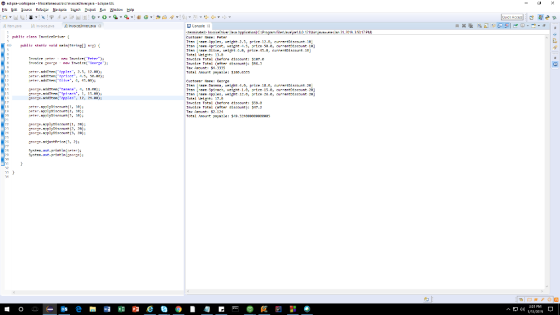
thanks a lot, friend : )
Add Answer to:
Problem Description
to implement a Java application, called
ShoppingApplication, that can be used in a retail...
Write the following program in Java using Eclipse. A cash register is used in retail stores...
 Write the following program in Java using
Eclipse.
A cash register is used in retail stores to help clerks enter a
number of items and calculate their subtotal and total. It usually
prints a receipt with all the items in some format. Design a
Receipt class and Item class. In general, one receipt can contain
multiple items. Here is what you should have in the Receipt
class:
numberOfItems: this variable will keep track of
the number of items added to...
Write the following program in Java using
Eclipse.
A cash register is used in retail stores to help clerks enter a
number of items and calculate their subtotal and total. It usually
prints a receipt with all the items in some format. Design a
Receipt class and Item class. In general, one receipt can contain
multiple items. Here is what you should have in the Receipt
class:
numberOfItems: this variable will keep track of
the number of items added to...
Need help solving this qestion related to object and item classes involving arrays in PYTHON. Classes...
Need help solving this qestion related to object and item classes involving arrays in PYTHON. Classes and Object - Inventory Item as Object In this assignment the idea is to use an Item class to capture what you need for recording and displaying the details of an order from an online store like Amazon. This is a Class and Object assignment. For the assignment you must define and implement the Item class so that the code shown immediately below can...
Write code in Java programming language. The ShoppingCart class will be composed with an array of...
Write code in Java programming language. The ShoppingCart class will be composed with an array of Item objects. You do not need to implement the Item class for this question, only use it. Item has a getPrice() method that returns a float and a one-argument constructor that takes a float that specifies the price. The ShoppingCart class should have: Constructors: A no-argument and a single argument that takes an array of Items. Fields: • Items: an array of Item objects...
Implement a Java class that is called RainFall that uses a double array to store the...
Implement a Java class that is called RainFall that uses a double array to store the amount of rainfall for each month of the year. The class should have only one instance variable of type double[]. Implement the following methods in the RainFall class: 1. A constructor that creates and initializes all entries in the array to be -1. 2. toString: a method that returns a one-line String representation of the object that includes 12 double numbers that represent the...
C# for beginners (Methods and Properties, Data types) WorkStation:- Visual Studio 2019 Create a class called...
C# for beginners (Methods and Properties, Data types) WorkStation:- Visual Studio 2019 Create a class called Invoice that a hardware store might use to represent an invoice for an item sold at the store. An Invoice should include four pieces of information as instance variables – a part number (type int), a part description (type string), a quantity of the item being purchased (type int) and a price per item (type decimal). Your class should have a constructor that initializes...
Hi , i have facing problems in both 5 error while i am soloving it can...
 Hi , i have facing problems in both 5 error while i am
soloving it can you help me with good solotion for both pleas pleas
???
a- Write a java class to define the new data type Item. The data type Item is defined by the attributed name of type String) and price of type double). Provide the following methods in the class implementation: • Default constructor (that initializes the attribute name to the value “Unknown”, and the attribute...
Hi , i have facing problems in both 5 error while i am
soloving it can you help me with good solotion for both pleas pleas
???
a- Write a java class to define the new data type Item. The data type Item is defined by the attributed name of type String) and price of type double). Provide the following methods in the class implementation: • Default constructor (that initializes the attribute name to the value “Unknown”, and the attribute...
[IN JAVA] Finish the program. There are instructions in the comments. You may want to comment...
[IN JAVA] Finish the program. There are instructions in the comments. You may want to comment out the function calls in main, and get one function to work at a time. Thanks in advance! Template import java.util.Scanner; public class Main{ public static Scanner kb = new Scanner(System.in); public static void main(String [] args) { String productName; double productPrice; int productQuantity; double shipping; int quantityDiscount; double finalTotal; productName = queryName(); productPrice = queryPrice(); productQuantity = queryQuantity(); System.out.println(); quantityDiscount = computeQuantityDiscount(productQuantity); shipping...
java Invoice class
Create a class named Invoice that contains fields for an item number, name, quantity, price, and total cost. Create insurance methods that set the item name, quantity,and price. Whenever the price for quantity is set, recalculate the total (price times quantity). Also include a display Line() method that displays the item number,name, quantity, price, and total cost. Make sure you include a class named TestInvoice whose main method () declares three Invoice items. Create a method that prompts the user...
Need three seperate files. ShoppingCartManager.java ShoppingCart.java ItemsToPurchase.java These are from part 1 what do you mean...
 Need three seperate files. ShoppingCartManager.java
ShoppingCart.java
ItemsToPurchase.java
These are from part 1
what do you mean by deep study
7.25 LAB*: Program: Online shopping cart (Part 2) Note: Creating multiple Scanner objects for the same input stream yields unexpected behavior. Thus, good practice is to use a single Scanner object for reading input from System.in. That Scanner object can be passed as an argument to any methods that read input This program extends the earlier Online shopping cart program (Consider...
Need three seperate files. ShoppingCartManager.java
ShoppingCart.java
ItemsToPurchase.java
These are from part 1
what do you mean by deep study
7.25 LAB*: Program: Online shopping cart (Part 2) Note: Creating multiple Scanner objects for the same input stream yields unexpected behavior. Thus, good practice is to use a single Scanner object for reading input from System.in. That Scanner object can be passed as an argument to any methods that read input This program extends the earlier Online shopping cart program (Consider...
In Java* Please implement a class called "MyPet". It is designed as shown in the following...
 In Java*
Please implement a class called "MyPet". It is designed as shown
in the following class diagram.
Four private instance variables: name (of the type String),
color (of the type String), gender (of the type char) and weight(of
the type double).
Three overloaded constructors:
a default constructor with no argument
a constructor which takes a string argument for name, and
a constructor with take two strings, a char and a double for
name, color, gender and weight respectively.
public...
In Java*
Please implement a class called "MyPet". It is designed as shown
in the following class diagram.
Four private instance variables: name (of the type String),
color (of the type String), gender (of the type char) and weight(of
the type double).
Three overloaded constructors:
a default constructor with no argument
a constructor which takes a string argument for name, and
a constructor with take two strings, a char and a double for
name, color, gender and weight respectively.
public...
 Write the following program in Java using
Eclipse.
A cash register is used in retail stores to help clerks enter a
number of items and calculate their subtotal and total. It usually
prints a receipt with all the items in some format. Design a
Receipt class and Item class. In general, one receipt can contain
multiple items. Here is what you should have in the Receipt
class:
numberOfItems: this variable will keep track of
the number of items added to...
Write the following program in Java using
Eclipse.
A cash register is used in retail stores to help clerks enter a
number of items and calculate their subtotal and total. It usually
prints a receipt with all the items in some format. Design a
Receipt class and Item class. In general, one receipt can contain
multiple items. Here is what you should have in the Receipt
class:
numberOfItems: this variable will keep track of
the number of items added to...
 Hi , i have facing problems in both 5 error while i am
soloving it can you help me with good solotion for both pleas pleas
???
a- Write a java class to define the new data type Item. The data type Item is defined by the attributed name of type String) and price of type double). Provide the following methods in the class implementation: • Default constructor (that initializes the attribute name to the value “Unknown”, and the attribute...
Hi , i have facing problems in both 5 error while i am
soloving it can you help me with good solotion for both pleas pleas
???
a- Write a java class to define the new data type Item. The data type Item is defined by the attributed name of type String) and price of type double). Provide the following methods in the class implementation: • Default constructor (that initializes the attribute name to the value “Unknown”, and the attribute...
 Need three seperate files. ShoppingCartManager.java
ShoppingCart.java
ItemsToPurchase.java
These are from part 1
what do you mean by deep study
7.25 LAB*: Program: Online shopping cart (Part 2) Note: Creating multiple Scanner objects for the same input stream yields unexpected behavior. Thus, good practice is to use a single Scanner object for reading input from System.in. That Scanner object can be passed as an argument to any methods that read input This program extends the earlier Online shopping cart program (Consider...
Need three seperate files. ShoppingCartManager.java
ShoppingCart.java
ItemsToPurchase.java
These are from part 1
what do you mean by deep study
7.25 LAB*: Program: Online shopping cart (Part 2) Note: Creating multiple Scanner objects for the same input stream yields unexpected behavior. Thus, good practice is to use a single Scanner object for reading input from System.in. That Scanner object can be passed as an argument to any methods that read input This program extends the earlier Online shopping cart program (Consider...
 In Java*
Please implement a class called "MyPet". It is designed as shown
in the following class diagram.
Four private instance variables: name (of the type String),
color (of the type String), gender (of the type char) and weight(of
the type double).
Three overloaded constructors:
a default constructor with no argument
a constructor which takes a string argument for name, and
a constructor with take two strings, a char and a double for
name, color, gender and weight respectively.
public...
In Java*
Please implement a class called "MyPet". It is designed as shown
in the following class diagram.
Four private instance variables: name (of the type String),
color (of the type String), gender (of the type char) and weight(of
the type double).
Three overloaded constructors:
a default constructor with no argument
a constructor which takes a string argument for name, and
a constructor with take two strings, a char and a double for
name, color, gender and weight respectively.
public...
Most questions answered within 3 hours.
-
Where is the error in this code sequence?
String s1 = "Hello";
String s2 = "ello";...
asked 11 months ago -
Financial data for Joel de Paris, Inc., for last year
follow:
Joel de Paris, Inc.
Balance...
asked 11 months ago -
Consider this reaction:
Al2(SO4)3 (aq)+ BaCl3
(aq) Al2Cl6 (aq)- +
3BaSO4(s) . What is the...
asked 11 months ago -
Suppose that Savneet is considering increasing her
recent random sample from 20 car rentals to 40...
asked 11 months ago -
Trucks arrive at an unloading terminal at an average rate of 120
per hour.
Trucks arrive...
asked 11 months ago -
Why are methanol and ethanol completely soluble in water while
octanol is not very little soluble....
asked 11 months ago -
A facilities manager at a university reads in a research report
that the mean amount of...
asked 11 months ago -
When the CuSO4 is rehydrated by adding water to the anhydrous
compound, is this an endothermic...
asked 11 months ago -
A ray of sunlight is passing from diamond into crown glass; the
angle of incidence is...
asked 11 months ago -
A block of mass 0.249 kg is placed on top of a light, vertical
spring of...
asked 11 months ago -
how do the kidneys compensate in the presences of acidosis
a) trigger hyperventilate
b) reserve acid...
asked 11 months ago -
Question 501 pts
The rental rate of capital to the firm increases. Which of the
following...
asked 11 months ago