This program will provide the user the tools to make up trains from a file of...
This program will provide the user the tools to make up trains from a file of available cars. The car data will be the reporting identifier, car type, weight (in tons) and length (in feet) for each car. The user can select to make up a train by total weight, total length or car type. The user will be able to display any train’s consist, and will be able to delete a train (returning the cars to the pool of available cars.)
General algorithm
Read the data file, storing to list of lists ( one car per sublist )
If file did not open or is empty, display message and exit
As long as quit option not selected:
Display menu, get choice
Make train by weight – pick first available cars that do not cause total weight to exceed desired weight. Some cars may be skipped. Total weight may be less than desired weight if not enough available cars.
Make train by length – pick first available cars that do not cause total length to exceed desired length. Some cars may be skipped. Total length may be less than the desired length if not enough available cars.
Make train by car type – pick first available cars of a specified type, up the maximum number of cars specified. Number of cars may be less than the desired number if not enough available cars.
Display train – present the range of train numbers (1 to highest assigned), display each cars’ data. If train is empty, display message.
Delete train – present range of train numbers (1 to highest assigned ). Delete cars in train’s list and reset all cars in pool to indicate available.
Quit – display message, end program.
Reading the data file
The file consists of many lines in the following format:
Reporting_mark type weight length
Where each item is separated by a space. Reporting mark and type are text (strings), weight and length are numbers.
The file is guaranteed to be correct, in that if a line exists, it will have exactly four items of the correct type. The file may be empty.
The data is to be stored into an overall list which will contain lists. Each sublist will have one car’s data, broken into the two strings and the two integers, followed by another integer set to 0. The 0 indicates the car is not assigned to any train.
The first few lines of the data file look like:
SHOX1107 Tank 120 55
RG39476 Stock_Car 20 38
ATSF21392 Boxcar 85 50
USAF35781 Flatcar 100 50
ATSF35793 Reefer 65 50
ATSF999245 Caboose 85 35
CNW69044 Hopper 105 50
Making up a train
Start by making an empty list for the current train.
You will make a train by looking through the car lists, one at a time, checking the type, weight or length field to determine if it can be added the train being built and if the car is available.
If building by weight or length, you’ll add a car’s weight or length to a total as you go along. Test each car that its value, when added to the total, does not exceed the desired total. If it can be added without exceeding the desired total, set the last field (the 0) to the train number, then append that car to the train. (It will remain in the master list, but now is marked as in a train.)
If building by car type, you won’t be concerned about weight or length. Keep adding available cars of the desired type until the maximum number of cars is reached, or there are no more cars.
In either type of train building, continue examining all cars until either the maximum value (weight, length, number of cars) has been reached, or there are no more cars to check.
When the new train is complete, return it to main( ).
Functions
Your program must have the following functions:
main( ) starts the program. Opens and checks the data file, calls the read_file, loops as long as quit option not chosen, executing the selected option.
read_file( ) given open file handle, reads data into list of lists. Returns list, empty list if no data
choose_option( ) displays menu of options, gets and validates option. Return choice as an integer
choose_car_type( ) displays list of car types, get user selection. Validate selection, return car type as string
make_train_wt( ) given list of cars, limit and train number, selects cars to make selected train type. Marks cars with train number in main car list. Return train as a list
make_train_len( ) given list of cars, limit and train number, selects cars to make selected train type. Marks cars with train number in main car list. Return train as a list
make_train_type( ) given list of cars, limit, car type and train number, selects cars to make selected train type. Marks cars with train number in main car list. Return train as a list
display_train( ) given a list that holds one train, display the cars’ information in formatted form
delete_train( ) given list of cars and train number, marks all of trains cars as available (0).
You may have additional functions if you wish, but the ones above must be present and must be doing the tasks described.
Error handling
The program must handle any input for the main menu and car type inputs, giving an error message and re‑prompting for input until valid. All other inputs during grading will be valid, and don’t require error handling.
Car Types
Use the following for the types of cars available for selection. Put this list in your choose_car_type( ) function:
types = [
"Boxcar", "Caboose", "Covered_Hopper", "Covered_Hopper_3bay", \
"Depressed_Center_Flat", "Flatcar", "Gondola", "Hopper", \
"Piggyback/trailer", "Reefer", "Stock_Car", "Tank" ]
Deleting Trains
When a train is deleted, besides marking all its cars as being available (0 in the last element of the cars), make its list in the trains list an empty list. Do not delete the train’s list all together – once a train number has been used, it remains. The trains that follow should not get “renumbered” by the deletion of a lower numbered train. The deleted train will just be empty (no cars).
It must be in Python and on Geany. Thanks.
Homework Answers
Python code:
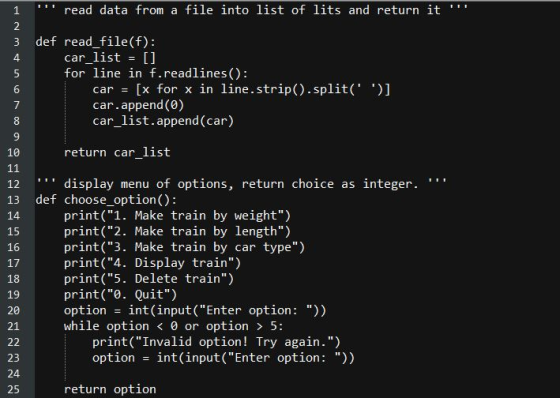
''' read data from a file into list of list and return it '''
def read_file(f):
car_list = []
for line in f.readlines():
car = [x for x in line.strip().split(' ')]
car.append(0)
car_list.append(car)
return car_list
''' display menu of options, return choice as integer. '''
def choose_option():
print("1. Make train by weight")
print("2. Make train by length")
print("3. Make train by car type")
print("4. Display train")
print("5. Delete train")
print("0. Quit")
option = int(input("Enter option: "))
while option < 0 or option > 5:
print("Invalid option! Try again.")
option = int(input("Enter option: "))
return option
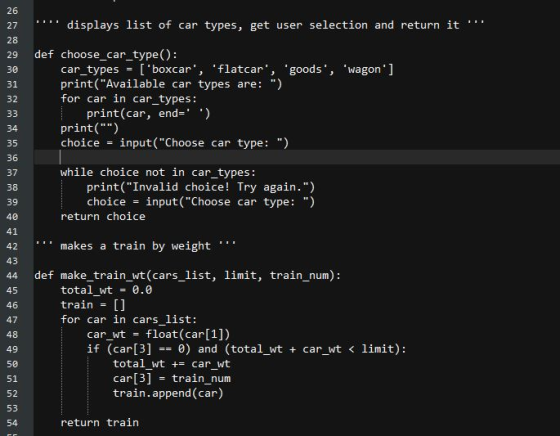
'''' displays list of car types, get user selection and return it '''
def choose_car_type():
car_types = ['boxcar', 'flatcar', 'goods', 'wagon']
print("Available car types are: ")
for car in car_types:
print(car, end=' ')
print("")
choice = input("Choose car type: ")
while choice not in car_types:
print("Invalid choice! Try again.")
choice = input("Choose car type: ")
return choice
''' makes a train by weight '''
def make_train_wt(cars_list, limit, train_num):
total_wt = 0.0
train = []
for car in cars_list:
car_wt = float(car[1])
if (car[3] == 0) and (total_wt + car_wt < limit):
total_wt += car_wt
car[3] = train_num
train.append(car)
return train
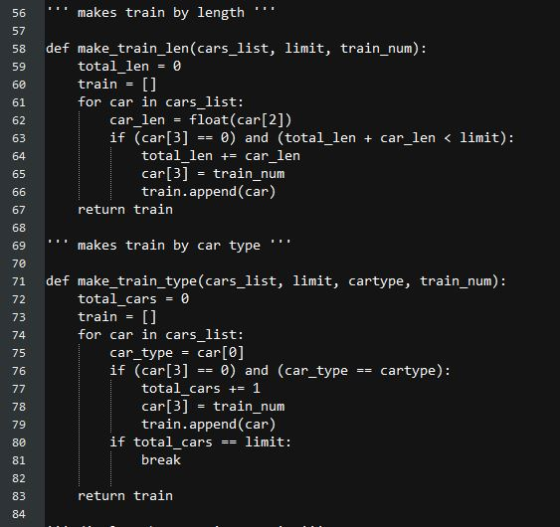
''' makes train by length '''
def make_train_len(cars_list, limit, train_num):
total_len = 0
train = []
for car in cars_list:
car_len = float(car[2])
if (car[3] == 0) and (total_len + car_len < limit):
total_len += car_len
car[3] = train_num
train.append(car)
return train
''' makes train by car type '''
def make_train_type(cars_list, limit, cartype, train_num):
total_cars = 0
train = []
for car in cars_list:
car_type = car[0]
if (car[3] == 0) and (car_type == cartype):
total_cars += 1
car[3] = train_num
train.append(car)
if total_cars == limit:
break
return train
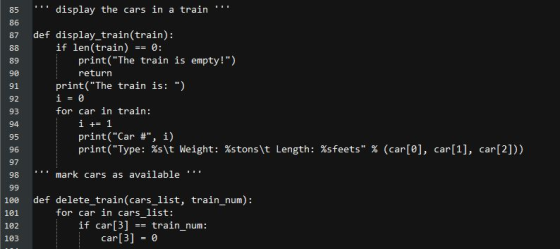
''' display the cars in a train '''
def display_train(train):
if len(train) == 0:
print("The train is empty!")
return
print("The train is: ")
i = 0
for car in train:
i += 1
print("Car #", i)
print("Type: %s\t Weight: %stons\t Length: %sfeets" % (car[0], car[1], car[2]))
''' mark cars as available '''
def delete_train(cars_list, train_num):
for car in cars_list:
if car[3] == train_num:
car[3] = 0
''' main driver function '''
def main():
try:
carsfile = open('cars.txt', 'r')
cars_list = read_file(carsfile)
carsfile.close()
except IOError:
print("Error! File not found.")
return
trains = []
train_num = 0
while True:
option = choose_option()
if option == 1:
weight = float(input("Enter desired weight: "))
train_num += 1
trains.append(make_train_wt(cars_list, weight, train_num))
print('Train Created! Train number is', train_num)
if option == 2:
length = float(input("Enter desired length: "))
train_num += 1
trains.append(make_train_len(cars_list, length, train_num))
print('Train Created! Train number is', train_num)
if option == 3:
cartype = choose_car_type()
limit = int(input("Enter number of cars: "))
train_num += 1
trains.append(make_train_type(cars_list, limit, cartype, train_num))
print('Train Created! Train number is', train_num)
if option == 4:
num = int(input("Enter train number: "))
display_train(trains[num - 1])
if option == 5:
num = int(input("Enter train number: "))
delete_train(cars_list, num)
if option == 0:
print("Exiting...")
return
# call to main function
if __name__ == "__main__":
main()
Code screen shot:
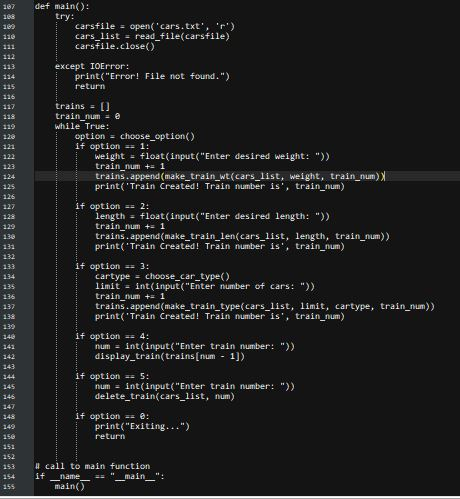
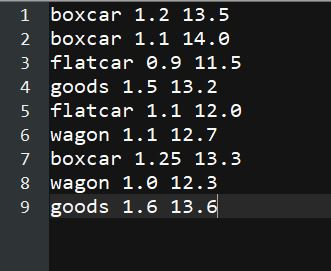
cars.txt file contents:
Add Answer to:
This program will provide the user the tools to make up trains
from a file of...
This program will provide the user the tools to make up trains from a file of...
This program will provide the user the tools to make up trains from a file of available cars. The car data will be the reporting identifier, car type, weight (in tons) and length (in feet) for each car. The user can select to make up a train by total weight, total length or car type. The user will be able to display any train’s consist, and will be able to delete a train (returning the cars to the pool of...
One railroad corridor with the following traffic and operating characteristics: 80-Car Trains 16 Trains per Day...
One railroad corridor with the following traffic and operating characteristics: 80-Car Trains 16 Trains per Day Cars on each train are 286,000 lb GRL railcars (50 cars are fully loaded, 30 are fully empty) The railcar Light Weight = 34,500 lbs Number of Locomotives per Train = 2 Locomotive Weight = 425,000 lbs. each Length of Route = 1,000 miles One year has 365 days 1 ton = 2,000 lbs GRL = maximum total weight when a railcar is fully...
JAVA Write a program that prompts the user to enter a file name, then opens the...
JAVA Write a program that prompts the user to enter a file name, then opens the file in text mode and reads it. The input files are assumed to be in CSV format. The input files contain a list of integers on each line separated by commas. The program should read each line, sort the numbers and print the comma separated list of integers on the console. Each sorted list of integers from the same line should be printed together...
Using the following definition (List.h file) for a list, implement the member functions (methods) for the...
Using the following definition (List.h file) for a list, implement the member functions (methods) for the List class and store the implementation in a List.cpp file. Use a doubly linked list to implement the list. Write the client code (the main method and other non-class methods) and put in file driver.cpp. file: List.h typedef int ElementType; class node{ ElementType data; node * next; node* prev; }; class List { public: List(); //Create an empty list bool Empty(); // return true...
Write a program that takes a file as input and checks whether or not the content...
Write a program that takes a file as input and checks whether or not the content of the file is balanced. In the context of this assignment “balanced” means that your program will check to make sure that for each left bracket there is a closing right bracket. Examples: [ ( ) ] { } à balanced. [ ( ] ) { } à unbalanced. Here is the list of brackets/braces that program must support: (: left parentheses...
Use BlueJ to write a program that reads a sequence of data for several car objects...
Use BlueJ to write a program that reads a sequence of data for several car objects from an input file. It stores the data in an ArrayList<Car> list . Program should work for input file containing info for any number of cars. (You should not assume that it will always be seven lines in the input file). Use notepad to create input file "inData.txt". File should be stored in the same folder where all files from BlueJ for this program...
Create a class called CarNode which has fields for the data (a Car) and next (CarNode)...
Create a class called CarNode which has fields for the data (a Car) and next (CarNode) instance variables. Include a one-argument constructor which takes a Car as a parameter. (For hints, see the PowerPoint on "Static vs. Dynamic Structures”.) public CarNode (Car c) { . . } The instance variables should have protected access. There will not be any get and set methods for the two instance variables. Create an abstract linked list class called CarList. This should be a...
Please try to write the code with Project 1,2 and 3 in mind. And use java language, thank you very much. Create an Edit Menu in your GUI Add a second menu to the GUI called Edit which will have one me...
 Please try to write the code with Project 1,2 and 3 in
mind. And use java language, thank you very much.
Create an Edit Menu in your GUI
Add a second menu to the GUI called Edit which will have one
menu item called Search. Clicking on search should prompt the user
using a JOptionPane input dialog to enter a car make. The GUI
should then display only cars of that make. You will need to write
a second menu...
Please try to write the code with Project 1,2 and 3 in
mind. And use java language, thank you very much.
Create an Edit Menu in your GUI
Add a second menu to the GUI called Edit which will have one
menu item called Search. Clicking on search should prompt the user
using a JOptionPane input dialog to enter a car make. The GUI
should then display only cars of that make. You will need to write
a second menu...
Java Programming Reading from a Text File Write a Java program that will use an object...
 Java Programming Reading from a Text File
Write a Java program that will use an object of the Scanner class to read employee payroll data from a text file The Text file payroll.dat has the following: 100 Washington Marx Jung Darwin George 40 200 300 400 Kar Car Charles 50 22.532 15 30 The order of the data and its types stored in the file are as follows: Data EmployeelD Last name FirstName HoursWorked double HourlyRate Data Tvpe String String...
Java Programming Reading from a Text File
Write a Java program that will use an object of the Scanner class to read employee payroll data from a text file The Text file payroll.dat has the following: 100 Washington Marx Jung Darwin George 40 200 300 400 Kar Car Charles 50 22.532 15 30 The order of the data and its types stored in the file are as follows: Data EmployeelD Last name FirstName HoursWorked double HourlyRate Data Tvpe String String...
Java Create a program for a car dealer to use where you have a class for...
Java Create a program for a car dealer to use where you have a class for Salesman, Cars, and the Records of sale. 4 salesman and 4 cars to start with but have array size for 50 cars, have space for 100 records in array. The program should have 6 options in the menu. buy car, sell car, show inventory, show salesman, show sales records, and exit. Salesman class - Name, ID number, Commision rate, Total commisions earned, Totals number...
 Please try to write the code with Project 1,2 and 3 in
mind. And use java language, thank you very much.
Create an Edit Menu in your GUI
Add a second menu to the GUI called Edit which will have one
menu item called Search. Clicking on search should prompt the user
using a JOptionPane input dialog to enter a car make. The GUI
should then display only cars of that make. You will need to write
a second menu...
Please try to write the code with Project 1,2 and 3 in
mind. And use java language, thank you very much.
Create an Edit Menu in your GUI
Add a second menu to the GUI called Edit which will have one
menu item called Search. Clicking on search should prompt the user
using a JOptionPane input dialog to enter a car make. The GUI
should then display only cars of that make. You will need to write
a second menu...
 Java Programming Reading from a Text File
Write a Java program that will use an object of the Scanner class to read employee payroll data from a text file The Text file payroll.dat has the following: 100 Washington Marx Jung Darwin George 40 200 300 400 Kar Car Charles 50 22.532 15 30 The order of the data and its types stored in the file are as follows: Data EmployeelD Last name FirstName HoursWorked double HourlyRate Data Tvpe String String...
Java Programming Reading from a Text File
Write a Java program that will use an object of the Scanner class to read employee payroll data from a text file The Text file payroll.dat has the following: 100 Washington Marx Jung Darwin George 40 200 300 400 Kar Car Charles 50 22.532 15 30 The order of the data and its types stored in the file are as follows: Data EmployeelD Last name FirstName HoursWorked double HourlyRate Data Tvpe String String...
Most questions answered within 3 hours.
-
Where is the error in this code sequence?
String s1 = "Hello";
String s2 = "ello";...
asked 11 months ago -
Financial data for Joel de Paris, Inc., for last year
follow:
Joel de Paris, Inc.
Balance...
asked 11 months ago -
Consider this reaction:
Al2(SO4)3 (aq)+ BaCl3
(aq) Al2Cl6 (aq)- +
3BaSO4(s) . What is the...
asked 11 months ago -
Suppose that Savneet is considering increasing her
recent random sample from 20 car rentals to 40...
asked 11 months ago -
Trucks arrive at an unloading terminal at an average rate of 120
per hour.
Trucks arrive...
asked 11 months ago -
Why are methanol and ethanol completely soluble in water while
octanol is not very little soluble....
asked 11 months ago -
A facilities manager at a university reads in a research report
that the mean amount of...
asked 11 months ago -
When the CuSO4 is rehydrated by adding water to the anhydrous
compound, is this an endothermic...
asked 11 months ago -
A ray of sunlight is passing from diamond into crown glass; the
angle of incidence is...
asked 11 months ago -
A block of mass 0.249 kg is placed on top of a light, vertical
spring of...
asked 11 months ago -
how do the kidneys compensate in the presences of acidosis
a) trigger hyperventilate
b) reserve acid...
asked 11 months ago -
Question 501 pts
The rental rate of capital to the firm increases. Which of the
following...
asked 11 months ago