1.Write a bash script A5p1.sh to output the number of executable and non-executable files and subdirectories...
1.Write a bash script A5p1.sh to output the number of executable and non-executable files and subdirectories separately in the directory that is specified as the first command line argument to this script. Do not count recursively in subdirectories. Do not call any external Linux utilities such as “ls”.
2.Write a bash script A5p1.sh to output the number of executable and non-executable files and subdirectories separately in the directory that is specified as the first command line argument to this script. Do not count recursively in subdirectories. Do not call any external Linux utilities such as “ls”.
Homework Answers
Hey, It is a very interesting problem where we don't have to use in-build methods and hence the problem becomes challenging. For simplicity purposes, I had divided the solution into parts. So, let's start:
PART ONE: REQUIREMENTS:
The problem statement is pretty clear that we need to find the number of executable and non-executable files in a directory using a bash script.
The use of inbuild methods or utilities is not allowed for this problem.
PART TWO: APPROACH
For solving this specific problem I am using the approach as described below:
STEP 1: Initialize two counters, one for executable files and directories and one for non-executable files and directories.
STEP 2: Iterate over all the files and directories under the specified path.
STEP 3: Check whether the file is executable or not
STEP 4: Repeat the steps until no file or subdirectory exists.
STEP 5: make sure the steps don't count the recursive files and directories.
PART THREE: IMPLEMENTATION:
I will provide the text code at the end of the explanation.
STEP 1: Variables
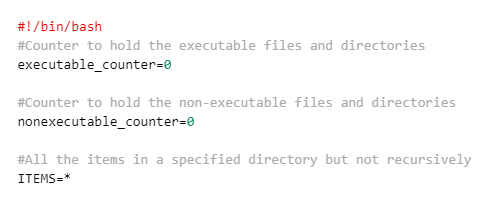
STEP 2: Iterating over each item
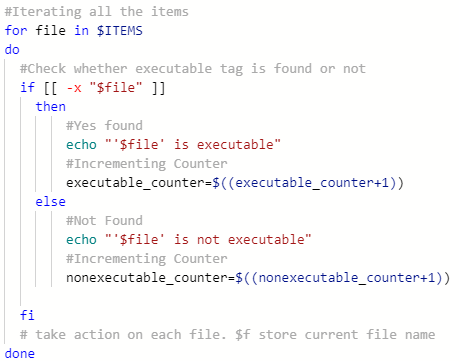
STEP 3: Printing the result:

PART FOUR: SAMPLE INPUT-OUTPUT:
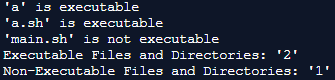
There was a folder named ABC inside folder a but that was not processed because we don't want recursive computations.
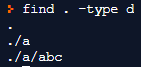
PART FIVE: SOURCE CODE:
Please read all the comments from the code.
Please read the code in a modular fashion for better understanding.
**********************CODE**********************
#!/bin/bash
#Counter to hold the executable files and directories
executable_counter=0
#Counter to hold the non-executable files and directories
nonexecutable_counter=0
#All the items in a specified directory but not recursively
ITEMS=*
#Iterating all the items
for file in $ITEMS
do
#Check whether executable tag is found or not
if [[ -x "$file" ]]
then
#Yes found
echo "'$file' is executable"
#Incrementing Counter
executable_counter=$((executable_counter+1))
else
#Not Found
echo "'$file' is not executable"
#Incrementing Counter
nonexecutable_counter=$((nonexecutable_counter+1))
fi
# take action on each file. $f store current file name
done
#Printing the results
echo "Executable Files and Directories: '$executable_counter'"
echo "Non-Executable Files and Directories: '$nonexecutable_counter'"
**********************CODE***********************
I hope it helps. Please don't forget to thumbs up if it helped you.
Keep learning and keep HomeworkLibing.
Happy Coding :)
*************************COMPLETE*****************************
Add Answer to:
1.Write a bash script A5p1.sh to output the
number of executable and non-executable files and subdirectories...
write the bash script Write a script compress_large_files.sh. This script accepts one or more command line...
write the bash script Write a script compress_large_files.sh. This script accepts one or more command line arguments. The first argument has to be an integer; let’s call it size. If this is the only command line argument, compress_large_files.sh inspects all files in the current working directory and compresses every file of size at least size. If there is more than one command line argument, all arguments except the first one must be valid directories. In this case, compress_large_files.sh inspects the...
LINUX 140U Create a file named script1.sh that contains a bash script that: Accepts NO command...
LINUX 140U Create a file named script1.sh that contains a bash script that: Accepts NO command line arguments and does NOT use the read command. I will give you no credit if your bash script includes a read command. Also, you need to have at least one for..in loop in your code even if there may be other ways to do this problem. The script will go through a list of entries in the current directory (do not process subdirectories):...
Write a C program countFiles.c to be executed on the command line as follows: countFiles <directory> The program...
Write a C program countFiles.c to be executed on the command line as follows: countFiles <directory> The program should count the (regular) files in the specified directory as well as all subdirectories and output the total number on the console. Files and subdirectories whose names .start with should be ignored! To do this, define a function int countFilesRec(char* dirName)that dirName returns the number of (regular) files in the directory and all the subdirectories. Call the function recursively to count the...
Problem 4: Write a Bash script that removes all zero length ordinary files in the directory...
Problem 4: Write a Bash script that removes all zero length ordinary files in the directory (including those in the sub-directories at all levels) passed as an optional argument. If you do not specify the directory argument, the script uses the current working directory as the default argument. This problem is for practicing bash programming skills. Though there is an easier way to achieve the goal with the find command, the find command is not allowed to appear in your...
Write a Bash script that removes all zero length ordinary files in the directory (including those...
Write a Bash script that removes all zero length ordinary files in the directory (including those in the sub-directories at all levels) passed as an optional argument. If you do not specify the directory argument, the script uses the current working directory as the default argument. This problem is for practicing bash programming skills. Though there is an easier way to achieve the goal with find, find is not allowed to appear in your bash script. Post the screenshot of...
Write a bash shell script to carry out each of the following tasks: What to Do:...
Write a bash shell script to carry out each of the following tasks: What to Do: a. Safe Delete: When you use the “rm” command in Linux, it will delete the specified files, with no chance for recovering them back later. Write a script (called srm) that will safely delete the files passed to it as command-line arguments. For example, typing the command: “srm file1 file2 file3”, the script shall not actually delete these files, but instead it shall move...
LUNIX (Please Label) Exit vi (:q) and from the command line, type viscript4.sh. For this script,...
LUNIX (Please Label) Exit vi (:q) and from the command line, type viscript4.sh. For this script, we will iterate through all files in the current directory print out their name using the for loop. Example (do not type yet): foriin*;do …;done where the…does some operation on$I, which stands for the current file. To do this, enter the following in your script4.sh file: #!/bin/bash for i in *; do echo $i done Once the above works, change the for loop to...
write a bash script that will take one or more directory names as arguments and count...
write a bash script that will take one or more directory names as arguments and count the number of .txt files under each one (that is the number of .txt files in each subdirectory, subdirectories and so on).
Write a Bash script that removes all zero length ordinary files in the directory (including those...
Write a Bash script that removes all zero length ordinary files in the directory (including those in the sub-directories at all levels) passed as an optional argument. If you do not specify the directory argument, the script uses the current working directory as the default argument. This problem is for practicing bash programming skills. Though there is an easier way to achieve the goal with find, find is not allowed to appear in your bash script.
Write a bash shell script called direct.sh. This script will take an arbitrary number of command...
Write a bash shell script called direct.sh. This script will take an arbitrary number of command line arguments. Your script should create directories starting with the first argument, then the second directory inside the first one, and then the next one inside the second one, and so on.
Most questions answered within 3 hours.
-
Where is the error in this code sequence?
String s1 = "Hello";
String s2 = "ello";...
asked 10 months ago -
Financial data for Joel de Paris, Inc., for last year
follow:
Joel de Paris, Inc.
Balance...
asked 10 months ago -
Consider this reaction:
Al2(SO4)3 (aq)+ BaCl3
(aq) Al2Cl6 (aq)- +
3BaSO4(s) . What is the...
asked 10 months ago -
Suppose that Savneet is considering increasing her
recent random sample from 20 car rentals to 40...
asked 10 months ago -
Trucks arrive at an unloading terminal at an average rate of 120
per hour.
Trucks arrive...
asked 10 months ago -
Why are methanol and ethanol completely soluble in water while
octanol is not very little soluble....
asked 10 months ago -
A facilities manager at a university reads in a research report
that the mean amount of...
asked 10 months ago -
When the CuSO4 is rehydrated by adding water to the anhydrous
compound, is this an endothermic...
asked 10 months ago -
A ray of sunlight is passing from diamond into crown glass; the
angle of incidence is...
asked 10 months ago -
A block of mass 0.249 kg is placed on top of a light, vertical
spring of...
asked 10 months ago -
how do the kidneys compensate in the presences of acidosis
a) trigger hyperventilate
b) reserve acid...
asked 10 months ago -
Question 501 pts
The rental rate of capital to the firm increases. Which of the
following...
asked 10 months ago