import random import turtle def isInScreen(win,turt): leftBound = -win.window_width() / 2 rightBound = win.window_width() / 2...
import random
import turtle
def isInScreen(win,turt):
leftBound = -win.window_width() / 2
rightBound = win.window_width() / 2
topBound = win.window_height() / 2
bottomBound = -win.window_height() / 2
turtleX = turt.xcor()
turtleY = turt.ycor()
stillIn = True
if turtleX > rightBound or turtleX < leftBound:
stillIn = False
if turtleY > topBound or turtleY < bottomBound:
stillIn = False
return stillIn
def main():
wn = turtle.Screen()
# Define your turtles here
june = turtle.Turtle()
june.shape('turtle')
while isInScreen(wn,june):
coin = random.randrange(0, 2)
if coin == 0:
june.left(90)
else:
june.right(90)
june.forward(50)
wn.exitonclick()
main()
Modify the program in the following ways:
- Write appropriate comments for this program and function.
Include:
- A header comment for the program
- A header for the function describing the parameters and return value.
- Comment the blocks of code.
The text has descriptions of all this, so reread that if necessary.
- Create a new turtle, a black hole turtle, that moves to some
random location on the screen and draws a black dot of diameter
100. Use the .dot function instead of .circle, since you want the
turtle at the center of the figure. [As of Fall 1, 2018, there is a
bug in the active code window. If you are using the textbook to
write this program, use may have to use dot(50) to get the correct
size black hole. If you are using a stand-alone python compiler,
use dot(100).]
This should be done in the main function before creating the randomly walking turtle. - Write a boolean function that has two turtles as parameters,
and returns true if the turtles are within 50 units of each other
and false otherwise.
There are several ways to determine the distance between two turtles. You could use math.sqrt or math.hypot to compute the distance. If you read the turtle documentation, you may find another way as well. Talk to the instructor if you are having trouble with this. Be sure to comment this function. - Modify the while loop so that the program stops when the turtle leaves the screen or when it touches the black hole. Use your Boolean function from Step 3.
- Modify the function isInScreen so that the function only
returns false if the turtle wanders off the top or bottom of the
screen.
The next step is going to deal with the turtle moving off the screen horizontally. - Modify the body of the while loop so that if the turtle wanders off the screen either to the right or the left, it reappears on the opposite side of the screen.
- Add another feature to your program. Either more randomness, or one more randomly walking turtle, or multiple black holes, or ???
Homework Answers
'''
This program uses turtle graphics to run a turtle object across the
screen. Another
turtle object is used to draw a black hole. So when the runner
turtle touches the
black hole, the program stops. Otherwise, looping infinitely.
'''
import random
import turtle
import math
def isInScreen(win,turt):
'''
this method checks if the turtle is within the window bounds
:param win: window object
:param turt: turtle object
:return: True if inside, else False
'''
leftBound = -win.window_width() / 2
rightBound = win.window_width() / 2
topBound = win.window_height() / 2
bottomBound = -win.window_height() / 2
turtleX = turt.xcor()
turtleY = turt.ycor()
stillIn = True
if turtleX > rightBound or turtleX < leftBound:
stillIn = False
if turtleY > topBound or turtleY < bottomBound:
stillIn = False
return stillIn
def isClose(turt1,turt2):
'''
This method checks if two turtles are too close (distance between
them is under 50)
:param turt1: first turtle
:param turt2: second turtle
:return: True if distance between turt1 and turt2 is less than or
equal to 50
'''
#finding positions
pos1=turt1.pos()
pos2=turt2.pos()
#using distance formula, finding distance between two
positions
#(distance= square root of [(x1-x2)^2 + (y1-y2)^2] )
distance=math.sqrt(math.pow(pos1[0]-pos2[0],2)+math.pow(pos1[1]-pos2[1],2))
if distance<=50:
#too close
return True
return False #not close
def main():
#creating window
wn = turtle.Screen()
# Defining first turtle
june = turtle.Turtle()
june.shape('turtle')
#defining turtle that draws black hole
black_hole = turtle.Turtle()
black_hole.shape('turtle')
#finding window bounds
boundX = wn.window_width() // 2
boundY = wn.window_height() // 2
#generating a random valid position on the screen
pos=(random.randint(-boundX,boundX),random.randint(-boundY,boundY))
#pen up, so no drawing will be done
black_hole.up()
#moving turtle to above position
black_hole.goto(pos)
#pen down, will draw anything now.
black_hole.down()
#drawing a black dot of diameter 100
black_hole.dot(100,'black')
#looping infinitely
while True:
#generating a value between 0 and 1
coin = random.randrange(0, 2)
#if the value is 0, turning left 90 degrees, or else turning
right
if coin == 0:
june.left(90)
else:
june.right(90)
#moving 50 spaces in the above direction
june.forward(50)
#checking if two turtles are close
if isClose(june,black_hole):
#end of loop (june entered the black hole)
break
#checking if turtle is not inside window bounds
if not isInScreen(wn,june):
#finding position
pos=june.pos()
#defining new x and y positions, currently set to current
positions
newX=pos[0]
newY=pos[1]
#updating x and y coordinates to emerge from other side of the
window
#if any bounds are crosses
if pos[0]<-boundX:
newX=boundX-1
elif pos[0]>boundX:
newX=-boundX+1
if pos[1]<-boundY:
newY=boundY-1
elif pos[1]>boundY:
newY=-boundY+1
#pen up, no drawing
june.up()
#hiding turtle, movement will be hidden
june.ht()
#moving to new position
june.goto(newX,newY)
#pen down
june.down()
#showing turtle
june.st()
wn.exitonclick()
main()
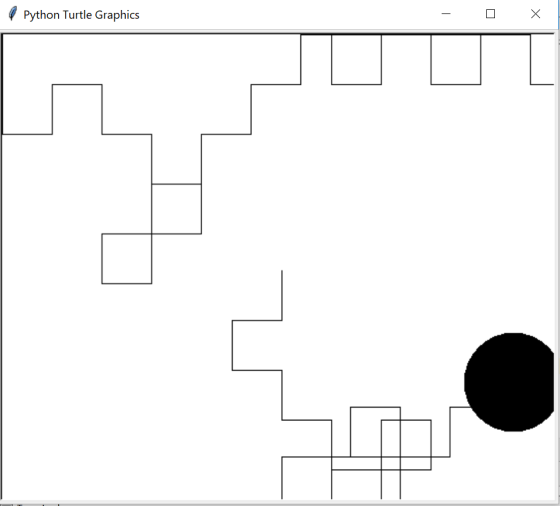
Add Answer to:
import random
import turtle
def isInScreen(win,turt):
leftBound = -win.window_width() / 2
rightBound = win.window_width() / 2...
fix this python program (error:NameError: name 'turtle' is not defined) def Drawtriangularmotion(): import turtle ...
fix this python program (error:NameError: name 'turtle' is not defined) def Drawtriangularmotion(): import turtle import random index=0 size=[80,75,60] color=['red','green','blue'] myTurtle=turtle.Turtle() screen = turtle.Screen() def draw_square(): global index myTurtle.fillcolor(color[index]) myTurtle.begin_fill() for _ in range(4): myTurtle.left(90) myTurtle.forward(size[index]) myTurtle.end_fill() index+=1 def draw_triangle(): for _ in range(3): draw_square() myTurtle.penup() myTurtle.forward(450) myTurtle.left(120) myTurtle.pendown() def main(): draw_triangle() screen.exitonclick() main()
import random def doTest(operation): ## complete your work here ## # return True for now...
 import random
def doTest(operation):
## complete your work here ##
# return True for now
return True
responsesCorrect = 0
print("The software will process a test with 10 questions ……
")
for compteur in range (10):
operation = random.randint(0,1)
if doTest(operation) == True:
responsesCorrect += 1
print(responsesCorrect, "Correct responses")
if responsesCorrect <= 6 :
print("Ask some help from your instructor.")
else:
print("Congratulations!")
Requirement: You must use the format provided below and
then complete the fill! Python! Thanks!...
import random
def doTest(operation):
## complete your work here ##
# return True for now
return True
responsesCorrect = 0
print("The software will process a test with 10 questions ……
")
for compteur in range (10):
operation = random.randint(0,1)
if doTest(operation) == True:
responsesCorrect += 1
print(responsesCorrect, "Correct responses")
if responsesCorrect <= 6 :
print("Ask some help from your instructor.")
else:
print("Congratulations!")
Requirement: You must use the format provided below and
then complete the fill! Python! Thanks!...
I cannot run this code! Please explain and fix it for me import turtle import random...
I cannot run this code! Please explain and fix it for me import turtle import random # Approximate size of turtle objects in pixels BODY_SIZE = 80 # Half if the body size for collision detection with the edge of the screen HALF_BODY_SIZE = BODY_SIZE / 2 # if enemies get this close to friend there is collision COLLISION_DISTANCE = 5 # The window size SIZE = 500 # inner boundary within window for reversing the direction of enemies LOWER_BOUND...
Here is a Python program. import turtle class Box: def __init__(self, x, y, width, height):...
Here is a Python program. import turtle class Box: def __init__(self, x, y, width, height): self.x = x self.y = y self.width = width self.height = height def show(self): turtle.up() turtle.goto(x, y) turtle.down() for _ in range(2): turtle.forward(width) turtle.right(90) turtle.forward(height) turtle.right(90) bigbox = Box(-100, -150, 200, 300) bigbox.show() turtle.done() If you run the above program, it will produce an error. What is the keyword that has...
I need help with this code, I have it started here import sys import turtle menu...
 I need help with this code, I have it started here
import sys
import turtle
menu = "Press 1 for Flower"
UserChoice = input(menu)
#function to draw squares
def draw_square(square):
for i in range(0,2):
square.forward(100)
square.right(70)
square.forward(100)
square.right(110)
#function to draw flower
def draw_flower(petalNumber):
window = turtle.Screen()
window.bgcolor("yellow")
pen = turtle.Turtle()
pen.shape("triangle")
pen.color("red")
for number in range(0,petalNumber):
draw_square(pen)
pen.right(360/petalNumber)
for i in range(0,4):
pen.circle(20)
pen.right(90)
pen.right(90)
pen.forward(300)
pen.right(90)
draw_square(pen)
pen.left(180)
draw_square(pen)
pen.left(270)
pen.forward(200)
window.exitonclick()
#function for original art...
I need help with this code, I have it started here
import sys
import turtle
menu = "Press 1 for Flower"
UserChoice = input(menu)
#function to draw squares
def draw_square(square):
for i in range(0,2):
square.forward(100)
square.right(70)
square.forward(100)
square.right(110)
#function to draw flower
def draw_flower(petalNumber):
window = turtle.Screen()
window.bgcolor("yellow")
pen = turtle.Turtle()
pen.shape("triangle")
pen.color("red")
for number in range(0,petalNumber):
draw_square(pen)
pen.right(360/petalNumber)
for i in range(0,4):
pen.circle(20)
pen.right(90)
pen.right(90)
pen.forward(300)
pen.right(90)
draw_square(pen)
pen.left(180)
draw_square(pen)
pen.left(270)
pen.forward(200)
window.exitonclick()
#function for original art...
Using python Here is the code import turtle def draw_triangle(vertex, length, k): ''' Draw a ...
 Using python
Here is the code
import turtle
def draw_triangle(vertex, length, k):
'''
Draw a triangle at depth k given the bottom vertex.
vertex: a tuple (x,y) that gives the coordinates of the bottom
vertex.
When k=0, vertex is the left bottom vertex for the outside
triangle.
length: the length of the original outside triangle (the
biggest one).
k: the depth of the input triangle.
As k increases by 1, the triangles shrink to a smaller
size.
When k=0, the...
Using python
Here is the code
import turtle
def draw_triangle(vertex, length, k):
'''
Draw a triangle at depth k given the bottom vertex.
vertex: a tuple (x,y) that gives the coordinates of the bottom
vertex.
When k=0, vertex is the left bottom vertex for the outside
triangle.
length: the length of the original outside triangle (the
biggest one).
k: the depth of the input triangle.
As k increases by 1, the triangles shrink to a smaller
size.
When k=0, the...
: back to classroom run Instructions from your teacher: import random def get_message(user_num, rand_num): Eo von...
 : back to classroom run Instructions from your teacher: import random def get_message(user_num, rand_num): Eo von AwNP Complete the get_message function so if user_num is equal to rand_num, return "You picked the same number as the computer!" if user_num is less than rand_num, return "Your number is smaller than the computer's number." if user_num is greater than rand_num, return "Your number is higher than the computer's number." Comment out the call to main when trying to pass the tests. 11...
Copy the following Python fuction discussed in class into your file: from random import * def...
Copy the following Python fuction discussed in class into your file: from random import * def makeRandomList(size, bound): a = [] for i in range(size): a.append(randint(0, bound)) return a a. Rename the function sumList as meanList and modify it so that it finds the average of the list. The average is the sum divided by the size (len) of the list. Make sure that the function doesn't give you an error when it is called on an empty list. The...
Hi, can you help me add these requirements in my Turtle python program. The program is...
Hi, can you help me add these requirements in my Turtle python program. The program is supposed to run an Olympics skating game. The program is below the requirements. Thanks Requirements -Your race will be random generated so each time there is a possibility that a different winner. -Have a countdown of “READY” “SET” “GO” appear on the screen and then the turtles take off. -Have the program tell the winner[s]. -Award Medals. -User may guess who will win. -Allow...
This is a python question. Start with this program, import json from urllib import request def...
This is a python question. Start with this program, import json from urllib import request def main(): to_continue = 'Yes' while to_continue == 'yes' or to_continue == 'Yes': currency_code = input("Enter currency code: ").upper() dollars = int(input("Enter number of dollar you want to convert: ")) # calling the exchange_rates function data = get_exchange_rates() if currency_code in data["rates"].keys(): currency = data["rates"][currency_code] # printing the the currency value by multiplying the dollars amount. print("The value is:", str(currency * dollars)) else: print("Error: the...
 import random
def doTest(operation):
## complete your work here ##
# return True for now
return True
responsesCorrect = 0
print("The software will process a test with 10 questions ……
")
for compteur in range (10):
operation = random.randint(0,1)
if doTest(operation) == True:
responsesCorrect += 1
print(responsesCorrect, "Correct responses")
if responsesCorrect <= 6 :
print("Ask some help from your instructor.")
else:
print("Congratulations!")
Requirement: You must use the format provided below and
then complete the fill! Python! Thanks!...
import random
def doTest(operation):
## complete your work here ##
# return True for now
return True
responsesCorrect = 0
print("The software will process a test with 10 questions ……
")
for compteur in range (10):
operation = random.randint(0,1)
if doTest(operation) == True:
responsesCorrect += 1
print(responsesCorrect, "Correct responses")
if responsesCorrect <= 6 :
print("Ask some help from your instructor.")
else:
print("Congratulations!")
Requirement: You must use the format provided below and
then complete the fill! Python! Thanks!...
 I need help with this code, I have it started here
import sys
import turtle
menu = "Press 1 for Flower"
UserChoice = input(menu)
#function to draw squares
def draw_square(square):
for i in range(0,2):
square.forward(100)
square.right(70)
square.forward(100)
square.right(110)
#function to draw flower
def draw_flower(petalNumber):
window = turtle.Screen()
window.bgcolor("yellow")
pen = turtle.Turtle()
pen.shape("triangle")
pen.color("red")
for number in range(0,petalNumber):
draw_square(pen)
pen.right(360/petalNumber)
for i in range(0,4):
pen.circle(20)
pen.right(90)
pen.right(90)
pen.forward(300)
pen.right(90)
draw_square(pen)
pen.left(180)
draw_square(pen)
pen.left(270)
pen.forward(200)
window.exitonclick()
#function for original art...
I need help with this code, I have it started here
import sys
import turtle
menu = "Press 1 for Flower"
UserChoice = input(menu)
#function to draw squares
def draw_square(square):
for i in range(0,2):
square.forward(100)
square.right(70)
square.forward(100)
square.right(110)
#function to draw flower
def draw_flower(petalNumber):
window = turtle.Screen()
window.bgcolor("yellow")
pen = turtle.Turtle()
pen.shape("triangle")
pen.color("red")
for number in range(0,petalNumber):
draw_square(pen)
pen.right(360/petalNumber)
for i in range(0,4):
pen.circle(20)
pen.right(90)
pen.right(90)
pen.forward(300)
pen.right(90)
draw_square(pen)
pen.left(180)
draw_square(pen)
pen.left(270)
pen.forward(200)
window.exitonclick()
#function for original art...
 Using python
Here is the code
import turtle
def draw_triangle(vertex, length, k):
'''
Draw a triangle at depth k given the bottom vertex.
vertex: a tuple (x,y) that gives the coordinates of the bottom
vertex.
When k=0, vertex is the left bottom vertex for the outside
triangle.
length: the length of the original outside triangle (the
biggest one).
k: the depth of the input triangle.
As k increases by 1, the triangles shrink to a smaller
size.
When k=0, the...
Using python
Here is the code
import turtle
def draw_triangle(vertex, length, k):
'''
Draw a triangle at depth k given the bottom vertex.
vertex: a tuple (x,y) that gives the coordinates of the bottom
vertex.
When k=0, vertex is the left bottom vertex for the outside
triangle.
length: the length of the original outside triangle (the
biggest one).
k: the depth of the input triangle.
As k increases by 1, the triangles shrink to a smaller
size.
When k=0, the...
 : back to classroom run Instructions from your teacher: import random def get_message(user_num, rand_num): Eo von AwNP Complete the get_message function so if user_num is equal to rand_num, return "You picked the same number as the computer!" if user_num is less than rand_num, return "Your number is smaller than the computer's number." if user_num is greater than rand_num, return "Your number is higher than the computer's number." Comment out the call to main when trying to pass the tests. 11...
Most questions answered within 3 hours.
-
Where is the error in this code sequence?
String s1 = "Hello";
String s2 = "ello";...
asked 10 months ago -
Financial data for Joel de Paris, Inc., for last year
follow:
Joel de Paris, Inc.
Balance...
asked 10 months ago -
Consider this reaction:
Al2(SO4)3 (aq)+ BaCl3
(aq) Al2Cl6 (aq)- +
3BaSO4(s) . What is the...
asked 10 months ago -
Suppose that Savneet is considering increasing her
recent random sample from 20 car rentals to 40...
asked 10 months ago -
Trucks arrive at an unloading terminal at an average rate of 120
per hour.
Trucks arrive...
asked 10 months ago -
Why are methanol and ethanol completely soluble in water while
octanol is not very little soluble....
asked 10 months ago -
A facilities manager at a university reads in a research report
that the mean amount of...
asked 10 months ago -
When the CuSO4 is rehydrated by adding water to the anhydrous
compound, is this an endothermic...
asked 10 months ago -
A ray of sunlight is passing from diamond into crown glass; the
angle of incidence is...
asked 10 months ago -
A block of mass 0.249 kg is placed on top of a light, vertical
spring of...
asked 10 months ago -
how do the kidneys compensate in the presences of acidosis
a) trigger hyperventilate
b) reserve acid...
asked 10 months ago -
Question 501 pts
The rental rate of capital to the firm increases. Which of the
following...
asked 10 months ago