I cannot run this code! Please explain and fix it for me import turtle import random...
I cannot run this code! Please explain and fix it for me
import turtle
import random

# Approximate size of turtle objects in pixels
BODY_SIZE = 80

# Half if the body size for collision detection with the edge of the screen
HALF_BODY_SIZE = BODY_SIZE / 2

# if enemies get this close to friend there is collision
COLLISION_DISTANCE = 5

# The window size
SIZE = 500

# inner boundary within window for reversing the direction of enemies
LOWER_BOUND = -SIZE / 2 + HALF_BODY_SIZE
UPPER_BOUND = SIZE / 2 - HALF_BODY_SIZE

# changing the turtle size
turtle.shapesize(3, 3)


# method to create and return a turtle
def createTurtle():
# creating a turtle
 t = turtle.Turtle()
# using circle shape and red color
 t.shape('circle')
 t.color('red')
# pen up
t.up()
# assigning a random direction as heading
t.setheading(random.randint(0, 360))
# returning it
    return t


# method to check if a turtle hit the edges
    def turtle_bounce(t):
        # finding position
        x, y = t.pos()
        # finding screen width and height
        width, height = t.getscreen().screensize()
        # checking if the coordinates are outside the bounds
        if x < -width / 2 or x > width / 2 or y < -height / 2 or y > height / 2:
            return True  # should bounce
            return False  # well inside

# creating a screen
win = turtle.Screen()
# adjusting animation delay and window update delay to make the drawings faster
# otherwise the animation will look pathetic.
# remove below two lines if you dont need.
win.delay(0)
win.tracer(2)
# 500x500 screen size
win.screensize(500, 500)
# adjusting screen coordinates
win.setworldcoordinates(-300, -250, 300, 250)
# adding title
win.title('Turtle Escape')

# creating a 'friend' turtle
friend = turtle.Turtle()
# using turtle shape and lime color
friend.shape('turtle')
friend.color('lime')
# pen up
friend.penup()
# set the position
friend.goto(win.window_width() / 2 - BODY_SIZE, - win.window_height() / 2 + BODY_SIZE)
friend.pendown()
# assigning a random direction as heading
friend.setheading(90)


def up():
    friend.penup()


# assigning a direction as heading
friend.setheading(90)
# moving forward 45 spaces
friend.forward(45)
friend.pendown()


def down():
    friend.penup()


# assigning a direction as heading
friend.setheading(270)
# moving forward 45 spaces
friend.forward(45)
friend.pendown()


def left():
    friend.penup()


# assigning a direction as heading
friend.setheading(180)
# moving forward 45 spaces
friend.forward(45)
friend.pendown()


def right():
    friend.penup()


# assigning a direction as heading
friend.setheading(0)
# moving forward 45 spaces
friend.forward(45)
friend.pendown()


def collision(friend, enemies):
# initialize is_collison to False
is_collision = False
        # for all enemies
    for enemy in enemies:
        # how far is this enemy from friend
        dist = friend.distance(enemy.pos())
        if (dist <= COLLISION_DISTANCE):
    is_collision = True  # set is_collision to true
    break  # break out of the loop, one collision is enough
    return is_collision  # return whether collision was detected


def reached_opposite_corner(friend):


# initialize reached_corner to False
    reached_corner = False
    x, y = friend.pos()
    if (x < LOWER_BOUND and y > UPPER_BOUND):
    # opposite corner when x< lowerbound and y > upper bounds
    # if friend's x is less that window's lower bounds
    # and friend's y is greater that upper bound
        reached_corner = True  # friend has reached corner set variable to true
        return reached_corner  # return whether friend has reached upper left corner or not

# creating an empty list of enemies
enemies = []
# looping for 5 times, creating a turtle, appending to list
for i in range(5):
    enemies.append(createTurtle())

# assigning functions to keys
win.onkey(up, "Up")
win.onkey(left, "Left")
win.onkey(right, "Right")
win.onkey(down, "Down")

# looping indefinitely
while True and not collision(friend, enemies) and not reached_opposite_corner(friend):
    # looping through each enemies
    for enemy in enemies:
        # moving forward 5 spaces
        enemy.forward(5)
        # fetching position
        x, y = enemy.pos()
        # checking if turtle hit the edges
        if turtle_bounce(enemy):
            # moving back
            enemy.backward(5)
            # using another random direction between 0 and 360
            enemy.setheading(random.randint(0, 360))

# Checking whether player won or not
if (reached_opposite_corner(friend)):
    print("Game over: your friend made it!")
else:
print("Game over: your friend is now turtle soup!")Homework Answers
In case of any query do comment. Please rate answer as well. Thanks
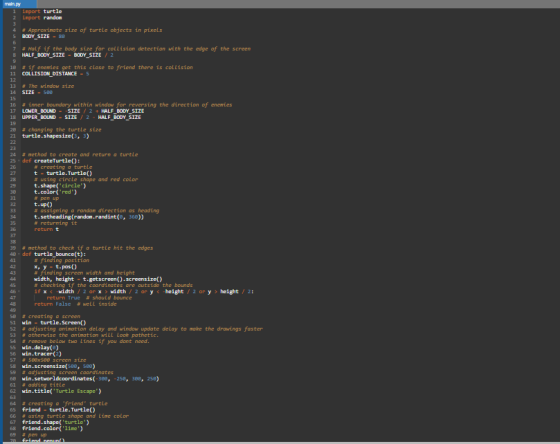
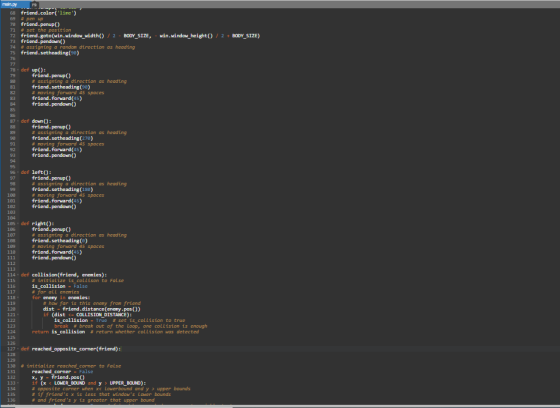
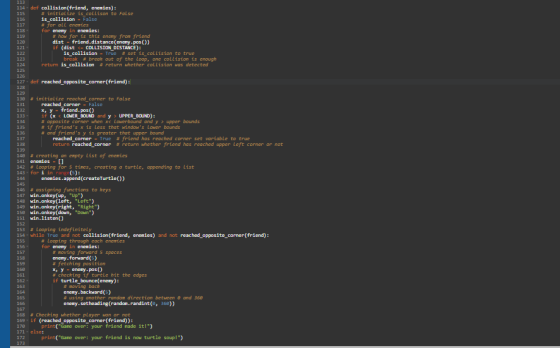
Note: You have to make sure that indentation is correct. I have enabled the editor to show you white spaces as a difference. See below screen shots for difference. Code text is also provided.
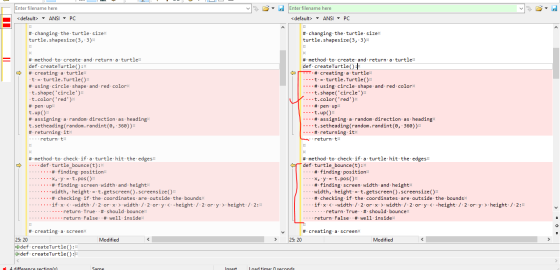
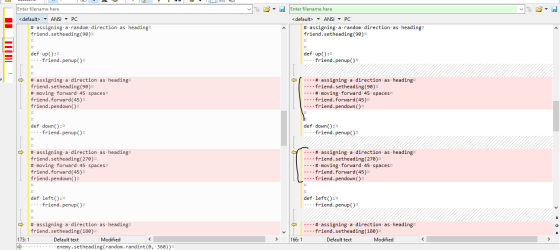
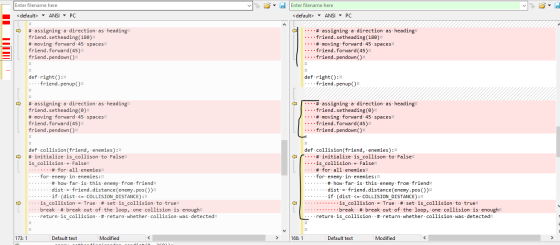
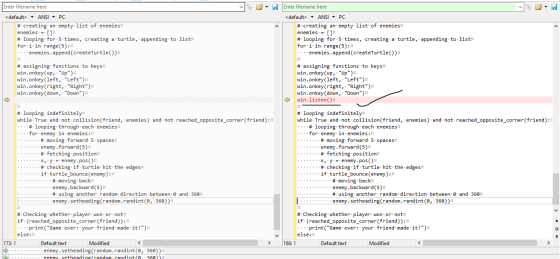
Code:
import turtle
import random
# Approximate size of turtle objects in pixels
BODY_SIZE = 80
# Half if the body size for collision detection with the edge of
the screen
HALF_BODY_SIZE = BODY_SIZE / 2
# if enemies get this close to friend there is collision
COLLISION_DISTANCE = 5
# The window size
SIZE = 500
# inner boundary within window for reversing the direction of
enemies
LOWER_BOUND = -SIZE / 2 + HALF_BODY_SIZE
UPPER_BOUND = SIZE / 2 - HALF_BODY_SIZE
# changing the turtle size
turtle.shapesize(3, 3)
# method to create and return a turtle
def createTurtle():
# creating a turtle
t = turtle.Turtle()
# using circle shape and red color
t.shape('circle')
t.color('red')
# pen up
t.up()
# assigning a random direction as heading
t.setheading(random.randint(0, 360))
# returning it
return t
# method to check if a turtle hit the edges
def turtle_bounce(t):
# finding position
x, y = t.pos()
# finding screen width and height
width, height = t.getscreen().screensize()
# checking if the coordinates are outside the bounds
if x < -width / 2 or x > width / 2 or y < -height / 2 or y
> height / 2:
return True # should bounce
return False # well inside
# creating a screen
win = turtle.Screen()
# adjusting animation delay and window update delay to make the
drawings faster
# otherwise the animation will look pathetic.
# remove below two lines if you dont need.
win.delay(0)
win.tracer(2)
# 500x500 screen size
win.screensize(500, 500)
# adjusting screen coordinates
win.setworldcoordinates(-300, -250, 300, 250)
# adding title
win.title('Turtle Escape')
# creating a 'friend' turtle
friend = turtle.Turtle()
# using turtle shape and lime color
friend.shape('turtle')
friend.color('lime')
# pen up
friend.penup()
# set the position
friend.goto(win.window_width() / 2 - BODY_SIZE, -
win.window_height() / 2 + BODY_SIZE)
friend.pendown()
# assigning a random direction as heading
friend.setheading(90)
def up():
friend.penup()
# assigning a direction as heading
friend.setheading(90)
# moving forward 45 spaces
friend.forward(45)
friend.pendown()
def down():
friend.penup()
# assigning a direction as heading
friend.setheading(270)
# moving forward 45 spaces
friend.forward(45)
friend.pendown()
def left():
friend.penup()
# assigning a direction as heading
friend.setheading(180)
# moving forward 45 spaces
friend.forward(45)
friend.pendown()
def right():
friend.penup()
# assigning a direction as heading
friend.setheading(0)
# moving forward 45 spaces
friend.forward(45)
friend.pendown()
def collision(friend, enemies):
# initialize is_collison to False
is_collision = False
# for all enemies
for enemy in enemies:
# how far is this enemy from friend
dist = friend.distance(enemy.pos())
if (dist <= COLLISION_DISTANCE):
is_collision = True # set is_collision to true
break # break out of the loop, one collision is enough
return is_collision # return whether collision was detected
def reached_opposite_corner(friend):
# initialize reached_corner to False
reached_corner = False
x, y = friend.pos()
if (x < LOWER_BOUND and y > UPPER_BOUND):
# opposite corner when x< lowerbound and y > upper
bounds
# if friend's x is less that window's lower bounds
# and friend's y is greater that upper bound
reached_corner = True # friend has reached corner set variable to
true
return reached_corner # return whether friend has reached upper
left corner or not
# creating an empty list of enemies
enemies = []
# looping for 5 times, creating a turtle, appending to list
for i in range(5):
enemies.append(createTurtle())
# assigning functions to keys
win.onkey(up, "Up")
win.onkey(left, "Left")
win.onkey(right, "Right")
win.onkey(down, "Down")
win.listen()
# looping indefinitely
while True and not collision(friend, enemies) and not
reached_opposite_corner(friend):
# looping through each enemies
for enemy in enemies:
# moving forward 5 spaces
enemy.forward(5)
# fetching position
x, y = enemy.pos()
# checking if turtle hit the edges
if turtle_bounce(enemy):
# moving back
enemy.backward(5)
# using another random direction between 0 and 360
enemy.setheading(random.randint(0, 360))
# Checking whether player won or not
if (reached_opposite_corner(friend)):
print("Game over: your friend made it!")
else:
print("Game over: your friend is now turtle soup!")
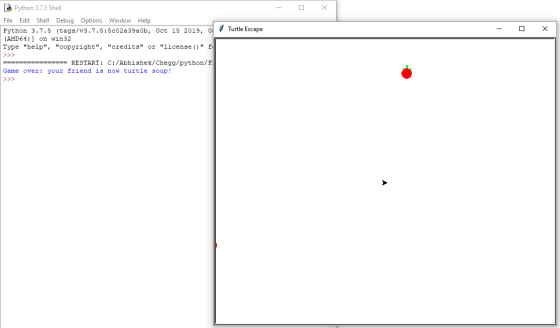
================screen shot of the code for indentation=======
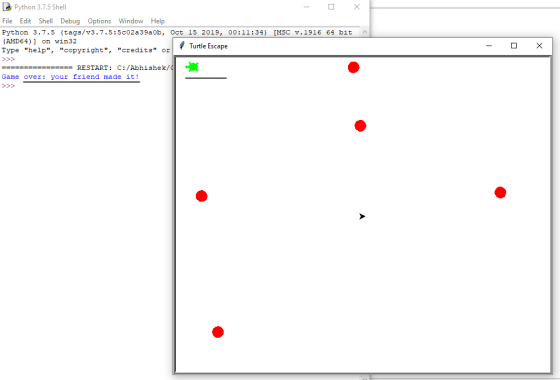
Output:
Add Answer to:
I cannot run this code! Please explain and fix it for me
import turtle
import random...
import random import turtle def isInScreen(win,turt): leftBound = -win.window_width() / 2 rightBound = win.window_width() / 2...
import random import turtle def isInScreen(win,turt): leftBound = -win.window_width() / 2 rightBound = win.window_width() / 2 topBound = win.window_height() / 2 bottomBound = -win.window_height() / 2 turtleX = turt.xcor() turtleY = turt.ycor() stillIn = True if turtleX > rightBound or turtleX < leftBound: stillIn = False if turtleY > topBound or turtleY < bottomBound: stillIn = False return stillIn def main(): wn = turtle.Screen() # Define your turtles here june = turtle.Turtle() june.shape('turtle') while isInScreen(wn,june): coin = random.randrange(0, 2) if...
Using python Here is the code import turtle def draw_triangle(vertex, length, k): ''' Draw a ...
 Using python
Here is the code
import turtle
def draw_triangle(vertex, length, k):
'''
Draw a triangle at depth k given the bottom vertex.
vertex: a tuple (x,y) that gives the coordinates of the bottom
vertex.
When k=0, vertex is the left bottom vertex for the outside
triangle.
length: the length of the original outside triangle (the
biggest one).
k: the depth of the input triangle.
As k increases by 1, the triangles shrink to a smaller
size.
When k=0, the...
Using python
Here is the code
import turtle
def draw_triangle(vertex, length, k):
'''
Draw a triangle at depth k given the bottom vertex.
vertex: a tuple (x,y) that gives the coordinates of the bottom
vertex.
When k=0, vertex is the left bottom vertex for the outside
triangle.
length: the length of the original outside triangle (the
biggest one).
k: the depth of the input triangle.
As k increases by 1, the triangles shrink to a smaller
size.
When k=0, the...
Fix the todo in ball.java Ball.java package hw3; import java.awt.Color; import java.awt.Point; import edu.princeton.cs.algs4.StdDraw; /** *...
Fix the todo in ball.java Ball.java package hw3; import java.awt.Color; import java.awt.Point; import edu.princeton.cs.algs4.StdDraw; /** * A class that models a bounding ball */ public class Ball { // Minimum and maximum x and y values for the screen private static double minX; private static double minY; private static double maxX; private static double maxY; private Point center; private double radius; // Every time the ball moves, its x position changes by...
Here is my code for minesweeper in python and it has something wrong. Could you please help me to fix it? import tkinter as tk import random class Minesweeper: def __init__(self): self.main = tk.Tk()...
 Here is my code for minesweeper in python and it has something
wrong. Could you please help me to fix it?
import tkinter as tk
import random
class Minesweeper:
def __init__(self):
self.main = tk.Tk()
self.main.title("mine sweeper")
self.define_widgets()
self.mines = random.sample( [(i,j) for i in range(25) for j in
range(50) ],self.CustomizeNumberOfMines())
print(self.mines)
self.main.mainloop()
self.CustomizeNumberOfMines()
def define_widgets(self):
""" Define a canvas object, populate it with squares and
possible texts """
self.canvas = tk.Canvas(self.main, width = 1002, height=502,
bg="#f0f0f0")
self.canvas.grid(row=0, column=0)
self.boxes =...
Here is my code for minesweeper in python and it has something
wrong. Could you please help me to fix it?
import tkinter as tk
import random
class Minesweeper:
def __init__(self):
self.main = tk.Tk()
self.main.title("mine sweeper")
self.define_widgets()
self.mines = random.sample( [(i,j) for i in range(25) for j in
range(50) ],self.CustomizeNumberOfMines())
print(self.mines)
self.main.mainloop()
self.CustomizeNumberOfMines()
def define_widgets(self):
""" Define a canvas object, populate it with squares and
possible texts """
self.canvas = tk.Canvas(self.main, width = 1002, height=502,
bg="#f0f0f0")
self.canvas.grid(row=0, column=0)
self.boxes =...
could you please help me with this problem, also I need a little text so I...
 could you please help me with this problem, also I
need a little text so I can understand how you solved the
problem?
import java.io.File; import java.util.Scanner; /** *
This program lists the files in a directory specified by * the
user. The user is asked to type in a directory name. * If the name
entered by the user is not a directory, a * message is printed and
the program ends. */ public class DirectoryList { public static...
could you please help me with this problem, also I
need a little text so I can understand how you solved the
problem?
import java.io.File; import java.util.Scanner; /** *
This program lists the files in a directory specified by * the
user. The user is asked to type in a directory name. * If the name
entered by the user is not a directory, a * message is printed and
the program ends. */ public class DirectoryList { public static...
 Using python
Here is the code
import turtle
def draw_triangle(vertex, length, k):
'''
Draw a triangle at depth k given the bottom vertex.
vertex: a tuple (x,y) that gives the coordinates of the bottom
vertex.
When k=0, vertex is the left bottom vertex for the outside
triangle.
length: the length of the original outside triangle (the
biggest one).
k: the depth of the input triangle.
As k increases by 1, the triangles shrink to a smaller
size.
When k=0, the...
Using python
Here is the code
import turtle
def draw_triangle(vertex, length, k):
'''
Draw a triangle at depth k given the bottom vertex.
vertex: a tuple (x,y) that gives the coordinates of the bottom
vertex.
When k=0, vertex is the left bottom vertex for the outside
triangle.
length: the length of the original outside triangle (the
biggest one).
k: the depth of the input triangle.
As k increases by 1, the triangles shrink to a smaller
size.
When k=0, the...
 Here is my code for minesweeper in python and it has something
wrong. Could you please help me to fix it?
import tkinter as tk
import random
class Minesweeper:
def __init__(self):
self.main = tk.Tk()
self.main.title("mine sweeper")
self.define_widgets()
self.mines = random.sample( [(i,j) for i in range(25) for j in
range(50) ],self.CustomizeNumberOfMines())
print(self.mines)
self.main.mainloop()
self.CustomizeNumberOfMines()
def define_widgets(self):
""" Define a canvas object, populate it with squares and
possible texts """
self.canvas = tk.Canvas(self.main, width = 1002, height=502,
bg="#f0f0f0")
self.canvas.grid(row=0, column=0)
self.boxes =...
Here is my code for minesweeper in python and it has something
wrong. Could you please help me to fix it?
import tkinter as tk
import random
class Minesweeper:
def __init__(self):
self.main = tk.Tk()
self.main.title("mine sweeper")
self.define_widgets()
self.mines = random.sample( [(i,j) for i in range(25) for j in
range(50) ],self.CustomizeNumberOfMines())
print(self.mines)
self.main.mainloop()
self.CustomizeNumberOfMines()
def define_widgets(self):
""" Define a canvas object, populate it with squares and
possible texts """
self.canvas = tk.Canvas(self.main, width = 1002, height=502,
bg="#f0f0f0")
self.canvas.grid(row=0, column=0)
self.boxes =...
 could you please help me with this problem, also I
need a little text so I can understand how you solved the
problem?
import java.io.File; import java.util.Scanner; /** *
This program lists the files in a directory specified by * the
user. The user is asked to type in a directory name. * If the name
entered by the user is not a directory, a * message is printed and
the program ends. */ public class DirectoryList { public static...
could you please help me with this problem, also I
need a little text so I can understand how you solved the
problem?
import java.io.File; import java.util.Scanner; /** *
This program lists the files in a directory specified by * the
user. The user is asked to type in a directory name. * If the name
entered by the user is not a directory, a * message is printed and
the program ends. */ public class DirectoryList { public static...
Most questions answered within 3 hours.
-
Where is the error in this code sequence?
String s1 = "Hello";
String s2 = "ello";...
asked 11 months ago -
Financial data for Joel de Paris, Inc., for last year
follow:
Joel de Paris, Inc.
Balance...
asked 11 months ago -
Consider this reaction:
Al2(SO4)3 (aq)+ BaCl3
(aq) Al2Cl6 (aq)- +
3BaSO4(s) . What is the...
asked 11 months ago -
Suppose that Savneet is considering increasing her
recent random sample from 20 car rentals to 40...
asked 11 months ago -
Trucks arrive at an unloading terminal at an average rate of 120
per hour.
Trucks arrive...
asked 11 months ago -
Why are methanol and ethanol completely soluble in water while
octanol is not very little soluble....
asked 11 months ago -
A facilities manager at a university reads in a research report
that the mean amount of...
asked 11 months ago -
When the CuSO4 is rehydrated by adding water to the anhydrous
compound, is this an endothermic...
asked 11 months ago -
A ray of sunlight is passing from diamond into crown glass; the
angle of incidence is...
asked 11 months ago -
A block of mass 0.249 kg is placed on top of a light, vertical
spring of...
asked 11 months ago -
how do the kidneys compensate in the presences of acidosis
a) trigger hyperventilate
b) reserve acid...
asked 11 months ago -
Question 501 pts
The rental rate of capital to the firm increases. Which of the
following...
asked 11 months ago