JAVASCRIPT Create a simple web page that contains a JavaScript form that will allow the user...
JAVASCRIPT
Create a simple web page that contains a JavaScript form that will allow the user to answer 7 trivia questions.
Your trivia game should contain:
- 2 text boxes
- 2 select dropdowns
- 2 multiple choice questions (using radio buttons, 4 options min)
- 1 choose-all-that-apply (checkboxes, 4 options min, one answer should be "None of the above"). No part-points for semi-correct answers.
The questions can cover any topic you wish - but please keep it professional and easy enough that the average person could get a few correct.
Before the user is allowed to calculate and display their final score on the screen, ensure that they have filled out all of the fields or made a selection choice in all of the questions. You might want to consider disabling the button or perhaps you would rather prevent the display of the results using your program logic. Without using an alert(), prompt(), or confirm() or console.log, make sure the user is aware of any issues in the form. These messages should be cleared when the user fixes them.
Use common-sense / real-world validation for your form. (Do not allow empty fields, if numeric only, if letters only, ensure at least one item is checked in each group, these are just some examples). For your button, ensure to use <button type="button" id="yourButtonId">.
If the user has filled in all responses (or selected a response), then you must check to see if they entered the correct answers and calculate their score. You can hard-code the correct trivia answers in your code. Ensure that any typed responses are not case sensitive.
Quick, incomplete example:
If (document.getElementById(“answer1”).value == “Monkeys”) { //
//Add one to correctScore – tally score
}
Only check their trivia answers if they have given you valid data. Don't calculate and display a score unless you have good data!
After you have corrected all of their responses, display their final grade as a percentage on the screen (in an output div somewhere using innerHTML). Round their percentage result to 2 decimal places). If their grade is between 0 and 50% color the text red - between 51-79% color it orange - 80%+ color it green!
Ensure that all of your html content is a div with an id of container. Give this div a 1px solid green border with 5px of padding. 10px of top margin too. Div should be centered horizontally with a width of 800px. Div content should be left aligned. Add some user instructions and flair to make your page professional looking and/or visually appealing.
HTML Page - trivia.html
JS Page - trivProcess.js
Homework Answers
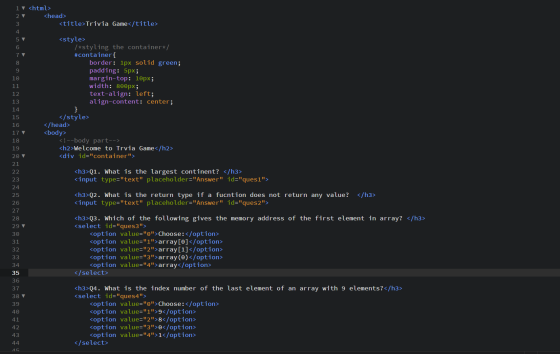
trivia.html
In order to apply the padding and margin as metioned in the
question use css as shown in the code below.
Also in html create a tag to show the result like the final percent
or any error msg if any.
In order to use the trivia.js file use the <script src="trivia.js"></script> make sure both the files are in the same folder
Code
<html>
<head>
<title>Trivia Game</title>
<style>
/*styling the container*/
#container{
border: 1px solid green;
padding: 5px;
margin-top: 10px;
width: 800px;
text-align: left;
align-content: center;
}
</style>
</head>
<body>
<!--body part-->
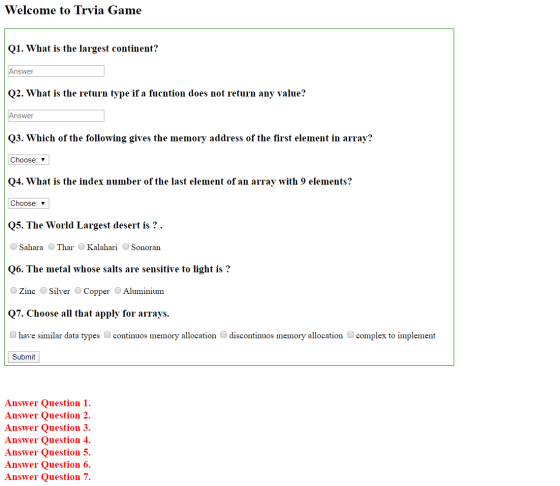
<h2>Welcome to Trvia Game</h2>
<div id="container">
<h3>Q1. What is the largest continent? </h3>
<input type="text" placeholder="Answer" id="ques1">
<h3>Q2. What is the return type if a fucntion does not return
any value? </h3>
<input type="text" placeholder="Answer" id="ques2">
<h3>Q3. Which of the following gives the memory address of
the first element in array? </h3>
<select id="ques3">
<option value="0">Choose:</option>
<option value="1">array[0]</option>
<option value="2">array[1]</option>
<option value="3">array(0)</option>
<option value="4">array</option>
</select>
<h3>Q4. What is the index number of the last element of an
array with 9 elements?</h3>
<select id="ques4">
<option value="0">Choose:</option>
<option value="1">9</option>
<option value="2">8</option>
<option value="3">0</option>
<option value="4">1</option>
</select>
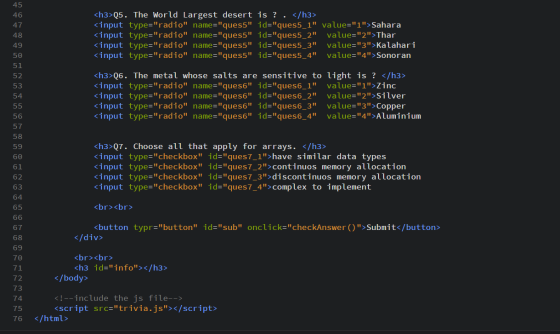
<h3>Q5. The World Largest desert is ? . </h3>
<input type="radio" name="ques5" id="ques5_1"
value="1">Sahara
<input type="radio" name="ques5" id="ques5_2"
value="2">Thar
<input type="radio" name="ques5" id="ques5_3"
value="3">Kalahari
<input type="radio" name="ques5" id="ques5_4"
value="4">Sonoran
<h3>Q6. The metal whose salts are sensitive to light is ?
</h3>
<input type="radio" name="ques6" id="ques6_1"
value="1">Zinc
<input type="radio" name="ques6" id="ques6_2"
value="2">Silver
<input type="radio" name="ques6" id="ques6_3"
value="3">Copper
<input type="radio" name="ques6" id="ques6_4"
value="4">Aluminium
<h3>Q7. Choose all that apply for arrays. </h3>
<input type="checkbox" id="ques7_1">have similar data
types
<input type="checkbox" id="ques7_2">continuos memory
allocation
<input type="checkbox" id="ques7_3">discontinuos memory
allocation
<input type="checkbox" id="ques7_4">complex to
implement
<br><br>
<button typr="button" id="sub"
onclick="checkAnswer()">Submit</button>
</div>
<br><br>
<h3 id="info"></h3>
</body>
<!--include the js file-->
<script src="trivia.js"></script>
</html>
trivia.js
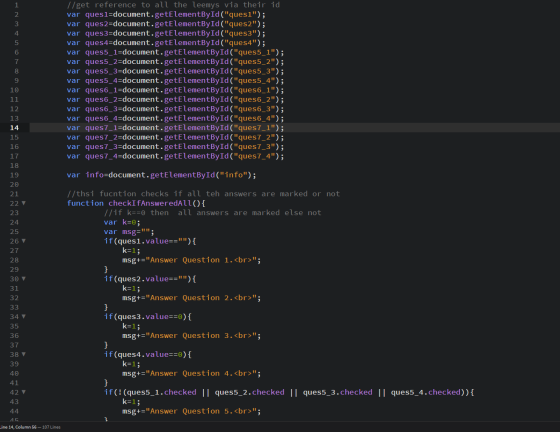
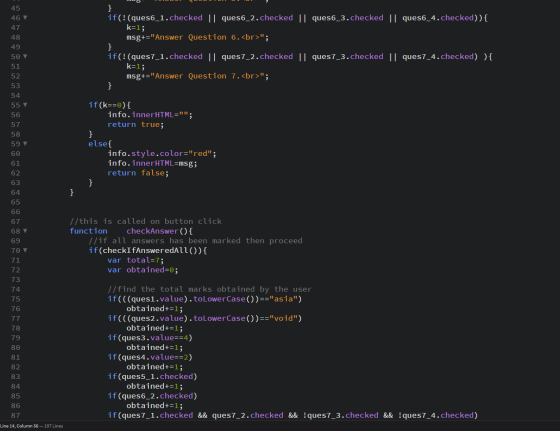
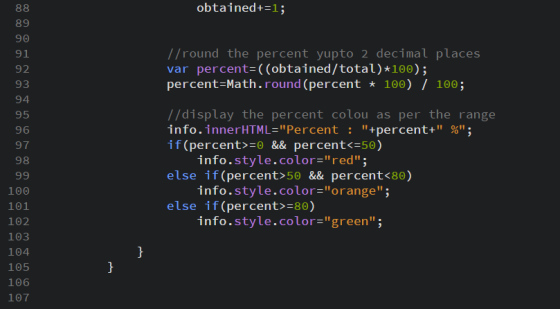
on clicking the submit button checkAnswer() method is called which first cehceks if all answers have been marked , if yes then it finds the mraks obtained and then shows the result else it shows the error.
Code
Output
Add Answer to:
JAVASCRIPT
Create a simple web page that contains a JavaScript form that
will allow the user...
Create an HTML5 page that contains a form to collect the following data. The text in...
Create an HTML5 page that contains a form to collect the following data. The text in bold indicates the id value that should be assigned to each html control: Product (drop down list) product – iPad, iPhone 6S, Galaxy 5S, Moto X, and so on Quantity (number) quantity Unit price (number) unit_price Discount (%)(number) discount_rate Date (date) order_date First Name (text box) first_name Last Name (text box) last_name Payment type (drop down list) payment_type – Visa, Master, Discover, Amex, and...
for Javascript, JQuery When the page is first opened a user will see the name field...
 for Javascript, JQuery
When the page is first opened a user will see the name field and the
three vacation images to the left of the page. The page
should behave according to the following rules.
1. When a user's mouse pointer goes over any image, that image's
border will change to be "outset 10px" and when the mouse pointer
leaves that image it's border will change to "none".
2. When the user clicks a "Vacation" image on the left,...
for Javascript, JQuery
When the page is first opened a user will see the name field and the
three vacation images to the left of the page. The page
should behave according to the following rules.
1. When a user's mouse pointer goes over any image, that image's
border will change to be "outset 10px" and when the mouse pointer
leaves that image it's border will change to "none".
2. When the user clicks a "Vacation" image on the left,...
NEED HELP with HTML with Javascript embedding for form validation project below. I have my code...
 NEED HELP with HTML with Javascript embedding
for form validation project below. I have my code
below but I'm stuck with validation. If anyone can fix it, I'd
really appreciate.
******************************************************************************
CODE:
<!DOCTYPE html>
<!--
To change this license header, choose License Headers in Project
Properties.
To change this template file, choose Tools | Templates
and open the template in the editor.
-->
<html>
<head>
<title>Nice</title>
<meta charset="UTF-8">
<meta name="viewport" content="width=device-width,
initial-scale=1.0">
<script>
var textFromTextArea;
function getWords(){
var text =...
NEED HELP with HTML with Javascript embedding
for form validation project below. I have my code
below but I'm stuck with validation. If anyone can fix it, I'd
really appreciate.
******************************************************************************
CODE:
<!DOCTYPE html>
<!--
To change this license header, choose License Headers in Project
Properties.
To change this template file, choose Tools | Templates
and open the template in the editor.
-->
<html>
<head>
<title>Nice</title>
<meta charset="UTF-8">
<meta name="viewport" content="width=device-width,
initial-scale=1.0">
<script>
var textFromTextArea;
function getWords(){
var text =...
PHP you need to create a form to allow the user to enter their name, email,...
 PHP
you need to create a form to allow the user to enter their name,
email, and address
information. That information will be sent to a PHP script that
will process and display that information.
Your assignment should have two pages. The first page is straight
html (user_input.html) that has
a form with the appropriate form elements to collect the user
input. The form should then be submitted
using the POST method to a php script (display_user_info.php) that
will process...
PHP
you need to create a form to allow the user to enter their name,
email, and address
information. That information will be sent to a PHP script that
will process and display that information.
Your assignment should have two pages. The first page is straight
html (user_input.html) that has
a form with the appropriate form elements to collect the user
input. The form should then be submitted
using the POST method to a php script (display_user_info.php) that
will process...
Create JavaScript to validate the form The form accepts some personal information, item quanitites, and a...
Create JavaScript to validate the form The form accepts some personal information, item quanitites, and a shipping method. Your task is to ensure that the user inputs the correct data. In particular: The firstName, lastName, address, city, province, and postalCode fields must all have a value. The postalCode field must be 6 digits long The quantity fields for the widgits must contain a number greater than or equal to zero At least one item must be ordered The user must...
Problems: Develop a web page that allows a user to try out different text and background...
 Problems:
Develop a web page that allows a user to try out different text
and background color combinations by clicking buttons. Use
Javascript to implement the functionalities.
Below are two screen shots of the working application. Clicking
the buttons at the bottom changes either the foreground color or
the background color. The following descriptions are about the
details. Specifically, you have to implement:
An HTML file should include the following features (3
points)
Some texts (Anything you like)
Put the...
Problems:
Develop a web page that allows a user to try out different text
and background color combinations by clicking buttons. Use
Javascript to implement the functionalities.
Below are two screen shots of the working application. Clicking
the buttons at the bottom changes either the foreground color or
the background color. The following descriptions are about the
details. Specifically, you have to implement:
An HTML file should include the following features (3
points)
Some texts (Anything you like)
Put the...
Use html form and external javascript for this. and add css for innovation. a. Signup page...
Use html form and external javascript for this. and add css for innovation. a. Signup page – for users to signup to the website i. When the user clicks on the submit button, they must see a confirmation alert have signed up. ii. Use a form with six input boxes to allow the user to signup b. Login page – for users to login to the website iii.Use a form with two or more input boxes c. after login user...
In an external JavaScript file, you need to create two global variables for the Quarter name...
In an external JavaScript file, you need to create two global variables for the Quarter name array and the Sales amount array. Create an anonymous function and connect it to the onclick event of the Add to Array button that adds the values from the fields (Quarter and Sales) to the respective arrays. Create an anonymous function and connect it to the onclick event of Display Sales button displays the contents of the arrays, displays the sum of all the...
Please help with this assignment section A. This question is from world wide web Info Sys Dev. Section A te HTML/JavaSc...
 Please help with this assignment section A. This question is
from world wide web Info Sys Dev.
Section A te HTML/JavaScript web page called sectiona.html, that has the fpllowing items: a. 2 text items labeled as "CAD Dollar" and "US Dollar", the first(CAD dollars) is enabled with id-"cad", while the later is disabled with id-us" b.1 button named as "convert". functionality: When the user clicks on the button, a JavaScript function named "convert" will be called to convert the value...
Please help with this assignment section A. This question is
from world wide web Info Sys Dev.
Section A te HTML/JavaScript web page called sectiona.html, that has the fpllowing items: a. 2 text items labeled as "CAD Dollar" and "US Dollar", the first(CAD dollars) is enabled with id-"cad", while the later is disabled with id-us" b.1 button named as "convert". functionality: When the user clicks on the button, a JavaScript function named "convert" will be called to convert the value...
language:php create a form with textboxes that will allow the user to insert a new product...
language:php create a form with textboxes that will allow the user to insert a new product name, product price and product code into the database. set the values of category_id, code, name and price that will be inserted. Here, the form will capture the values Use the correct form method when form data is to be inserted into a database. Display all the available product codes, names and prices in a HTML table directly below the form. That is, when the...
 NEED HELP with HTML with Javascript embedding
for form validation project below. I have my code
below but I'm stuck with validation. If anyone can fix it, I'd
really appreciate.
******************************************************************************
CODE:
<!DOCTYPE html>
<!--
To change this license header, choose License Headers in Project
Properties.
To change this template file, choose Tools | Templates
and open the template in the editor.
-->
<html>
<head>
<title>Nice</title>
<meta charset="UTF-8">
<meta name="viewport" content="width=device-width,
initial-scale=1.0">
<script>
var textFromTextArea;
function getWords(){
var text =...
NEED HELP with HTML with Javascript embedding
for form validation project below. I have my code
below but I'm stuck with validation. If anyone can fix it, I'd
really appreciate.
******************************************************************************
CODE:
<!DOCTYPE html>
<!--
To change this license header, choose License Headers in Project
Properties.
To change this template file, choose Tools | Templates
and open the template in the editor.
-->
<html>
<head>
<title>Nice</title>
<meta charset="UTF-8">
<meta name="viewport" content="width=device-width,
initial-scale=1.0">
<script>
var textFromTextArea;
function getWords(){
var text =...
 PHP
you need to create a form to allow the user to enter their name,
email, and address
information. That information will be sent to a PHP script that
will process and display that information.
Your assignment should have two pages. The first page is straight
html (user_input.html) that has
a form with the appropriate form elements to collect the user
input. The form should then be submitted
using the POST method to a php script (display_user_info.php) that
will process...
PHP
you need to create a form to allow the user to enter their name,
email, and address
information. That information will be sent to a PHP script that
will process and display that information.
Your assignment should have two pages. The first page is straight
html (user_input.html) that has
a form with the appropriate form elements to collect the user
input. The form should then be submitted
using the POST method to a php script (display_user_info.php) that
will process...
 Problems:
Develop a web page that allows a user to try out different text
and background color combinations by clicking buttons. Use
Javascript to implement the functionalities.
Below are two screen shots of the working application. Clicking
the buttons at the bottom changes either the foreground color or
the background color. The following descriptions are about the
details. Specifically, you have to implement:
An HTML file should include the following features (3
points)
Some texts (Anything you like)
Put the...
Problems:
Develop a web page that allows a user to try out different text
and background color combinations by clicking buttons. Use
Javascript to implement the functionalities.
Below are two screen shots of the working application. Clicking
the buttons at the bottom changes either the foreground color or
the background color. The following descriptions are about the
details. Specifically, you have to implement:
An HTML file should include the following features (3
points)
Some texts (Anything you like)
Put the...
 Please help with this assignment section A. This question is
from world wide web Info Sys Dev.
Section A te HTML/JavaScript web page called sectiona.html, that has the fpllowing items: a. 2 text items labeled as "CAD Dollar" and "US Dollar", the first(CAD dollars) is enabled with id-"cad", while the later is disabled with id-us" b.1 button named as "convert". functionality: When the user clicks on the button, a JavaScript function named "convert" will be called to convert the value...
Please help with this assignment section A. This question is
from world wide web Info Sys Dev.
Section A te HTML/JavaScript web page called sectiona.html, that has the fpllowing items: a. 2 text items labeled as "CAD Dollar" and "US Dollar", the first(CAD dollars) is enabled with id-"cad", while the later is disabled with id-us" b.1 button named as "convert". functionality: When the user clicks on the button, a JavaScript function named "convert" will be called to convert the value...
Most questions answered within 3 hours.
-
Where is the error in this code sequence?
String s1 = "Hello";
String s2 = "ello";...
asked 11 months ago -
Financial data for Joel de Paris, Inc., for last year
follow:
Joel de Paris, Inc.
Balance...
asked 11 months ago -
Consider this reaction:
Al2(SO4)3 (aq)+ BaCl3
(aq) Al2Cl6 (aq)- +
3BaSO4(s) . What is the...
asked 11 months ago -
Suppose that Savneet is considering increasing her
recent random sample from 20 car rentals to 40...
asked 11 months ago -
Trucks arrive at an unloading terminal at an average rate of 120
per hour.
Trucks arrive...
asked 11 months ago -
Why are methanol and ethanol completely soluble in water while
octanol is not very little soluble....
asked 11 months ago -
A facilities manager at a university reads in a research report
that the mean amount of...
asked 11 months ago -
When the CuSO4 is rehydrated by adding water to the anhydrous
compound, is this an endothermic...
asked 11 months ago -
A ray of sunlight is passing from diamond into crown glass; the
angle of incidence is...
asked 11 months ago -
A block of mass 0.249 kg is placed on top of a light, vertical
spring of...
asked 11 months ago -
how do the kidneys compensate in the presences of acidosis
a) trigger hyperventilate
b) reserve acid...
asked 11 months ago -
Question 501 pts
The rental rate of capital to the firm increases. Which of the
following...
asked 11 months ago