Use html form and external javascript for this. and add css for innovation. a. Signup page...
Use html form and external javascript for this. and add css for innovation.
a. Signup page – for users to signup to the
website
i. When the user clicks on the submit button, they must
see a confirmation alert have signed up.
ii. Use a form with six input boxes to allow the user
to signup
b. Login page – for users to login to the website
iii.Use a form with two or more input boxes
c. after login user should see his information as output text in a
page called info.
ps: i need help for all of the following steps.
Homework Answers
You will need to have back-end language and a database connection for storing user credentials and displaying profile info. You can't create a user profile only using HTML+CSS+JS. You can use PHP or any other server-side language to connect your database and run your query and you can use MySQL as a database for your website. Following is the html, css and js code for a signup page with 6 fields and login page. rest tou can try using PHP and MySQL.
Code for SignUp.html:
<head>
<meta charset="utf-8">
<meta name="viewport" content="width=device-width,
initial-scale=1.0">
<title>Sign Up Form</title>
<style type="text/css">
*, *:before,
*:after {
-moz-box-sizing: border-box;
-webkit-box-sizing: border-box;
box-sizing: border-box;
}
body {
font-family: 'Nunito', sans-serif;
color: #384047;
}
form {
max-width: 300px;
margin: 10px auto;
padding: 10px 20px;
background: #f4f7f8;
border-radius: 8px;
}
h1 {
margin: 0 0 30px 0;
text-align: center;
}
input[type="text"],
input[type="password"],
input[type="date"],
input[type="datetime"],
input[type="email"],
input[type="number"],
input[type="search"],
input[type="tel"],
input[type="time"],
input[type="url"],
textarea,
select {
background: rgba(255,255,255,0.1);
border: none;
font-size: 16px;
height: auto;
margin: 0;
outline: 0;
padding: 15px;
width: 100%;
background-color: #e8eeef;
color: #8a97a0;
box-shadow: 0 1px 0 rgba(0,0,0,0.03) inset;
margin-bottom: 30px;
}
input[type="radio"],
input[type="checkbox"] {
margin: 0 4px 8px 0;
}
select {
padding: 6px;
height: 32px;
border-radius: 2px;
}
button {
padding: 19px 39px 18px 39px;
color: #FFF;
background-color: #4bc970;
font-size: 18px;
text-align: center;
font-style: normal;
border-radius: 5px;
width: 100%;
border: 1px solid #3ac162;
border-width: 1px 1px 3px;
box-shadow: 0 -1px 0 rgba(255,255,255,0.1) inset;
margin-bottom: 10px;
}
fieldset {
margin-bottom: 30px;
border: none;
}
legend {
font-size: 1.4em;
margin-bottom: 10px;
}
label {
display: block;
margin-bottom: 8px;
}
label.light {
font-weight: 300;
display: inline;
}
.number {
background-color: #5fcf80;
color: #fff;
height: 30px;
width: 30px;
display: inline-block;
font-size: 0.8em;
margin-right: 4px;
line-height: 30px;
text-align: center;
text-shadow: 0 1px 0 rgba(255,255,255,0.2);
border-radius: 100%;
}
@media screen and (min-width: 480px) {
form {
max-width: 480px;
}
}
</style>
<link
href='https://fonts.googleapis.com/css?family=Nunito:400,300'
rel='stylesheet' type='text/css'>
<link rel="stylesheet" href="css/main.css">
</head>
<body>
<form action="index.html" method="post">
<h1>Sign Up</h1>
<fieldset>
<legend><span class="number">1</span>Your basic
info</legend>
<label for="name">Name:</label>
<input type="text" id="name" name="user_name">
<label for="mail">Email:</label>
<input type="email" id="mail" name="user_email">
<label for="password">Password:</label>
<input type="password" id="password"
name="user_password">
<label>Date of Birth:</label>
<input type="date" name="dob" id="dob">
</fieldset>
<fieldset>
<legend><span class="number">2</span>Your
profile</legend>
<label for="bio">Biography:</label>
<textarea id="bio" name="user_bio"></textarea>
</fieldset>
<fieldset>
<label for="job">Job Role:</label>
<select id="job" name="user_job">
<optgroup label="Web">
<option value="frontend_developer">Front-End
Developer</option>
<option value="php_developor">PHP
Developer</option>
<option value="python_developer">Python
Developer</option>
<option value="rails_developer"> Rails
Developer</option>
<option value="web_designer">Web
Designer</option>
<option value="WordPress_developer">WordPress
Developer</option>
</optgroup>
<optgroup label="Mobile">
<option value="Android_developer">Androild
Developer</option>
<option value="iOS_developer">iOS
Developer</option>
<option value="mobile_designer">Mobile
Designer</option>
</optgroup>
<optgroup label="Business">
<option value="business_owner">Business
Owner</option>
<option value="freelancer">Freelancer</option>
</optgroup>
<optgroup label="Other">
<option value="secretary">Secretary</option>
<option value="maintenance">Maintenance</option>
</optgroup>
</select>
<label>Interests:</label>
<input type="checkbox" id="development"
value="interest_development" name="user_interest"><label
class="light"
for="development">Development</label><br>
<input type="checkbox" id="design" value="interest_design"
name="user_interest"><label class="light"
for="design">Design</label><br>
<input type="checkbox" id="business" value="interest_business"
name="user_interest"><label class="light"
for="business">Business</label>
</fieldset>
<button type="submit">Sign Up</button>
</form>
</body>
</html>
Code for login.html
<head>
<meta charset="utf-8">
<meta name="viewport" content="width=device-width,
initial-scale=1.0">
<title>Log-In</title>
<style type="text/css">
*, *:before,
*:after {
-moz-box-sizing: border-box;
-webkit-box-sizing: border-box;
box-sizing: border-box;
}
body {
font-family: 'Nunito', sans-serif;
color: #384047;
}
form {
max-width: 300px;
margin: 10px auto;
padding: 10px 20px;
background: #f4f7f8;
border-radius: 8px;
}
h1 {
margin: 0 0 30px 0;
text-align: center;
}
input[type="text"],
input[type="password"],
input[type="date"],
input[type="datetime"],
input[type="email"],
input[type="number"],
input[type="search"],
input[type="tel"],
input[type="time"],
input[type="url"],
textarea,
select {
background: rgba(255,255,255,0.1);
border: none;
font-size: 16px;
height: auto;
margin: 0;
outline: 0;
padding: 15px;
width: 100%;
background-color: #e8eeef;
color: #8a97a0;
box-shadow: 0 1px 0 rgba(0,0,0,0.03) inset;
margin-bottom: 30px;
}
input[type="radio"],
input[type="checkbox"] {
margin: 0 4px 8px 0;
}
select {
padding: 6px;
height: 32px;
border-radius: 2px;
}
button {
padding: 19px 39px 18px 39px;
color: #FFF;
background-color: #4bc970;
font-size: 18px;
text-align: center;
font-style: normal;
border-radius: 5px;
width: 100%;
border: 1px solid #3ac162;
border-width: 1px 1px 3px;
box-shadow: 0 -1px 0 rgba(255,255,255,0.1) inset;
margin-bottom: 10px;
}
fieldset {
margin-bottom: 30px;
border: none;
}
legend {
font-size: 1.4em;
margin-bottom: 10px;
}
label {
display: block;
margin-bottom: 8px;
}
label.light {
font-weight: 300;
display: inline;
}
.number {
background-color: #5fcf80;
color: #fff;
height: 30px;
width: 30px;
display: inline-block;
font-size: 0.8em;
margin-right: 4px;
line-height: 30px;
text-align: center;
text-shadow: 0 1px 0 rgba(255,255,255,0.2);
border-radius: 100%;
}
@media screen and (min-width: 480px) {
form {
max-width: 480px;
}
}
</style>
<link
href='https://fonts.googleapis.com/css?family=Nunito:400,300'
rel='stylesheet' type='text/css'>
<link rel="stylesheet" href="css/main.css">
</head>
<body>
<form action="index.html" method="post">
<h1>Log In</h1>
<fieldset>
<label for="mail">Email:</label>
<input type="email" id="mail" name="user_email">
<label for="password">Password:</label>
<input type="password" id="password"
name="user_password">
</fieldset>
<button type="submit">Sign Up</button>
</form>
</body>
</html>
OUTPUT:
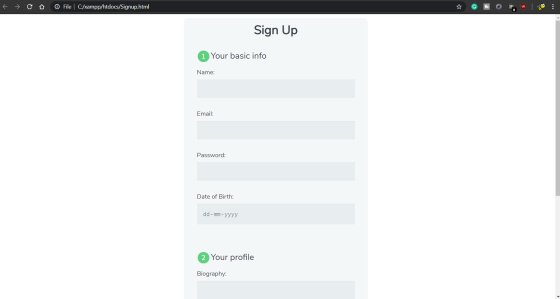
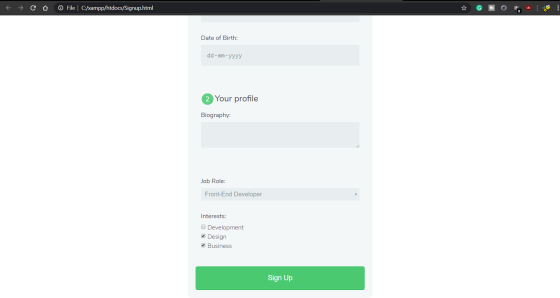
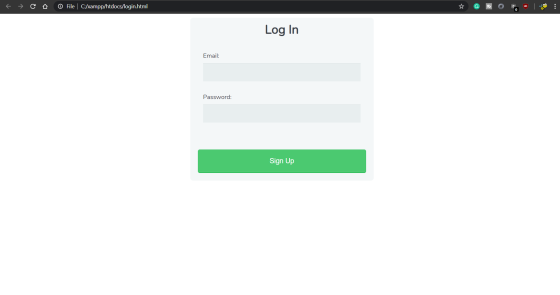
Add Answer to:
Use html form and external javascript for this. and add css for
innovation.
a. Signup page...
given below are the project description and their Html and css files i need javascript according to the project and other files!
 HTML------------------------------------------------------CSS---------------------------------------------------WEB230 - JavaScript 1 Assignment 7 - FormsSome of these tasks would be better done in HTML or CSS but do them in JavaScript to practice whatwe have learned.1. Select the form element and save it in a variable. From here we can access all of the form fields.2. When the page loads do the following:add the password value "monkey"select the favourite city "New York"clear the textarea3. Add an event handler to the "name" field to change the background color...
Write a two page paper (size 12, times new roman font) on how HTML, CSS, JavaScript...
Write a two page paper (size 12, times new roman font) on how HTML, CSS, JavaScript and Java come together to form a website.
Create an external JavaScript file/code and then write a function that displays an alert box. This...
Create an external JavaScript file/code and then write a function that displays an alert box. This box will display when the user clicks the submit button to submit the information typed in the form, so be sure the alert box contains an appropriate message. please use the OnClick event handler for your form's submit button.
***JAVASCRIPT*** I need JAVASCRIPT codes for this question. Also a little explanation and full screenshots of...
 ***JAVASCRIPT***
I need JAVASCRIPT codes for this question. Also a little
explanation and full screenshots of the codes.
Short 6-1 Upgrade the MPG application In this exercise, you'll upgrade a version of the MPG application so the error messages are displayed in span elements to the right of the text boxes. Estimated time: 10 to 15 minutes. Calculate Miles Per Gallon Miles Driven Mies must be numeric and greater than zero Gallons of Gas Used Gallons must be numeric and...
***JAVASCRIPT***
I need JAVASCRIPT codes for this question. Also a little
explanation and full screenshots of the codes.
Short 6-1 Upgrade the MPG application In this exercise, you'll upgrade a version of the MPG application so the error messages are displayed in span elements to the right of the text boxes. Estimated time: 10 to 15 minutes. Calculate Miles Per Gallon Miles Driven Mies must be numeric and greater than zero Gallons of Gas Used Gallons must be numeric and...
Please Help!!! Requirements: Use an external CSS & JS file, no internal or inline styles &...
Please Help!!! Requirements: Use an external CSS & JS file, no internal or inline styles & scripts Please comment your JS to demonstrate your understanding of what is happening Create a form with at least 2 inputs and a submit button A good example would be First Name, Last Name, and Age. Use JS to provide the user with some feedback on the values they enter or choose with your inputs To do this you will need create a function...
Consider the attached Registration form. Use jQuery to: 1) Change the "Search" link on the left...
 Consider the attached Registration form.
Use jQuery to:
1) Change the "Search" link on the left to a button that when
clicked, hide all the fields on the form and display the text "This
is a search feature..."
2) Display "required" in every input field upon loading the
page
3) When the user fills the form and clicks "Login", the values
inputted should be displayed in the empty row (under Login) of the
page. The display should be in the...
Consider the attached Registration form.
Use jQuery to:
1) Change the "Search" link on the left to a button that when
clicked, hide all the fields on the form and display the text "This
is a search feature..."
2) Display "required" in every input field upon loading the
page
3) When the user fills the form and clicks "Login", the values
inputted should be displayed in the empty row (under Login) of the
page. The display should be in the...
NEED HELP with HTML with Javascript embedding for form validation project below. I have my code...
 NEED HELP with HTML with Javascript embedding
for form validation project below. I have my code
below but I'm stuck with validation. If anyone can fix it, I'd
really appreciate.
******************************************************************************
CODE:
<!DOCTYPE html>
<!--
To change this license header, choose License Headers in Project
Properties.
To change this template file, choose Tools | Templates
and open the template in the editor.
-->
<html>
<head>
<title>Nice</title>
<meta charset="UTF-8">
<meta name="viewport" content="width=device-width,
initial-scale=1.0">
<script>
var textFromTextArea;
function getWords(){
var text =...
NEED HELP with HTML with Javascript embedding
for form validation project below. I have my code
below but I'm stuck with validation. If anyone can fix it, I'd
really appreciate.
******************************************************************************
CODE:
<!DOCTYPE html>
<!--
To change this license header, choose License Headers in Project
Properties.
To change this template file, choose Tools | Templates
and open the template in the editor.
-->
<html>
<head>
<title>Nice</title>
<meta charset="UTF-8">
<meta name="viewport" content="width=device-width,
initial-scale=1.0">
<script>
var textFromTextArea;
function getWords(){
var text =...
JAVASCRIPT Create a simple web page that contains a JavaScript form that will allow the user...
JAVASCRIPT Create a simple web page that contains a JavaScript form that will allow the user to answer 7 trivia questions. Your trivia game should contain: 2 text boxes 2 select dropdowns 2 multiple choice questions (using radio buttons, 4 options min) 1 choose-all-that-apply (checkboxes, 4 options min, one answer should be "None of the above"). No part-points for semi-correct answers. The questions can cover any topic you wish - but please keep it professional and easy enough that the...
Create an HTML5 page that contains a form to collect the following data. The text in...
Create an HTML5 page that contains a form to collect the following data. The text in bold indicates the id value that should be assigned to each html control: Product (drop down list) product – iPad, iPhone 6S, Galaxy 5S, Moto X, and so on Quantity (number) quantity Unit price (number) unit_price Discount (%)(number) discount_rate Date (date) order_date First Name (text box) first_name Last Name (text box) last_name Payment type (drop down list) payment_type – Visa, Master, Discover, Amex, and...
the best way to include external javascript code into a HTML page is to use the...
the best way to include external javascript code into a HTML page is to use the include statement. true or false To retrieve a specific row from a set of mysqli results, call the data_seem method of thr result object. true or false
 ***JAVASCRIPT***
I need JAVASCRIPT codes for this question. Also a little
explanation and full screenshots of the codes.
Short 6-1 Upgrade the MPG application In this exercise, you'll upgrade a version of the MPG application so the error messages are displayed in span elements to the right of the text boxes. Estimated time: 10 to 15 minutes. Calculate Miles Per Gallon Miles Driven Mies must be numeric and greater than zero Gallons of Gas Used Gallons must be numeric and...
***JAVASCRIPT***
I need JAVASCRIPT codes for this question. Also a little
explanation and full screenshots of the codes.
Short 6-1 Upgrade the MPG application In this exercise, you'll upgrade a version of the MPG application so the error messages are displayed in span elements to the right of the text boxes. Estimated time: 10 to 15 minutes. Calculate Miles Per Gallon Miles Driven Mies must be numeric and greater than zero Gallons of Gas Used Gallons must be numeric and...
 Consider the attached Registration form.
Use jQuery to:
1) Change the "Search" link on the left to a button that when
clicked, hide all the fields on the form and display the text "This
is a search feature..."
2) Display "required" in every input field upon loading the
page
3) When the user fills the form and clicks "Login", the values
inputted should be displayed in the empty row (under Login) of the
page. The display should be in the...
Consider the attached Registration form.
Use jQuery to:
1) Change the "Search" link on the left to a button that when
clicked, hide all the fields on the form and display the text "This
is a search feature..."
2) Display "required" in every input field upon loading the
page
3) When the user fills the form and clicks "Login", the values
inputted should be displayed in the empty row (under Login) of the
page. The display should be in the...
 NEED HELP with HTML with Javascript embedding
for form validation project below. I have my code
below but I'm stuck with validation. If anyone can fix it, I'd
really appreciate.
******************************************************************************
CODE:
<!DOCTYPE html>
<!--
To change this license header, choose License Headers in Project
Properties.
To change this template file, choose Tools | Templates
and open the template in the editor.
-->
<html>
<head>
<title>Nice</title>
<meta charset="UTF-8">
<meta name="viewport" content="width=device-width,
initial-scale=1.0">
<script>
var textFromTextArea;
function getWords(){
var text =...
NEED HELP with HTML with Javascript embedding
for form validation project below. I have my code
below but I'm stuck with validation. If anyone can fix it, I'd
really appreciate.
******************************************************************************
CODE:
<!DOCTYPE html>
<!--
To change this license header, choose License Headers in Project
Properties.
To change this template file, choose Tools | Templates
and open the template in the editor.
-->
<html>
<head>
<title>Nice</title>
<meta charset="UTF-8">
<meta name="viewport" content="width=device-width,
initial-scale=1.0">
<script>
var textFromTextArea;
function getWords(){
var text =...
Most questions answered within 3 hours.
-
Where is the error in this code sequence?
String s1 = "Hello";
String s2 = "ello";...
asked 11 months ago -
Financial data for Joel de Paris, Inc., for last year
follow:
Joel de Paris, Inc.
Balance...
asked 11 months ago -
Consider this reaction:
Al2(SO4)3 (aq)+ BaCl3
(aq) Al2Cl6 (aq)- +
3BaSO4(s) . What is the...
asked 11 months ago -
Suppose that Savneet is considering increasing her
recent random sample from 20 car rentals to 40...
asked 11 months ago -
Trucks arrive at an unloading terminal at an average rate of 120
per hour.
Trucks arrive...
asked 11 months ago -
Why are methanol and ethanol completely soluble in water while
octanol is not very little soluble....
asked 11 months ago -
A facilities manager at a university reads in a research report
that the mean amount of...
asked 11 months ago -
When the CuSO4 is rehydrated by adding water to the anhydrous
compound, is this an endothermic...
asked 11 months ago -
A ray of sunlight is passing from diamond into crown glass; the
angle of incidence is...
asked 11 months ago -
A block of mass 0.249 kg is placed on top of a light, vertical
spring of...
asked 11 months ago -
how do the kidneys compensate in the presences of acidosis
a) trigger hyperventilate
b) reserve acid...
asked 11 months ago -
Question 501 pts
The rental rate of capital to the firm increases. Which of the
following...
asked 11 months ago