USE JAVA: Given the Interface Code and the Interface Implementation Code; Write Junit Tests to test...
USE JAVA: Given the Interface Code and the Interface Implementation Code; Write Junit Tests to test all fuctionality.
-------------
Interface code:
public interface CustomList {

    /**

     * This method should add a new item into the CustomList and should

     * return true if it was successfully able to insert an item.

     * @param item the item to be added to the CustomList

     * @return true if item was successfully added, false if the item was not successfully added (note: it should always be able to add an item to the list)

     */

    boolean add (T item);


    /**

     * This method should add a new item into the CustomList at the

     * specified index (thus shuffling the other items to the right). If the index doesn't

     * yet exist, then you should throw an IndexOutOfBoundsException.

     * @param index the spot in the zero-based array where you'd like to insert your

     *        new item

     * @param item the item that will be inserted into the CustomList

     * @return true when the item is added

     * @throws IndexOutOfBoundsException

     */

    boolean add (int index, T item) throws IndexOutOfBoundsException;


    /**

     * This method should return the size of the CustomList

     * based on the number of actual elements stored inside of the CustomList

     * @return an int representing the number of elements stored in the CustomList

     */

    int getSize();


    /**

     * This method will return the actual element from the CustomList based on the

     * index that is passed in.

     * @param index represents the position in the backing Object array that we want to access

     * @return The element that is stored inside of the CustomList at the given index

     * @throws IndexOutOfBoundsException

     */

    T get(int index) throws IndexOutOfBoundsException;


    /**

     * This method should remove an item from the CustomList at the

     * specified index. This will NOT leave an empty null where the item

     * was removed, instead all other items to the right will be shuffled to the left.

     * @param index the index of the item to remove

     * @return the actual item that was removed from the list

     * @throws IndexOutOfBoundsException

     */

    T remove(int index) throws IndexOutOfBoundsException;
-------------------------------------
interface implementation code:
import java.util.Arrays;

// Updated this existing class to include the 7 changes stated below

public class CustomArrayList implements CustomList
{
        // 1st, created an instance variable called arraySize
        private int arraySize = 0;

        // 2nd, moved new Object[10] into the constructor as the constructor initializes
        // the object
        Object[] arrayObject;

        /**
         * add method contains the functionality of doubling the array in size when the
         * object array is full. EX: when adding the 11th element; object array grows
         * from 10 to 20 elements. EX: when adding the 21st element; object array grows
         * from 20 to 40 elements.
         */

        // 3rd, Created the Constructor
        public CustomArrayList()
        {
                System.out.println("Constructor call creates an array object of 10 elements\n");
                arrayObject = new Object[10]; // Default ArraySize is 10 elements
        }

        // ----------New functionality required as part of Hw7 --------------------
        @Override
        public boolean add(int index, T item) throws IndexOutOfBoundsException
        {
                if (arraySize == arrayObject.length)
                {
                        int invalidIndex = arrayObject.length + 1;
                        System.out.println("Cannot add element at index position = " + invalidIndex);
                        increaseSize();
                        return false;
                } else
                {
                        arrayObject[arraySize++] = item;
                }
                return false;
        }

        // ----------Kept Old functionality from Hw5 --------------------
        @Override
        public boolean add(T item)
        {
                //4th, Provided Method body for the CustomList Interface's add() method
                if(arraySize == arrayObject.length)
                {
                        int invalidIndex=arrayObject.length+1;
                        System.out.println("Cannot add element at index position = " + invalidIndex );
                        increaseSize();
                        return false;
                }
                else
                {
                        arrayObject[arraySize++]= item;
                        return true;
                }
        }

        @Override
        public T remove(int index) throws IndexOutOfBoundsException
        {
                // TODO Auto-generated method stub
                return null;
        }

        // --------------------Reusing Hw5's Code for everything listed below
        // -----------------
        @Override
        public int getSize()
        {
                // 5th, Provided Method body for the CustomList Interface's getSize() method
                return arrayObject.length;
        }

        @SuppressWarnings("unchecked")
        @Override
        public T get(int index)
        {
                // 6th, Provided Method body for the CustomList Interface's get() method
                return (T) arrayObject[index];
        }

        // 7th, Created a brand new method that exists outside of the CustomList Interface
        // in order to grow the array in size when it gets full
        private void increaseSize()
        {
                int updatedSize = (arrayObject.length) * 2;
                System.out.println(
                                "Updating the Array Size to go from " + arrayObject.length + " to " + updatedSize + " elements");
                System.out.println("Transferring all the elements into the bigger array\n");
                arrayObject = Arrays.copyOf(arrayObject, updatedSize);
        }


}Homework Answers
import java.util.Arrays;
interface CustomList<T>
{
/**This method should add a new item into the
CustomList and should return true if it was successfully able to
insert an item.
@param item the item to be added to the
CustomList
@return true if item was successfully added, false if the item was
not successfully added
(note: it should always be able to add an item to the
list) */
boolean add (T item);
/**This method should add a new item into the
CustomList at the specified index (thus shuffling the other items
to the right).
If the index doesn't yet exist, then you should throw an
IndexOutOfBoundsException.
@param index the spot in the zero-based array where
you'd like to insert your new item
@param item the item that will be inserted into the
CustomList
@return true when the item is added
@throws IndexOutOfBoundsException */
boolean add (int index, T item) throws
IndexOutOfBoundsException;
/** This method should return the size of the
CustomList based on the number of actual elements stored inside of
the
CustomList @return an int representing the number of
elements stored in the CustomList */
int getSize();
/**This method will return the actual element from the
CustomList based on the index that is passed in.
@param index represents the position in the backing
Object array that we want to access
@return The element that is stored inside of the
CustomList at the given index @throws
IndexOutOfBoundsException */
T get(int index) throws
IndexOutOfBoundsException;
/** This method should remove an item from the
CustomList at the specified index. This will NOT leave an empty
null where
the item was removed, instead all other items to the
right will be shuffled to the left.
@param index the index of the item to remove
@return the actual item that was removed from the list
@throws IndexOutOfBoundsException */
T remove(int index) throws
IndexOutOfBoundsException;
}
class CustomArrayList<T> implements CustomList<T>
{
// 1st, created an instance variable called arraySize
private int arraySize = 0;
// 2nd, moved new Object[10] into the constructor as the
constructor initializes the object
Object[] arrayObject;
/**add method contains the functionality of doubling the array
in size when the object array is full. EX: when adding the 11th
element; object array grows
from 10 to 20 elements. EX: when adding the 21st element; object
array grows from 20 to 40 elements. */
// 3rd, Created the Constructor
public CustomArrayList()
{
System.out.println("Constructor call creates an array object of 10
elements\n");
arrayObject = new Object[10]; // Default ArraySize is 10
elements
}
// ----------New functionality required as part of Hw7
--------------------
public boolean add(int index, T item) throws
IndexOutOfBoundsException
{
if (arraySize == arrayObject.length)
{
int invalidIndex = arrayObject.length + 1;
System.out.println("Cannot add element at index position = " +
invalidIndex);
increaseSize();
return false;
} else
{
arrayObject[arraySize++] = item;
}
return false;
}
// ----------Kept Old functionality from Hw5
--------------------
public boolean add(T item)
{
//Provided Method body for the CustomList Interface's add()
method
if(arraySize == arrayObject.length)
{
int invalidIndex=arrayObject.length+1;
System.out.println("Cannot add element at index position = " +
invalidIndex );
increaseSize();
return false;
}
else
{
arrayObject[arraySize++]= item;
return true;
}
}
public T remove(int index) throws IndexOutOfBoundsException
{
Object[] anotherArray;
// Create another array of size one less
anotherArray = new Object[arrayObject.length -
1];
// Copy the elements from starting till index from
original array to the other array
System.arraycopy(arrayObject, 0, anotherArray, 0,
index);
Object ittm=arrayObject[index];
// Copy the elements from index + 1
till end from original array to the other array
System.arraycopy(arrayObject, index + 1, anotherArray,
index, arrayObject.length - index - 1);
return (T) ittm ;
}
// Reusing Hw5's Code for everything listed below
public int getSize()
{
return arrayObject.length; // Provided Method body for the
CustomList Interface's getSize() method
}
public T get(int index)
{
return (T) arrayObject[index]; // Provided Method body for the
CustomList Interface's get() method
}
// Created a brand new method that exists outside of
the CustomList Interface in order to grow the array in size when it
gets full
private void increaseSize()
{
int updatedSize = (arrayObject.length) * 2;
System.out.println("Updating the Array Size to go from " +
arrayObject.length + " to " + updatedSize + " elements");
System.out.println("Transferring all the elements into the bigger
array\n");
arrayObject = Arrays.copyOf(arrayObject, updatedSize);
}
}
class Junit extends CustomArrayList
{
public static void main(String arg[])
{
CustomArrayList<Integer> CA =
new CustomArrayList<Integer>();
boolean Y=true;
boolean Y1=true;
int i,v1,v=16;
Y1=CA.add(0,45);
for(i=1;i<10;i++)
{
v++;
System.out.println(CA.add(v));
}
int a=CA.getSize();
System.out.println("List size=
"+a);
try
{
v1=CA.get(2);
System.out.println("Index:
"+v1);
}
catch(Exception e)
{}
int g=CA.remove(4);
System.out.println("element at
Index 4 is : "+g);
}
}
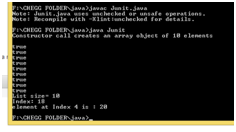
This program is giving some warning message but you can run it. Here elements can be added or removed easily.
Please like my answer if you satisfied with the answer.
thank you so much.
Add Answer to:
USE JAVA: Given the Interface Code and the Interface
Implementation Code; Write Junit Tests to test...
Given the Interface Code write a java class that implements this interface and show the working...
Given the Interface Code write a java class that implements this interface and show the working functionality in the main method: public interface CustomList<T> { /** * This method should add a new item into the <code>CustomList</code> and should * return <code>true</code> if it was successfully able to insert an item. * @param item the item to be added to the <code>CustomList</code> * @return <code>true</code> if item was successfully added, <code>false</code> if the item was not successfully added (note: it...
Given a singly-linked list interface and linked list node class, implement the singly-linked list which has...
Given a singly-linked list interface and linked list node class, implement the singly-linked list which has the following methods in Java: 1. Implement 3 add() methods. One will add to the front (must be O(1)), one will add to the back (must be O(1)), and one will add anywhere in the list according to given index (must be O(1) for index 0 and O(n) for all other indices). They are: void addAtIndex(int index, T data), void addToFront(T data), void addToBack(T...
Java Programming: The following is my code: public class KWSingleLinkedList<E> { public void setSize(int size)...
Java Programming: The following is my code: public class KWSingleLinkedList<E> { public void setSize(int size) { this.size = size; } /** Reference to list head. */ private Node<E> head = null; /** The number of items in the list */ private int size = 0; /** Add an item to the front of the list. @param item The item to be added */ public void addFirst(E...
Complete an Array-Based implementation of the ADT List including a main method and show that the...
Complete an Array-Based implementation of the ADT List including a main method and show that the ADT List works. Draw a class diagram of the ADT List __________________________________________ public interface IntegerListInterface{ public boolean isEmpty(); //Determines whether a list is empty. //Precondition: None. //Postcondition: Returns true if the list is empty, //otherwise returns false. //Throws: None. public int size(); // Determines the length of a list. // Precondition: None. // Postcondition: Returns the number of items in this IntegerList. //Throws: None....
JAVA // TO DO: add your implementation and JavaDoc public class SmartArray<T>{ private static final...
JAVA // TO DO: add your implementation and JavaDoc public class SmartArray<T>{ private static final int DEFAULT_CAPACITY = 2; //default initial capacity / minimum capacity private T[] data; //underlying array // ADD MORE PRIVATE MEMBERS HERE IF NEEDED! @SuppressWarnings("unchecked") public SmartArray(){ //constructor //initial capacity of the array should be DEFAULT_CAPACITY } @SuppressWarnings("unchecked") public SmartArray(int initialCapacity){ // constructor // set the initial capacity of...
Create a Java code that includes all the methods from the Lecture slides following the ADTs...
 Create a Java code that includes all the methods from the
Lecture slides following the ADTs
LECTURE SLIDES
Collect/finish the Java code (interface and the complete working classes) from lecture slides for the following ADTS: 4) Queue ADT that uses a linked list internally (call it LQueue) Make sure you keep the same method names as in the slides (automatic testing will be performed)! For each method you develop, add comments and estimate the big-O running time of its algorithm....
Create a Java code that includes all the methods from the
Lecture slides following the ADTs
LECTURE SLIDES
Collect/finish the Java code (interface and the complete working classes) from lecture slides for the following ADTS: 4) Queue ADT that uses a linked list internally (call it LQueue) Make sure you keep the same method names as in the slides (automatic testing will be performed)! For each method you develop, add comments and estimate the big-O running time of its algorithm....
Create a Java code that includes all the methods from the Lecture slides following the ADTs...
 Create a Java code that includes all the methods from the
Lecture slides following the ADTs
LECTURE SLIDE
Collect/finish the Java code (interface and the complete working classes) from lecture slides for the following ADTS 2) ArrayList ADT that uses a linked list internally (call it LArrayList) Make sure you keep the same method names as in the slides (automatic testing will be performed)! For each method you develop, add comments and estimate the big-O running time of its algorithm....
Create a Java code that includes all the methods from the
Lecture slides following the ADTs
LECTURE SLIDE
Collect/finish the Java code (interface and the complete working classes) from lecture slides for the following ADTS 2) ArrayList ADT that uses a linked list internally (call it LArrayList) Make sure you keep the same method names as in the slides (automatic testing will be performed)! For each method you develop, add comments and estimate the big-O running time of its algorithm....
Plz help me with the code. And here are the requirement. Thanks!! You are required to...
Plz help me with the code. And here are the requirement. Thanks!! You are required to design and implement a circular list using provided class and interface. Please filling the blank in CircularList.java. This circular list has a tail node which points to the end of the list and a number indicating how many elements in the list. And fill out the blank of the code below. public class CircularList<T> implements ListInterface<T> { protected CLNode<T> tail; // tail node that...
package model; import java.util.Iterator; /** * This class implements interface PriorityList<E> to represent a generic *...
package model; import java.util.Iterator; /** * This class implements interface PriorityList<E> to represent a generic * collection to store elements where indexes represent priorities and the * priorities can change in several ways. * * This collection class uses an Object[] data structure to store elements. * * @param <E> The type of all elements stored in this collection */ // You will have an error until you have have all methods // specified in interface PriorityList included inside this...
NO ONE HAS PROVIDED THE CORRECT CODE TO PROVIDE THE GIVEN OUTPUT. PLEASE PROVIDE CODE THAT...
NO ONE HAS PROVIDED THE CORRECT CODE TO PROVIDE THE GIVEN OUTPUT. PLEASE PROVIDE CODE THAT WOULD CAUSE THE HW1.java TO PRINT THE RIGHT DATA.!!! The LinkedList class implements both the List interface and the Stack interface, but several methods (listed below) are missing bodies. Write the code so it works correctly. You should submit one file, LinkedList.java. Do not change the interfaces. Do not change the public method headers. Do not rename the LinkedList class. None of your methods...
 Create a Java code that includes all the methods from the
Lecture slides following the ADTs
LECTURE SLIDES
Collect/finish the Java code (interface and the complete working classes) from lecture slides for the following ADTS: 4) Queue ADT that uses a linked list internally (call it LQueue) Make sure you keep the same method names as in the slides (automatic testing will be performed)! For each method you develop, add comments and estimate the big-O running time of its algorithm....
Create a Java code that includes all the methods from the
Lecture slides following the ADTs
LECTURE SLIDES
Collect/finish the Java code (interface and the complete working classes) from lecture slides for the following ADTS: 4) Queue ADT that uses a linked list internally (call it LQueue) Make sure you keep the same method names as in the slides (automatic testing will be performed)! For each method you develop, add comments and estimate the big-O running time of its algorithm....
 Create a Java code that includes all the methods from the
Lecture slides following the ADTs
LECTURE SLIDE
Collect/finish the Java code (interface and the complete working classes) from lecture slides for the following ADTS 2) ArrayList ADT that uses a linked list internally (call it LArrayList) Make sure you keep the same method names as in the slides (automatic testing will be performed)! For each method you develop, add comments and estimate the big-O running time of its algorithm....
Create a Java code that includes all the methods from the
Lecture slides following the ADTs
LECTURE SLIDE
Collect/finish the Java code (interface and the complete working classes) from lecture slides for the following ADTS 2) ArrayList ADT that uses a linked list internally (call it LArrayList) Make sure you keep the same method names as in the slides (automatic testing will be performed)! For each method you develop, add comments and estimate the big-O running time of its algorithm....
Most questions answered within 3 hours.
-
Where is the error in this code sequence?
String s1 = "Hello";
String s2 = "ello";...
asked 11 months ago -
Financial data for Joel de Paris, Inc., for last year
follow:
Joel de Paris, Inc.
Balance...
asked 11 months ago -
Consider this reaction:
Al2(SO4)3 (aq)+ BaCl3
(aq) Al2Cl6 (aq)- +
3BaSO4(s) . What is the...
asked 11 months ago -
Suppose that Savneet is considering increasing her
recent random sample from 20 car rentals to 40...
asked 11 months ago -
Trucks arrive at an unloading terminal at an average rate of 120
per hour.
Trucks arrive...
asked 11 months ago -
Why are methanol and ethanol completely soluble in water while
octanol is not very little soluble....
asked 11 months ago -
A facilities manager at a university reads in a research report
that the mean amount of...
asked 11 months ago -
When the CuSO4 is rehydrated by adding water to the anhydrous
compound, is this an endothermic...
asked 11 months ago -
A ray of sunlight is passing from diamond into crown glass; the
angle of incidence is...
asked 11 months ago -
A block of mass 0.249 kg is placed on top of a light, vertical
spring of...
asked 11 months ago -
how do the kidneys compensate in the presences of acidosis
a) trigger hyperventilate
b) reserve acid...
asked 11 months ago -
Question 501 pts
The rental rate of capital to the firm increases. Which of the
following...
asked 11 months ago