Pythpn #Exercise 1 #Ask the user for a three letter word using the prompt: three letter...
Pythpn
#Exercise 1
#Ask the user for a three letter word using the prompt: three
letter word? (include a space after the ?)
#Display the entire word
#Display the word vertically, one letter at a time using print
statements and the string index
#For example, if the user enters baa, the output should be (ignore
# signs):
#baa
#b
#a
#a
#Exercise 2
#Ask the user for a number using the prompt: first number? (include
a space after the ?)
#Ask the user for a number using the prompt: second number?
(include a space after the ?)
#Convert both numbers to integers
#Calculate the product of the two numbers
#Convert the two numbers and the product to strings using the str()
function
#Display the following on screen using a print statement and the +
concatenator.(note the spacing esp no space before the .)
#The product of [first number] times [second number] is
[product].
#For example, if the user entered 2 and 3, the final output should
be:
#The product of 2 times 3 is 6.
#Exercise 3
#Ask the user for a first name using the prompt: first name?
(include a space after the ?)
#Ask the user for a last name using the prompt: last name? (include
a space after the ?)
#Ask the user for a middle inital using the prompt: middle initial?
(include a space after the ?)
#Display the user entered full name in the following format [first
name] {middle inital]. [last nmae] (note the .)
#For example, if the user entered Malu Roldan H in response to the
input statements, the output should be:
#Malu H. Roldan
#Next, display the user's initials one letter at a time vertically.
For example, for Malu H. Roldan,
#the output should be (ignore # signs):
#M
#H
#R
#Exercise 4
#Ask the user for a six letter cheer using the prompt: six letter
cheer? (include a space after the ?)
#Display the entire cheer with an exclamation point after it (e.g.
if user enters boohoo, display boohoo!)
#Display the cheer vertically, one letter at a time ending with an
exclamation point in the last line
#For example, for user entry boohoo, display (ignore #
signs):
#b
#o
#o
#h
#o
#o
#!
#Exercise 5
#a Ask the user for a birth year using the prompt: birthyear?
(include a space after the ?)
#b Convert the user input to an integer
#c Subtract the user entered birthyear from 2019
#d Convert the result of the previous line and the user entry to
strings using the str() function
#e Display the following using the + concatenator in a print
statement (note the punctuation and spacing):
#f It has been [converted result of line 5c]! years since your
birthyear in [converted user entry]!
#g Hence, if user entered 2010, display:
#h It has been 9! years since your birthyear in 2010
#i Next, display the words: You were born in the year:
#j Display the converted user entered birthyear vertically, one
digit at a time.
#k For example, for 2010 display (ignore the # signs):
#2
#0
#1
#0
Homework Answers
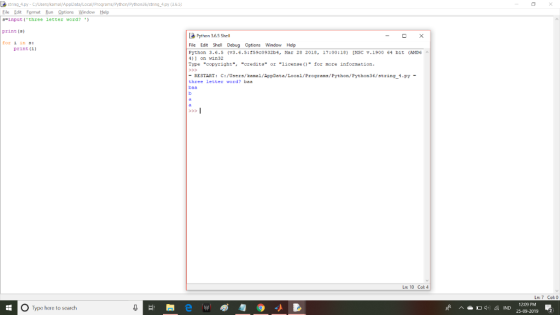
Exercise 1 using python 3
============================================================================================
s=input('three letter word? ')
print(s)
for i in s:
print(i)
============================================================================================
Output
Add Answer to:
Pythpn
#Exercise 1
#Ask the user for a three letter word using the prompt: three
letter...
I have to use java programs using netbeans. this course is introduction to java programming so...
 I have to use java programs using netbeans. this
course is introduction to java programming so i have to write it in
a simple way using till chapter 6 (arrays) you can use (loops ,
methods , arrays)
You will implement a menu-based system for Hangman Game. Hangman is a popular game that allows one player to choose a word and another player to guess it one letter at a time. Implement your system to perform the following tasks: Design...
I have to use java programs using netbeans. this
course is introduction to java programming so i have to write it in
a simple way using till chapter 6 (arrays) you can use (loops ,
methods , arrays)
You will implement a menu-based system for Hangman Game. Hangman is a popular game that allows one player to choose a word and another player to guess it one letter at a time. Implement your system to perform the following tasks: Design...
Using visual Studio C# 1. In one text box, your program must except a letter (A-Za-z),...
Using visual Studio C# 1. In one text box, your program must except a letter (A-Za-z), a number (0-9), or a special symbol (#@!$%^&*). 2. If the user enters a letter, call a module, displayLetter. Pass the letter they entered into the module. The module will then display a figure (stick man?) using the letter the person entered. 3. If the user enters a number, call a module displayNumber. Pass the number they entered into the module. The module will...
Create a script that presents a word guessing game. Allow users to guess the word letter-by-letter by entering a character in a form. Start by assigning a secret word to a variable named $secret. Afte...
Create a script that presents a word guessing game. Allow users to guess the word letter-by-letter by entering a character in a form. Start by assigning a secret word to a variable named $secret. After each guess, print the word using asterisks for each remaining letter but fill in the letters that the user guessed correctly. You need to store the user’s guess in a hidden text field name $hidden_guess. For example, if the word you want users to guess...
Using GUI to ask user for an alphabet input and to graphically display the hangman. During...
Using GUI to ask user for an alphabet input and to graphically display the hangman. During each round, the player will enter an input, and the program will display the hangman accordingly to the input. Main method with a loop that will provide a hint and prompt the user for an input after each round. String getWord() method returns a random word from our list to use for the game. Void hangman(String guess) method that will receive the user input...
Using java program, create a Username class. ask user to type username 1)username length have to...
Using java program, create a Username class. ask user to type username 1)username length have to >1 and <15 2)username can not include any special character (ex.!@##$}{|\....) ,but it also have to type Spanish or other foreign language 3)user can not include any empty space (ex. user name) all of three error have to print out. and if there is any error contains, have to ask user to input user name again. for example: input username: #$%he f username can't...
1. Prompt the user for one of the arithmetic operators ('op'): +, -, *,/, or **...
 1. Prompt the user for one of the arithmetic operators ('op'): +, -, *,/, or ** 2. Prompt the user for two input integers ('a' and'b') 3. The input numbers can be positive or negative 4. Perform the arithmetic operation using the two input numbers 5. The first entered number ('a') is the left side, the second ('b') the right side of the operation For exponentiation, the first number is the base, the second the exponent Print (display) the following...
Create a Python list (use first three letters of your name followed by the letter L...
Create a Python list (use first three letters of your name followed by the letter L as the name of the list.) with the following data: 10, 20.0, 50.00, 7000, 7500, 7700, 7800, 8000, 9000, ‘python’. Display the entire list with an appropriate message. Display the 4th element in the list with an appropriate message. Display the first 3 values of the list only. Display all the values starting from the sixth element to the end of the list. Change...
In Java Main method Your main program will prompt the user for a test name and...
In Java Main method Your main program will prompt the user for a test name and the number of scores the user will enter. After creating an arraylist to hold the scores, prompt the user for all the scores to hold in the arraylist. After all the scores are entered, then repeat back the score & letter grade. GradeBook Object Create an instance of a GradeBook object and pass the test name and arraylist to set the instance variables. At...
This program will ask the user to enter a number of players, then ask the user...
This program will ask the user to enter a number of players, then ask the user for each player's name and score. Once all of the players have been entered, the program will display a bar chart with each of their scores scaled as a percentage of the maximum score entered. See below for details on exactly how this should work - an example transcript of how the program should work is shown below (remember that values entered by the...
Lab: User login system (python) Create a user login system. Your code should do the following:...
Lab: User login system (python) Create a user login system. Your code should do the following: 1.Load your user database from “UD.txt” (USE THE EXACT FILE NAME, file is given in the folder) 2.Display “Login or create a new user? Select L to login, select C to create new user.” 3. If wrong selection is entered, take the user back to step 2. 4. If the user entered “L”, display “Please enter your user name and hit enter” 5. Check...
 I have to use java programs using netbeans. this
course is introduction to java programming so i have to write it in
a simple way using till chapter 6 (arrays) you can use (loops ,
methods , arrays)
You will implement a menu-based system for Hangman Game. Hangman is a popular game that allows one player to choose a word and another player to guess it one letter at a time. Implement your system to perform the following tasks: Design...
I have to use java programs using netbeans. this
course is introduction to java programming so i have to write it in
a simple way using till chapter 6 (arrays) you can use (loops ,
methods , arrays)
You will implement a menu-based system for Hangman Game. Hangman is a popular game that allows one player to choose a word and another player to guess it one letter at a time. Implement your system to perform the following tasks: Design...
 1. Prompt the user for one of the arithmetic operators ('op'): +, -, *,/, or ** 2. Prompt the user for two input integers ('a' and'b') 3. The input numbers can be positive or negative 4. Perform the arithmetic operation using the two input numbers 5. The first entered number ('a') is the left side, the second ('b') the right side of the operation For exponentiation, the first number is the base, the second the exponent Print (display) the following...
Most questions answered within 3 hours.
-
Where is the error in this code sequence?
String s1 = "Hello";
String s2 = "ello";...
asked 10 months ago -
Financial data for Joel de Paris, Inc., for last year
follow:
Joel de Paris, Inc.
Balance...
asked 10 months ago -
Consider this reaction:
Al2(SO4)3 (aq)+ BaCl3
(aq) Al2Cl6 (aq)- +
3BaSO4(s) . What is the...
asked 10 months ago -
Suppose that Savneet is considering increasing her
recent random sample from 20 car rentals to 40...
asked 10 months ago -
Trucks arrive at an unloading terminal at an average rate of 120
per hour.
Trucks arrive...
asked 10 months ago -
Why are methanol and ethanol completely soluble in water while
octanol is not very little soluble....
asked 10 months ago -
A facilities manager at a university reads in a research report
that the mean amount of...
asked 10 months ago -
When the CuSO4 is rehydrated by adding water to the anhydrous
compound, is this an endothermic...
asked 10 months ago -
A ray of sunlight is passing from diamond into crown glass; the
angle of incidence is...
asked 10 months ago -
A block of mass 0.249 kg is placed on top of a light, vertical
spring of...
asked 10 months ago -
how do the kidneys compensate in the presences of acidosis
a) trigger hyperventilate
b) reserve acid...
asked 10 months ago -
Question 501 pts
The rental rate of capital to the firm increases. Which of the
following...
asked 10 months ago