Add appropriate descriptive comments to EACH line of the code in the project explaining why the...
Add appropriate descriptive comments to EACH line of the code in the project explaining why the code is in the application.
import java.io.*;
public class ExceptionTesterApp {
public static void main(String[] args) {
System.err.println("In main: calling method1.");
method1();
System.err.println("In main: returned from method1.");
}
public static void method1() {
System.err.println("\tIn method1: calling method2.");
try {
method2();
} catch (FileNotFoundException e) {
System.err.println(e.toString());
}
System.err.println("\tIn method1: returned from method2.");
}
public static void method2() throws FileNotFoundException {
System.err.println("\t\tIn method2: calling method3.");
method3();
System.err.println("\t\tIn method2: returned from method3.");
}
public static void method3() throws FileNotFoundException
{
System.err.println("\t\t\tIn method3: Entering.");
// Add code to throw an exception here.
// System.out.println(1/0);
BufferedReader in = new BufferedReader(new
FileReader("products.ran"));
System.err.println("\t\t\tIn method3: Exiting.");
}
}
Homework Answers
The code is as follows for mentioned tasks :
/**
*
* @author Sumit Jain
*/
// READ ALL THE COMMENTS WHERE YOU HAVE ASKED FOR YOUR QUERY
import java.io.*;
public class ExceptionTesterApp {
public static void main(String[] args) {
System.err.println("In main: calling Method1.");
Method1();
System.err.println("In main: returned from Method1.");
}
public static void Method1() {
System.err.println("\tIn Method1: calling Method2.");
Method2();
System.err.println("\tIn Method1: returned from Method2.");
}
public static void Method2() {
System.err.println("\t\tIn Method2: calling Method3.");
Method3();
System.err.println("\t\tIn Method2: returned from Method3.");
}
public static void Method3() {
System.err.println("\t\t\tIn Method3: Entering.");
// CODE ADDED IS HERE
int x = 0;
int y = 10;
// UNCHECKED EXCEPTION IS THROWN HERE
int z = y / x;
System.err.println("\t\t\tIn Method3: Exiting.");
}
}
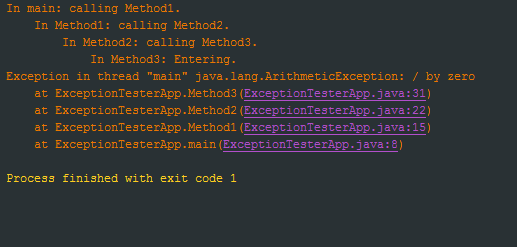
out put :
Add Answer to:
Add appropriate descriptive comments to EACH line of the
code in the project explaining why the...
Add appropriate descriptive comments to each line of code in the project explaining why the code...
Add appropriate descriptive comments to each line of code in the project explaining why the code is in the application. public class FutureValueFrame extends JFrame { private JTextField investmentField; private JTextField interestRateField; private JComboBox yearsComboBox; private JList futureValueList; private DefaultListModel futureValueModel; public FutureValueFrame() { initComponents(); } private void initComponents() { try { UIManager.setLookAndFeel( UIManager.getSystemLookAndFeelClassName()); } catch (ClassNotFoundException | InstantiationException | IllegalAccessException | UnsupportedLookAndFeelException e) { System.out.println(e); } setTitle("Future Value Calculator"); setDefaultCloseOperation(JFrame.EXIT_ON_CLOSE); setLocationByPlatform(true); investmentField = new JTextField(); interestRateField = new JTextField();...
Add appropriate descriptive comments to each line of the code, explaining why the code is in...
Add appropriate descriptive comments to each line of the code, explaining why the code is in the application. import java.text.NumberFormat; public class LineItem implements Cloneable { private Product product; private int quantity; private double total; public LineItem() { this.product = new Product(); this.quantity = 0; this.total = 0; } public LineItem(Product product, int quantity) { this.product = product; this.quantity = quantity; } public void setProduct(Product product) { this.product = product; } public Product getProduct() { return product; } public void...
Can someone please help me add appropriate descriptive comments to each line of code in the...
Can someone please help me add appropriate descriptive comments to each line of code in the project explaining why the code is in the application. import java.util.ArrayList; import java.util.List; import java.util.function.Predicate; public class BookManager { private List<Book> bookList; public BookManager() { bookList = new BookCatalog().getCatalog(); } public List<Book> getBooks(Predicate<Book> condition) { List<Book> books = new ArrayList<>(); for (Book b: bookList) { if (condition.test(b)) { books.add(b); } } return books; } } import java.util.List; public class BookManagerApp { public...
How to solve this problem by using reverse String and Binary search? Read the input one...
How to solve this problem by using reverse String and Binary search? Read the input one line at a time and output the current line if and only if it is not a suffix of some previous line. For example, if the some line is "0xdeadbeef" and some subsequent line is "beef", then the subsequent line should not be output. import java.io.BufferedReader; import java.io.FileReader; import java.io.FileWriter; import java.io.IOException; import java.io.InputStreamReader; import java.io.PrintWriter; import java.util.ArrayList; import java.util.List; import java.util.Set; import java.util.TreeSet;...
Please complete the give code (where it says "insert code here") in Java, efficiently. Read the...
Please complete the give code (where it says "insert code here") in Java, efficiently. Read the entire input one line at a time and then output a subsequence of the lines that appear in the same order they do in the file and that are also in non-decreasing or non-increasing sorted order. If the file contains n lines, then the length of this subsequence should be at least sqrt(n). For example, if the input contains 9 lines with the numbers...
How to complete these methods: /** * Returns a reference to the course with title equals to the argument. This * m...
How to complete these methods: /** * Returns a reference to the course with title equals to the argument. This * method searches in the courses stored in the HashMap {@code courses} to find * the course whose title equals to the argument {@code title}. If the course is * not found, {@code null} is returned. * * @param title the title of the course * @return a reference to the course, or {@code null} if the course is not ...
Java only. Thanks These questions involve choosing the right abstraction (Collection, Set, List, Queue, Deque, SortedSet,...
Java only. Thanks These questions involve choosing the right abstraction (Collection, Set, List, Queue, Deque, SortedSet, Map, or SortedMap) to EFFICIENTLY accomplish the task at hand. The best way to do these is to read the question and then think about what type of Collection is best to use to solve it. There are only a few lines of code you need to write to solve each of them. Unless specified otherwise, sorted order refers to the natural sorted order...
Using java socket programming rewrite the following program to handle multiple clients simultaneously (multi threaded programming)...
Using java socket programming rewrite the following program to handle multiple clients simultaneously (multi threaded programming) import java.io.*; import java.net.*; public class WelcomeClient { public static void main(String[] args) throws IOException { if (args.length != 2) { System.err.println( "Usage: java EchoClient <host name> <port number>"); System.exit(1); } String hostName = args[0]; int portNumber = Integer.parseInt(args[1]); try ( Socket kkSocket = new Socket(hostName, portNumber); PrintWriter out = new PrintWriter(kkSocket.getOutputStream(), true); BufferedReader in = new BufferedReader( new InputStreamReader(kkSocket.getInputStream())); ) { BufferedReader...
Please answer question correctly and show the result of the working code. The actual and demo...
Please answer question correctly and show the result of the working code. The actual and demo code is provided .must take command line arguments of text files for ex : input.txt output.txt from a filetext(any kind of input for the text file should work as it is for testing the question) This assignment is about using the Java Collections Framework to accomplish some basic text-processing tasks. These questions involve choosing the right abstraction (Collection, Set, List, Queue, Deque, SortedSet, Map,...
Modify the socket-based date server below so that the server services each client request in a...
Modify the socket-based date server below so that the server services each client request in a separate thread. import java.net.*; import java.io.*; public class DateClient { public static void main(String[] args) { try { /* make connection to server socket */ Socket sock = new Socket(“127.0.0.1”,6013); InputStream in = sock.getInputStream(); BufferedReader bin = new BufferedReader(new InputStreamReader(in)); /* read the date from the socket */ String line; while ( (line = bin.readLine()) != null) System.out.println(line); /* close the socket connection*/ sock.close(); ...
Most questions answered within 3 hours.
-
Where is the error in this code sequence?
String s1 = "Hello";
String s2 = "ello";...
asked 11 months ago -
Financial data for Joel de Paris, Inc., for last year
follow:
Joel de Paris, Inc.
Balance...
asked 11 months ago -
Consider this reaction:
Al2(SO4)3 (aq)+ BaCl3
(aq) Al2Cl6 (aq)- +
3BaSO4(s) . What is the...
asked 11 months ago -
Suppose that Savneet is considering increasing her
recent random sample from 20 car rentals to 40...
asked 11 months ago -
Trucks arrive at an unloading terminal at an average rate of 120
per hour.
Trucks arrive...
asked 11 months ago -
Why are methanol and ethanol completely soluble in water while
octanol is not very little soluble....
asked 11 months ago -
A facilities manager at a university reads in a research report
that the mean amount of...
asked 11 months ago -
When the CuSO4 is rehydrated by adding water to the anhydrous
compound, is this an endothermic...
asked 11 months ago -
A ray of sunlight is passing from diamond into crown glass; the
angle of incidence is...
asked 11 months ago -
A block of mass 0.249 kg is placed on top of a light, vertical
spring of...
asked 11 months ago -
how do the kidneys compensate in the presences of acidosis
a) trigger hyperventilate
b) reserve acid...
asked 11 months ago -
Question 501 pts
The rental rate of capital to the firm increases. Which of the
following...
asked 11 months ago