Hello, In Python Enhance the prior assignment by doing the following 1) Create a class that...
Hello,
In Python
Enhance the prior assignment by doing the following
1) Create a class that contain all prior functions
MyLib
# This function adds two numbers
def addition(a, b):
    return a + b

# This function subtracts two numbers
def subtraction(a, b):
    return a - b

# This function multiplies two numbers
def multiplication(a, b):
    return a * b

# This function divides two numbers
# The ZeroDivisionError exception is raised when division or modulo by zero takes place for all numeric types
def division(a, b):
    try:
        return a / b
    # This exception will be raised when the user attempts division by zero
    # Implemented here so if the users input is '0' it will display error that you can't divide by zero
    except ZeroDivisionError:
        print("Error: Cannot divide by zero!")

# This function allows for string manipulation
def scalc(p1):
    string1 = p1.split(",")
    if string1[2] == "+":
        result = addition(float(string1[0]), float(string1[1]))
    elif string1[2] == "-":
        result = subtraction(float(string1[0]), float(string1[1]))
    elif string1[2] == "*":
        result = multiplication(float(string1[0]), float(string1[1]))
    elif string1[2] == "/":
        result = division(float(string1[0]), float(string1[1]))
    return result

# This function returns the results of input values in addition, subtraction, multiplication and division
def allInOne(a, b):
    add = a + b
    subtract = a - b
    multiply = a * b
    divide = a / b

    print('res is dictionary', {"add": add, "sub": subtract, "mult": multiply, "div": divide})
    return{"add": add, "sub": subtract, "mult": multiply, "div": divide}
# This module contains math operation functions
import MyLib


# This is the main function, this is the starting point of execution of the program
def main():
    print("\nWelcome to Calculator!\n")
    # Menu of available math operations for use
    menuList = ["1) Addition", "2) Subtraction", "3) Multiplication", "4) Division", "5) Scalc", "6) All in one",
                "0) Exit\n"]
    # Takes user input to proceed with selected math operations
    while True:
        try:
            print("Please enter your choice to perform a math operation: ")
            for n in menuList:
                print(n)
            menuChoice = int(input("Please input your selection then press ENTER: "))
            if menuChoice == 0:
                print("Goodbye!")
                sys.exit()
            # Checks users input against available options in menu list, if not user is notified to try again.
            if menuChoice > 6 or menuChoice < 0:
                print("\nNot a valid selection from the menu!"
                      "\nTry again! ")
                main()
        # This exception will be raised if the users input is not the valid data expected in this argument.
        except ValueError:
            print("\nError!! Only integer values, Please try again!")

            main()
        # User input to determine input of range a user can work with
        print("Please enter a value for low & high range between -100 & 100")
        lowRange = int(input("Enter your low range: "))
        if lowRange < -100 or lowRange > 100:
            print("Error: ensure input doesn't exceed range of -100 to 100")

            break
        highRange = int(input("Enter your high range: "))
        if highRange < -100 or highRange > 100:
            print("Error: ensure input doesn't exceed range of -100 to 100")

            break
            # Takes user input to perform math operations with input value
        firstNum = float(input("Enter your first number: "))
        secondNum = float(input("Enter your second number: "))
        # Checks users input value is within the given ranges
        while True:
            if firstNum < lowRange or firstNum > highRange:
                print("Error: first number input exceeds ranges, try again!")

                break
            if secondNum < lowRange or secondNum > highRange:
                print("Error: second number input exceeds ranges, try again!")

                break
            # Computes math calculations based on users menu selection
            if menuChoice == 1:
                print(firstNum, '+', secondNum, '=', MyLib.addition(firstNum, secondNum))
            elif menuChoice == 2:
                print(firstNum, '-', secondNum, '=', MyLib.subtraction(firstNum, secondNum))
            elif menuChoice == 3:
                print(firstNum, '*', secondNum, '=', MyLib.multiplication(firstNum, secondNum))
            elif menuChoice == 4:
                print(firstNum, '/', secondNum, '=', MyLib.division(firstNum, secondNum))
            elif menuChoice == 5:
                print('The result of ', firstNum, '+', secondNum, '=', MyLib.scalc(str(firstNum) + ','
                                                                                   + str(secondNum) + ',+'))
                print('The result of ', firstNum, '-', secondNum, '=', MyLib.scalc(str(firstNum) + ' ,'
                                                                                   + str(secondNum) + ',-'))
                print('The result of ', firstNum, '*', secondNum, '=', MyLib.scalc(str(firstNum) + ', '
                                                                                   + str(secondNum) + ',*'))
                print('The result of ', firstNum, '/', secondNum, '=', MyLib.scalc(str(firstNum) + ', '
                                                                                   + str(secondNum) + ',/'))
            elif menuChoice == 6:
                res = MyLib.allInOne(firstNum, secondNum)
                print(str(firstNum) + " + " + str(secondNum) + " = " + str(res["add"]))
                print(str(firstNum) + " - " + str(secondNum) + " = " + str(res["sub"]))
                print(str(firstNum) + " * " + str(secondNum) + " = " + str(res["mult"]))
                print(str(firstNum) + " / " + str(secondNum) + " = " + str(res["div"]))

            # This will ask the user if they want to us the calculator again
            while True:
                reCalculate = input("\nWould you like to try another operation? (y/n): ")
                if reCalculate == 'Y' or reCalculate == 'y':
                    print()
                    main()
                else:
                    print("\nThanks for using calculator! "
                          "\nGoodbye!")
                sys.exit()


main()
Thank you!
Homework Answers
Hi,
I have edited the code added a class and optimized code to run with the class.
The required answer is given below in case you face any doubts you can ask me in comments.
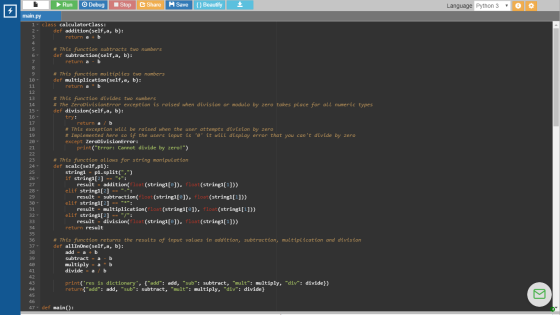
main.py
class calculatorClass:
def addition(self,a, b):
return a + b
# This function subtracts two numbers
def subtraction(self,a, b):
return a - b
# This function multiplies two numbers
def multiplication(self,a, b):
return a * b
# This function divides two numbers
# The ZeroDivisionError exception is raised when division or modulo
by zero takes place for all numeric types
def division(self,a, b):
try:
return a / b
# This exception will be raised when the user attempts division by
zero
# Implemented here so if the users input is '0' it will display
error that you can't divide by zero
except ZeroDivisionError:
print("Error: Cannot divide by zero!")
# This function allows for string manipulation
def scalc(self,p1):
string1 = p1.split(",")
if string1[2] == "+":
result = addition(float(string1[0]), float(string1[1]))
elif string1[2] == "-":
result = subtraction(float(string1[0]), float(string1[1]))
elif string1[2] == "*":
result = multiplication(float(string1[0]), float(string1[1]))
elif string1[2] == "/":
result = division(float(string1[0]), float(string1[1]))
return result
# This function returns the results of input values in addition,
subtraction, multiplication and division
def allInOne(self,a, b):
add = a + b
subtract = a - b
multiply = a * b
divide = a / b
print('res is dictionary', {"add": add, "sub": subtract, "mult":
multiply, "div": divide})
return{"add": add, "sub": subtract, "mult": multiply, "div":
divide}
def main():
print("\nWelcome to Calculator!\n")
calculatorObj = calculatorClass()
# Menu of available math operations for use
menuList = ["1) Addition", "2) Subtraction", "3) Multiplication",
"4) Division", "5) Scalc", "6) All in one",
"0) Exit\n"]
# Takes user input to proceed with selected math operations
while True:
try:
print("Please enter your choice to perform a math operation:
")
for n in menuList:
print(n)
menuChoice = int(input("Please input your selection then press
ENTER: "))
if menuChoice == 0:
print("Goodbye!")
return
# Checks users input against available options in menu list, if not
user is notified to try again.
if menuChoice > 6 or menuChoice < 0:
print("\nNot a valid selection from the menu!"
"\nTry again! ")
main()
# This exception will be raised if the users input is not the valid
data expected in this argument.
except ValueError:
print("\nError!! Only integer values, Please try again!")
main()
# User input to determine input of range a user can work with
print("Please enter a value for low & high range between -100
& 100")
lowRange = int(input("Enter your low range: "))
if lowRange < -100 or lowRange > 100:
print("Error: ensure input doesn't exceed range of -100 to
100")
break
highRange = int(input("Enter your high range: "))
if highRange < -100 or highRange > 100:
print("Error: ensure input doesn't exceed range of -100 to
100")
break
# Takes user input to perform math operations with input
value
firstNum = float(input("Enter your first number: "))
secondNum = float(input("Enter your second number: "))
# Checks users input value is within the given ranges
while True:
if firstNum < lowRange or firstNum > highRange:
print("Error: first number input exceeds ranges, try again!")
break
if secondNum < lowRange or secondNum > highRange:
print("Error: second number input exceeds ranges, try again!")
break
# Computes math calculations based on users menu selection
if menuChoice == 1:
print(firstNum, '+', secondNum, '=',
calculatorObj.addition(firstNum, secondNum))
elif menuChoice == 2:
print(firstNum, '-', secondNum, '=',
calculatorObj.subtraction(firstNum, secondNum))
elif menuChoice == 3:
print(firstNum, '*', secondNum, '=',
calculatorObj.multiplication(firstNum, secondNum))
elif menuChoice == 4:
print(firstNum, '/', secondNum, '=',
calculatorObj.division(firstNum, secondNum))
elif menuChoice == 5:
print('The result of ', firstNum, '+', secondNum, '=',
calculatorObj.scalc(str(firstNum) + ','
+ str(secondNum) + ',+'))
print('The result of ', firstNum, '-', secondNum, '=',
calculatorObj.scalc(str(firstNum) + ' ,'
+ str(secondNum) + ',-'))
print('The result of ', firstNum, '*', secondNum, '=',
calculatorObj.scalc(str(firstNum) + ', '
+ str(secondNum) + ',*'))
print('The result of ', firstNum, '/', secondNum, '=',
calculatorObj.scalc(str(firstNum) + ', '
+ str(secondNum) + ',/'))
elif menuChoice == 6:
res = calculatorObj.allInOne(firstNum, secondNum)
print(str(firstNum) + " + " + str(secondNum) + " = " +
str(res["add"]))
print(str(firstNum) + " - " + str(secondNum) + " = " +
str(res["sub"]))
print(str(firstNum) + " * " + str(secondNum) + " = " +
str(res["mult"]))
print(str(firstNum) + " / " + str(secondNum) + " = " +
str(res["div"]))
# This will ask the user if they want to us the calculator
again
while True:
reCalculate = input("\nWould you like to try another operation?
(y/n): ")
if reCalculate == 'Y' or reCalculate == 'y':
print()
main()
else:
print("\nThanks for using calculator! "
"\nGoodbye!")
return
main()
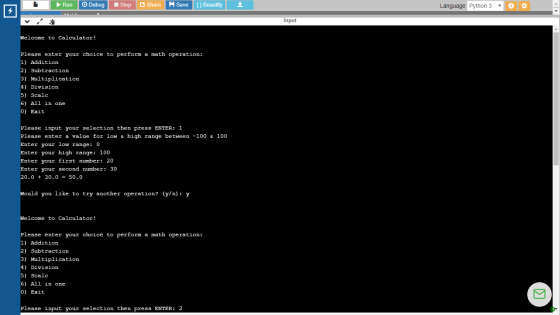
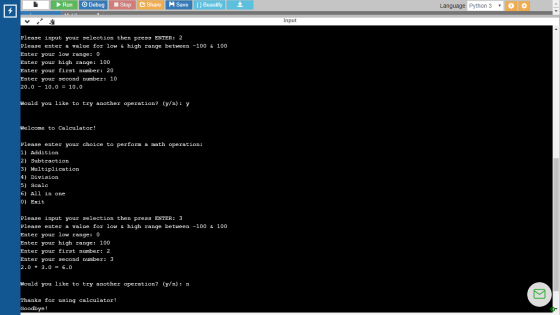
Screenshot and Outputs
Add Answer to:
Hello,
In Python
Enhance the prior assignment by doing the following
1) Create a class that...
IN JAVA: Write a program that displays a menu as shown in the sample run. You...
IN JAVA: Write a program that displays a menu as shown in the sample run. You can enter 1, 2, 3, or 4 for choosing an addition, subtraction, multiplication, or division test. After a test is finished, the menu is redisplayed. You may choose another test or enter 5 to exit the system. Each test generates two random single-digit numbers to form a question for addition, subtraction, multiplication, or division. For a subtraction such as number1 – number2, number1 is...
(For Python program) Write a program that fulfills the functionalities of a mathematical quiz with the...
(For Python program) Write a program that fulfills the functionalities of a mathematical quiz with the four basic arithmetic operations, i.e., addition, subtraction, multiplication and integer division. A sample partial output of the math quiz program is shown below. The user can select the type of math operations that he/she would like to proceed with. Once a choice (i.e., menu option index) is entered, the program generates a question and asks the user for an answer. A sample partial output...
Can you add code comments where required throughout this Python Program, Guess My Number Program, and...
Can you add code comments where required throughout this Python Program, Guess My Number Program, and describe this program as if you were presenting it to the class. What it does and everything step by step. import random def menu(): #function for getting the user input on what he wants to do print("\n\n1. You guess the number\n2. You type a number and see if the computer can guess it\n3. Exit") while True: #using try-except for the choice will handle the...
12p I need help this is Python EXCEPTIONS: It's easier to ask forgiveness than permission. Try...
 12p
I need help this is Python
EXCEPTIONS: It's easier to ask forgiveness than permission. Try the code and catch the errors. The other paradigm is 'Look before you leap' which means test conditions to avoid errors. This can cause race conditions. 1.Write the output of the code here: class MyError(Exception): pass def notZero(num): if num == 0: raise MyError def run(f): try: exec(f) except TypeError: print("Wrong type, Programmer error") except ValueError: print("We value only integers.") except Zero Division Error:...
12p
I need help this is Python
EXCEPTIONS: It's easier to ask forgiveness than permission. Try the code and catch the errors. The other paradigm is 'Look before you leap' which means test conditions to avoid errors. This can cause race conditions. 1.Write the output of the code here: class MyError(Exception): pass def notZero(num): if num == 0: raise MyError def run(f): try: exec(f) except TypeError: print("Wrong type, Programmer error") except ValueError: print("We value only integers.") except Zero Division Error:...
Hello! I'm looking for help with this assignment. Complete a program in pseudocode and Python that...
Hello! I'm looking for help with this assignment. Complete a program in pseudocode and Python that performs the following tasks. Open the file called M4Lab1ii.py linked below these instructions in your M4 Content module in IDLE. Save as M4Lab1ii.py. Replace ii with your initials. [example for someone with the initials cc: M4Lab1cc.py] Complete Steps 1-7 as requested within the code’s comments. Run your program and test all four calculations, then exit the program. Save your program as M4Lab1ii.py using your...
PYTHON import random # VARIABLES first_num = random.randint(1, 100) sec_num = random.randint(1, 100) totalsum = first_num...
PYTHON import random # VARIABLES first_num = random.randint(1, 100) sec_num = random.randint(1, 100) totalsum = first_num + sec_num def additon(first_num, sec_num): return first_num + sec_num; # INTRO print("Hello, \n" "this is an app that helps you practice your math skills while generating 6 sets of lucky numbers") question = input('Are you up for a challenge? [Y/N]') if question == 'n': print('okay, see you later') if question == 'y': print("Let's start!!") # USER NAME VALUE uname = input('what is your user...
PYTHON The provided code in the ATM program is incomplete. Complete the run method of the...
PYTHON The provided code in the ATM program is incomplete. Complete the run method of the ATM class. The program should display a message that the police will be called after a user has had three successive failures. The program should also shut down the bank when this happens. [comment]: <> (The ATM program allows a user an indefinite number of attempts to log in. Fix the program so that it displays a message that the police will be called...
Python has the complex class for performing complex number arithmetic. For this assignment, you will design...
Python has the complex class for performing complex number arithmetic. For this assignment, you will design and implement your own Complex class. Note that the complex class in Python is named in lowercase, while our custom Complex class is named with C in uppercase. A complex number is of the form a + bi, where a and b are real numbers and i is √-1. The numbers a and b are known as the real part and the imaginary part...
For my computer class I have to create a program that deals with making and searching...
 For my computer class I have to create a program that deals with
making and searching tweets. I am done with the program but keep
getting the error below when I try the first option in the shell.
Can someone please explain this error and show me how to fix it in
my code below? Thanks!
twitter.py - C:/Users/Owner/AppData/Local/Programs/Python/Python38/twitter.py (3.8.3) File Edit Format Run Options Window Help import pickle as pk from Tweet import Tweet import os def show menu():...
For my computer class I have to create a program that deals with
making and searching tweets. I am done with the program but keep
getting the error below when I try the first option in the shell.
Can someone please explain this error and show me how to fix it in
my code below? Thanks!
twitter.py - C:/Users/Owner/AppData/Local/Programs/Python/Python38/twitter.py (3.8.3) File Edit Format Run Options Window Help import pickle as pk from Tweet import Tweet import os def show menu():...
A group of new college graduates want to know if they save a certain amount of...
A group of new college graduates want to know if they save a certain amount of money every month for a certain amount of years, how much saving they are going to get after certain amount of time. Write a python program to help them out. Ask the user to input how much they plan to save per month; how many years (integer) they are going to keep on saving the money; every how many years do they expect to...
 12p
I need help this is Python
EXCEPTIONS: It's easier to ask forgiveness than permission. Try the code and catch the errors. The other paradigm is 'Look before you leap' which means test conditions to avoid errors. This can cause race conditions. 1.Write the output of the code here: class MyError(Exception): pass def notZero(num): if num == 0: raise MyError def run(f): try: exec(f) except TypeError: print("Wrong type, Programmer error") except ValueError: print("We value only integers.") except Zero Division Error:...
12p
I need help this is Python
EXCEPTIONS: It's easier to ask forgiveness than permission. Try the code and catch the errors. The other paradigm is 'Look before you leap' which means test conditions to avoid errors. This can cause race conditions. 1.Write the output of the code here: class MyError(Exception): pass def notZero(num): if num == 0: raise MyError def run(f): try: exec(f) except TypeError: print("Wrong type, Programmer error") except ValueError: print("We value only integers.") except Zero Division Error:...
 For my computer class I have to create a program that deals with
making and searching tweets. I am done with the program but keep
getting the error below when I try the first option in the shell.
Can someone please explain this error and show me how to fix it in
my code below? Thanks!
twitter.py - C:/Users/Owner/AppData/Local/Programs/Python/Python38/twitter.py (3.8.3) File Edit Format Run Options Window Help import pickle as pk from Tweet import Tweet import os def show menu():...
For my computer class I have to create a program that deals with
making and searching tweets. I am done with the program but keep
getting the error below when I try the first option in the shell.
Can someone please explain this error and show me how to fix it in
my code below? Thanks!
twitter.py - C:/Users/Owner/AppData/Local/Programs/Python/Python38/twitter.py (3.8.3) File Edit Format Run Options Window Help import pickle as pk from Tweet import Tweet import os def show menu():...
Most questions answered within 3 hours.
-
Where is the error in this code sequence?
String s1 = "Hello";
String s2 = "ello";...
asked 11 months ago -
Financial data for Joel de Paris, Inc., for last year
follow:
Joel de Paris, Inc.
Balance...
asked 11 months ago -
Consider this reaction:
Al2(SO4)3 (aq)+ BaCl3
(aq) Al2Cl6 (aq)- +
3BaSO4(s) . What is the...
asked 11 months ago -
Suppose that Savneet is considering increasing her
recent random sample from 20 car rentals to 40...
asked 11 months ago -
Trucks arrive at an unloading terminal at an average rate of 120
per hour.
Trucks arrive...
asked 11 months ago -
Why are methanol and ethanol completely soluble in water while
octanol is not very little soluble....
asked 11 months ago -
A facilities manager at a university reads in a research report
that the mean amount of...
asked 11 months ago -
When the CuSO4 is rehydrated by adding water to the anhydrous
compound, is this an endothermic...
asked 11 months ago -
A ray of sunlight is passing from diamond into crown glass; the
angle of incidence is...
asked 11 months ago -
A block of mass 0.249 kg is placed on top of a light, vertical
spring of...
asked 11 months ago -
how do the kidneys compensate in the presences of acidosis
a) trigger hyperventilate
b) reserve acid...
asked 11 months ago -
Question 501 pts
The rental rate of capital to the firm increases. Which of the
following...
asked 11 months ago