Consider the following C++ program. It prints a small table containing sin and cos values from...
Consider the following C++ program. It prints a small table containing sin and cos values from 0 to 360 degrees.
#include <iostream>
#include <iomanip>
#include <cmath>
using namespace std;

int main()
{
   int step = 20;

   cout << setw(10) << "degrees"
        << setw(10) << "cos"
        << setw(10) << "sin"
        << endl;

   for (int degrees = 0; degrees <= 360; degrees += step)
   {
      cout << setw(10) << degrees
           << setw(10) << setprecision(5) << fixed << cos(degrees)
           << setw(10) << setprecision(5) << fixed << sin(degrees)
           << endl;
   }
   return 0;
}
Step 1: Copy this program into your C++ program editor, and compile it. Hopefully you will not get any error messages.
Step 2: Run the program and look at the output. Do the values for sin and cos look correct? Take a close look at sin and cos for 0 and 360 degrees. We know they should be the same but they are different. Clearly something is wrong, so it is time to read the manual page for sin and cos.
Step 3: Type in "man sin" in your Linux window to see the manual page for this function. Near the top of the manual page you will see the function prototype "double sin(double x);". If you look at the code above you will see that we are calling sin(degrees) where degrees is declared to be an integer variable. Edit your code to change the "int" to "double" in the for loop and compile and run the program. Did this fix the problem? If not, there must be another problem.
Step 4: Type in "man sin" again and you will see that the description says "The sin() function returns the sine of x, where x is given in radians." In our code above we have made the classic mistake of calling a trigonometric function in degrees instead of radians. This is possibly the number one error people make when calling the cmath library functions. To fix this problem, we need to convert our angle in degrees to radians.
Step 5: Inside the for loop declare "double radians = degrees * M_PI / 180". The constant M_PI is defined to be 3.14159265358979323846 in the library, which saves us a lot of memorization and typing. Next, change sin(degrees) to sin(radians) and cos(degrees) to cos(radians) in the cout statements. Recompile and run your program. Do the sin and cos values look correct now?
Step 6: Since we calculated the value of radians, it would be nice to add this value to our program output. Edit your program and add another column with the header "radians" right after the "degrees" column. Then inside the loop print the value of radians using the same formatting as sin and cos. When you are finished your program should print the following:
   degrees   radians       cos       sin
         0   0.00000   1.00000   0.00000
        20   0.34907   0.93969   0.34202
        40   0.69813   0.76604   0.64279
        60   1.04720   0.50000   0.86603
                       ...
Step 7: To make your program more flexible, edit your code and prompt the user to "Enter step size: " and then use cin to read the value of step. If the user enters a value that is less than or equal to zero you should terminate the program by calling "return 0;" Recompile your program and try out several values to create some different size tables. Can you imagine how time consuming and painful it would be to create tables like this before calculators or computers were invented?
Homework Answers
Note: Could you plz go through this code and let me
know if u need any changes in this.Thank You
_________________
#include <iostream>
#include <iomanip>
#include <cmath>
using namespace std;
int main()
{
int step = 20;
cout << setw(10) << "degrees"
<< setw(10) << "radians"
<< setw(10) << "cos"
<< setw(10) << "sin"
<< endl;
for (int degrees = 0; degrees <= 360; degrees += step)
{
double radians = degrees * M_PI / 180;
cout << setw(10) << degrees
<< setw(10) <<
radians
<< setw(10) << setprecision(5) << fixed <<
cos(radians)
<< setw(10) << setprecision(5) << fixed <<
sin(radians)
<< endl;
}
return 0;
}
___________________________
Output:
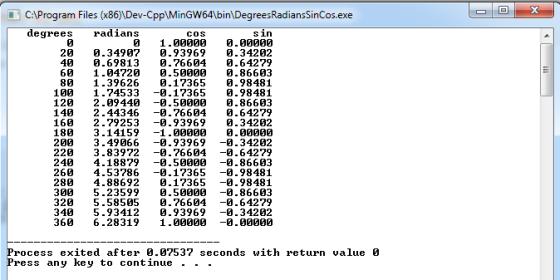
_______________Could you plz rate me well.Thank
You
Add Answer to:
Consider the following C++ program. It prints a small table
containing sin and cos values from...
The following C++ code contains an incomplete program that should be able to calculate the distance between...
The following C++ code contains an incomplete program that should be able to calculate the distance between a series of geocoded locations. Two parts of the program need to be completed: 1. The portion of the main() function that calculates the distances between each of the hard-coded 5 locations, and stores it in a two-dimensional array declared as distances. 2. A portion of the calculateDistanceBetweenLocations(l1, l2) function; omitted code spaces are designed with a // TODO: comment. The code is properly...
Need help with a C++ problem I have
For my assignment I have to write a program that creates a restaurant billing system. I think that I got it correct but it says that it is incorrect, so I was wondering if someone would be able to look over my code. It says that I need tax of $0.20, and the amount due to be $4.10, which is what I have in my output.https://imgur.com/a/jgglmvWMy issue is that I have the correct outcome when I run my program but...
PLEASE TYPE OUT IN TEXT (please no pdf or writing) C++ CODE Consider the following program...
PLEASE TYPE OUT IN TEXT (please no pdf or writing) C++ CODE Consider the following program in which the statements are in the incorrect order. Rearrange the statements in the following order so that the program prompts the user to input: The height of the base of a cylinder The radius of the base of a cylinder The program then outputs (in order): The volume of the cylinder. The surface area of the cylinder Format the output to two decimal...
Given the incomplete program below, write two functions, one called integer and another called decimal. You...
Given the incomplete program below, write two functions, one called integer and another called decimal. You can use following incomplete program. Your assignment is to supply the necessary missing code: #include #include using namespace std; int integer (….) { //REPLACE THE … WITH THE REQUIRED PARAMETER (A DOUBLE) //WRITE HERE THE CODE TO EXTRACT THE INTEGER AND RETURN IT } double decimal (….) { //REPLACE THE … WITH THE REQUIRED PARAMETER //WRITE HERE THE CODE TO EXTRACT THE DECIMAL PORTION,...
Please program in C++ and document the code as you go so I can understand what...
Please program in C++ and document the code as you go so I can understand what you did for example ///This code does~ Your help is super appreciated. Ill make sure to like and review to however the best answer needs. Overview You will revisit the program that you wrote for Assignment 2 and add functionality that you developed in Assignment 3. Some additional functionality will be added to better the reporting of the students’ scores. There will be 11...
5.15 PROGRAM: Functions - Upset Fowls (C++) (1) Correct the first FIXME by moving the intro...
5.15 PROGRAM: Functions - Upset Fowls (C++) (1) Correct the first FIXME by moving the intro text to the function stub named PrintIntro and then calling the PrintIntro function in main. Development suggestion: Verify the program has the same behavior before continuing. (2) Correct the second FIXME by completing the function stub GetUsrInpt and then calling this function in main. Notice that the function GetUsrInpt will need to return two values: fowlAngle and fowlVel. (3) Correct the third FIXME by...
Consider the following C++ program. It reads a sequence of strings from the user and uses...
Consider the following C++ program. It reads a sequence of strings from the user and uses "rot13" encryption to generate output strings. Rot13 is an example of the "Caesar cipher" developed 2000 years ago by the Romans. Each letter is rotated 13 places forward to encrypt or decrypt a message. For more information see the rot13 wiki page. #include <iostream> #include <string> using namespace std; char rot13(char ch) { if ((ch >= 'a') && (ch <= 'z')) return char((13 +...
Instructions: Consider the following C++ program. It reads a sequence of strings from the user and...
Instructions: Consider the following C++ program. It reads a sequence of strings from the user and uses "rot13" encryption to generate output strings. Rot13 is an example of the "Caesar cipher" developed 2000 years ago by the Romans. Each letter is rotated 13 places forward to encrypt or decrypt a message. For more information see the rot13 wiki page. #include <iostream> #include <string> using namespace std; char rot13(char ch) { if ((ch >= 'a') && (ch <= 'z')) return char((13...
Introduction: One of the most important uses of pointers is for dynamic allocation of memory. In...
Introduction: One of the most important uses of pointers is for dynamic allocation of memory. In C++ there are commands that let the user request a chunk of memory from the operating system, and use this memory to store data. There are also commands to return memory back to the O/S when the program is finished using the data. In this lab, we will explore some of the things that can go wrong when using dynamic memory and discuss how...
Instructions: Consider the following C++ program. At the top you can see the interface for the...
Instructions: Consider the following C++ program. At the top you can see the interface for the Student class. Below this is the implementation of the Student class methods. Finally, we have a very small main program. #include <string> #include <fstream> #include <iostream> using namespace std; class Student { public: Student(); Student(const Student & student); ~Student(); void Set(const int uaid, const string name, const float gpa); void Get(int & uaid, string & name, float & gpa) const; void Print() const; void...
Most questions answered within 3 hours.
-
Where is the error in this code sequence?
String s1 = "Hello";
String s2 = "ello";...
asked 11 months ago -
Financial data for Joel de Paris, Inc., for last year
follow:
Joel de Paris, Inc.
Balance...
asked 11 months ago -
Consider this reaction:
Al2(SO4)3 (aq)+ BaCl3
(aq) Al2Cl6 (aq)- +
3BaSO4(s) . What is the...
asked 11 months ago -
Suppose that Savneet is considering increasing her
recent random sample from 20 car rentals to 40...
asked 11 months ago -
Trucks arrive at an unloading terminal at an average rate of 120
per hour.
Trucks arrive...
asked 11 months ago -
Why are methanol and ethanol completely soluble in water while
octanol is not very little soluble....
asked 11 months ago -
A facilities manager at a university reads in a research report
that the mean amount of...
asked 11 months ago -
When the CuSO4 is rehydrated by adding water to the anhydrous
compound, is this an endothermic...
asked 11 months ago -
A ray of sunlight is passing from diamond into crown glass; the
angle of incidence is...
asked 11 months ago -
A block of mass 0.249 kg is placed on top of a light, vertical
spring of...
asked 11 months ago -
how do the kidneys compensate in the presences of acidosis
a) trigger hyperventilate
b) reserve acid...
asked 11 months ago -
Question 501 pts
The rental rate of capital to the firm increases. Which of the
following...
asked 11 months ago