How do I use VLookup in Excel to add a product name in the next cell...
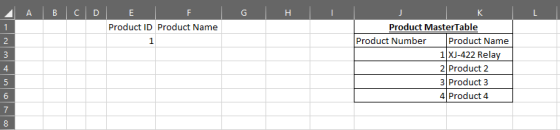
How do I use VLookup in Excel to add a product name in the next cell to a product ID? Product ID has the number (#1) in its cell and Product Name (XJ-422 Relay) is blank. So the 'E' column has the Product ID and column 'F' needs the Product Name added.
Homework Answers
To use a vlookup a reference table is needed. The reference table is usually a master data table. In this case it will be a table which will store the details of all the product ID and the product names. For vlookup to be used, the first column in this master data table should be same as the column which is being looked up. So if you are using Product ID in this case to lookup Product Name, the first column in the master data should be Product ID.
See below image. Assume the product master table is present in column J to K. The 'E' column has the Product ID and column 'F' needs the Product Name added.
The format of vlookup is as below
vlookup(lookup value, lookup array, column number from lookup table, match type)
Lookup value is the value to be looked up which is product ID in this case
Lookup array is the master data from where we need to fetch data. In our case this is J3 to K6
Column number is the column number is the lookup table which needs to be fetched. In our case this is 2 as the product name is present in column 2.
Match Type is the type of match. 0 or false means exact match while 1 or True means exact match.
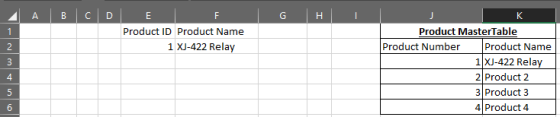
Hence the formula is our case looks like below

This will give the answer as below
Add Answer to:
How do I use VLookup in Excel to add a product name in the next
cell...
Use the following Excel features in exercise 7: VLOOKUP, INDEX and MATCH. Use MATCH to determine...
 Use the following Excel
features in exercise 7: VLOOKUP, INDEX and MATCH.
Use MATCH to determine what row Rake resides.
Use INDEX to display the name “Rake” for the row you have
determined in part 1. Hint, you need the output from part 1 to
accomplish part 2
Use a combination of INDEX and MATCH to display the product ID
number of light bulbs in cell B6.
Using VLOOKUP, add a box under the VLOOKUP heading that
displays the quantity...
Use the following Excel
features in exercise 7: VLOOKUP, INDEX and MATCH.
Use MATCH to determine what row Rake resides.
Use INDEX to display the name “Rake” for the row you have
determined in part 1. Hint, you need the output from part 1 to
accomplish part 2
Use a combination of INDEX and MATCH to display the product ID
number of light bulbs in cell B6.
Using VLOOKUP, add a box under the VLOOKUP heading that
displays the quantity...
How do I...Modify the formula in the Per Unit column by combining the IFERROR function with the VLOOKUP function to disp...
How do I...Modify the formula in the Per Unit column by combining the IFERROR function with the VLOOKUP function to display either the per-unit price or a blank cell if an error value occurs.
I need a loop/if statement to run in excel that does the following: Checks the cell...
I need a loop/if statement to run in excel that does the following: Checks the cell to see if the cell has a single zero in it - if it does the zero needs deleted - if not it will go down the column into another cell and check the next one and so on - if you are familiar with processrobot that is the software I am using.
In EXCEL VBA: How would I manage to do this in VBA? The assignment is in...
In EXCEL VBA: How would I manage to do this in VBA? The assignment is in essence add the amount in one column based upon the what’s in one column. In more description: Column A has a name, column B has random numbers in it, and column C has a price in USD. Some numbers in Column B are the same. For the cells that are the same in column B, I would add together the cells in column C....
Excel Question - How do I highlight the name of the fruit when the quantity is...
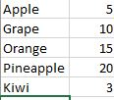 Excel Question - How do I highlight the name of the fruit when
the quantity is over 10? I get that we are supposed to use
"conditional formatting", but I could only get it to highlight the
number, not the name of the fruit.
.
Apple Grape Orange Pineapple Kiwi
Excel Question - How do I highlight the name of the fruit when
the quantity is over 10? I get that we are supposed to use
"conditional formatting", but I could only get it to highlight the
number, not the name of the fruit.
.
Apple Grape Orange Pineapple Kiwi
Hello I was wondering how could I solve this excel assignment, since I never used Excel,...
 Hello I was wondering how could I solve this excel assignment,
since I never used Excel, I have no clue how to begin and how to
get the values and charts inputed into excel. Could I see an excel
version on how I could do this? Please help, and thank
you!
Step Instructions Points Possible Use a cell reference or a single formula where appropriate in order to receive full credit. Do not copy and paste values or type values,...
Hello I was wondering how could I solve this excel assignment,
since I never used Excel, I have no clue how to begin and how to
get the values and charts inputed into excel. Could I see an excel
version on how I could do this? Please help, and thank
you!
Step Instructions Points Possible Use a cell reference or a single formula where appropriate in order to receive full credit. Do not copy and paste values or type values,...
20 points Use your inventory spreadsheet from assignment 1 Add a column (if you don't have...
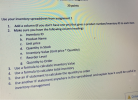 20 points Use your inventory spreadsheet from assignment 1 Add a column (if you don't have one yet) that gives a product number/inventory ID to each item Make sure you have the following column headings 1. 2. a. Inventory ID b. Product Name Unit price C. d. Quantity in Stock e. Inventory Value (Unit price Quantity) Reorder Level f. g. Quantity to Order 3. Use a formula to calculate Inventory Value 4. Use a formula to calculate total inventory Use...
how would these questions be answered and what are the formulas to use in excel? The...
 how would these questions be answered and what are the formulas
to use in excel?
The 4 digit id is 6305
Step 24 of 40: Transaction #3 es Shareholder' s ity 2 Your turn: Transaction # 3 Nunya Business has received 25% of the amount you recorded in Transaction #2 as partial payment of Its accounts receivable. After you record this transaction: The amounts will be based on formulas in the worksheet cells, as opposed to numbers that you've calculated...
how would these questions be answered and what are the formulas
to use in excel?
The 4 digit id is 6305
Step 24 of 40: Transaction #3 es Shareholder' s ity 2 Your turn: Transaction # 3 Nunya Business has received 25% of the amount you recorded in Transaction #2 as partial payment of Its accounts receivable. After you record this transaction: The amounts will be based on formulas in the worksheet cells, as opposed to numbers that you've calculated...
how would these questions be answered and what are the formulas to use in excel? Step...
 how would these questions be answered and what are the formulas
to use in excel?
Step 24 of 40: Transaction #3 es Shareholder' s ity 2 Your turn: Transaction # 3 Nunya Business has received 25% of the amount you recorded in Transaction #2 as partial payment of Its accounts receivable. After you record this transaction: The amounts will be based on formulas in the worksheet cells, as opposed to numbers that you've calculated outside of Excel and then manually...
how would these questions be answered and what are the formulas
to use in excel?
Step 24 of 40: Transaction #3 es Shareholder' s ity 2 Your turn: Transaction # 3 Nunya Business has received 25% of the amount you recorded in Transaction #2 as partial payment of Its accounts receivable. After you record this transaction: The amounts will be based on formulas in the worksheet cells, as opposed to numbers that you've calculated outside of Excel and then manually...
Please show cell references for Excel for this Cost of Goods Manufactured Schedule. Yes the answer...
 Please show cell references for Excel for this Cost of Goods
Manufactured Schedule.
Yes
the answer is provided for reference, I need to know how the
answers were determined using cell referencing in Excel.
Save View Help Se Home Insert Page Layout Formulas Data Review 1 Co Online Pictures 3D Models - Shapes SmartArt able Recommended Table Pictures Pivot Tables Screenshot Tables illustrations Get Add-ins My Add-ins - Icons Add-ins fr BROOKS CORPORATION BROOKS CORPORATION Cost of Goods Manufactured Schedule...
Please show cell references for Excel for this Cost of Goods
Manufactured Schedule.
Yes
the answer is provided for reference, I need to know how the
answers were determined using cell referencing in Excel.
Save View Help Se Home Insert Page Layout Formulas Data Review 1 Co Online Pictures 3D Models - Shapes SmartArt able Recommended Table Pictures Pivot Tables Screenshot Tables illustrations Get Add-ins My Add-ins - Icons Add-ins fr BROOKS CORPORATION BROOKS CORPORATION Cost of Goods Manufactured Schedule...
 Use the following Excel
features in exercise 7: VLOOKUP, INDEX and MATCH.
Use MATCH to determine what row Rake resides.
Use INDEX to display the name “Rake” for the row you have
determined in part 1. Hint, you need the output from part 1 to
accomplish part 2
Use a combination of INDEX and MATCH to display the product ID
number of light bulbs in cell B6.
Using VLOOKUP, add a box under the VLOOKUP heading that
displays the quantity...
Use the following Excel
features in exercise 7: VLOOKUP, INDEX and MATCH.
Use MATCH to determine what row Rake resides.
Use INDEX to display the name “Rake” for the row you have
determined in part 1. Hint, you need the output from part 1 to
accomplish part 2
Use a combination of INDEX and MATCH to display the product ID
number of light bulbs in cell B6.
Using VLOOKUP, add a box under the VLOOKUP heading that
displays the quantity...
 Excel Question - How do I highlight the name of the fruit when
the quantity is over 10? I get that we are supposed to use
"conditional formatting", but I could only get it to highlight the
number, not the name of the fruit.
.
Apple Grape Orange Pineapple Kiwi
Excel Question - How do I highlight the name of the fruit when
the quantity is over 10? I get that we are supposed to use
"conditional formatting", but I could only get it to highlight the
number, not the name of the fruit.
.
Apple Grape Orange Pineapple Kiwi
 Hello I was wondering how could I solve this excel assignment,
since I never used Excel, I have no clue how to begin and how to
get the values and charts inputed into excel. Could I see an excel
version on how I could do this? Please help, and thank
you!
Step Instructions Points Possible Use a cell reference or a single formula where appropriate in order to receive full credit. Do not copy and paste values or type values,...
Hello I was wondering how could I solve this excel assignment,
since I never used Excel, I have no clue how to begin and how to
get the values and charts inputed into excel. Could I see an excel
version on how I could do this? Please help, and thank
you!
Step Instructions Points Possible Use a cell reference or a single formula where appropriate in order to receive full credit. Do not copy and paste values or type values,...
 20 points Use your inventory spreadsheet from assignment 1 Add a column (if you don't have one yet) that gives a product number/inventory ID to each item Make sure you have the following column headings 1. 2. a. Inventory ID b. Product Name Unit price C. d. Quantity in Stock e. Inventory Value (Unit price Quantity) Reorder Level f. g. Quantity to Order 3. Use a formula to calculate Inventory Value 4. Use a formula to calculate total inventory Use...
 how would these questions be answered and what are the formulas
to use in excel?
The 4 digit id is 6305
Step 24 of 40: Transaction #3 es Shareholder' s ity 2 Your turn: Transaction # 3 Nunya Business has received 25% of the amount you recorded in Transaction #2 as partial payment of Its accounts receivable. After you record this transaction: The amounts will be based on formulas in the worksheet cells, as opposed to numbers that you've calculated...
how would these questions be answered and what are the formulas
to use in excel?
The 4 digit id is 6305
Step 24 of 40: Transaction #3 es Shareholder' s ity 2 Your turn: Transaction # 3 Nunya Business has received 25% of the amount you recorded in Transaction #2 as partial payment of Its accounts receivable. After you record this transaction: The amounts will be based on formulas in the worksheet cells, as opposed to numbers that you've calculated...
 how would these questions be answered and what are the formulas
to use in excel?
Step 24 of 40: Transaction #3 es Shareholder' s ity 2 Your turn: Transaction # 3 Nunya Business has received 25% of the amount you recorded in Transaction #2 as partial payment of Its accounts receivable. After you record this transaction: The amounts will be based on formulas in the worksheet cells, as opposed to numbers that you've calculated outside of Excel and then manually...
how would these questions be answered and what are the formulas
to use in excel?
Step 24 of 40: Transaction #3 es Shareholder' s ity 2 Your turn: Transaction # 3 Nunya Business has received 25% of the amount you recorded in Transaction #2 as partial payment of Its accounts receivable. After you record this transaction: The amounts will be based on formulas in the worksheet cells, as opposed to numbers that you've calculated outside of Excel and then manually...
 Please show cell references for Excel for this Cost of Goods
Manufactured Schedule.
Yes
the answer is provided for reference, I need to know how the
answers were determined using cell referencing in Excel.
Save View Help Se Home Insert Page Layout Formulas Data Review 1 Co Online Pictures 3D Models - Shapes SmartArt able Recommended Table Pictures Pivot Tables Screenshot Tables illustrations Get Add-ins My Add-ins - Icons Add-ins fr BROOKS CORPORATION BROOKS CORPORATION Cost of Goods Manufactured Schedule...
Please show cell references for Excel for this Cost of Goods
Manufactured Schedule.
Yes
the answer is provided for reference, I need to know how the
answers were determined using cell referencing in Excel.
Save View Help Se Home Insert Page Layout Formulas Data Review 1 Co Online Pictures 3D Models - Shapes SmartArt able Recommended Table Pictures Pivot Tables Screenshot Tables illustrations Get Add-ins My Add-ins - Icons Add-ins fr BROOKS CORPORATION BROOKS CORPORATION Cost of Goods Manufactured Schedule...
Most questions answered within 3 hours.
-
Where is the error in this code sequence?
String s1 = "Hello";
String s2 = "ello";...
asked 10 months ago -
Financial data for Joel de Paris, Inc., for last year
follow:
Joel de Paris, Inc.
Balance...
asked 10 months ago -
Consider this reaction:
Al2(SO4)3 (aq)+ BaCl3
(aq) Al2Cl6 (aq)- +
3BaSO4(s) . What is the...
asked 10 months ago -
Suppose that Savneet is considering increasing her
recent random sample from 20 car rentals to 40...
asked 10 months ago -
Trucks arrive at an unloading terminal at an average rate of 120
per hour.
Trucks arrive...
asked 10 months ago -
Why are methanol and ethanol completely soluble in water while
octanol is not very little soluble....
asked 10 months ago -
A facilities manager at a university reads in a research report
that the mean amount of...
asked 10 months ago -
When the CuSO4 is rehydrated by adding water to the anhydrous
compound, is this an endothermic...
asked 10 months ago -
A ray of sunlight is passing from diamond into crown glass; the
angle of incidence is...
asked 10 months ago -
A block of mass 0.249 kg is placed on top of a light, vertical
spring of...
asked 10 months ago -
how do the kidneys compensate in the presences of acidosis
a) trigger hyperventilate
b) reserve acid...
asked 10 months ago -
Question 501 pts
The rental rate of capital to the firm increases. Which of the
following...
asked 10 months ago