Sabhil needs the first field in the form to get the focus as soon as the...
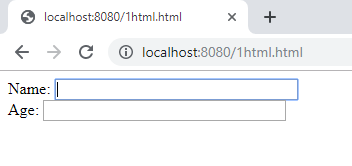
Sabhil needs the first field in the form to get the focus as soon as the form loads. Which event does he need to specify in the open spot where it says EVENT?
<!DOCTYPE html>
<html>
<head>
<script>
function setFocus()
{
document.getElementById("fname").focus();
}
</script>
</head>
<body EVENT="setFocus()">
<form>
Name: <input type="text" id="fname" size="30"><br>
Age: <input type="text" id="age" size="30">
</form>
</body>
</html>
Homework Answers
<!DOCTYPE html>
<html>
<head>
<!-- script is used for javascript -->
<script>
//function setFocus()
function setFocus()
{
document.getElementById("fname").focus();
}
</script>
</head>
<!-- body onload event -->
<body onload="setFocus()">
<form>
Name: <input type="text" id="fname" size="30"><br>
Age: <input type="text" id="age" size="30">
</form>
</body>
</html>
======================
Add Answer to:
Sabhil needs the first field in the form to get the focus as
soon as the...
Modify this code to store the form elements as variables and display them on the page...
Modify this code to store the form elements as variables and display them on the page in an HTML table. <!DOCTYPE html> <html> <head> <script> function getValues() { var result = ""; result += "First Name: " + document.forms["myForm"]["fname"].value + "<br>"; result += "Last Name: " + document.forms["myForm"]["lname"].value + "<br>"; result += "Address: " + document.forms["myForm"]["address"].value + "<br>"; result += "City: " + document.forms["myForm"]["city"].value + "<br>"; result += "State: " + document.forms["myForm"]["state"].value + "<br>"; document.getElementById("output").innerHTML = result; } </script>...
Using JavaScript, I want to make a function that will open a new alert box that will say hello fi...
Using JavaScript, I want to make a function that will open a new alert box that will say hello first name, last name after the person logs into the sign in form. This will happen aftrer the validation function is invoked. See code below. See the welcomefunction(). <!DOCTYPE html> <html> <head> <script> //validate the login form function validateForm() { var x = document.forms["LoginForm"]["fname"].value; //set x and y to first name and last name var y = document.forms["LoginForm"]["lname"].value; if (x ==...
LANGUAGE JAVASCRIPT, PHP Need help with PHP and ajax code. The user needs to login but,...
 LANGUAGE JAVASCRIPT, PHP
Need help with PHP and ajax code. The user needs to login but, I
keep getting an error that I coded "Wrong username and password!"
***PLEASE DONT GIVE ME A NEW CODE THAT IS NOWHERE NEAR
THE CODE I SUBMITTED***** PLEASE LOOK AT THE CODE AND SEE ANY
ISSUES
login.html
<!DOCTYPE html>
<html>
<head>
<title>login popup</title>
<script
src="https://ajax.googleapis.com/ajax/libs/jquery/3.5.1/jquery.min.js"></script>
<style type="text/css">
body {
background-color: white;
}
</style>
</head>
<body>
<center>
<h1 style="text-align: center;"> Login </h1>
<form>
Login
ID:...
LANGUAGE JAVASCRIPT, PHP
Need help with PHP and ajax code. The user needs to login but, I
keep getting an error that I coded "Wrong username and password!"
***PLEASE DONT GIVE ME A NEW CODE THAT IS NOWHERE NEAR
THE CODE I SUBMITTED***** PLEASE LOOK AT THE CODE AND SEE ANY
ISSUES
login.html
<!DOCTYPE html>
<html>
<head>
<title>login popup</title>
<script
src="https://ajax.googleapis.com/ajax/libs/jquery/3.5.1/jquery.min.js"></script>
<style type="text/css">
body {
background-color: white;
}
</style>
</head>
<body>
<center>
<h1 style="text-align: center;"> Login </h1>
<form>
Login
ID:...
Using form events functions to answer this question. Use the attached form html file which contains...
Using form events functions to answer this question. Use the attached form html file which contains 2 html radio buttons. When the first choice is chosen, display the text ”First” under the first choice. When the second choice is chosen, display the text ”Second” under the second choice. Instead of using JavaScript complete this question using JQuery <!DOCTYPE html> <html> <head> <title>midterm exam</title> <link rel="stylesheet" href="css/q1.css" /> </head> <body> <div id = "page"> <form> ...
How can I connect the html forms to php --> mysql database <!DOCTYPE html> <html lang="en">...
How can I connect the html forms to php --> mysql database <!DOCTYPE html> <html lang="en"> <head> <meta charset="UTF-8"> <title>Title</title> </head> <body> <h2> <center> Average: </h2> <h3> <center> Rate the following: </h2> <h3> <center> Rating Criteria: <br> Developing (0-5), Competent (6-10), Accomplished (10-15); </h3> <center> Judge Name: <input type="text" id="judge"> <br> <br> <center> 1. Articulate requirements and design of the project: <input type="text" id="num1"> <br> <br> 2. Plan the solution and implement the project: <input type="text" id="num2"> <br> <br> 3....
Create an HTML form that takes these inputs: Number of rows, and number of columns. This...
Create an HTML form that takes these inputs: Number of rows, and number of columns. This form will submit to a PHP page. Create that page that will accept input from the HTML form and generates the table from the user's input. I already have the portion that generates the table based on user input by using Javascript in an HTML page, I just need to know how to generate the table using a PHP page instead. Here's the code...
I am working on a normal javascript program where i have to take two names and...
I am working on a normal javascript program where i have to take two names and put them in array and print out in sorted order.But,when the user clicks the print button it should show the output,but if user clicks second time,it should start again(basically reload the page).I have done the part about userinput and sorting and printing,but couldn't get the function of when user clicks button second time. <!DOCTYPE html> <html> <body> <input type="text" id="Name1" value=""><br> <input type="text" id="Name2"...
Add comments to it by filling in the blank comments numbers 1 through 32. (The first...
Add comments to it by filling in the blank comments numbers 1 through 32. (The first few comments are HTML comments, not JavaScript comments, and are bracketed according to <!- this is an HTML comment>.) <!DOCTYPE html> <html> <body onload="handleFormAction()"> <h2>Form handling example in JavaScript</h2> <h3>(Or, John Doe meets Robbie Robot)</h3> <h4>Instructions: Fill in the form. Then fill in comments 1 through 23 in the JavaScript code!</h4> <form target="_blank" action= > <!- 1: replace this placeholder HTML comment with a...
Modify the following file, so that: If the user input for the age input box is...
Modify the following file, so that: If the user input for the age input box is empty, please send the user a warning message: “Age field cannot be empty” and return to the form web page to allow the user to re-input the age; If the user input for the age input box is incorrect (e. g. less than 1), please also send the user a warning message: “Your age input is not correct!” and return to the form web...
Unit 1 Programming Assignment Follow the directions for each of the following questions. Answer the question...
Unit 1 Programming Assignment Follow the directions for each of the following questions. Answer the question or provide the code in a space below the question. 1. Write the complete script tag set for a script whose line statement is document.write(“Hello, world.”); 2. Build a complete HTML document and include the answer to the previous question such that the page executes the script as the page loads. Open the document in your browser to test the results. 3. Add a...
 LANGUAGE JAVASCRIPT, PHP
Need help with PHP and ajax code. The user needs to login but, I
keep getting an error that I coded "Wrong username and password!"
***PLEASE DONT GIVE ME A NEW CODE THAT IS NOWHERE NEAR
THE CODE I SUBMITTED***** PLEASE LOOK AT THE CODE AND SEE ANY
ISSUES
login.html
<!DOCTYPE html>
<html>
<head>
<title>login popup</title>
<script
src="https://ajax.googleapis.com/ajax/libs/jquery/3.5.1/jquery.min.js"></script>
<style type="text/css">
body {
background-color: white;
}
</style>
</head>
<body>
<center>
<h1 style="text-align: center;"> Login </h1>
<form>
Login
ID:...
LANGUAGE JAVASCRIPT, PHP
Need help with PHP and ajax code. The user needs to login but, I
keep getting an error that I coded "Wrong username and password!"
***PLEASE DONT GIVE ME A NEW CODE THAT IS NOWHERE NEAR
THE CODE I SUBMITTED***** PLEASE LOOK AT THE CODE AND SEE ANY
ISSUES
login.html
<!DOCTYPE html>
<html>
<head>
<title>login popup</title>
<script
src="https://ajax.googleapis.com/ajax/libs/jquery/3.5.1/jquery.min.js"></script>
<style type="text/css">
body {
background-color: white;
}
</style>
</head>
<body>
<center>
<h1 style="text-align: center;"> Login </h1>
<form>
Login
ID:...
Most questions answered within 3 hours.
-
Where is the error in this code sequence?
String s1 = "Hello";
String s2 = "ello";...
asked 11 months ago -
Financial data for Joel de Paris, Inc., for last year
follow:
Joel de Paris, Inc.
Balance...
asked 11 months ago -
Consider this reaction:
Al2(SO4)3 (aq)+ BaCl3
(aq) Al2Cl6 (aq)- +
3BaSO4(s) . What is the...
asked 11 months ago -
Suppose that Savneet is considering increasing her
recent random sample from 20 car rentals to 40...
asked 11 months ago -
Trucks arrive at an unloading terminal at an average rate of 120
per hour.
Trucks arrive...
asked 11 months ago -
Why are methanol and ethanol completely soluble in water while
octanol is not very little soluble....
asked 11 months ago -
A facilities manager at a university reads in a research report
that the mean amount of...
asked 11 months ago -
When the CuSO4 is rehydrated by adding water to the anhydrous
compound, is this an endothermic...
asked 11 months ago -
A ray of sunlight is passing from diamond into crown glass; the
angle of incidence is...
asked 11 months ago -
A block of mass 0.249 kg is placed on top of a light, vertical
spring of...
asked 11 months ago -
how do the kidneys compensate in the presences of acidosis
a) trigger hyperventilate
b) reserve acid...
asked 11 months ago -
Question 501 pts
The rental rate of capital to the firm increases. Which of the
following...
asked 11 months ago