The files provided in the code editor to the right contain syntax and/or logic errors. In...
The files provided in the code editor to the right contain syntax and/or logic errors. In each case, determine and fix the problem, remove all syntax and coding errors, and run the program to ensure it works properly.
Note: DebugDataOne1.txt and DebugDataOne2.txt do not need to be edited. They are used by the program.
import java.nio.file.*;
import java.nio.file.attribute.*;
import java.io.IOException;
public class DebugThirteen1 {
public static void main(String[] args) {
Path file1 = Paths.get("/root/sandbox/DebugDataOne1.txt"); // path
to file DebugDataOne1.txt in your system
Path file2 = Paths.get("/root/sandbox/DebugDataOne2.txt"); // path
to file DebugDataOne2.txt in your system
try {
BasicFileAttributes attr1 = Files.readAttributes(file1,
BasicFileAttributes.class);
System.out.println("File: " + file1.getFileName());
System.out.println("Creation time " + attr1.creationTime());
System.out.println("Last modified time " +
attr1.lastModifiedTime());
System.out.println("Size " + attr1.size());
BasicFileAttributes attr2 = Files.readAttributes(file2,
BasicFileAttributes.class);
System.out.println("\nFile: " + file2.getFileName());
System.out.println("Creation time " + attr2.creationTime());
System.out.println("Last modified time " +
attr2.lastModifiedTime());
System.out.println("Size " + attr2.size());
if (attr1.creationTime().compareTo(attr2.creationTime()) >
0)
System.out.println("\n" + file2.getFileName() + " was created
earlier");
else
System.out.println("\n" + file1.getFileName() + " was created
earlier");
if (attr1.size() > attr2.size())
System.out.println(file1.getFileName() + " is larger ");
else
System.out.println(file2.getFileName() + " is larger");
} catch (IOException e) {
System.out.println("IOException");
}
}
}
Homework Answers
the code has no error in particular. it ran successfully on my machine with the output:
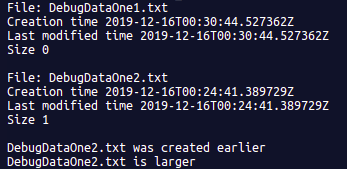
i created the samples files in the same directory as the code and modified the path accordingly. However, it may not run for you and give an output -> "IOException"
you may have to modify the path (bolded ) according to your directory as well as your OS.
drop a comment if there is a problem. if you are not able to work it out, put the file paths in the comment as well and I will edit the code
//--------------------
import java.nio.file.*;
import java.nio.file.attribute.*;
import java.io.IOException;
public class DebugThirteen1 {
public static void main(String[] args) {
Path file1 = Paths.get("/root/sandbox/DebugDataOne1.txt"); // path to file DebugDataOne1.txt in your system
Path file2 = Paths.get("/root/sandbox/DebugDataOne2.txt"); // path to file DebugDataOne2.txt in your system
try {
BasicFileAttributes attr1 = Files.readAttributes(file1, BasicFileAttributes.class);
System.out.println("File: " + file1.getFileName());
System.out.println("Creation time " + attr1.creationTime());
System.out.println("Last modified time " + attr1.lastModifiedTime());
System.out.println("Size " + attr1.size());
BasicFileAttributes attr2 = Files.readAttributes(file2, BasicFileAttributes.class);
System.out.println("\nFile: " + file2.getFileName());
System.out.println("Creation time " + attr2.creationTime());
System.out.println("Last modified time " + attr2.lastModifiedTime());
System.out.println("Size " + attr2.size());
if (attr1.creationTime().compareTo(attr2.creationTime()) > 0)
System.out.println("\n" + file2.getFileName() + " was created earlier");
else
System.out.println("\n" + file1.getFileName() + " was created earlier");
if (attr1.size() > attr2.size())
System.out.println(file1.getFileName() + " is larger ");
else if(attr1.size() < attr2.size())
System.out.println(file2.getFileName() + " is larger");
else{
System.out.println("both are the same size");
}
} catch (IOException e) {
System.out.println("IOException");
}
}
}
Add Answer to:
The files provided in the code editor to the right contain
syntax and/or logic errors. In...
Need help debugging DebugThirteen1.Java Debug 13-1 DebugThirteen1.Java // Program describes two files // tells you which...
Need help debugging DebugThirteen1.Java Debug 13-1 DebugThirteen1.Java // Program describes two files // tells you which one is newer and which one is larger import java.nio.file.*; import java.nio.file.attribute.*; import java.io.IOException; public class DebugThirteen1 { public static void main(String[] args) { Path file1 = Paths.get("/root/sandbox/DebugDataOne1"); Path file2 = Paths.get("/root/sandbox/DebugDataOne2.txt"); try { BasicFileAttributes attr1 = Files.readAttributes(file1, BasicFileAttributes.class); System.out.println("File: " + file1getFileName()); System.out.println("Creation time " + attr1.creationTime()); System.out.println("Last modified time " + attr1lastModifiedTime()); System.out.println("Size " + attr1.size()); BasicFileAttributes attr2 = Files.readAttributes(file2, BasicFileAttributes.class); System.out.println("\nFile:...
I have the code DebugDataOne1.txt Somewhere over the rainbow. DebugDataOne2.txt There's no place like home. Are...
 I have the code
DebugDataOne1.txt
Somewhere over the rainbow.
DebugDataOne2.txt
There's no place like home.
Are you a good witch or a bad witch?
DebugThirteen1.java
import java.nio.file.*;
import java.nio.file.attribute.*;
import java.io.IOException;
public class DebugThirteen1
{
public static void main(String[] args)
{
try
{
Path file1 =
Paths.get("C:\\Java\\Chapter.13\\\\DebugData1.txt");
Path file2 =
Paths.get("C:\\Java\\Chapter.13\\\\DebugData2.txt");// Please use
the path of the file from where you want to access it.
BasicFileAttributes attr1 =
Files.readAttributes(file1, BasicFileAttributes.class);
System.out.println("File: " + file1.getFileName());
System.out.println("Creation time " + attr1.creationTime());
System.out.println("Last...
I have the code
DebugDataOne1.txt
Somewhere over the rainbow.
DebugDataOne2.txt
There's no place like home.
Are you a good witch or a bad witch?
DebugThirteen1.java
import java.nio.file.*;
import java.nio.file.attribute.*;
import java.io.IOException;
public class DebugThirteen1
{
public static void main(String[] args)
{
try
{
Path file1 =
Paths.get("C:\\Java\\Chapter.13\\\\DebugData1.txt");
Path file2 =
Paths.get("C:\\Java\\Chapter.13\\\\DebugData2.txt");// Please use
the path of the file from where you want to access it.
BasicFileAttributes attr1 =
Files.readAttributes(file1, BasicFileAttributes.class);
System.out.println("File: " + file1.getFileName());
System.out.println("Creation time " + attr1.creationTime());
System.out.println("Last...
This is a JAVA language The files provided in the code editor to the right contain...
This is a JAVA language The files provided in the code editor to the right contain syntax and/or logic errors. In each case, determine and fix the problem, remove all syntax and coding errors, and run the program to ensure it works properly. Note: DebugData2.txt does not need to be edited. It is used by the program. DebugData2.txt 435-9845 239-9845 981-9883 384-5656 875-3784 874-8120 DebugThirteen2.java // Program reads in a file of phone numbers without area codes // inserts "(312)...
The files provided in the code editor to the right contain syntax and/or logic errors. In...
The files provided in the code editor to the right contain syntax and/or logic errors. In each case, determine and fix the problem, remove all syntax and coding errors, and run the program to ensure it works properly. // DebugFive2.java // Decides if two numbers are evenly divisible import java.util.Scanner; public class DebugFive2 { public static void main(String args[]) { int num; int num2; Scanner input = new Scanner(System.in); System.out.print("Enter a number "); num = input.nextInteger() System.out.print("Enter another number ");...
Programming Exercise 13-3 Instructions Write an application that displays the sizes of the files lyric1.txt and...
Programming Exercise 13-3 Instructions Write an application that displays the sizes of the files lyric1.txt and lyric2.txt in bytes as well as the ratio of their sizes to each other. ---------------------------------------------------------------------------------------------------------------------------------------------------------------------------------------------------------------------------------------------------------- FileSizeComparison.java import java.nio.file.*; import java.nio.file.attribute.*; import java.io.IOException; public class FileSizeComparison { public static void main(String[] args) { Path textFile = Paths.get("/root/sandbox/lyric1.txt"); Path wordFile = Paths.get("/root/sandbox/lyric2.txt"); // Write your code here } } ---------------------------------------------------------------------------------------------------------------------------------------------------------------------------------------------------------------------------------------------------------- lyric1.txt I hope you had the time of your life. ---------------------------------------------------------------------------------------------------------------------------------------------------------------------------------------------------------------------------------------------------------- lyric2.txt Would you lie with...
The files provided in the code editor to the right contain syntax and/or logic errors. In...
The files provided in the code editor to the right contain syntax and/or logic errors. In each case, determine and fix the problem, remove all syntax and coding errors, and run the program to ensure it works properly. public class DebugTwo1 { public static void main(String[] args) { integer oneInt = 315; double oneDouble = 12.4; character oneChar = 'A'; System.out.print("The int is "); System.out.println(oneint); System.out.print("The double is "); System.out.println(onDouble); System.out.print("The char is "); System.out.println(oneChar); } }
The files provided in the code editor to the right contain syntax and/or logic errors. In...
The files provided in the code editor to the right contain syntax and/or logic errors. In each case, determine and fix the problem, remove all syntax and coding errors, and run the program to ensure it works properly. // Prompt user for value to start // Value must be between 1 and 20 inclusive // At command line, count down to blastoff // With a brief pause between each displayed value import java.util.*; public class DebugSix3 { public static void...
The files provided in the code editor to the right contain syntax and/or logic errors. In...
The files provided in the code editor to the right contain syntax and/or logic errors. In each case, determine and fix the problem, remove all syntax and coding errors, and run the program to ensure it works properly. // Start with a penny // double it every day // how much do you have in a 30-day month? public class DebugSix1 { public static void main(String args[]) { final int DAYS = 30; double money = 0.01; int day =...
The files provided contain syntax and/or logic errors. In each case, determine and fix the problem,...
The files provided contain syntax and/or logic errors. In each case, determine and fix the problem, remove all syntax and coding errors, and run the program to ensure it works properly. import java.util.*; public class DebugEight1 { public static void main(String args[]) { Scanner input = new Scanner(System.in); char userCode; String entry, message; boolean found = false; char[] okayCodes = {'A''C''T''H'}; StringBuffer prompt = new StringBuffer("Enter shipping code for this delivery\nValid codes are: "); for(int x = 0; x <...
Correct the five syntax, run-time or logic errors that are found in the CountAndAverageNumbers.java file. Link...
Correct the five syntax, run-time or logic errors that are found in the CountAndAverageNumbers.java file. Link to the file: CountAndAverageNumbers.javaPreview the document. Make sure you include comments in your code where errors were corrected. If you do not flag each error with a comment, points will be deducted. Upload the corrected .java file here. The output of the corrected file looks like the following: Debug4Output.PNG This program reads an unspecified number of integers, determines how many positive and negative values...
 I have the code
DebugDataOne1.txt
Somewhere over the rainbow.
DebugDataOne2.txt
There's no place like home.
Are you a good witch or a bad witch?
DebugThirteen1.java
import java.nio.file.*;
import java.nio.file.attribute.*;
import java.io.IOException;
public class DebugThirteen1
{
public static void main(String[] args)
{
try
{
Path file1 =
Paths.get("C:\\Java\\Chapter.13\\\\DebugData1.txt");
Path file2 =
Paths.get("C:\\Java\\Chapter.13\\\\DebugData2.txt");// Please use
the path of the file from where you want to access it.
BasicFileAttributes attr1 =
Files.readAttributes(file1, BasicFileAttributes.class);
System.out.println("File: " + file1.getFileName());
System.out.println("Creation time " + attr1.creationTime());
System.out.println("Last...
I have the code
DebugDataOne1.txt
Somewhere over the rainbow.
DebugDataOne2.txt
There's no place like home.
Are you a good witch or a bad witch?
DebugThirteen1.java
import java.nio.file.*;
import java.nio.file.attribute.*;
import java.io.IOException;
public class DebugThirteen1
{
public static void main(String[] args)
{
try
{
Path file1 =
Paths.get("C:\\Java\\Chapter.13\\\\DebugData1.txt");
Path file2 =
Paths.get("C:\\Java\\Chapter.13\\\\DebugData2.txt");// Please use
the path of the file from where you want to access it.
BasicFileAttributes attr1 =
Files.readAttributes(file1, BasicFileAttributes.class);
System.out.println("File: " + file1.getFileName());
System.out.println("Creation time " + attr1.creationTime());
System.out.println("Last...
Most questions answered within 3 hours.
-
Where is the error in this code sequence?
String s1 = "Hello";
String s2 = "ello";...
asked 10 months ago -
Financial data for Joel de Paris, Inc., for last year
follow:
Joel de Paris, Inc.
Balance...
asked 10 months ago -
Consider this reaction:
Al2(SO4)3 (aq)+ BaCl3
(aq) Al2Cl6 (aq)- +
3BaSO4(s) . What is the...
asked 10 months ago -
Suppose that Savneet is considering increasing her
recent random sample from 20 car rentals to 40...
asked 10 months ago -
Trucks arrive at an unloading terminal at an average rate of 120
per hour.
Trucks arrive...
asked 10 months ago -
Why are methanol and ethanol completely soluble in water while
octanol is not very little soluble....
asked 10 months ago -
A facilities manager at a university reads in a research report
that the mean amount of...
asked 10 months ago -
When the CuSO4 is rehydrated by adding water to the anhydrous
compound, is this an endothermic...
asked 10 months ago -
A ray of sunlight is passing from diamond into crown glass; the
angle of incidence is...
asked 10 months ago -
A block of mass 0.249 kg is placed on top of a light, vertical
spring of...
asked 10 months ago -
how do the kidneys compensate in the presences of acidosis
a) trigger hyperventilate
b) reserve acid...
asked 10 months ago -
Question 501 pts
The rental rate of capital to the firm increases. Which of the
following...
asked 10 months ago